
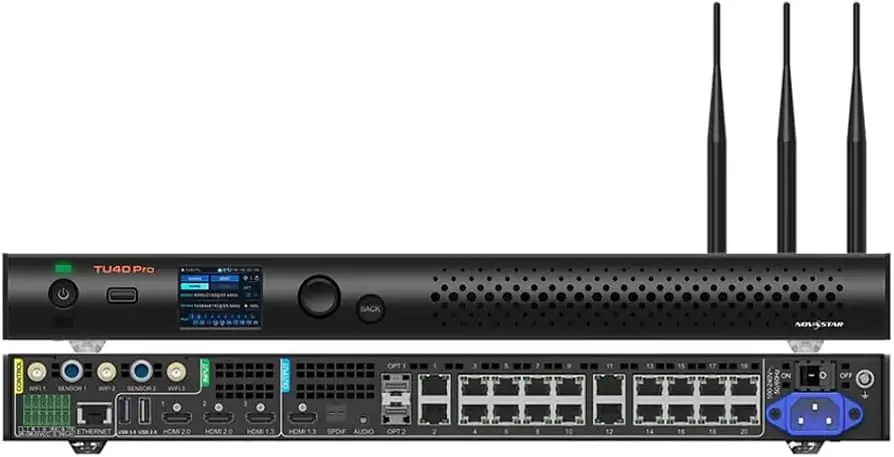
The NovaStar TU40 Pro is a revolutionary all-in-one LED playback control processor, meticulously designed to meet the demands of modern LED screen applications. This device integrates advanced video processing, Android OS, and sending card functionality into one compact unit, offering unparalleled interaction, display, and playback control capabilities. With support for up to 13 million pixels, the TU40 Pro transforms any presentation into a stunning visual experience. Its versatility makes it ideal for corporate showrooms, conference rooms, auditoriums, and outdoor standalone LED displays.
1. Novastar TU40 Pro Playback Control Processor Introduction
Novastar TU40 Pro stands out as an innovative solution in the realm of LED display management. It combines an Android-based desktop UI system with powerful video processing functions, allowing seamless integration of third-party apps. The device supports wireless screen mirroring across multiple platforms, including Windows, macOS, iOS, and Android, ensuring flexibility and ease of use.
Key features include:
- Maximum Load Capacity: Supports up to 13 million pixels.
- Advanced Image Processing: Offers four display modes—standard, meeting, vivid, and skin—to optimize content presentation.
- Wireless Screen Mirroring: Ensures smooth and high-quality content sharing from various devices.
- Third-Party App Support: Runs on Android 13.0, enabling users to install additional applications for enhanced functionality.
2. Core Features and Specifications of Novastar TU40 Pro Controller
2.1 Inputs and Outputs
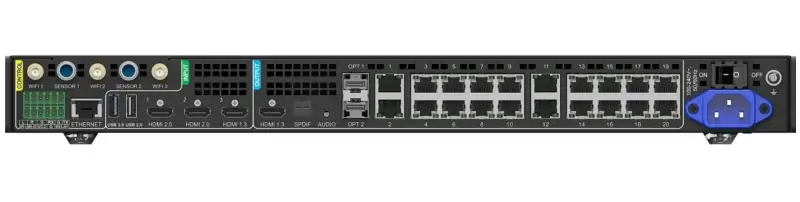
The TU40 Pro LED Playback Control Processor boasts a comprehensive suite of input and output options, ensuring versatile connectivity and high-quality performance:
- HDMI Inputs:
- 1x HDMI 1.3 input (Max resolution: 1920×1080@60Hz)
- 2x HDMI 2.0 inputs (Max resolution: 3840×2160@60Hz)
- USB Inputs:
- 2x USB 2.0 inputs
- 1x USB 3.0 input (Supports mouse, keyboard, camera, speaker; for USB playback, firmware update, and exporting logs)
- HDMI Output:
- 1x HDMI 1.3 output (For device debugging)
- Ethernet Outputs:
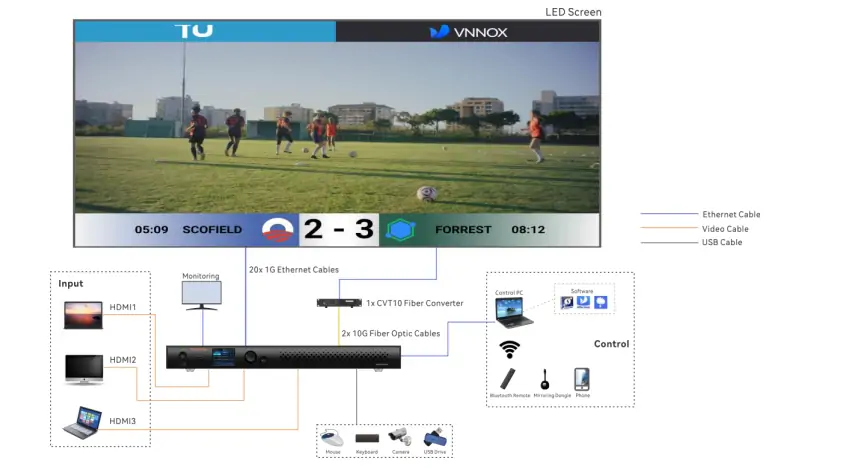
- 20x Gigabit Ethernet outputs
- OPT Outputs:
- 2x 10G OPT outputs (For fiber converting applications)
- Audio Outputs:
- 1x SPDIF digital audio output
- 1x 3.5-mm audio output
- 1x HDMI eARC audio output
- 1x Phoenix audio output
- Output Image Scaling:
- Width range: 64 to 16,384 pixels
- Height range: 64 to 8,192 pixels
- Total device load capacity ≤ 13 million pixels
2.2 System Functions
The Novastar TU40 Pro Controller offers a plethora of system functions designed to enhance user experience and operational efficiency:
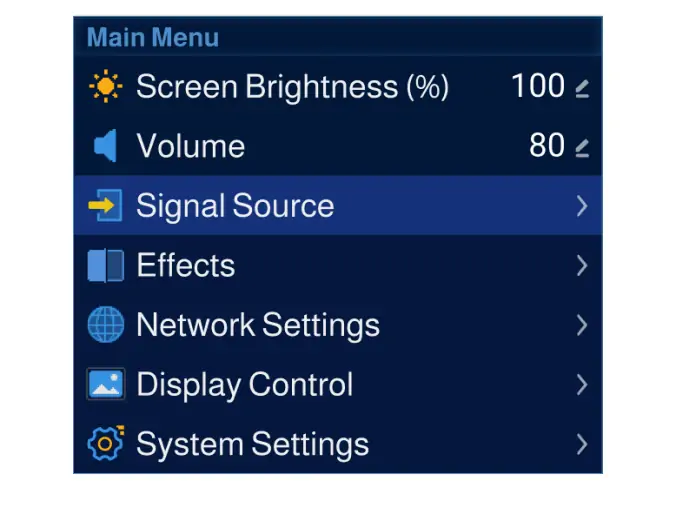
- Android 13.0-Based Desktop UI System: Supports third-party apps, expanding its functionality.
- Screen Drawing and Commenting: Facilitates real-time annotations and interactive presentations.
- Wireless Screen Mirroring: Supports resolutions up to 3840×2160@30Hz, compatible with Windows, macOS, iOS, and Android terminals.
- Powerful Processing Performance:
- Quad-core A73 + quad-core A53 ARM processor @ 2.2 GHz
- High-definition video decoding of H.264 and H.265 at 4K@60Hz
- 8 GB RAM and 128 GB storage space
- Playback Control via Different Terminals:
- Intelligent playback control via mobile app (ViPlex Handy)
- Convenient playback control via remote
- USB playback for standalone operation
- Dual Wi-Fi Modes: Allows simultaneous Wi-Fi and wireless hotspot connections.
- Dynamic Engine: Enhances display contrast and image details while reducing power consumption.
- AI Image Enhancement: Optimizes color saturation, brightness, sharpness, and dynamic motion compensation.
- Decoding and Playback of HDR Content: Delivers rich, dynamic visuals.
- Effect Adjustment: Offers customizable display modes with adjustable brightness, color temperature, saturation, and contrast.
- Eye Comfort Mode: Reduces eye strain during prolonged viewing sessions.
3. Step-by-Step Setup and Configuration of Novastar TU40 Pro
3.1 Hardware Setup
Setting up the Novastar TU40 Pro involves several straightforward steps:
- Unpack and Prepare Accessories:
- Open the package and gather necessary accessories such as Ethernet cables, remote, and mirroring dongle.
- Build the Hardware Environment:
- Follow the provided diagram to connect peripherals like a mouse, keyboard, sound system, camera, and infrared touch frame as needed.
- Connect Ethernet Cables:
- Connect the LED screen to the designated Ethernet output ports on the TU40 Pro in the correct order.
3.2 Software Installation and Configuration
1. Install Related Apps:
-
- Download and install ViPlex Handy and VNNOX Care from the app store for program editing, publishing, and screen configuration.
2. Configure the LED Screen:
-
- Open VNNOX Care, navigate to the Local Config page, and tap Quick Start to configure the LED screen following the prompts.
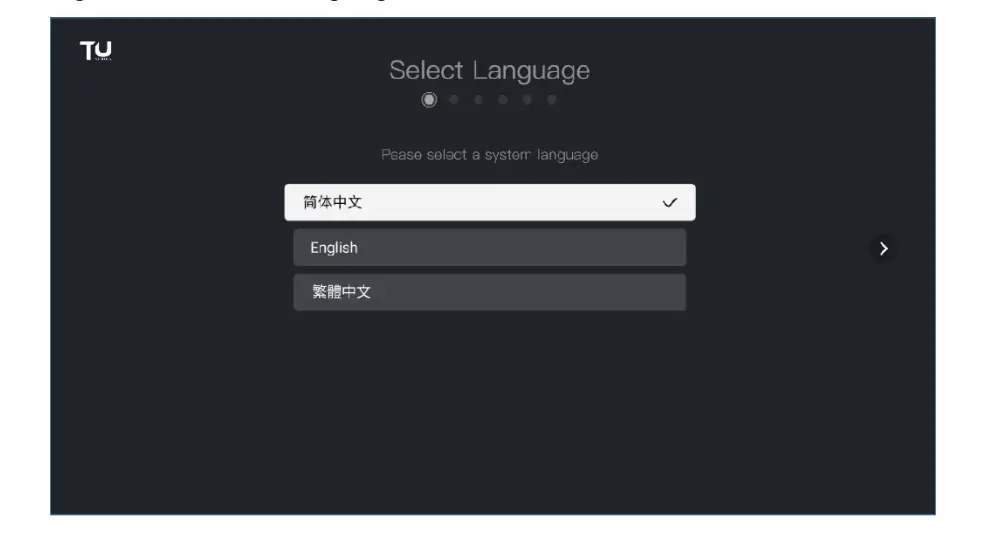
3. Initialize the System:
-
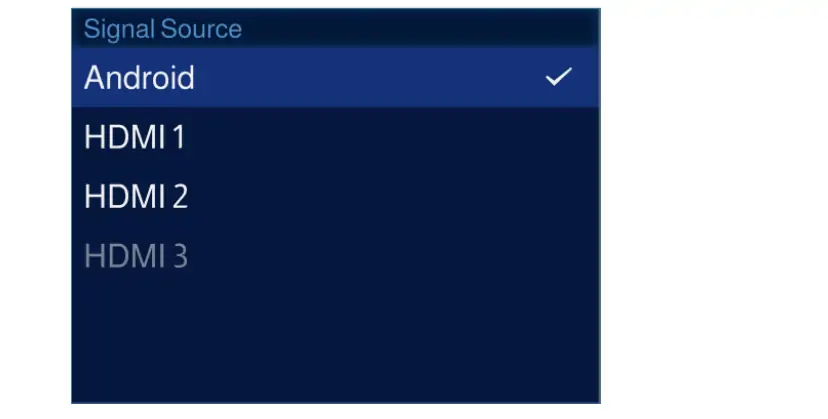
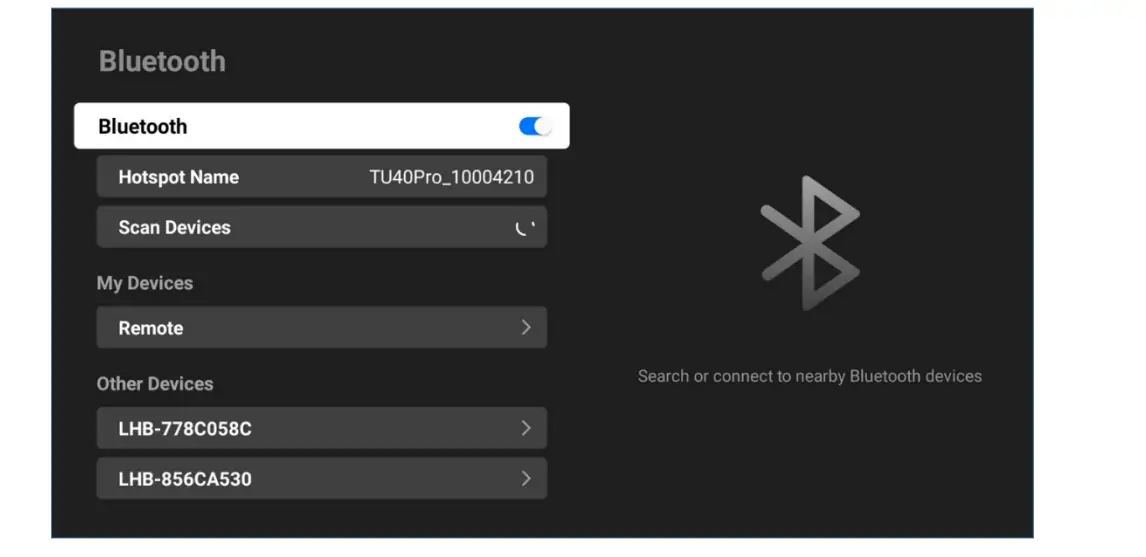
- Set the system language, pair the remote via Bluetooth, choose a time zone, connect to Wi-Fi, and rename your device for easy identification.
4. Novastar TU40 Pro Price
The Novastar TU40 Pro Price reflects its innovative features and robust performance. For the latest pricing information, visit the official LED Screen Cloud Platform or authorized distributors. Competitive pricing ensures that the TU40 Pro remains accessible for various applications, from corporate environments to educational institutions.
5. Applications of Novastar TU40 Pro Playback Device
The Novastar TU40 Pro Playback Device is highly versatile, catering to a broad range of applications:
- Corporate Showrooms: Ideal for showcasing products and services with vibrant, high-resolution displays.
- Conference Rooms: Facilitates wireless presentations and video conferencing, enhancing collaboration.
- Auditoriums: Provides large-scale, high-definition visual experiences for events and lectures.
- Outdoor Displays: Suitable for standalone LED screens in public spaces, ensuring visibility and impact.
6. Novastar TU40 Pro File Download
Access essential resources for the Novastar TU40 Pro through the following links:
- NovaStar TU40 Pro Specifications
- NovaStar TU40 Pro User Manual
- NovaStar ViPlex Handy
Ensure you have the latest firmware, software, and user manuals to maximize the performance of your device.
7. FAQs
8. Conclusion
The Novastar TU40 Pro LED Playback Control Processor represents a significant advancement in LED display technology. Its all-in-one architecture, powerful processing capabilities, and versatile application make it an indispensable tool for modern display needs. Whether you’re managing a corporate showroom, conducting a conference, or setting up a digital signage network, the TU40 Pro ensures optimal performance and reliability.
For more detailed information and technical support, visit www.novastar.tech. Explore the full potential of your LED projects with the NovaStar TU40 Pro, where innovation meets practicality.
 NovaStar MX6000 Pro: The 8K LED Controller Game-Changer
 Novastar VX400 Pro: The Next-Level 4K LED Controller Guide
Related Posts
Fill In Your Needs In Detail
Fill in the screen usage scene and size you need in “Content”.You will get a quote.



