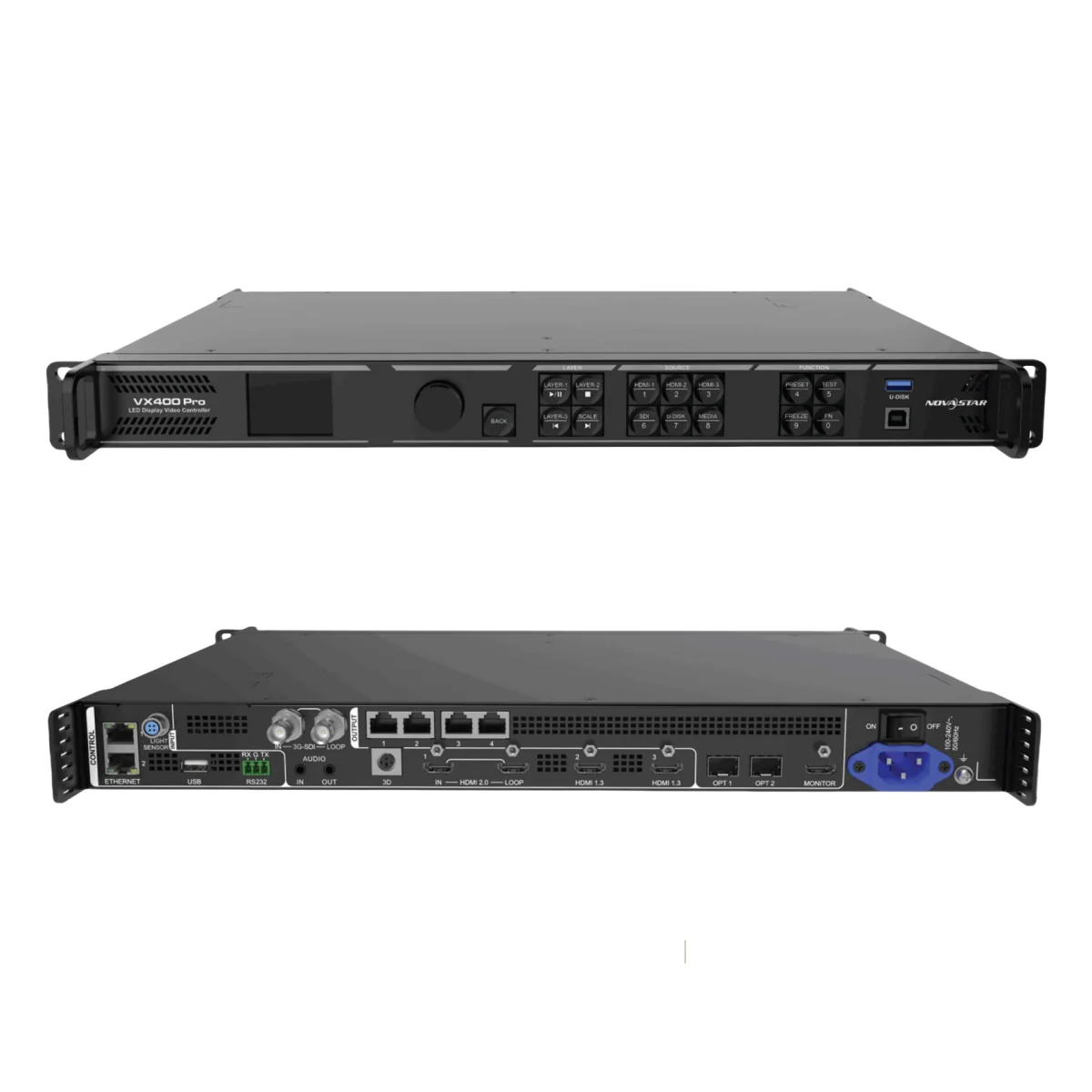
The NovaStar VX400 Pro is an all-in-one LED controller with 4K60 HDMI input and a 2.6-million-pixel LED output capacity. Its four Gigabit Ethernet outputs suit rental LED displays and fixed installations. A 4K input does not mean it can drive a full 4K LED wall.
This guide covers specifications, layer limits, setup choices and manuals. It is based on manufacturer documentation, not hands-on testing.
1. What Is the Novastar VX400 Pro?
The VX400 Pro combines video processing and LED transmission. Maximum output width is 10,240 pixels and maximum height is 8,192 pixels; these are separate limits, subject to the 2.6-million-pixel total. It cannot output a 10,240 × 8,192 canvas.
- Input: HDMI 2.0 accepts up to 4096 × 2160 at 60 Hz.
- Modes: Video Controller, Fiber Converter and ByPass.
- Latency: Zero controller frames requires low latency plus ByPass; this is not end-to-end system latency.
Check screen width × height and each port’s mapped load before choosing this model. See NovaStar’s VX400 Pro specifications V1.4.0.
2. Core Features of the VX400 Pro LED Controller
Plan connections, layer resources and backup paths before commissioning.
2.1 Multiple Input and Output Connectors
1. Inputs:
- One HDMI 2.0 input with loop output; two HDMI 1.3 inputs.
- One 3G-SDI input with loop output.
- OPT 1 can serve as a 10G fiber input or output.
- Front USB 3.0 supports media playback.
2. Outputs:
- Four Gigabit Ethernet ports: 650,000 pixels per port at 8-bit, 2.6 million total.
- Two optical ports support transmission, copying or backup; they do not increase capacity. Optical modules are sold separately.
- HDMI monitoring output is fixed at 1920 × 1080 at 60 Hz.

2.2 Advanced Video Processing
- Layers: Six 2K × 1K resources. One 4K × 2K layer consumes four; one 4K × 1K layer consumes two.
- Calibration: Pixel-level brightness and chroma calibration uses NovaLCT.
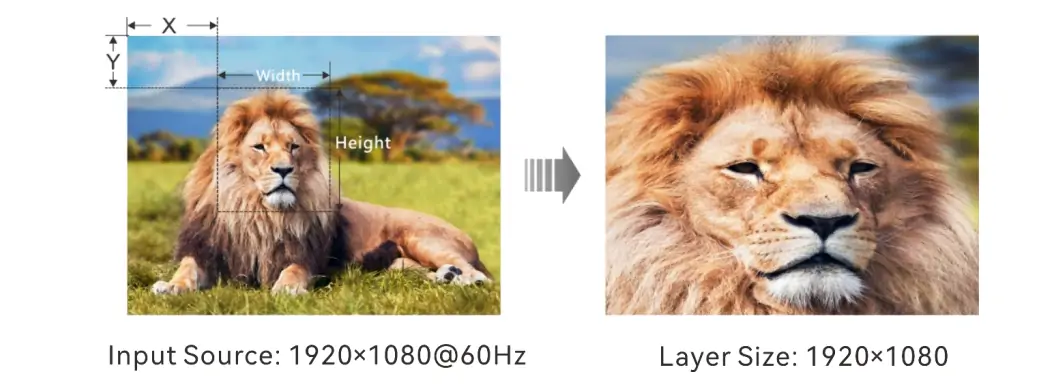
- Crop: Select and scale a source region, as illustrated below; cropping does not add image detail.
2.3 Low Latency and Synchronization
- Low latency: ByPass omits image processing. Follow the manual’s cabling restrictions before enabling low latency.
- Synchronization: Output can synchronize to a video input source. Test the complete camera-to-screen chain for live use.
2.4 Flexible Control Options
Control options: Front-panel knob, Unico client or web interface, NovaLCT, VICP mobile app and optional remote control. Save and test presets before an event.
2.5 Backup and Reliability
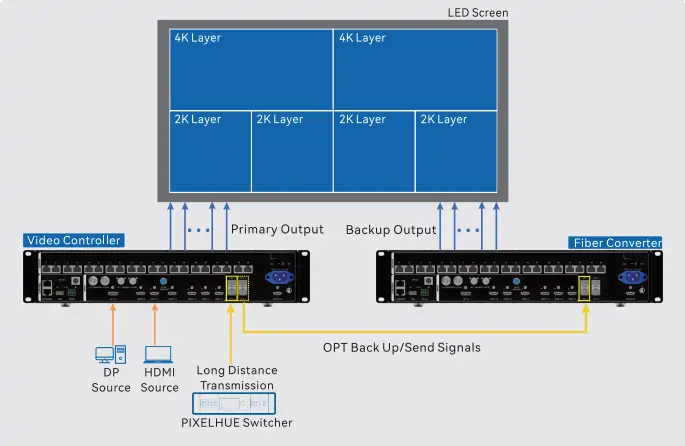
Backup options: Device, input, Ethernet-port, optical/Ethernet and dual receiving-card backup. Configure the required hardware and test failover; a listed backup feature alone does not provide redundancy.
Power recovery: Previously saved settings are restored after restart. Save configuration changes before disconnecting power.
2.6 Enhanced Display Capabilities
- OSD: Text or image overlays; image and text OSD cannot run together. The VX400 Pro image-area limit is 4096 × 1080 pixels, so the menu illustration below is not a recommended size preset.
- 3D: Requires a compatible emitter and glasses.
- USB: Media decoding supports specified 4K files, but the USB source output is 1920 × 1080 at 60 Hz.
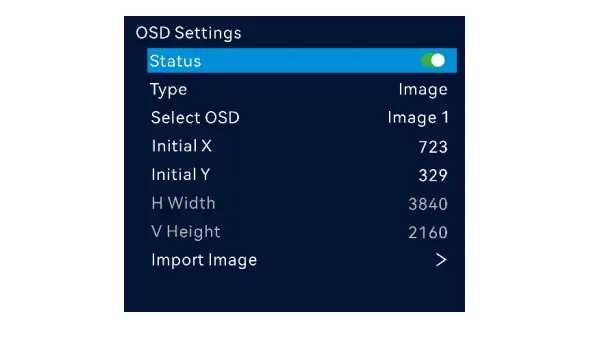
Check format and firmware requirements in the current VX Pro series user manual before preparing content.
3. Technical Specifications of VX400 Pro Video Processor
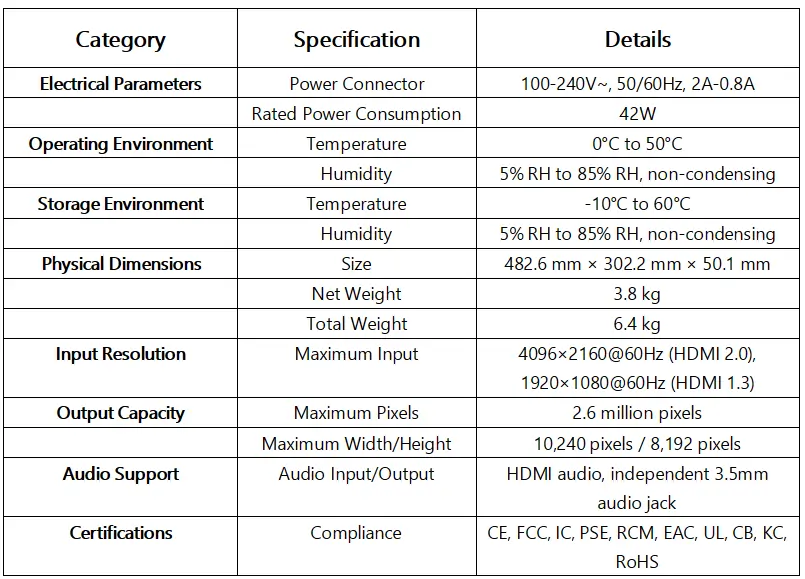
Readable specifications accompany the original graphic below. Values are from NovaStar’s V1.4.0 datasheet.
| Item | Specification |
|---|---|
| LED output | 2.6 million pixels; four Gigabit Ethernet ports |
| Maximum canvas dimensions | Width 10,240 or height 8,192 pixels, within total load |
| HDMI inputs | HDMI 2.0: 4096 × 2160 at 60 Hz; HDMI 1.3: 1920 × 1080 at 60 Hz |
| Audio | Embedded HDMI and 3.5 mm connections |
| Power supply / rated consumption | 100–240 V AC, 50/60 Hz, 2–0.8 A / 42 W |
| Operating conditions | 0–50 °C; 5–85% RH, non-condensing |
| Storage conditions | −10–60 °C; 5–95% RH, non-condensing |
| Overall dimensions | 482.6 × 302.2 × 50.1 mm (W × D × H) |
| Weight | 3.8 kg net; 6.4 kg packed in paper box |
| Listed certifications | CE, FCC, IC, PSE, RCM, EAC, UL, CB, KC, RoHS; confirm regional documentation |
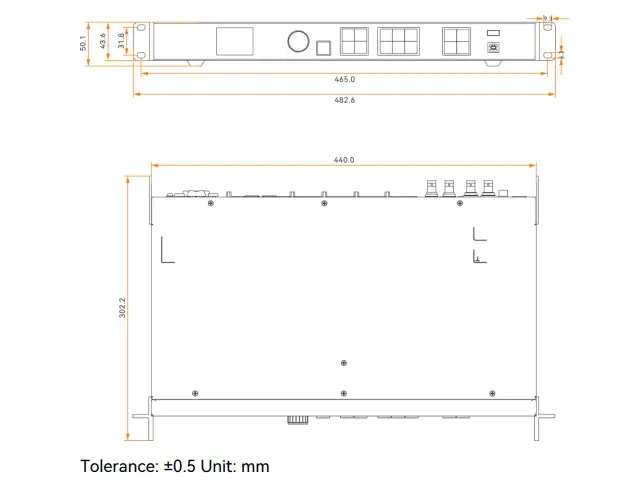
Mount horizontally with ventilation clearance. Use the dimension drawing below to check rack fit and mounting positions.
4. Applications of the Novastar VX400 Pro All-in-One Controller
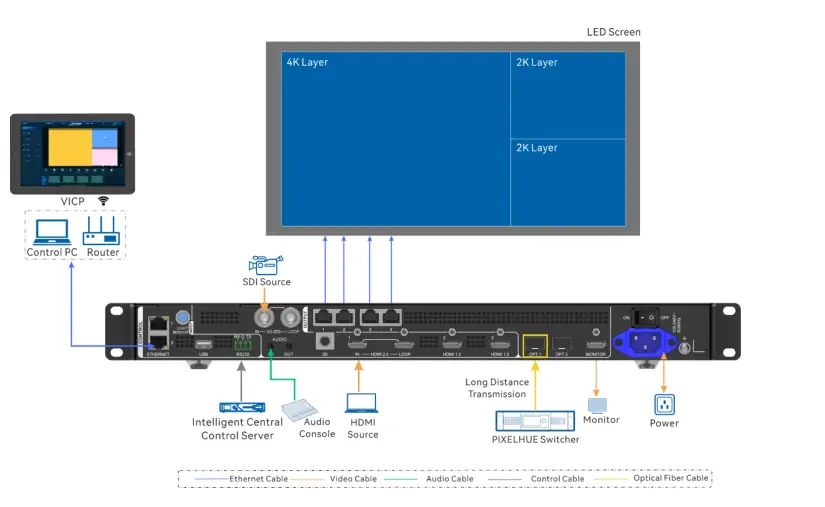
In the connection diagram below, sources feed the controller and Ethernet outputs feed receiving cards. One 4K × 2K layer plus two 2K × 1K layers uses all six resources.
4.1 Stage Performances and Live Events
For stage events, verify source frame rates and latency with the actual cameras and screen. Test backup switching during rehearsal.
4.2 Corporate Environments
For conferences, budget layer resources for presentations and video. Save presets for each speaker or layout.
4.3 Retail Advertising
For retail signage, test USB files before deployment. Outdoor screens still need the controller installed in a suitable protected environment.
4.4 Sports Venues
For scoreboards and perimeter displays, calculate the actual pixel load. Viewing distance and brightness depend on the LED screen, not this controller alone.
4.5 Control Rooms
For control rooms, confirm source compatibility and monitoring needs. Apply calibration data appropriate to the receiving cards and modules.
Diagram clarification: The processing illustration below depicts a larger VX Pro system with 20 Ethernet ports and 12 layer resources. It is not the VX400 Pro’s four-port, six-resource configuration.
5. NovaStar VX400 Pro 4K LED Controller File Download
Keep the supplied documentation for the installed firmware. These existing downloads remain available:
- Quick Start Guide V1.0.1: Download PDF
- User Manual V1.2.0 (archived): Download PDF
- Specifications Sheet: Download PDF
For current limits, use the VX Pro series manual V1.4.1 and VX400 Pro datasheet V1.4.0. Our NovaStar software download guide explains configuration tools.
6. FAQs
7. Conclusion
The VX400 Pro is suitable when the LED wall fits its 2.6-million-pixel capacity and six-resource layer budget. Its 4K input, optical transport and backup options must be matched to the installation.
Price: Request a dated quotation covering optical modules, remote control, shipping, taxes and support. No current price has been verified for this guide.
Before ordering, send your supplier the screen resolution, receiving-card model, source formats and backup requirements for a compatibility check.
Start Your Project Now!
 NovaStar TU40 Pro: Specs, Setup and Buying Guide
 NovaStar TB20 Plus Review: Specs, Setup & TB10 Comparison
Related Posts






Fill In Your Needs In Detail
Fill in the screen usage scene and size you need in “Content”.You will get a quote.