
2026 NovaStar RCFG RCFGX Files Free Download
Last reviewed: September 17, 2026.
Notice! Uploading the wrong file to your LED display may result in low brightness, flickering, or poor images. They even cause the diode or controller chip to overheat. Therefore, it is critical to download the correct RCFG RCFGX files. In this article, you can find and download the right Novastar rcfg rcfgx files to your LED display for free.
1. What is Novastar Rcfgx file?
A Novastar RCFGX file is an extension of the Novastar RCFG (Receive Configuration File) format used for LED display control systems. While the details of the RCFGX format may vary depending on the version and specific use case, in general, it extends the functionality and features of Novastar’s standard RCFG file.
This RCFGX file contains settings that control the performance of the LED display such as refresh rate, color, brightness, and pixel count. It is a crucial configuration tool to ensure the quality of the images and videos displayed on the screen. It is critical for controlling NovaStar hardware (e.g., Novastar VX1000 video controllers, MCTRL660 PRO sending cards) in scenarios like stage productions, rental events, or engineering projects
2. Rcfg File Meaning
The RCFG file is a configuration file used by the NovaStar LED display system. It stores parameters necessary to control hardware components such as LED controllers and processors, such as screen layout adjustments, resolution settings, and color calibration data. While its exact technical structure is not explicitly detailed in the available resources, it may operate in a manner similar to the RCFGX format (a compressed XML-based configuration file), but may lack compression or use older formatting standards.
3. Novastar RCFG RCFGX File Download List
Below are some popular Novastar RCFG RCFGX files for PC, which are listed below. You can choose the corresponding configuration file to download according to your LED display module.
Novastar ViPlex Express Software: ViPlex Express and ViPlex Handy Download
| Novastar RCFGX File for Outdoor Fixed LED Display |
|---|
| Novastar RCFGX File Download for Indoor Fixed LED Display |
|---|
| Novastar RCFGX File Download for Outdoor Rental LED Screen |
|---|
| P4.81mm Outdoor Rental LED Screen | P3.91mm Outdoor Rental LED Screen | P2.976mm Outdoor Rental LED Screen |
| P2.604mm Outdoor Rental LED Screen |
| Novastar RCFGX File Download for Indoor Rental LED Screen |
|---|
| Novastar RCFGX File Download for Rental LED Screen |
|---|
4. How to Upload Novastar RCFG RCFGX Files to NovaLCT Software?
The video below shows the complete workflow. If you prefer to follow the steps in text:
- Back up the configuration that is already on the receiving cards. Export it in NovaLCT before you change anything, so you can restore it if the new file does not match.
- Download the file that matches your module from the list above. Check the module resolution, driver IC and scan mode, not just the pixel pitch.
- Open NovaLCT and connect to the screen. Confirm the software detects your sending card and every receiving card.
- Import the RCFG or RCFGX file in the screen configuration window (Settings → Screen Configuration in most NovaLCT versions), then check that the reported parameters match your cabinet.
- Send the configuration to the receiving cards and verify the colours, brightness and refresh rate on the screen.
- If the image is wrong, restore your backup and re-check the file against the module specification.
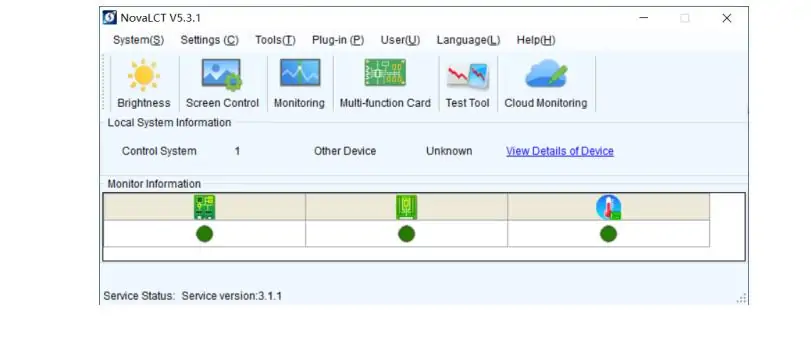
You will need the matching NovaLCT version installed — you can download the latest NovaStar software, firmware and manuals here. Setting up a VX1000 controller at the same time? Our NovaStar VX1000 setup guide covers the controller side.
Still stuck? Contact us (EagerLED), a professional LED module manufacturer. Our technical team will help you upload the correct Novastar RCFG or RCFGX file — please include your module model, driver IC and scan mode so we can identify the right file quickly.
5.How to Make Novastar RCFG,RCFGX,SCR,SCFG Files on NovaLCT Software?
6. RCFG vs RCG vs RCFGX: What’s the Difference?
RCFG and RCFGX are both receiving-card configuration files used by NovaStar LED control systems. The difference is the format generation and the NovaLCT version that produced the file:
- RCFG — the older receiving-card configuration format. It stores the module parameters, cabinet layout, data flow and calibration data a receiving card needs to drive a specific LED module. Legacy equipment and older NovaLCT releases still use it.
- RCFGX — the extended version of the same format. Current NovaLCT releases export RCFGX by default, and it carries the same receiving-card settings in a newer container.
- RCG — in practice a misspelling of RCFG rather than a separate NovaStar format. If you searched for an “RCG file” or “novastar rcg file”, the file you need is the RCFG file in the download list above.
So the short answer: RCFG and RCFGX are the same kind of file in two format generations, and RCG means RCFG. Match the file to your NovaLCT version — older releases read RCFG, recent releases read both.
7. NovaStar RCFG RCFGX FAQ
GET A QUOTE
Consult us for LED display solutions