

Catetory
2026 New LED Screen Price for You
Fill in the information and get your LED screen budget immediately!
Featured Articles
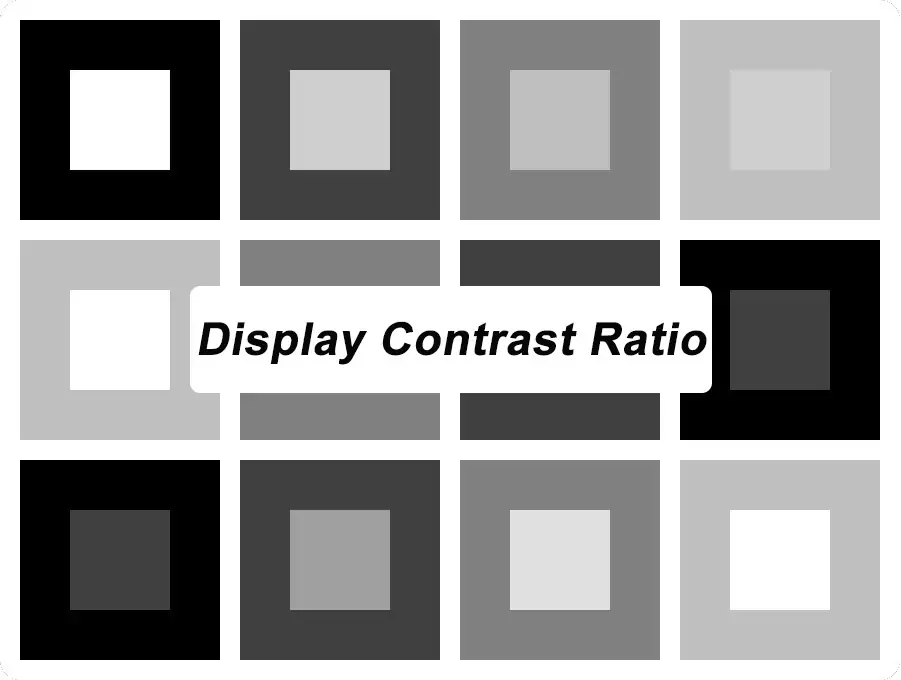
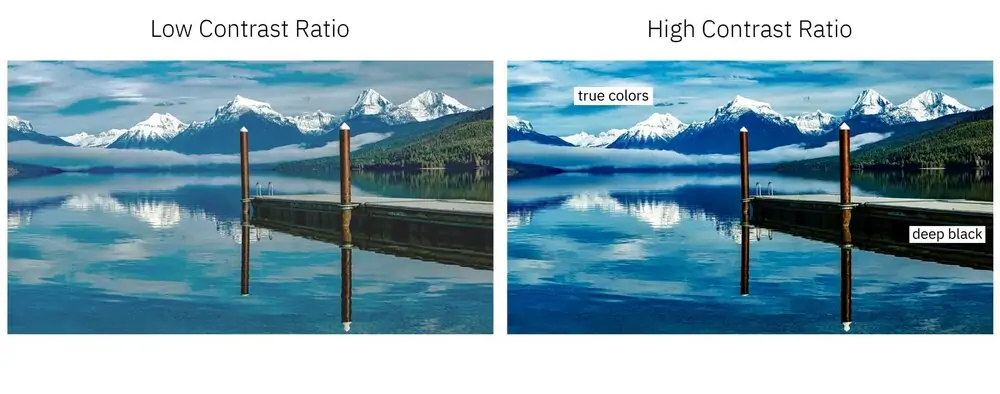
Display contrast ratio measures the brightness difference between the brightest white and darkest black an LED screen can show. It mainly affects how deep blacks appear, how clearly the shadow details show, and how impressive the image looks.
When you see numbers like 1000:1, 3000:1, or 5000:1, you will know they refer to contrast ratio. But do you have insight into these digits? Or can you make a quick comparison between two LED screens?
This article will walk you through what it is, which display technology has a good contrast ratio, what affects it, and how to diagnose and improve it. In addition, the display contrast ratio calculator supports instant calculations.
1. What is Display Contrast Ratio?
Display contrast ratio describes the difference in luminance between the brightest white and the darkest black a display can produce under specified measurement conditions. Luminance describes light traveling from the screen toward the observer and is commonly expressed in nits, equivalent to candelas per square meter (cd/m²).
Contrast ratio is calculated by dividing white luminance by black luminance:
Contrast ratio = White luminance ÷ Black luminance
So it is usually written in ratios such as 3000:1, 1000:1, and 5000:1. Use 1000:1 as an example. 1,000:1 means the measured white is 1,000 times as bright as the measured black. White at 300 cd/m² and black at 0.3 cd/m² produce a contrast ratio of 1,000:1. But the number does not indicate how many colors or shades the display can show.
In other words, a higher display contrast ratio provides deeper black, clearer dark details, and greater image depth. Measuring display contrast ratio can’t only consider one factores. Ambient light, reflections, display technologies, and brightness are also important elements.
1.1 Is Contrast Ratio the Same as Brightness?
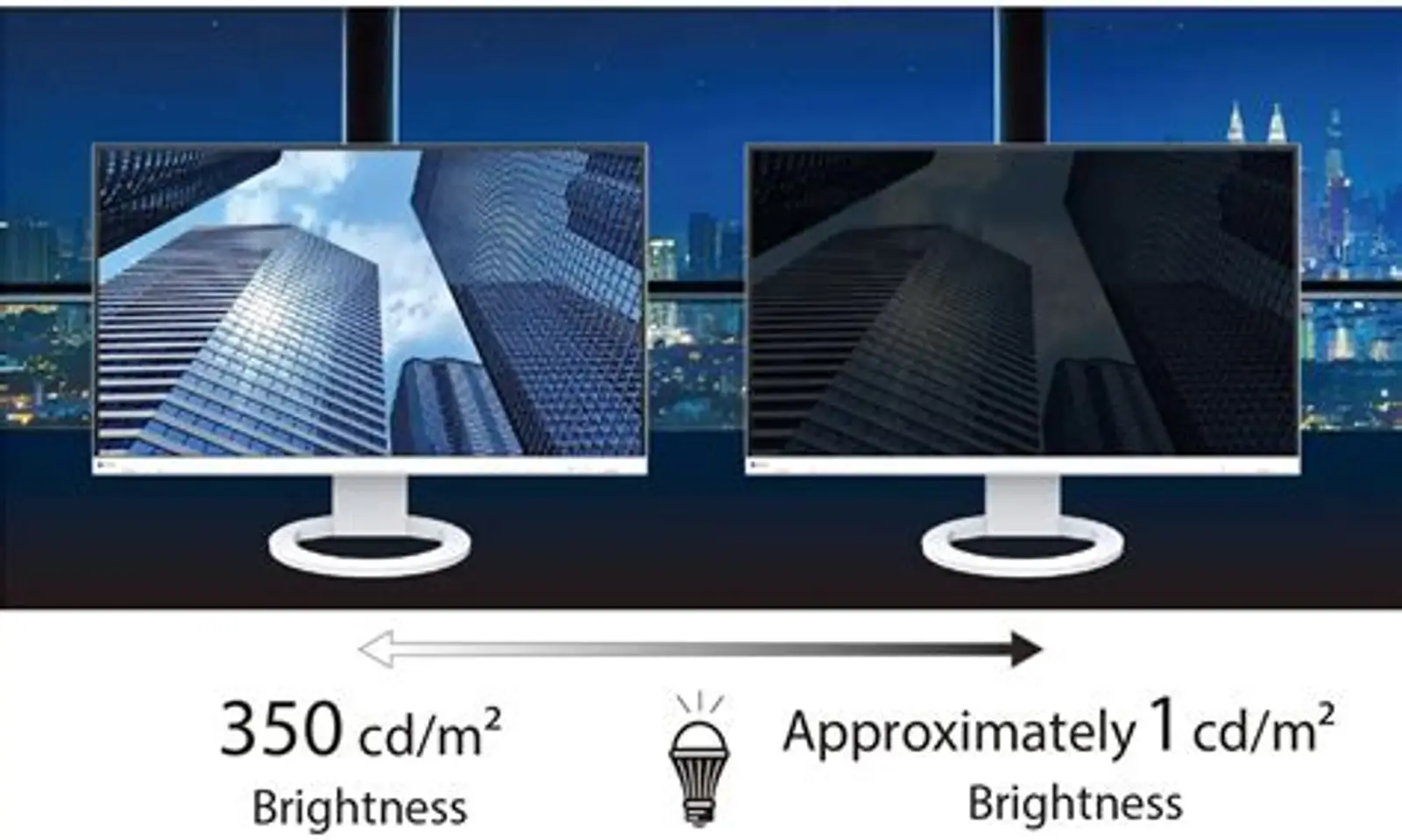
No. Brightness describes light output, while contrast ratio compares white output with black output.
A brighter screen can have a lower contrast ratio if its black level is also higher. Conversely, a display with modest white output can achieve a high ratio through a very low black level. Therefore, buying an LED display requires comprehensive consideration.
2. Static vs Dynamic Contrast Ratio: What They Are
Static and dynamic contrast ratios describe the difference between white and black luminance under different operating conditions. Understanding this difference helps you compare display specifications accurately.
2.1 What is Static Contrast Ratio?
Static contrast ratio (also called fall-on/fall-off contrast) measures white luminance divided by black luminance at fixed settings. In LCD specifications, it is commonly called native contrast ratio.
For example, a display with white luminance of 300 cd/m² and black luminance of 0.1 cd/m² has a static contrast ratio of 3,000:1.
How to Calculate:
Static Contrast Ratio = L_full-white ÷ L_full-black
Where:
L_full-white = Luminance of the screen when showing a full-white test frame (cd/m² or nits)
L_full-black = Luminance of the screen when showing a full-black test frame (cd/m² or nits)
Note: The display should be tested under identical locked settings(brightness, gamma, drive current unchanged).
2.2 What is Dynamic Contrast Ratio?
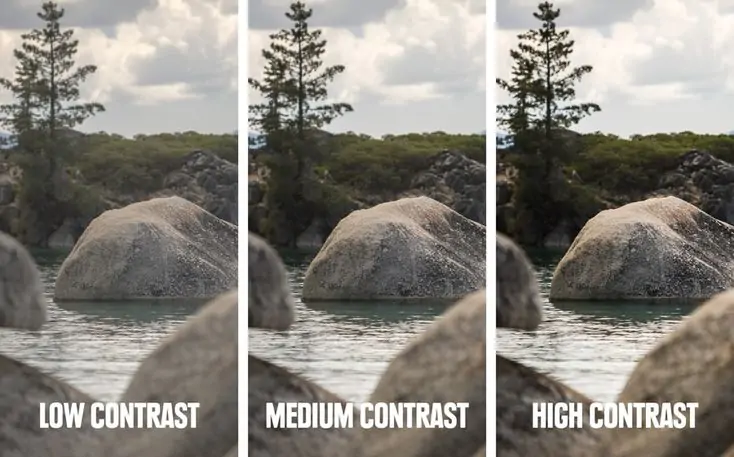
Dynamic contrast ratio compares white and black luminance captured from different frames while the display automatically adjusts its light output according to the content.
For example, an LCD may increase its backlight brightness for a bright scene and reduce it for a dark scene. That can produce a large ratio between measurements taken at different times. So, for LED display buyers, static contrast ratio is still a key factor you should concentrate on.
How to Calculate:
Dynamic Contrast Ratio = Maximum Measured White Luminance ÷ Minimum Measured Black Luminance
For example, suppose a display produces:
- 1,000 nits during a white test frame.
- 0.001 nits during a black test frame after its automatic dimming system reduces light output.
The calculation is:
1,000 ÷ 0.001 = 1,000,000:1
In simple terms, dynamic contrast ratio differs greatly among manufacturers, as tests are taken at different times with dynamic brightness control enabled. If some suppliers only show dynamic contrast ratio figures, you should ask for the native contrast ratio.
2.3 Where Does ANSI Contrast Fit?
ANSI stands for the American National Standards Institute. For display contrast testing, “ANSI contrast” refers to a standardized measurement method using a fixed 4×4 checkerboard test pattern, where white and black squares appear simultaneously on the same screen frame.
ANSI contrast ratio = Average white luminance ÷ Average black luminance
It sits between static contrast and real viewing performance. Static contrast tests full white and full black frames separately, while ANSI contrast simulates real content that mixes bright and dark regions together. Therefore, ANSI contrast is the most reliable indicator to judge the actual visual effect you will see during normal playback.
Note: Most suppliers don’t list ANSI contrast on spec sheets because the values are usually much lower than static and dynamic contrast figures.
2.4 Static Contrast Ratio vs Dynamic Contrast Ratio
3. 1000:1 vs 1500:1 vs 3000:1 vs 4000:1 vs 5000:1 Display Contrast Ratio
Not every contrast rating on a display spec sheet tells the same story. While a greater display contrast ratio promises richer blacks, crisp highlights and better image depth, you may wonder how noticeable the gap really is.
We will break down contrast values including 1000:1, 1500:1, 3000:1, 4000:1, and 5000:1 to show their practical differences.
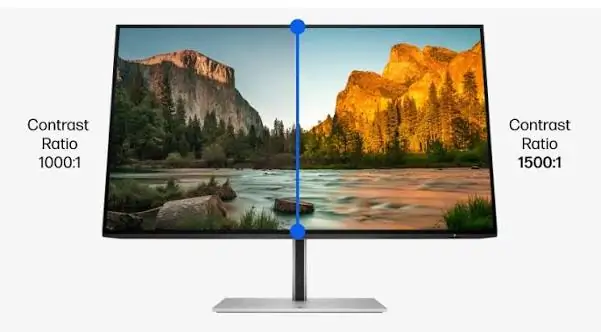
3.1 1000:1, 1500:1, 3000:1, 4000:1, and 5000:1
These display contrast ratios must be static contrast ratios. If they are dynamic contrast ratios, the visual performance will be far weaker.
3.2 Is 3000:1 Noticeably better than 1000:1?
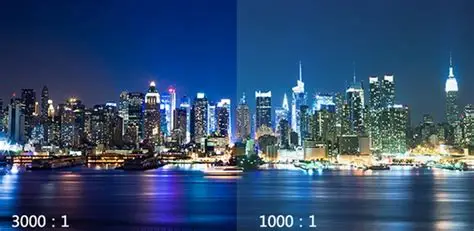
Yes, 3000:1 can look noticeably better than 1000:1, especially in a dim room. When measured under the same conditions at equal white brightness, it produces a black level one-third as bright, helping dark scenes look deeper.
The difference may be less obvious in bright surroundings, where reflections make blacks appear lighter. Compare both screens using the same content, brightness, and lighting—3000:1 does not mean three times better picture quality.
3.3 Is 5000:1 Always Better than 4000:1?
A 5000:1 contrast ratio is not always better than 4000:1 in practice. When both displays use the same measurement method and white brightness, 5000:1 indicates a lower black level, which may make dark scenes look deeper.
However, room lighting, screen reflections, and image settings can outweigh that difference. Compare both displays under your actual viewing conditions and check shadow detail, readability, and overall image quality before choosing. Don’t just stare at screen contrast ratio alone.
4. LED, OLED, IPS, QLED and LCD Contrast Ratio Compared
LED, OLED, IPS, QLED and LCD describe different aspects of display technology. IPS is a type of LCD panel, while mainstream QLED televisions also use LCD technology. “LED” requires particular care: an LED-backlit LCD and a direct-view LED wall form images differently.
Key Note for Buyers:
- Direct-view LED: It supports high brightness for indoor and outdoor signage and works well for large video walls.
- OLED: It delivers exceptional shadow and color performance, yet it carries burn-in risk if static logos or text remain displayed for extended periods.
- IPS (LCD panel): It provides a wide viewing angle, but its limited contrast makes it a poor choice for applications that demand deep black tones.
- QLED: Quantum dots create brighter and more vivid colors, but it is built on LCD technology and cannot switch off individual pixels to achieve true black.
- Traditional LCD: It is a low-cost solution, but it is not suitable for commercial projects that require strong image depth and clear dark details.
5. Why Ambient Light Changes Display Contrast Ratio
Ambient light reflects from the screen and raises the luminance viewers see in dark areas. The image may then appear less deep even though the display’s hardware and settings remain unchanged.
This effect is particularly relevant to retail windows, outdoor advertising, and brightly illuminated commercial spaces. NIST’s ambient contrast research addresses how environmental illumination changes display contrast measurements.
A worked example:
Assume a display produces:
- White luminance: 1,000 nits
- Black luminance: 0.2 nits
Its dark-room contrast is:
1,000 ÷ 0.2 = 5000:1
Now assume reflected light adds 10 nits equally to the measured white and black areas:
Ambient contrast ≈ (1,000 + 10) ÷ (0.2 + 10)
Ambient contrast ≈ 99:1
This simplified model illustrates why reflections can greatly reduce contrast. It assumes equal added reflected luminance; actual results depend on surface properties and lighting geometry.
5.1 What Should Buyers Do?
Evaluate the display under the lighting it will actually face.
- For a shop window, inspect it from outside through the glass.
- For a stage, switch on the relevant lighting cues.
- For a conference room, use the normal meeting-room lighting.
Increasing output may help visibility, but controlling reflections can also be essential.
6. Factors Affect Screen Contrast Ratio
Screen contrast ratio determines how clear and vivid the picture looks. However, contrast ratio is also affected by multiple factors, such as brightness levels, display technologies, ambient lighting, and calibrations. You should have insight into what mainly influences it, which will help you know how to disgnose and improve image quality.
6.1 Display Technology
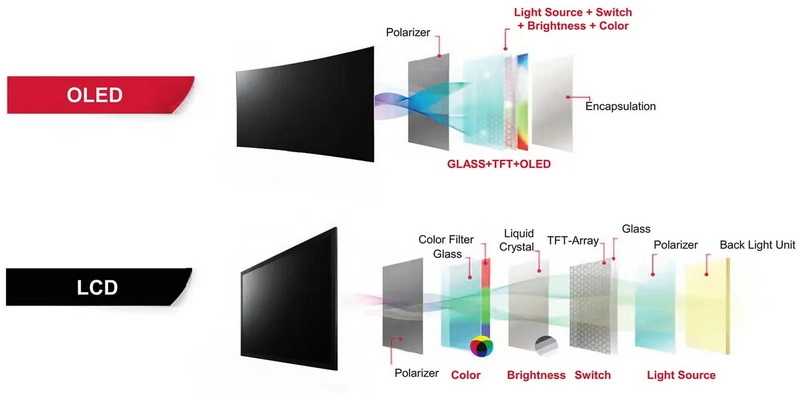
Different display technologies produce black in different ways. LCD panels block light from a backlight, while OLED and direct-view LED displays control light emitted by their pixels.
This affects how dark black areas can become and how clearly bright objects stand out. Before comparing contrast ratios, confirm the display technology and measurement method.
6.2 Backlight Technology
For LCD displays, backlight design affects contrast. Local dimming adjusts separate backlight zones, allowing dark parts of an image to receive less light while brighter areas remain illuminated.
Performance depends on the zone layout and control algorithm. Test white text against a black background to check for halos around bright objects. OLED and direct-view LED screens do not use a separate backlight.
6.3 Ambient Light
Sunlight and room lighting reflect from the screen, making dark areas appear lighter. This reduces visible contrast even when the display’s settings remain unchanged.
For example, a screen that shows deep blacks in a showroom may look washed out beside a shop window. Evaluate it under lighting similar to the intended installation.
6.4 Surface Coating and Screen Reflection
The screen’s surface affects how much surrounding light reaches the viewer through reflection. Coatings, protective layers, and the exposed surfaces between LED emitters can all influence visible black levels.
A matte finish may soften distinct reflections but spread reflected light across a larger area. Inspect the actual screen from several angles rather than assuming that a matte or glossy label guarantees better display contrast ratios.
6.5 Brightness Setting of the Display
Brightness settings influence white output, but increasing brightness does not always improve contrast proportionally. Black luminance may also change, depending on the display and its controls.
Set brightness for the viewing environment, then check dark details and bright textures. A daytime setting suitable for a retail window may be uncomfortable in a dim conference room.
6.6 Panel / LED Chip Quality
In LCD displays, panel construction affects light leakage and black uniformity. In direct-view LED screens, LED packages, masks, module surfaces, and manufacturing consistency influence the finished image.
LED chip quality alone does not determine the display contrast ratio. Inspect uniform gray patterns across the complete screen to identify uneven brightness, color differences, or visible module boundaries.
6.7 Calibration and Drive Parameters
Calibration helps align brightness and color across the display. Gamma, black-level settings, signal-range handling, and LED drive parameters also affect whether subtle dark shades remain visible.
Incorrect settings can make blacks look gray or compress shadow detail into solid black. Ask the supplier to demonstrate smooth dark gradients at your intended operating brightness, then save the verified configuration.
7. What is the Best Contrast Ratio for Your Application?
For daily use, an LED screen with 1000:1 to 3000:1 static contrast ratio is the most practical choice.
The best choice is a display that preserves the required detail under your operating conditions. There is no single ratio that guarantees this across every application.
7.1 For Office and Conference Rooms
Best Display Contrast Ratio: 1000:1–3000:1
This range generally supports clear documents, spreadsheets, and presentations when screen brightness is appropriate for the room.
7.2 For Home Theaters and Ordinary Gaming
Best Display Contrast Ratio: 3000:1–5000:1 or higher
Higher native contrast helps dark scenes look deeper, while OLED is another option for especially low black levels.
7.3 For Indoor Retail and Showrooms
Best Display Contrast Ratio: Around 5000:1 or higher for direct-view LED
This is a useful specification target for product imagery and promotional content, provided reflections and showroom lighting are well controlled.
7.4 For High-End Gaming
Best Display Contrast Ratio: 5000:1 or higher native, or effectively infinite OLED contrast
Strong contrast improves separation between bright highlights and dark backgrounds, but also check HDR performance, response time, and shadow detail.
7.5 For Outdoor Advertising
Best Display Contrast Ratio: Around 5000:1 or higher as a specification starting point
Daylight readability depends heavily on brightness and surface reflectance, so verify performance outdoors rather than relying on the dark-room ratio.
7.6 For Control Rooms and Studios
Best Display Contrast Ratio: Application-dependent; around 3000:1–5000:1 as an initial comparison range
Prioritize readable low-gray detail and uniformity in control rooms, while studios should verify contrast against their monitoring or camera requirements.
8. LED Display Contrast Ration Calculator
LED Display Contrast Ratio Calculator
See how screen brightness, black level and ambient light affect contrast.
- Dark-room contrast
- —
- Reflected luminance
- —
9. How to Compare Two LED Displays Fairly
A fair comparison controls the conditions that can otherwise favor one screen.
- Confirm the configurations. Record model, pixel pitch, module construction, surface treatment, processor, and firmware where relevant.
- Match measured white luminance. Compare at a level suitable for the application, rather than allowing one sample to dominate through extra brightness.
- Use identical content. Feed both displays from a consistent source and check that signal handling matches.
- Match the lighting and viewing position. Avoid placing one screen beside a window while shielding the other.
- Document processing. Record dynamic adjustments, calibration, gamma, and brightness settings.
- Inspect mixed scenes. Use dark video with bright text, smooth gradients, and images with highlight texture.
- Check the whole screen. Look for uneven modules and off-axis changes, not just a good-looking central area.
- Compare the test reports. Ensure the ratios use compatible methods before ranking them numerically.
Bring your own content to the demonstration. Familiar material makes missing detail and incorrect reproduction easier to recognize.
10. How to Diagnose and Improve Poor LED Display Contrast
Start with the visible symptom. Different problems can produce a similarly washed-out image.
10.1 Reduce unwanted light first
Redirect fixtures that shine onto the display, manage daylight, and review the viewing geometry. For glass-fronted installations, inspect reflections from the glass as well as the screen.
10.2 Check the complete signal chain
Compare an internal test pattern with content from the normal player or computer.
If the internal pattern looks correct but the source does not, investigate the player, video range, processor, and conversion settings before changing the display calibration.
10.3 Adjust brightness and tonal settings carefully
Set output for the environment, then verify near-black and near-white detail.
Avoid trying to deepen black by pushing settings until shadow information disappears. Likewise, increasing contrast until highlights become featureless reduces useful image detail.
10.4 Recheck uniformity
Use gray patterns to identify inconsistent areas. Ask the installer to review configuration and calibration before assuming the entire display needs replacement.
After adjustments, repeat the test with actual content and save the verified operating settings.
11. FAQs
12. Conclusion
Display contrast ratio shapes the depth, clarity and readability of everything displayed on an LED screen. It directly impacts the overall viewing experience.
If the visual experience is your top priority, don’t just chase a high contrast ratio. Static contrast ratio, refresh rate, brightness and LED screen resolution all play a vital role when you choose an LED screen. You can explore our other articles to deepen your knowledge of LED display specs.
Related articles
Flexible LED Screens: B2B Selection Guide
Flexible LED screens use bendable modules to create curved walls, column wraps and other shaped displays. For a B2B project, compare the permitted curvature, viewing distance, installation environment and […]
LED Screen Technology for B2B Displays
LED screen technology helps businesses deliver readable, dynamic content across advertising, events, retail, transport and corporate spaces. The right LED display depends on the viewing distance, indoor or outdoor […]
How to Choose a Digital Advertising Board for Your Business
A digital advertising board helps businesses present promotional videos, images and messages in retail spaces, workplaces, public venues and outdoor locations. Choosing the right LED advertising board starts with […]
GET A QUOTE
Consult us for LED display solutions