The NovaStar TB40 LED controller is a Taurus multimedia player and LED sending device for screens with up to 1,300,000 pixels. It supports stored playlists and live HDMI playback. If you are planning a retail sign, lobby display, roadside cabinet, or small video wall, the first question is whether its 1.3 million pixel output capacity fits your cabinet map. The second is whether you need scheduled playback, a live HDMI feed, or both.
This guide explains the NovaStar TB40 specifications, configuration workflow, connection ports, software, and common faults in installation language. It also separates limits that are often confused: 4K video decoding describes the source file, while 1.3 million pixels describes the LED canvas the player can drive. Use the calculations and checklist below before buying or loading a receiving-card file.
For a fast decision: choose the NovaStar TB40 LED controller when your mapped LED pixels total no more than 1,300,000, you want onboard scheduling or an HDMI source, and your receiving cards are compatible with the planned NovaStar configuration. Confirm the current hardware revision, firmware, accessories, and local regulatory requirements with the supplier before installation.
1. What is the NovaStar TB40 LED controller?
The NovaStar TB40 is a Taurus-series multimedia player for full-color LED displays. It stores and plays content, sends pixel data to the LED receiving cards, and accepts an HDMI feed for live playback. The device is useful when an installation needs both a signage player and a sending controller without a separate computer running continuously. It is a controller for the LED cabinet system, not a substitute for the receiving cards inside those cabinets.
01. How the signal path works
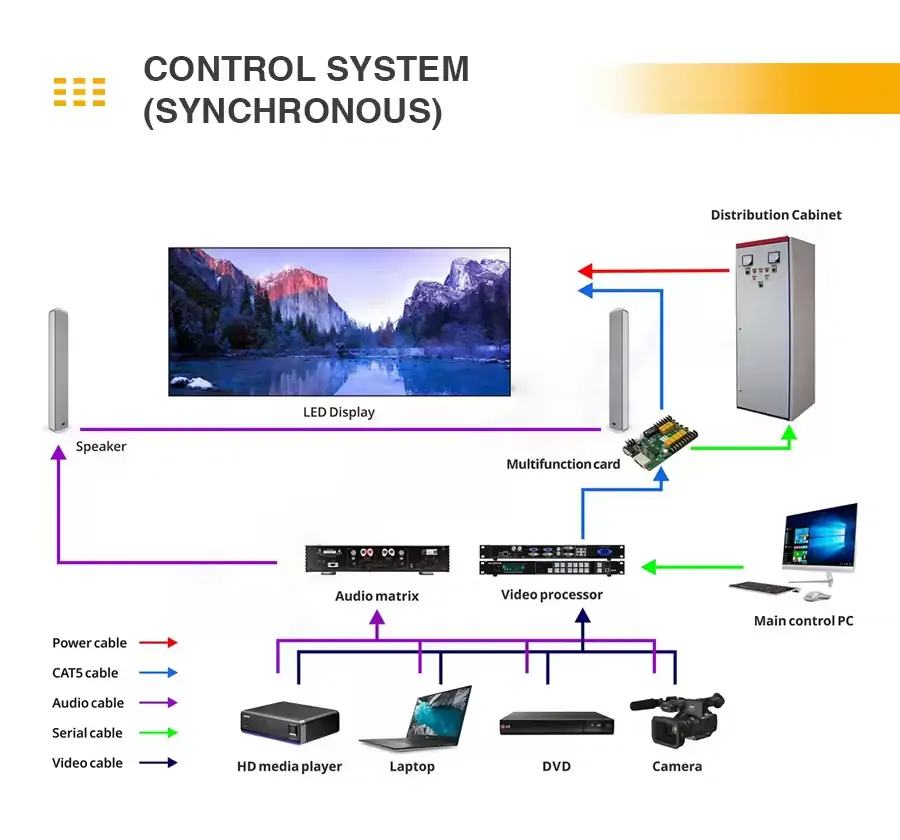
Content reaches the NovaStar TB40 LED controller from its internal storage, a USB device, a local publishing computer, or a network publishing platform. For a live source, HDMI IN becomes the video input in synchronous mode. The TB40 maps that picture to the configured screen and transmits LED data through its output Ethernet ports to the first receiving card. Cabinet data cables then follow the configured connection order. An HDMI OUT port can loop a video signal to compatible downstream equipment; it does not increase the TB40’s LED pixel capacity.
Successful commissioning requires the correct screen width and height, cabinet arrangement, receiving-card configuration, and port mapping. A picture that is scrambled or split across cabinets usually points to a mapping or receiving-card issue before it points to a bad video file. Ask the LED screen manufacturer for the correct receiving-card configuration file and cabinet wiring diagram. Back up a working configuration before changing it.
02. Asynchronous and synchronous use
In asynchronous mode, the NovaStar TB40 plays a locally published program, making it suitable for scheduled advertising, menus, or information boards. Content can continue playing from local storage when the network is unavailable, provided the program was published in advance. In synchronous mode, the HDMI source is active and can be scaled to the screen. Use this for a camera, computer, or other live feed. The front-panel SWITCH changes modes; check the current mode before troubleshooting a black screen.
Multi-screen synchronous playback is a separate function for coordinated content across multiple TB40 units. NovaStar specifies NTP timing, or GPS and RF timing with the specified optional modules. It also notes that synchronized playback reduces the simultaneous video count within the device’s decoding budget. This is a planning constraint for multi-zone campaigns.
2. NovaStar TB40 specifications and capacity
The NovaStar TB40 LED controller can load up to 1,300,000 LED pixels. NovaStar lists a maximum width of 4096 pixels and a maximum height of 4096 pixels, but those axis limits do not mean a 4096 × 4096 display is within capacity. Multiply the actual screen width by height and check the result against 1.3 million. For example, 1280 × 960 equals 1,228,800 pixels and is within the stated pixel count; 1536 × 960 equals 1,474,560 and exceeds it. Custom resolutions also have a 153 MHz pixel-clock ceiling.
Source decoding and LED output are different measurements. The TB40 supports 4K media decoding, but the physical LED screen still has to fit its output capacity. NovaStar’s feature summary says H.264/H.265 4K at 60 Hz; its detailed codec table lists H.264 at up to 4096 × 2304 at 30 fps and H.265 at that resolution at 60 fps. Use the codec-specific limits and test the actual file rather than assuming every 4K file runs at 60 fps. NovaStar also lists playback options of two 1080p, four 720p, four 480p, or six 360p videos, subject to the selected layout and synchronization mode. A design with multiple video windows should be tested with the real encoded files before handover.
| Item | Published value | Installation implication |
|---|---|---|
| LED loading capacity | Up to 1,300,000 pixels | Calculate mapped width × height before selection. |
| Maximum dimensions | 4096 px width; 4096 px height | Both the axis limit and total pixel limit apply. |
| Sending outputs | Two Gigabit Ethernet ports | Both are primary by default; one may be configured as backup. |
| HDMI | HDMI 1.3 input and output | Input serves synchronous mode; output supports loop-through. |
| Processing and storage | Quad-core ARM A55 at 1.8 GHz; 1 GB RAM; 32 GB storage | Allow storage space for scheduled media and updates. |
| Video decoding | 4K decoding; frame rate depends on codec and resolution | Decoding capability is not LED output resolution. |
| Power | 12 V DC, 2 A; 18 W maximum; 25 W recommended supply | Use the specified supply and allow ventilation. |
| Operating environment | −20 °C to +60 °C; 0–80% RH, non-condensing | Use a suitable enclosure in exposed installations. |
| Dimensions and weight | 238.8 × 140.5 × 32.0 mm; 430 g net | Reserve accessible mounting and cable space. |
These figures come from NovaStar’s TB40 specifications, version 1.2.1. Verify the label and the documentation supplied with your particular unit if revisions differ. The NovaStar TB40 LED controller is listed as IP20, so an outdoor LED display needs a weather-protected, ventilated controller enclosure even if the LED cabinets themselves are outdoor rated.

3. NovaStar TB40 ports, networking, and software
01. Identify the ports before wiring
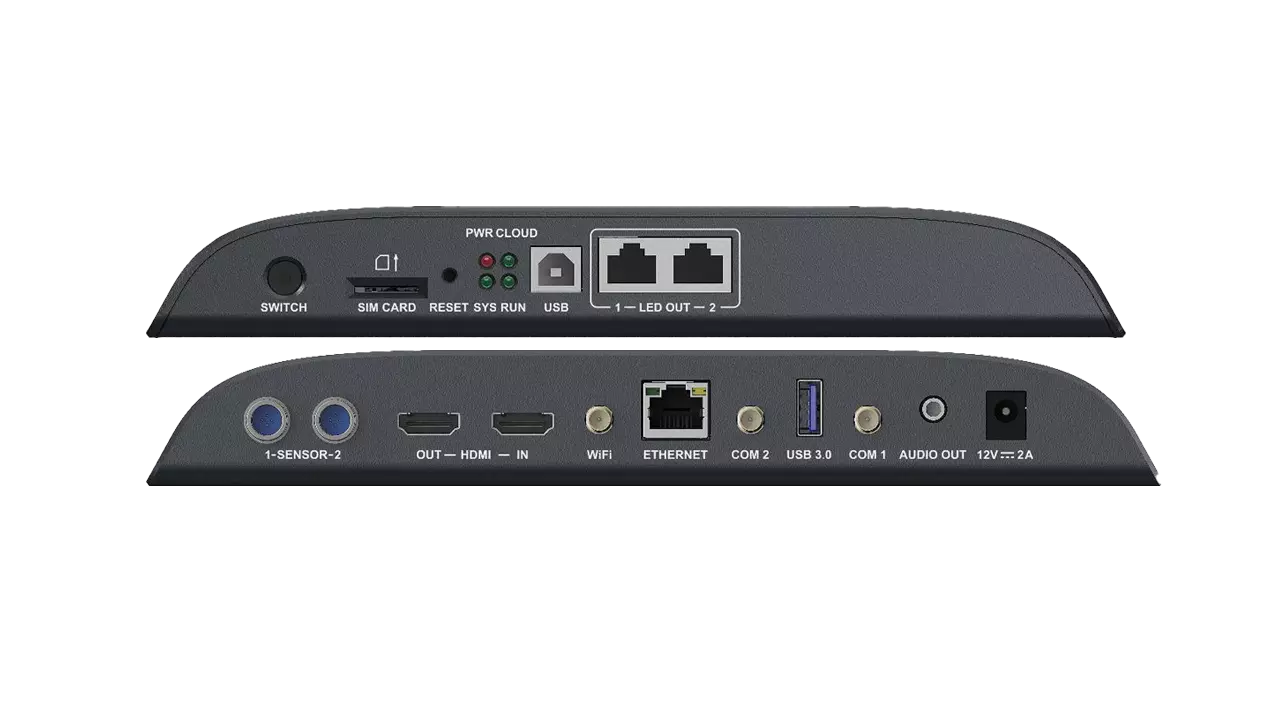
The two Gigabit Ethernet output ports carry LED pixel data to receiving cards. They can both serve as primary outputs, or one can be assigned as a backup according to the screen design. The separate Gigabit network port connects the NovaStar TB40 LED controller to a publishing computer, local network, or internet connection. Mixing up the network control port and sending outputs is a common reason a computer can reach the player while the screen stays dark.
HDMI IN takes a live source in synchronous mode. HDMI OUT offers loop output, with NovaStar listing a maximum 1920 × 1200 at 60 Hz and a 153 MHz pixel-clock condition. USB Type A supports media playback, firmware upgrade, and storage expansion; USB Type B links directly to a control computer. The stereo audio connector has a fixed 48 kHz sample rate. Two sensor connectors can work with compatible brightness or environmental sensors.
02. Choose a reliable control connection
The TB40 supports Wi-Fi access point and station modes simultaneously. The default access-point name uses “AP” plus the final eight digits of the serial number, and its password is printed on the SSID label. For a permanent installation, record the unit’s network settings in the handover sheet and use a managed connection where possible. Wired Ethernet is usually easier to diagnose and maintain for fixed displays.
NovaStar supports optional 4G or 5G modules, but the NovaStar TB40 LED controller does not ship with such a module by default. Check the supported module, antenna, SIM service, and regional bands before specifying cellular management. The manufacturer’s specification notes a network priority difference by firmware version: earlier than V4.5.0, wired networking takes priority over Wi-Fi and cellular; V4.5.0 and later allow coexistence. Confirm the firmware installed on the actual device.
03. Software roles
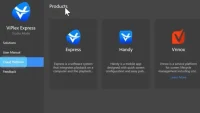
Use ViPlex Express on a computer for program editing and publishing, ViPlex Handy for supported mobile management, and the appropriate NovaStar configuration tools for screen parameters and receiving cards. Cloud publishing can help manage multiple locations, but it requires a working internet route and correct account binding. A local Wi-Fi or USB connection can still be used to commission a standalone display. For software versions, see EagerLED’s ViPlex Express setup and publishing guide and NovaStar software download page.
4. NovaStar TB40 configuration: step-by-step setup
A good NovaStar TB40 configuration starts with the LED screen bill of materials, not with a software menu. Record the cabinet pixel dimensions, number of cabinets across and down, receiving-card model, scan and module parameters, data-cable route, and required operating mode. Check the total mapped pixels and any irregular cabinet sections. Obtain the tested receiving-card configuration from the display manufacturer rather than assuming a generic file will work.
01. Prepare and connect the hardware
Mount the NovaStar TB40 LED controller where airflow, the power adapter, and all service ports remain accessible. With power off, connect each sending output to the specified first cabinet. Follow the cabinet connection diagram in order; a cable that jumps a cabinet can make later panels show the wrong region. Connect HDMI IN if a live source is required. Add the control network or USB computer link. Power the receiving system and controller as directed by the cabinet supplier, then check status indicators and physical link lights.
02. Configure the LED canvas
In the suitable NovaStar configuration software, enter the exact screen width and height and load the receiving-card parameters supplied for the panels. Set cabinet dimensions, cabinet count, and the order in which each output port feeds cabinets. Send the configuration to the receiving cards and save it to hardware so it survives a restart. Test a single-color pattern, a numbered grid, and a full-screen image. The numbered grid exposes reversed routes, swapped ports, and incorrect row order quickly.
03. Publish a program or select HDMI
For asynchronous use, create a program with the correct canvas size in ViPlex Express or ViPlex Handy, publish it to the NovaStar TB40 LED controller, and confirm it plays after the publishing computer disconnects. Check schedules, time zone, storage space, and clock synchronization. For synchronous use, connect a valid HDMI source, select synchronous mode with the front switch, and confirm input resolution and scaling. Full-screen scaling only scales down: NovaStar specifies source dimensions of 512–2048 pixels per axis, up to 1920 × 1080, with both source dimensions at least as large as the screen. See the HDMI scaling requirements. If the source is HDCP protected, test with content you are licensed and technically able to display.
04. Commission and document
After the basic image works, check brightness control, audio if used, scheduled restart behavior, remote access, and a power-cycle recovery. Save the screen configuration, program export, firmware version, serial number, IP settings, and cabinet map for future service. A spare configured controller can reduce downtime, but it must use the same receiving-card and cabinet settings. The NovaStar TB40 setup is complete only when a technician who did not build the wall can restore the picture from this record.
5. Synchronous versus asynchronous playback
The NovaStar TB40 LED controller is often selected because it can handle both a scheduled signage playlist and a live HDMI source. The choice affects how content is created, how a failure appears, and what a site needs to keep on hand. If a store wants a daily promotion that survives an internet outage, asynchronous playback is the default plan. If a venue wants a presentation laptop on the wall, synchronous HDMI is the plan. Some projects need both and switch modes at different times.
| Decision point | Asynchronous mode | Synchronous mode |
|---|---|---|
| Picture source | Stored and published program | Live HDMI input |
| Typical use | Advertising, menus, public information | Presentations, live production, external player |
| Internet dependency | Not needed for already stored content | Not needed for local HDMI picture |
| What to check first when black | Program, schedule, clock, storage | Mode switch, HDMI cable, source format |
| Content preparation | Publish at the mapped canvas size | Set source resolution and confirm scaling |
In either mode, output mapping remains essential. Changing from a local playlist to HDMI will not repair a missing receiving-card configuration. Conversely, if the test pattern appears across the entire wall, the LED chain is probably functioning and the next check is the content source. This simple separation of signal path and content path can save service time.
For several displays that must show coordinated programs, plan the timing method before installation. NTP is suitable when the controllers have a stable network clock. NovaStar also documents GPS timing with a specified 4G module and RF timing with a specified RF module. These features should be verified with the modules and firmware chosen for the job. The NovaStar TB40 LED controller’s multi-screen synchronization feature does not automatically combine several controllers into one larger canvas; design the display topology and playback strategy explicitly.
6. Where does the NovaStar TB40 fit?
The NovaStar TB40 LED controller suits a range of full-color LED signs when the screen’s pixel count and operating requirements fit the device. Typical examples are retail window displays, chain-store signage, reception walls, advertising cabinets, door-head signs, and protected smart-city displays. Its internal player makes it useful where a dedicated computer would add maintenance. Its HDMI input helps where a live source is occasionally needed.
Pixel pitch alone does not determine controller choice. A 3.9 mm display can be small enough to fit or large enough to exceed the limit. Calculate pixels from the receiving-card map or divide physical width and height by pitch for an early estimate, then use exact cabinet dimensions for final selection. A 3.0 m by 1.5 m P3.9 wall is roughly 769 by 385 pixels before cabinet rounding, whereas a much wider wall may require a different sending architecture.
Consider environmental protection separately from the controller’s operating temperature. Although NovaStar lists −20 °C to +60 °C, the IP20 enclosure is not waterproof. A roadside or lamp-post cabinet needs weather sealing, controlled ventilation, secure power, and a service plan. Brightness and temperature sensors can help operate the LED system, but the controller should not be exposed to rain or condensation. Also confirm local electrical and radio requirements when optional wireless modules are used.
For an installation that exceeds 1.3 million pixels, do not rely on the NovaStar TB40 LED controller simply because it decodes a 4K file. Compare another controller’s published loading capacity, output topology, and playback features against the actual wall. If the project needs complex live switching, redundant processors, unusual aspect ratios, or many independently timed sources, prepare a signal-flow drawing before selecting hardware. The smallest controller that safely meets the requirements is usually easier to commission than an underspecified controller pressed beyond its limits.
7. TB40 versus TB60 and purchase planning
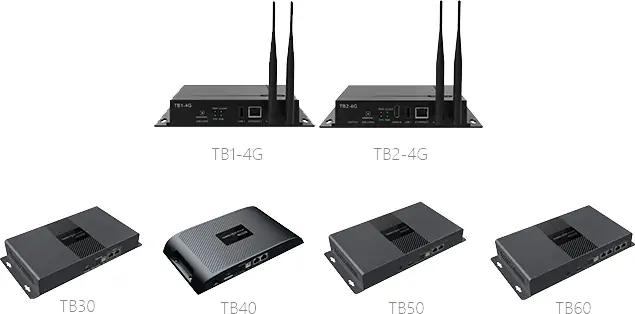
The NovaStar TB40 supports 1.3 million pixels through two LED output ports. NovaStar’s TB60 comparison lists 2.3 million pixels and four LED output ports for the TB60. Both list maximum width and height of 4096 pixels, subject to total capacity. The TB60 therefore accommodates a larger canvas; it is not a full 4K LED-wall controller. Compare the quoted revision’s inputs, power requirements, storage, and environmental ratings before ordering.
For a wall comfortably within capacity, the NovaStar TB40 LED controller may avoid the complexity of a separate player and sender. For a wall close to the 1.3 million limit, allow for final cabinet rounding, a possible layout change, and the intended backup port arrangement. If a design requires room to expand, choose a controller based on the expanded pixel map rather than today’s smallest layout. Sending-port redundancy also has to be supported by the actual cabinet wiring and receiving-card design.
There is no reliable universal NovaStar TB40 price. Dealer quotes vary with region, warranty, taxes, shipping, power accessories, optional cellular or RF modules, and support. Request a quote that lists the exact model and hardware revision, supplied power unit, software and firmware support, spare parts, and return terms. Ask whether the supplier will provide the receiving-card file and a commissioning checklist. A cheap controller is expensive if the installer must reverse-engineer a cabinet map on site.
Budget for the whole control chain: controller, receiving cards, data cables, network connection, protected enclosure, optional sensors or cellular data, and labor. If the deployment spans several stores, include remote publishing and backup procedures. This makes the NovaStar TB40 LED controller comparison practical, because the purchase price alone says little about deployment cost or recovery time.
8. NovaStar TB40 manual, downloads, and troubleshooting
For authoritative port and limit information, use NovaStar’s TB40 Multimedia Player Specifications V1.2.1. EagerLED also hosts a copy of the TB40 specification PDF. This file is a specification sheet, not a receiving-card configuration template or a complete installation manual. For software, start with the NovaStar software resources and match the version to your firmware and project. Request the actual cabinet configuration file from the LED display manufacturer.
01. Screen is black
Check power and RUN status first. NovaStar lists RUN flashing every 0.5 seconds as normal, every 2 seconds as no video source, and steady on or off as abnormal FPGA loading (indicator reference). If the controller is running, test the correct playback mode: an HDMI cable will not appear while the NovaStar TB40 LED controller is in asynchronous mode, and a stored program may not appear while it is in synchronous mode. Inspect the output-port link lights and the first receiving card. If the screen test pattern works, check the program schedule, source resolution, or HDMI signal rather than rewiring the wall.
02. Image is scrambled, shifted, or repeated
Compare the cabinet map with the physical data-cable route. Confirm receiving-card type, module size, scan parameters, and the configuration file. A mismatch can make one cabinet show content intended for another. Re-send the known-good receiving-card parameters and save them to hardware. Avoid changing multiple variables at once; test one port and one cabinet chain, then expand to the full installation.
03. Player cannot be reached
Confirm whether the computer is connected by USB, the NovaStar TB40 access-point Wi-Fi, or the same LAN. Check the actual IP address and that the separate control Ethernet port is used. A cloud connection additionally needs working internet access and account binding. For a cellular plan, verify the optional module and service. If a player is reachable locally but not remotely, focus on network routing and cloud setup.
04. Video stutters or schedules fail
Test the source codec, frame rate, and number of simultaneous video windows against the published decode options. Check available storage, time zone, and the device clock. For synchronized multi-screen programs, remember that the documented simultaneous-video allowance is reduced. Use a small known-good file to isolate the media issue, then retest with the production file. Keep a backup copy of the final program and configuration.
9. NovaStar TB40 FAQ
These answers summarize the most common installation questions. Check the manufacturer’s specification and the exact unit revision when a parameter affects procurement or commissioning.
01. What is the maximum LED resolution of the NovaStar TB40?
The NovaStar TB40 LED controller supports up to 1,300,000 mapped pixels, with a maximum width and height of 4096 pixels each. Both conditions apply. A 4096 x 4096 wall exceeds the pixel budget. Custom resolutions must also stay within the stated 153 MHz pixel-clock limit.
02. Where can I find the NovaStar TB40 manual and specifications?
Start with NovaStar's official TB40 specification PDF linked in section 8. The EagerLED download is a copy of that specification, not a receiving-card file. Obtain the correct cabinet map and receiving-card configuration from your LED display manufacturer.
03. Can the NovaStar TB40 run without internet?
Yes. A program published to local storage can play in asynchronous mode without an internet connection, and a local HDMI source can play in synchronous mode. Cloud publishing and remote monitoring need a working network path. A local computer can connect by USB or an appropriate local network.
04. Does the TB40 include 4G or 5G?
No cellular module is included by default. The NovaStar TB40 LED controller supports specified optional 4G or 5G modules that must be purchased separately. Confirm module compatibility, firmware, carrier bands, antenna, and service before relying on cellular control.
05. Why is my TB40 screen scrambled after setup?
First compare the configured cabinet order with the physical Ethernet route. Then check the receiving-card model, cabinet pixel dimensions, scan parameters, and saved configuration file. Use a numbered test grid and restore a known-good file from the cabinet supplier before changing the content playlist.
06. Can a TB40 decode 4K and drive a 4K LED wall?
Its 4K decoding capability describes media processing; supported frame rates depend on codec and resolution (see section 2). The LED output remains limited to 1,300,000 pixels. A full 3840 x 2160 LED canvas has more than eight million pixels and therefore needs a different sending design.
07. What is the warranty or price of a NovaStar TB40?
Neither a universal price nor a universal warranty period is established by the technical specification. Request a current written quote from the seller that identifies the hardware revision, supplied accessories, regional terms, warranty scope, and technical support.
10. Conclusion: select and commission the NovaStar TB40
The NovaStar TB40 LED controller is a practical choice for a full-color LED screen that fits within 1.3 million mapped pixels and needs stored playback, a live HDMI source, or both. Its strongest value is the integration of playback and LED sending in one unit. The decision still depends on the cabinet map, receiving-card file, signal route, environment, and service plan.
Before ordering, calculate the exact LED canvas, identify each sending and control port, and decide whether the site needs local scheduling, remote publishing, or live HDMI. During commissioning, test the receiving-card map before troubleshooting media, and save a known-good configuration. Use NovaStar’s current documentation for the hardware revision in hand. That process gives the NovaStar TB40 LED controller a better chance of delivering a stable display than any headline specification alone.
 NovaStar TU15 Pro: Specs, Manual, Setup and Price Guide
 Surface-Mounted Device LED | Full Guide For Display Technology
Related Posts






Fill In Your Needs In Detail
Fill in the screen usage scene and size you need in “Content”.You will get a quote.