Huidu B6L (HD-B6L) is a multimedia control card for LED poster screens, supporting stored-content playback and live HDMI input. One card loads up to 1.3 million LED pixels; HDMI splicing supports up to 10 cards within a 2.6-million-pixel canvas. It includes 16 GB storage, Wi-Fi and control through HDPlayer or LedArt. This guide explains specifications, setup, price checks, B6 differences and software downloads so you can match the controller to your display.
1. What is Huidu B6L?
Huidu B6L is made by Shenzhen Huidu Technology Co., Ltd. for poster, mirror and spliced LED displays. It stores programs, decodes media and sends display data to compatible receiving cards inside the cabinet. It supports asynchronous playback, synchronous HDMI playback and mixed picture-in-picture operation.
The controller is one part of the display system: receiving cards, modules, power supply and cabinet must also be compatible. An outdoor LED poster screen requires a suitable protective enclosure; the bare control board is not weatherproof. Specifications below follow the Huidu HD-B6L specification V1.3 (June 3, 2025).
1.1 Technical Overview
| Specification | Detail |
|---|---|
| Operating system | Android 11.0 |
| RAM | 2 GB |
| Internal storage | 16 GB nominal |
| Max pixel loading | 1.3 million pixels per card |
| Max width | 16,384 pixels |
| Max height | 8,192 pixels |
| Multi-card cascade | Up to 10 cascade levels; 2.6 million pixels combined |
| Video input | 1 × HDMI 1.4b |
| Video loop output | 1 × HDMI 1.4b (for cascading) |
| Ethernet | 1 × Gigabit input + 2 × Gigabit outputs |
| Wi-Fi | 2.4 GHz (AP and STA modes) |
| USB | 1 × USB 3.0 Type-A |
| 4G support | Optional PCIE module (Micro SIM slot) |
| Audio output | 1 × 3.5 mm TRS + 1 × 4-pin dual-channel |
| Sensor interfaces | 2 × dedicated ports (temperature, humidity, brightness, PM2.5, GPS, etc.) |
| Relay | 1 × onboard (max load: AC 250V/3A or DC 30V/3A) |
| Power input | DC 5V (4.6V–5.5V), max 18W |
| Operating temperature | -40°C to 70°C |
| Dimensions | 157 mm × 130 mm (V1.3 listed size; check mounting drawing) |
| Weight | 0.16 kg |
Maximum width and height are separate limits, subject to the total pixel capacity. Calculate width × height in LED pixels: a 640 × 1,920 poster contains 1,228,800 pixels, within the nominal single-card limit; 1,920 × 1,080 contains 2,073,600 and exceeds it. Confirm port allocation and receiving-card limits with the screen supplier.
Hardware decoding supports up to two 4K, six 1080p, ten 720p or twenty 360p video windows. Supported codecs include H.264, H.265, MPEG-1/2/4, VP8, VP9 and MJPEG; image formats include JPEG, BMP, GIF, PNG and WEBP. Decoding a 4K file does not give the LED display 4K output resolution. See the codec limits in the Huidu HD-B6L specification V1.3.
2. Key Advantages of HD-B6L Poster Screen Control System
2.1 Android 11 with Cloud Management
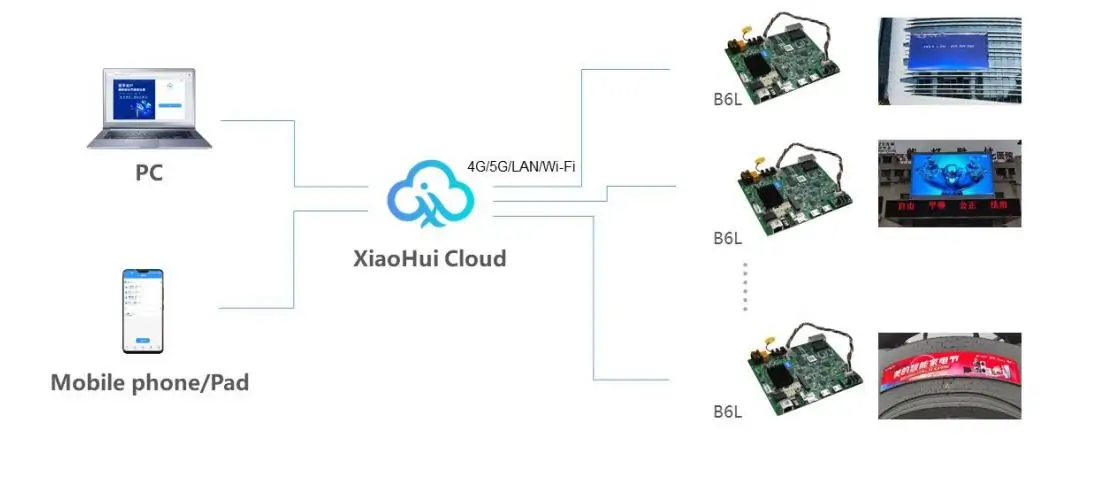
The B6L uses Android 11 with dedicated Android and FPGA software. This does not establish compatibility with every Android app. Huidu lists XiaoHui Cloud for browser-based remote program publishing and group management. Connect the controller to the Internet through LAN, Wi-Fi or an optional 4G module, then check account binding and device availability before scheduling updates.
The diagram below shows a computer or mobile device managing multiple B6L displays through XiaoHui Cloud. Its general “4G/5G” label is not a B6L 5G specification: the B6L V1.3 document lists optional 4G.
2.2 Built-in Wi-Fi for Wireless Control
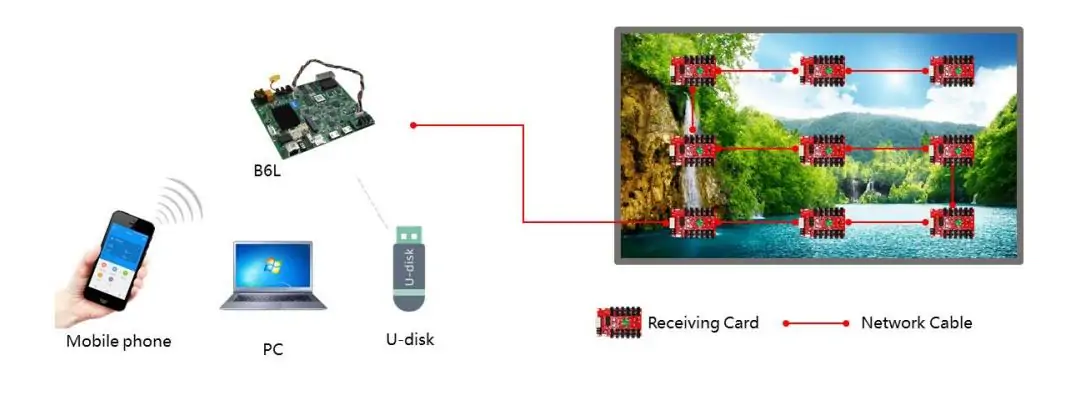
The B6L includes 2.4 GHz Wi-Fi with AP and STA modes. AP mode provides a direct local connection; STA mode joins an existing wireless network. Huidu lists LedArt for Android, iOS and Harmony platforms, with wireless program publishing. Match the app and firmware versions recommended for your card.
In the diagram below, a phone, PC or USB drive supplies content to the B6L; network cables carry display data from its output ports through the receiving-card chain. Keep the LAN input and LED output connections distinct. If discovery fails, check the selected network, signal strength and access permissions before changing screen parameters.
2.3 Sensor Integration
The two sensor interfaces accept compatible external environmental sensors. The specification lists temperature, humidity, brightness, wind, noise, PM2.5, PM10 and CO₂ monitoring, plus GPS support. Sensors are optional peripherals, not measurements supplied by the bare board. Select the sensor model and supported data fields with your supplier.
The onboard relay provides remote on/off control. Do not assume that arbitrary sensor-triggered automation is available: confirm the required control logic, wiring and load with the installer. A weather widget and a locally connected weather sensor are different data sources.
2.4 Flexible Multi-Video Playback
Multiple video windows let a poster combine a product clip with text, a clock or other supported content. Build the layout in HDPlayer and test the actual program on the screen before deployment. The decoder limits are alternatives for different resolutions, not quantities to add together. Keep files within the documented codec, resolution and bitrate limits, and check text legibility at the intended viewing distance.
3. How to Use the HD B6L Control Card
3.1 Hardware Installation
Mount the B6L securely inside the LED poster cabinet with power disconnected. Its supply input is 5 V DC (4.6–5.5 V), with maximum board consumption of 18 W. Confirm polarity, connectors and suitable supply capacity; the LED modules require their own correctly sized power system.
Connect the LED output ports to compatible receiving cards and the LAN input to the management network when needed. HDMI input is needed for live synchronous playback, while Wi-Fi or optional 4G is needed only for the chosen wireless connection. These are not four mandatory connections for every installation.
For splicing, connect HDMI OUT to the next card’s HDMI IN and configure each screen’s area. Huidu specifies up to 10 cascade levels and 2.6 million pixels for the combined canvas, not 13 million. Verify alignment and synchronization with a test pattern before publishing.
3.2 Software Setup
Install a compatible HDPlayer release from Huidu’s download centre. Connect the PC through the B6L LAN input or its supported Wi-Fi connection. Save the existing screen configuration before making changes. Obtain the correct module and receiving-card parameter file from the display supplier.
Set the screen width and height in pixels, receiving-card mapping and output-port allocation. Pixel pitch alone is insufficient to configure a panel. If the image is scrambled or incomplete, recheck module parameters, cable order and mapping before trying firmware changes. A correct configuration should display test colours and the entire canvas without missing sections.
3.3 Publishing Content
Create a program at the configured LED canvas size, arrange video, images and text, and set its schedule. Publish to the selected B6L and verify playback on the physical display. Stored programs use the card’s nominal 16 GB internal storage; usable media space is lower because system files also occupy storage. XiaoHui Cloud provides another publishing route for connected devices.
Choose asynchronous mode for stored content, synchronous mode for a live HDMI source, or mixed playback for supported HDMI and stored-content combinations. Test the intended mode, timing, audio and recovery after a restart.
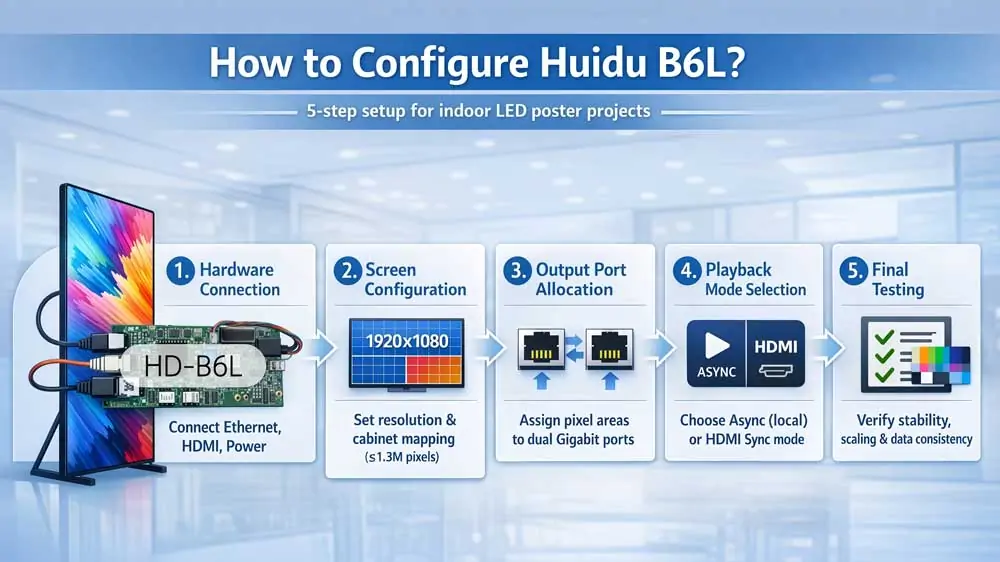
Setup graphic explained: connect hardware, configure screen resolution and cabinet mapping, allocate output-port areas, choose playback mode, then test stability, scaling and consistency. The graphic’s 1,920 × 1,080 example exceeds one B6L’s 1.3-million-pixel LED load; use your actual supported canvas size.
4. What is the Price of Huidu B6L LED Poster Control Card?
There is no verified manufacturer list price quoted here for the Huidu B6L. Request a dated quote for the exact HD-B6L board, quantity and destination. Prices advertised for a bare controller, a kit or a complete poster screen are not directly comparable.
Ask the seller to separate the card price from shipping, tax, accessories and setup support. Confirm currency, quote validity, stock, warranty and return terms before ordering. Marketplace prices can change and should not be treated as an official Huidu price.
4.1 Factors that Affect the Final Price
The delivered cost depends on order quantity, delivery destination, shipping service, taxes and the required accessories. Optional 4G adds a module, antenna and data-service costs. A power supply, receiving cards, sensors or preconfiguration may be separate items. Compare an itemised total for the same specification rather than the lowest advertised board price.
4.2 What is Included
The V1.3 specification lists a B6L card, HDMI cable, Wi-Fi antenna and certificate of conformity; the 4G antenna is optional with the 4G module. Verify the seller’s actual packing list. Do not assume that a power supply, SIM card or sensors are included.
Huidu advertises XiaoHui Cloud as free on its poster-controller product page. Confirm current service terms, account requirements and support arrangements; this is not a promise of lifetime free service or updates.
5. Huidu B6L vs Huidu B6: What is the Difference?
The HD-B6 and HD-B6L both support stored-content and HDMI playback. The B6 already has Wi-Fi and mobile control, so wireless access alone is not a reason to replace it. The comparison uses Huidu’s HD-B6 product specification and the B6L V1.3 document. Check the exact hardware revision before planning a replacement.
| Feature | Huidu B6 | Huidu B6L |
|---|---|---|
| Operating system | Not stated in cited B6 sheet | Android 11 + FPGA |
| RAM | Not disclosed | 2 GB |
| Internal storage | 8 GB | 16 GB |
| Max pixel loading | 1.3 million | 1.3 million |
| Max cascade | 2.3 million pixels (B6 specification) | 10 levels; 2.6 million pixels |
| Wi-Fi | Standard | 2.4 GHz (AP + STA) |
| 4G support | Optional | Optional PCIE module |
| Sensor ports | 1 sensor port | 2 × dedicated ports |
| Relay | Not listed | Yes |
| Mobile app control | Supported | LedArt (Android/iOS/Harmony) |
| Cloud management | Internet/LAN management supported | XiaoHui Cloud |
| HDMI version | HDMI input and loop output | HDMI 1.4b with loop output |
| USB | USB 2.0 | USB 3.0 Type-A |
| Audio output | Stereo audio output | 3.5 mm + 4-pin dual-channel |
Both cards load 1.3 million pixels individually. The B6L increases nominal storage from 8 GB to 16 GB and changes interfaces and system software. Huidu also documents Internet/LAN management for the B6; do not describe it as offline-only. For a replacement, verify supply voltage, receiving-card compatibility, mounting and configuration migration. The older B6 specification lists a 12 V adapter, whereas B6L requires 5 V DC.
6. Huidu B6L Software and Resource Download
6.1 HDPlayer (PC Control Software)
HDPlayer is Huidu’s PC software for screen configuration, program editing and publishing. Use a release that supports your B6L hardware and firmware, and retain the current configuration before upgrading.
Official downloads: Huidu download centre and the English HDPlayer download page. Several releases are listed; check compatibility and release notes instead of assuming an old version number is still the latest.
6.2 Huidu B6L Specs Download
Use the specification to check power, interfaces, decoding limits and dimensions against your board revision:
- Specification PDF (V1.3): HD-B6L Specification V1.3.pdf — manufacturer document hosted by EagerLED.
- Manufacturer resources: HD-B6L specification and user manual in Huidu’s product-page Download section.
V1.3 is dated June 3, 2025. Its revision history records the height-limit increase in V1.2 and a dimensions update in V1.3. Match documentation to your hardware and firmware when older sheets disagree.
6.3 Firmware Updates
Obtain firmware specifically approved for your HD-B6L hardware revision from Huidu or your screen supplier. Record the installed version and back up programs and screen parameters first. Follow the matching user manual and keep power and the connection stable during the update.
Android, FPGA and receiving-card software are different components. Do not treat an FPGA download menu as a universal firmware updater, or apply a file intended for a B6, B8L or B8H. After updating, verify mapping, brightness, playback and network access before returning the screen to service.
7. Huidu B6L FAQs
8. Conclusion
Huidu B6L suits LED poster projects that need local media playback, HDMI input and remote content updates within its loading limits. Select it by the actual canvas, receiving cards, power supply and management workflow. Confirm the delivered package and current quote, then test the complete screen with the intended content. For larger systems, compare the capacities in our Huidu HD-B8H guide before choosing a controller.
 13 LED Display Suppliers in the USA: 2026 Buyer’s Guide
 Huidu HD-B8H: Specs, Setup, Price & B8L Comparison
Related Posts




Fill In Your Needs In Detail
Fill in the screen usage scene and size you need in “Content”.You will get a quote.