The NovaStar MCTRL700 LED controller is a six-port sending controller for synchronous LED displays. It accepts a live HDMI 1.3 or single-link DVI source, maps that picture to receiving cards, and sends cabinet data over Gigabit Ethernet. One unit supports up to 1920 × 1200 at 60 Hz (2,304,000 pixels), with a separate 650,000-pixel limit per Ethernet output. It requires a live video source and does not scale the picture to fit the wall. These limits follow NovaStar’s MCTRL700 specification V1.2.3.
Use this guide to check the specifications, calculate screen and port capacity, configure NovaLCT, test backup and troubleshoot faults. The MCTRL600 comparison and official manual links help you choose the right hardware and setup workflow. For example, six ports do not make the MCTRL700 a 3.9-million-pixel controller: the total and individual port limits must both be satisfied.
Use the specifications with the receiving-card file and the actual cabinet layout before committing to hardware. NovaStar revises documents and firmware, so check the revision for the unit being installed. This guide was checked against specification V1.2.3 on October 14, 2026. Older PDFs and the product-page summary can show different custom-timing examples; use the current specification and validate the actual source.
Table of contents
- What the MCTRL700 does
- MCTRL700 specifications
- Calculate screen and port capacity
- Inputs, outputs, and signal flow
- NovaLCT setup and cabinet mapping
- Redundancy and cascading
- MCTRL700 vs MCTRL600 and other choices
- Troubleshooting checklist
- Manual, firmware, price, and resources
- Frequently asked questions
- Conclusion
1. What Is the NovaStar MCTRL700 LED Controller?
The NovaStar MCTRL700 LED controller is a standalone sending device. A video source feeds its HDMI or DVI input; the controller converts the image into data for compatible receiving cards inside an LED display. It is commonly used for rental walls and fixed installations where the source is supplied by a computer, media server, switcher, or external video processor.
Its role is easy to confuse with that of a video processor. The NovaStar MCTRL700 LED controller sends and maps an already prepared canvas. NovaStar’s specification change history explicitly records removal of the scaling function in V1.2.0. Use a dedicated video processor when the installation needs flexible scaling, cropping or live source switching. If the source is 1920 × 1080 but the LED canvas is 768 × 384, set the correct output timing and pixel placement upstream or use a suitable processor. Do not assume the controller will automatically fit the picture to the screen.
The MCTRL700 has six RJ45 outputs, a Type-B USB control connection, and UART ports for device cascading. HDMI and DVI loop outputs pass a video signal to another device; they are distinct from the six LED data outputs. A separate audio input is present, but audio distribution requires a compatible system design and should be verified with the receiving hardware. The controller supports pixel-level brightness and chroma calibration when used with NovaLCT and the appropriate calibration platform and data.
In practice, the controller is a good fit when the wall’s total pixels, source timing, and per-port loads fit the documented limits. The physical cabinet count by itself is not the deciding factor. A high-resolution fine-pitch cabinet can consume far more pixels than a larger coarse-pitch cabinet.

2. NovaStar MCTRL700 Specifications at a Glance
The table gives planning values for the standard NovaStar MCTRL700 LED controller, not the MCTRL700 Pro or another model. Check the label and document revision before loading a configuration file or ordering spare parts.
| Item | Documented value | Why it matters |
|---|---|---|
| Maximum input and total load | 1920 × 1200 at 60 Hz; 2,304,000 pixels | Full LED canvas must fit this limit. |
| Custom source timing | Up to 3840 pixels wide at 3840 × 600/60 Hz; up to 3840 pixels high at 500 × 3840/60 Hz in specification V1.2.3 | A width or height limit does not override the total load or valid timing. |
| Video inputs | 1 × HDMI 1.3 and 1 × single-link DVI; RGB 4:4:4, 8-bit, up to 1920 × 1200/60 Hz | Confirm the source output and connector. |
| LED data outputs | 6 × Gigabit Ethernet; up to 650,000 pixels per port | Calculate each cable chain separately. |
| Video loop outputs | 1 × HDMI OUT and 1 × DVI OUT | Used to pass the signal onward, not to drive receiving cards. |
| Control and cascade | Type-B USB 2.0; UART IN and OUT; up to 20 cascaded units | Provides configuration and multi-unit control. |
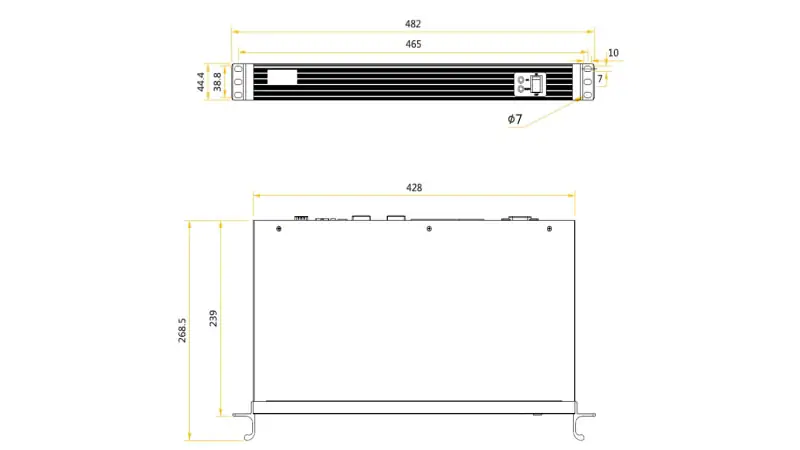
| Power and chassis | AC 100–240 V, 50/60 Hz; 1U rackmount; 482.0 × 268.5 × 44.4 mm | Install horizontally; allow cable clearance and ventilation. |
| Rated power consumption | 12 W | Allow rack power and ventilation. |
Source: NovaStar MCTRL700 specifications V1.2.3. The older V1.2.2 PDF lists 548 × 3840 at 60 Hz; the current PDF lists 500 × 3840. Do not mix revision-specific timing examples. Interlaced input is not supported. HDMI and DVI inputs are HDCP 1.4 compliant, but successful protected-content playback still depends on the whole signal path.
The six 650,000-pixel port ratings add to 3.9 million only as an arithmetic sum. The NovaStar MCTRL700 LED controller has a lower 2.304-million-pixel overall loading limit. A design must meet both limits simultaneously. The current MCTRL700 video-source table specifies 8-bit RGB 4:4:4. Confirm source timing, receiving-card compatibility and backup topology rather than assuming higher bit-depth support from another model.
The dimension drawing below uses millimeters: 482 mm overall width, 465 mm rack-hole spacing, 44.4 mm height and 268.5 mm overall depth. The body is 428 mm wide; leave room behind the rack for connectors. Check the manufacturer drawing before fabrication.
3. How to Calculate MCTRL700 Loading Capacity
01. Calculate the full LED canvas
Multiply the installed wall width in pixels by its height. A 1,920 × 1,080 wall contains 2,073,600 pixels and fits the stated 2,304,000-pixel overall limit at 60 Hz, subject to valid input timing. A 2,560 × 1,080 wall contains 2,764,800 pixels and exceeds it. The latter needs a different sending arrangement or more than one controller with a correctly divided canvas. Do not use the number of cabinets as a substitute for pixel arithmetic.
If a cabinet is 128 × 256 pixels, it has 32,768 pixels. A 12-by-5 cabinet wall would be 1,536 × 1,280 pixels, or 1,966,080 pixels. This calculation is within the total pixel budget, but it is not confirmation of a supported mode: the 1,280-pixel source height requires a custom timing that must be validated. The cabinet cable chains still need to stay within their individual port budgets. For a rental wall, record the configured mapping and the wall dimensions on the rack sheet so the next crew does not infer them from cable color.
02. Calculate every Ethernet output
For each RJ45 output, add the pixels of all cabinets on that data chain. For instance, ten 128 × 256 cabinets use 327,680 pixels; twenty use 655,360 pixels and exceed the stated 650,000-pixel per-port maximum. Leave sensible headroom for a change in cabinet layout or signal settings instead of designing exactly to the ceiling. Receiving-card and cabinet chain limits may impose stricter constraints than the sender specification.
| Example wall | Total pixels | Total limit check | Port planning note |
|---|---|---|---|
| 768 × 384 | 294,912 | Within 2,304,000 | Could fit one port by pixel count, but verify chain and card limits. |
| 1,536 × 1,280 | 1,966,080 | Within 2,304,000 | Split across multiple ports; validate custom input timing. |
| 1,920 × 1,080 | 2,073,600 | Within 2,304,000 | At least four 650,000-pixel port budgets by arithmetic; mapping determines actual count. |
| 2,560 × 1,080 | 2,764,800 | Exceeds 2,304,000 | Needs a different or divided sending design. |
03. Account for backup and source geometry
Redundant Ethernet cables do not increase the active pixel budget. A backup path must be planned to carry the same affected cabinets if the primary path fails. Likewise, a 3840-pixel custom width is allowed only with a correspondingly short height and supported timing; it is not permission to send a 3840 × 2160 image. When several controllers share a wall, define which pixels each unit receives and verify synchronization through the actual upstream system.
The NovaStar MCTRL700 LED controller should be selected from the complete signal chain, not from a port-count headline. Confirm source output, wall aspect ratio, receiving-card file, cabinet pixel dimensions, and any redundancy requirement before calculating the bill of materials.
4. Inputs, Outputs, and Signal Flow
Connect the prepared video feed to HDMI IN or DVI IN. Use a format the MCTRL700 accepts, normally progressive RGB at a supported resolution and 60 Hz. The HDMI OUT and DVI OUT connectors are loop outputs for passing video onward. The six numbered Gigabit Ethernet outputs carry mapped LED data to receiving cards. USB Type-B connects a configuration computer running NovaLCT; UART IN/OUT supports cascading controllers.
Label the Ethernet outputs on the rack and both ends of each cable. In a rental build, also label the first cabinet and the direction of each chain. An output connected to the wrong first cabinet may still produce a picture, but the image can appear scrambled or displaced. Use appropriate, tested network cable lengths and maintain strain relief; a link that works in rehearsal may fail when a truss moves.
For source switching, use a video switcher or processor ahead of the NovaStar MCTRL700 LED controller. Check that the upstream device sends a stable progressive timing and that any EDID or custom output resolution is saved. If the LED wall displays only a cropped part of a source, inspect the upstream canvas size and NovaLCT mapping. The MCTRL700’s loop connector does not solve a source-to-wall geometry mismatch.
Pixel-level calibration is a system workflow rather than a one-button sender feature. NovaLCT and compatible calibration data can correct brightness and chroma differences across modules. Keep a copy of the calibration data and receiving-card configuration before making changes. Replacing a module or receiving card may require restoring the correct data for that position.
5. NovaStar MCTRL700 Setup in NovaLCT
01. Prepare the hardware and configuration files
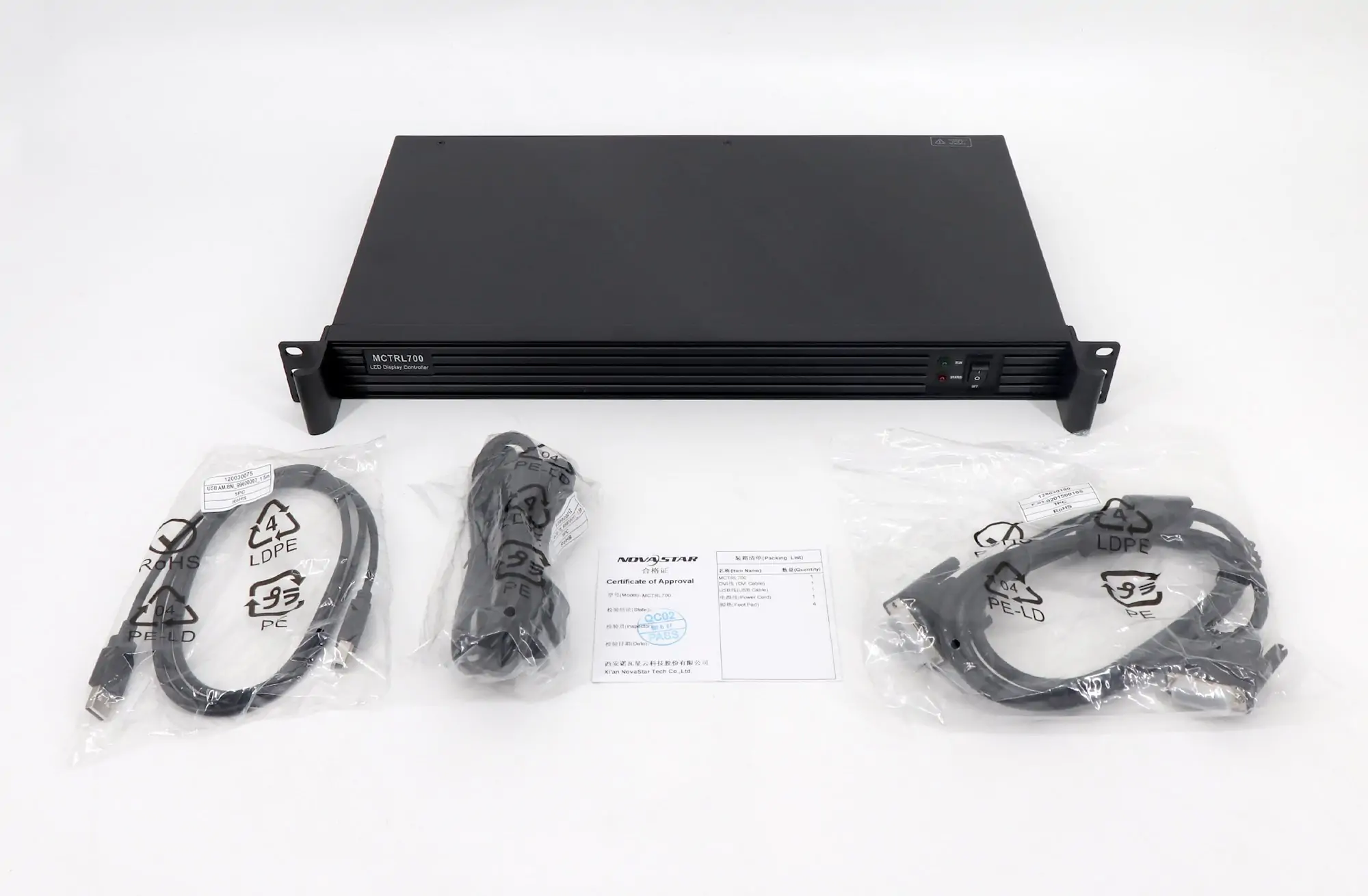
Record cabinet model, module resolution, receiving-card model, hub board, scan mode, and the correct receiving-card configuration file supplied for the cabinets. Mount the NovaStar MCTRL700 LED controller horizontally in a ventilated 1U rack position; NovaStar prohibits vertical or upside-down mounting. Connect mains power using the documented installation procedure. Before attaching all cabinet chains, confirm the source display mode on the computer or processor. A source that defaults to an unsupported interlaced mode can leave the wall dark even when power and cables are sound.
02. Connect source, control, and first data chain
Connect HDMI or single-link DVI from the source, USB Type-B from the NovaLCT computer, and Ethernet output 1 to the first receiving card in a known chain. Power the cabinets using the manufacturer’s power sequence. Verify the controller appears in NovaLCT and inspect the RUN and STA indicators. Start with one chain when troubleshooting a new system; it is easier to isolate a mapping or receiving-card problem before connecting all six outputs.
03. Load receiving-card parameters
In NovaLCT, load the exact configuration file for the cabinet and receiving-card hardware. Do not borrow a file merely because the cabinet pixel dimensions match. Scan mode, module wiring, color order, and hub assignments can differ. Send the receiving-card parameters and confirm a test pattern has correct color, orientation, and module order. Save to hardware only after the displayed result matches the physical cabinet.
04. Map the screen and verify the source
Set the screen width and height in pixels, assign cabinets to each output, and map their physical positions and cable direction. Check that every port’s load stays below 650,000 pixels and the entire display stays within 2,304,000 pixels. Display test images with clear edges, text, and solid colors. Verify the four corners, seam order, and source crop. Send the verified map to hardware, save it to hardware, and export a separate backup for the venue or show package. The NovaLCT synchronous-system manual covers screen connection, saved configuration and redundancy; menu labels depend on the software version.
NovaLCT menu labels can vary by version. Follow NovaStar’s documentation for the installed software and firmware, and verify a configuration on the actual wall. Do not update firmware during a live show or before preserving a working configuration. The NovaStar MCTRL700 LED controller can operate reliably only when source, mapping, cabinet file, and physical wiring describe the same wall.
6. Ethernet Redundancy and Cascading
NovaStar documents redundancy between MCTRL700 Ethernet ports. Redundancy is valuable for live events, broadcast backdrops, and control rooms, but it must be configured and tested rather than inferred from the presence of spare sockets. Plan a primary data path and an independent backup path for the relevant cabinets, then follow the topology supported by the specific firmware and receiving-card arrangement. A second cable connected without matching software configuration is not a verified failover system.
During commissioning, save the screen configuration, enable the intended backup relationship, and test by disconnecting a primary path under controlled conditions. Confirm the affected cabinets remain lit; a breathing RUN indicator means Ethernet-port redundancy has taken effect, according to the specification. Restore the primary path and confirm normal operation. Record which output backs up which chain. If the backup path shares a vulnerable connector or cable route, the real-world resilience is lower than the diagram suggests.
UART IN and OUT allow control cascading of up to 20 MCTRL700 units according to NovaStar’s specification. Cascading is useful when a wall exceeds one controller’s canvas or multiple displays share a control workflow. It does not combine the pixel capacity of separate boxes into a single unpartitioned sender. Each controller still needs a valid source portion, screen map, and port budget. HDMI or DVI loop outputs may pass a source to downstream equipment, but confirm each unit sees the correct picture and timing.
For multiple units, identify a master source plan before wiring. Draw the overall canvas, the pixel rectangle assigned to each controller, cabinet chain destinations, backup paths, and the control cascade. That diagram prevents an overlap or gap at the boundary between controllers. Keep device firmware revisions and cabinet files documented so a spare controller can be configured quickly.
7. MCTRL700 vs MCTRL600: Which Fits the Wall?
The MCTRL700 offers six Ethernet outputs and HDMI/DVI loop outputs; the MCTRL600 offers four Ethernet outputs. Both have a 1920 × 1200 at 60 Hz specification for 8-bit input. The MCTRL600 also documents 10-/12-bit input at a lower resolution. Compare the MCTRL700 V1.2.3 and MCTRL600 V2.3.5 specifications instead of treating the extra two ports as an increase in total pixel capacity.
| Decision factor | MCTRL700 | MCTRL600 |
|---|---|---|
| LED data outputs | Six Gigabit Ethernet ports | Four Gigabit Ethernet ports in the manufacturer specification |
| Overall wall load | 2,304,000 pixels at 1920 × 1200/60 Hz | 1920 × 1200 at 60 Hz for 8-bit input (2,304,000 pixels) |
| Input connections | HDMI 1.3 and single-link DVI | HDMI 1.3 and single-link DVI; 10-/12-bit input limited to 1440 × 900 at 60 Hz |
| Selection reason | More physical output chains or a documented backup layout | A smaller number of chains may be enough if all other limits fit. |
The NovaStar MCTRL700 LED controller is attractive when a wall needs more separate cable runs even though the overall pixel count remains below 2.304 million. Six ports can shorten individual chains and simplify distribution around a wide stage or venue. They do not compensate for an oversized source canvas. If a production needs integrated scaling, more input formats, 4K loading, optical outputs, or advanced switching, evaluate a suitable video processor or higher-capacity controller from NovaStar’s current range.
Compare the complete installed cost, including upstream processing, fiber conversion where needed, spare cables, receiving-card compatibility, and backup hardware. A lower controller price can become a higher system cost if it forces an extra processor or a difficult cable route.
8. Troubleshooting the NovaStar MCTRL700 LED Controller
Start with observable symptoms and change one variable at a time. In NovaStar’s indicator table, RUN flashing once every two seconds means no video input; four flashes per second means input is available. Fast flashing indicates the startup image, and breathing indicates active port redundancy. STA should remain red for normal power. Record the pattern before resetting anything.
| Symptom | First checks | Likely next action |
|---|---|---|
| Entire wall black; RUN flashes slowly | Source powered, correct input, progressive timing, HDMI/DVI cable | Test a known 1920 × 1080/60 Hz source and confirm input detection. |
| Entire wall black; source detected | Receiving-card power, first Ethernet link, screen configuration | Test one known cabinet chain and load its correct configuration. |
| Only one chain dark or unstable | Port assignment, cable, first receiving card, chain load | Swap a known-good cable and inspect that chain’s map. |
| Image cropped or offset | Upstream output resolution and NovaLCT screen coordinates | Match the prepared canvas to the mapped LED rectangle. |
| Wrong colors or scrambled modules | Cabinet configuration file, scan setting, module order | Restore the verified receiving-card file. |
| Backup fails when primary is unplugged | Backup topology and saved port relationship | Reconfigure and repeat a controlled failover test. |
If the wall works at first and then drops cabinets, inspect connector strain, cable routing, power distribution, and temperature. A network cable tester can confirm continuity but may not reveal intermittent movement-related faults, so test in the installed position. Keep a spare known-good patch cable and receiving card available for isolation. Avoid changing firmware to fix a mapping error unless NovaStar documents a relevant correction.
The NovaStar MCTRL700 LED controller is only one layer of the system. Video source, processor, sender, receiving cards, hub boards, modules, and power supplies all have distinct failure modes. A clear test pattern from the sender and a known-good single chain help separate them quickly.
9. MCTRL700 Manual, Firmware, Price, and Resources
For the most reliable figures, start with NovaStar’s MCTRL700 product page and the current MCTRL700 specification PDF; the archived V1.2.2 PDF is retained for older installations. The product page provides firmware and release notes, not a separate hardware user manual. Match the file to the exact standard MCTRL700 hardware and review the release notes before installing it. A copied firmware ZIP on a reseller page may not be the most suitable revision for an existing system.
For setup instructions, use the official NovaLCT synchronous-system user manual V5.9.2 (PDF), listed in NovaStar’s Software downloads when checked on October 14, 2026. This is the software configuration manual, not a model-specific hardware manual. Our NovaStar software download guide explains the available tools. Keep cabinet-specific receiving-card files and a working screen-map backup; matching pixel dimensions alone does not establish compatibility.
MCTRL700 price varies by region, availability, warranty, tax, and support package. A useful quotation should identify the controller model, firmware or hardware revision where relevant, shipping, warranty, and whether configuration assistance is included. For an LED display project, the controller price is only one line item. The correct choice also depends on cabinet pixels, source processing, spare units, cable lengths, and redundancy. Ask EagerLED about a complete LED wall configuration if those details are not yet fixed.
Related EagerLED reading: NovaStar TB40 guide explains an asynchronous player option; rental LED display options and LED screen modules provide context for cabinet and module selection. These products solve different needs; choose the control architecture after defining whether the display must follow a live external source or play scheduled content independently.
10. NovaStar MCTRL700 FAQ
01. How many pixels can the NovaStar MCTRL700 LED controller load?
NovaStar specifies a maximum of 1920 × 1200 at 60 Hz, or 2,304,000 pixels overall. Each of the six Ethernet ports supports up to 650,000 pixels. Both the overall limit and every active port limit must be met.
02. Does six times 650,000 mean the MCTRL700 loads 3.9 million pixels?
No. That sum describes six separate port ceilings, not the total controller capacity. The documented full-device limit remains 2,304,000 pixels at the stated timing.
03. Does the MCTRL700 scale an HDMI image to the LED wall?
No. Prepare the desired source canvas with a computer, media server, or suitable video processor, then map its pixels to the wall in NovaLCT. A cropped or offset picture usually calls for checking source timing and mapping.
04. Can the MCTRL700 accept an interlaced video signal?
No. NovaStar states that its HDMI and DVI inputs do not support interlaced input. Set the source to a supported progressive resolution and refresh rate.
05. What is the maximum number of cabinets?
There is no universal cabinet count. Multiply each cabinet's pixel width by height, then calculate the full wall and each output chain. Receiving-card capacity, physical topology, and source timing also matter.
06. Can two MCTRL700 units be cascaded?
Yes. The UART control ports support cascading, with up to 20 units documented. Each controller still requires its own valid pixel allocation and port mapping. Cascading does not turn several units into a single unpartitioned output.
07. How do I enable backup between Ethernet ports?
Design primary and backup paths for the relevant cabinets, configure the relationship in supported NovaLCT and firmware, save it, then disconnect a primary path during a controlled commissioning test. Record the tested port pair and cable route.
08. Where should I get the MCTRL700 manual and firmware?
Use NovaStar’s MCTRL700 product page for firmware and hardware specifications. For setup, use the NovaLCT synchronous-system manual. Confirm the standard MCTRL700 model, current hardware, and release notes before using a firmware package. Keep a backup of a working screen configuration.
11. Conclusion: Choose by the Whole Signal Chain
The NovaStar MCTRL700 LED controller is a practical six-output sender when a live-source LED wall fits its 2,304,000-pixel total limit and its 650,000-pixel per-port limits. Its HDMI and DVI inputs, loop outputs, NovaLCT mapping, Ethernet redundancy, and UART cascading support many rental and fixed-installation designs. Success depends on matching these features to the actual cabinet electronics and source canvas.
Before purchase or deployment, calculate the full wall and each chain, verify progressive source timing, retain the correct receiving-card file, and test backup paths on the assembled display. Those checks are more useful than a headline cabinet count or a multiplied port rating. For the NovaStar MCTRL700 LED controller, the manufacturer specification and a documented screen map should be the final reference.
 NovaStar VX1000 Pro: Specs, Setup, Modes & FAQs
 NovaStar TU20 Pro: Specs, Setup, Manual & Price Guide
Related Posts


Fill In Your Needs In Detail
Fill in the screen usage scene and size you need in “Content”.You will get a quote.