
In the world of high-definition LED displays, the Novastar MCTRL4K stands out as a powerhouse controller designed to deliver unparalleled performance and versatility. Whether you’re setting up for a live concert, a corporate event, or a large-scale digital signage installation, the MCTRL4K LED Display Controller offers the robust capabilities needed to handle ultra-high resolutions and complex configurations.
With a loading capacity of up to 4096×2160@60Hz and support for custom resolutions with widths or heights up to 7680 pixels, this controller is engineered to meet the demands of today’s most challenging visual projects.
In this comprehensive guide, we’ll dive into the features, specifications, and applications of the Novastar MCTRL4K, providing you with all the essential information to leverage its full potential. Plus, we’ll cover practical aspects like the Novastar MCTRL4K Price and where to find the Novastar MCTRL4K User Manual.
1. Key Features of the Novastar MCTRL4K
The Nova MCTRL 4K is packed with industry-leading technologies that enhance image quality, reliability, and ease of use. Here are some of its standout features:
- Ultra-High Loading Capacity: A single unit supports up to 4096×2160@60Hz, with the ability to handle custom resolutions as wide or tall as 7680 pixels. This makes it ideal for ultra-long or ultra-wide LED displays, such as those used in stadiums or broadcast studios.
- HDR Support: Compatible with HDR10 and HLG standards, the MCTRL4K works with HDR-enabled receiving cards to deliver vivid, detailed images with enhanced dynamic range. This is perfect for applications where color accuracy and contrast are critical.
- 3D Functionality: When paired with the EMT200 3D emitter and 3D glasses, the controller enables immersive 3D displays, adding a new dimension to entertainment and advertising.
- Low Latency Mode: With input source sync enabled, the delay can be reduced to just one frame, ensuring real-time performance for live events like sports and concerts.
- Pixel-Level Calibration: This feature allows for precise brightness and chroma adjustment at the pixel level, ensuring uniformity and consistency across the entire display.
- Multiple Input Options: Equipped with 1x DP 1.2, 1x HDMI 2.0, and 2x DL-DVI inputs, the NovaStar MCTRL4K supports a wide range of source devices, including high bit-depth inputs (8-bit, 10-bit, and 12-bit).
- Robust Outputs: It includes 16 Neutrik Gigabit Ethernet ports and 4x 10G optical ports, providing flexible connectivity for large-scale installations. The optical ports support long-distance transmission up to 10km, making them suitable for outdoor events.
- Advanced Software Compatibility: The controller works with NovaLCT V5.4.2 or later, offering seamless configuration and management. Recent updates have added features like input source frame rate settings (96 Hz/144 Hz) and a dehumidification function for improved reliability in varying environments.
2. Detailed Technical Specifications of MCTRL4K LED Display Controller
To help you understand the capabilities of the Novastar MCTRL4K Processor, here’s a comprehensive specifications chart based on the product data. This table covers key aspects like inputs, outputs, power, and environmental conditions:
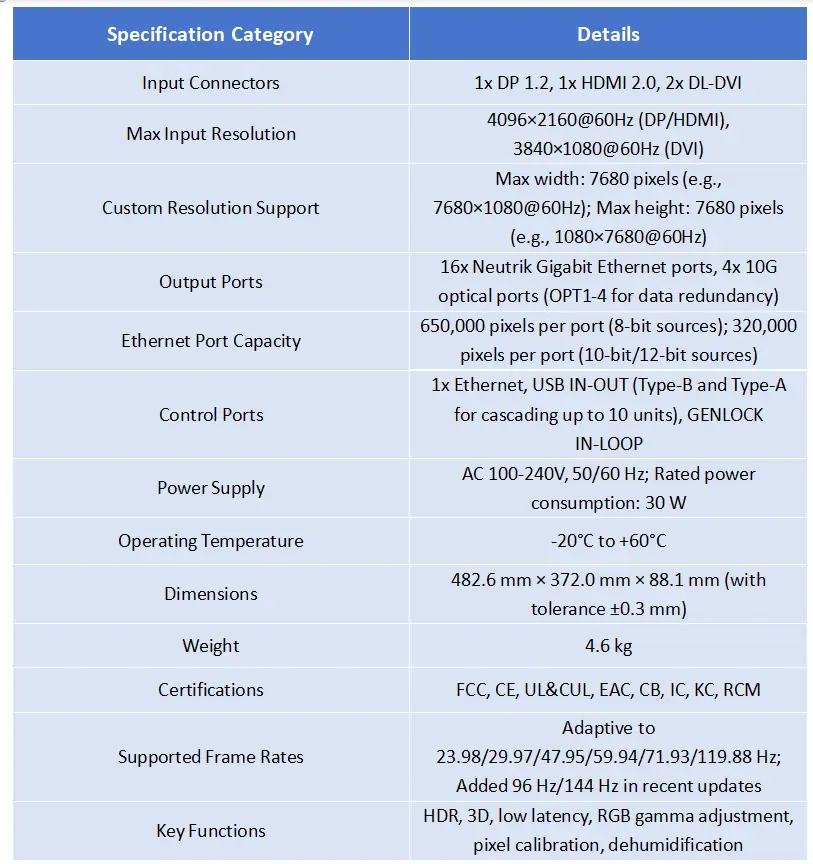
This table highlights the MCTRL4K’s versatility, making it suitable for a wide range of applications, from rental events to fixed installations. The inclusion of optical ports with enhancement modes ensures reliable data transmission even over long distances.
3. Input and Output Capabilities
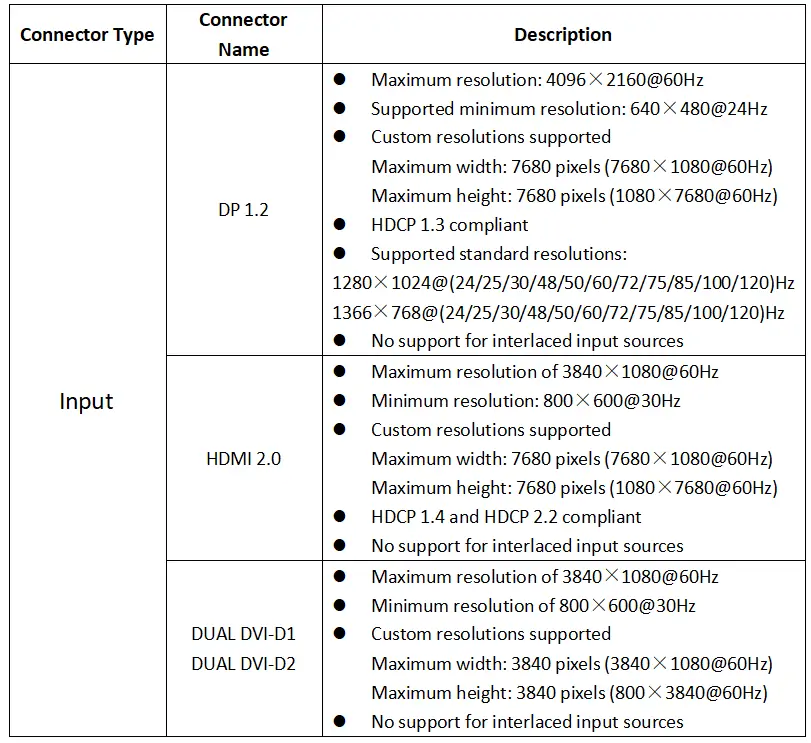
The Nova MCTRL4K is designed to handle diverse input sources and output configurations, providing flexibility for complex setups. Let’s break down its I/O features:
3.1 Input Sources
- DP 1.2: Supports resolutions up to 4096×2160@60Hz, with custom options and HDCP 1.3 compliance. It handles standard resolutions like 3840×2160@60Hz and is ideal for high-end graphics workstations.
- HDMI 2.0: Offers similar capabilities to DP, with HDCP 1.4 and 2.2 support, making it compatible with modern media players and gaming consoles.
- Dual-Link DVI: Each DVI port supports up to 3840×1080@60Hz, perfect for scenarios requiring multiple input streams, such as multi-card mode operations.
3.2 Output Options
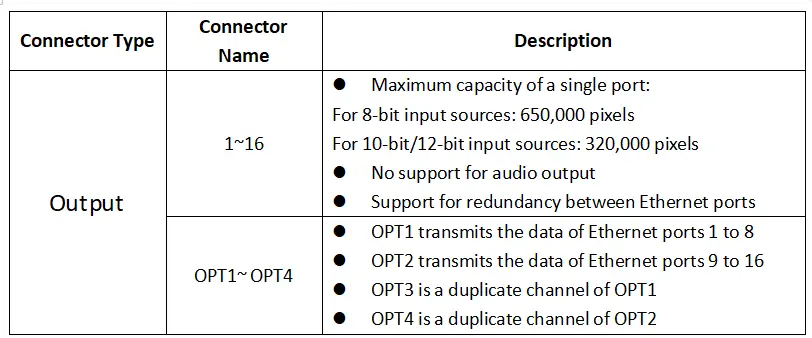
- The 16 Ethernet ports allow for distributed loading, with redundancy support to ensure uninterrupted display. For instance, in HDR mode, the per-port capacity is halved, but the overall system remains efficient.
- The optical ports (OPT1-4) facilitate high-bandwidth transmission, with OPT1 and OPT2 handling data for Ethernet ports 1-8 and 9-16, respectively, while OPT3 and OPT4 serve as backups. This redundancy is crucial for critical events where failure is not an option.
4. Control and Configuration
Controlling Novastar MCTRL4K LED Display Controller is straightforward, thanks to its intuitive interface and software integration. Key control aspects include:
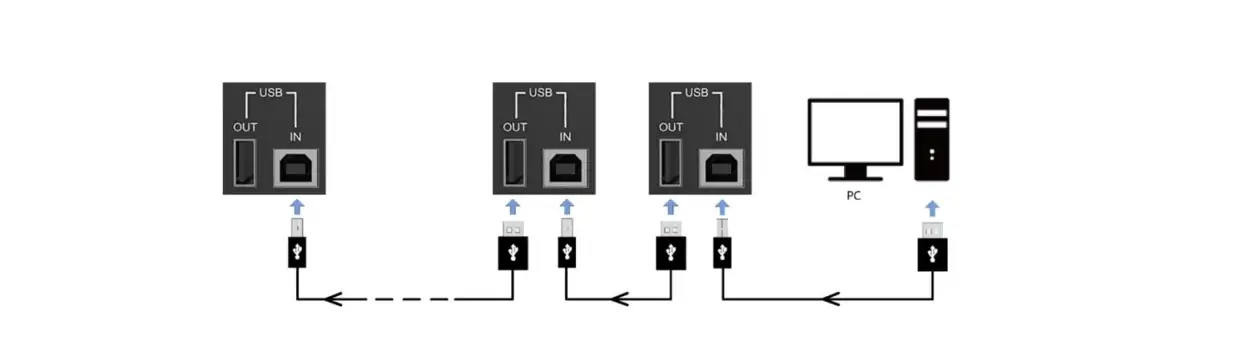
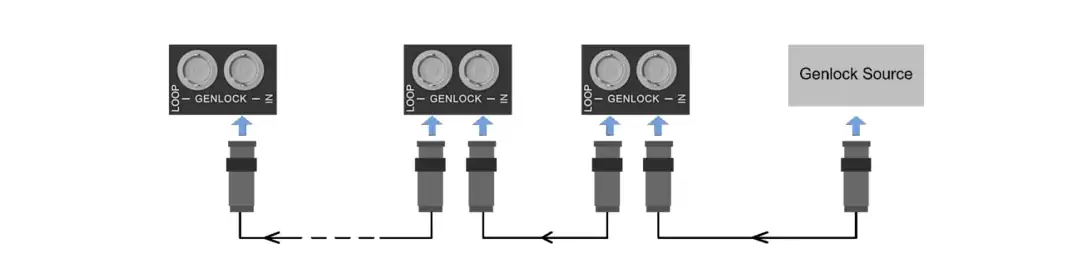
- Cascading Support: Up to 10 MCTRL4K units can be cascaded via USB or GENLOCK ports, enabling synchronized control of massive displays. This is particularly useful for large-scale installations like Olympic venues or concert tours.
- Software Management: The controller is compatible with NovaLCT and SmartLCT software, allowing for easy screen configuration, calibration, and firmware updates. The recent software updates have improved optical port compatibility and added an optical enhancement mode for better transmission quality.
- Quick Screen Setup: Using the onboard LCD menu, you can quickly configure parameters like cabinet rows/columns and data flow. For example, in mosaic mode, the controller can split inputs for side-by-side or top-bottom displays, while multi-card mode allows independent control of two screens.
Cascaded via USB:
Cascaded via GENLOCK:
5. NovaStar MCTRL4K Scaling and Resolution Settings
One of the standout features of NovaStar MCTRL4K is its ability to handle custom and ultra-high resolutions. Here’s how NovaStar MCTRL4K Scaling works:
- Preset Resolutions: The controller supports a wide range of standard resolutions, such as 1920×1080@120Hz for DP and HDMI, and 3840×1080@60Hz for DVI. This flexibility ensures compatibility with various source devices.
- Custom Resolution Setup: You can define custom widths and heights up to 7680 pixels via the input settings menu. For instance, a resolution of 1080×7680@60Hz can be set for ultra-tall displays used in retail or exhibitions.
- Ultra-High Resolution via NVIDIA Graphics: When using DP or HDMI inputs, you can leverage NVIDIA graphics cards (e.g., GeForce GTX 970) to set resolutions beyond 4096 pixels. The MCTRL4K Ultra-High Resolution Settings Generator tool helps calculate timing parameters, ensuring optimal performance without exceeding the 595.0 MHz pixel clock limit.
This scalability makes MCTRL4K a future-proof investment for evolving display technologies.
6. Application Scenarios
The Novastar MCTRL4K Processor excels in diverse environments, thanks to its mosaic and multi-card modes:
- Live Events and Concerts: With low latency and 3D support, it delivers synchronized, immersive experiences for audiences.
- Broadcast and Sports Venues: HDR and high frame rate capabilities ensure crisp, real-time visuals for scoring displays and replays.
- Digital Signage and Retail: Custom resolutions allow for creative installations, such as curved or irregular screens, while pixel calibration maintains image uniformity.
- Corporate and Control Rooms: The cascading function enables large video walls for monitoring and presentations, supported by reliable optical transmission.


7. Novastar MCTRL4K Files Download
As a professional controller supplier, we will provide you with free files to download, covering the user manual, specifications, firmware, and release notes.
User Manual:
Novastar MCTRL4K User Manual Download
Specifications:
Novastar MCTRL4K Specifications Download
Release Notes:
8. FAQs
9. Conclusion
The Novastar MCTRL4K is a top-tier solution for anyone seeking reliable, high-performance control over LED displays. Its impressive loading capacity, advanced features like HDR and 3D, and flexible I/O options make it a versatile choice for various applications.
By understanding its specifications and capabilities, you can maximize your investment and achieve stunning visual results. For more details, refer to the Novastar MCTRL4K User Manual and explore the NovaStar MCTRL4K Scaling options to tailor your setup.
If you’re considering a purchase, check the latest Novastar MCTRL4K Price from trusted suppliers to get the best deal. Embrace the power of the MCTRL4K LED Display Controller and elevate your LED displays to new heights!
 Novastar MCTRL600 LED Controller Full Introduction and FAQs
 Novastar H9 LED Controller: Ultimate All-in-One Splicing Solution
Related Posts

Fill In Your Needs In Detail
Fill in the screen usage scene and size you need in “Content”.You will get a quote.



