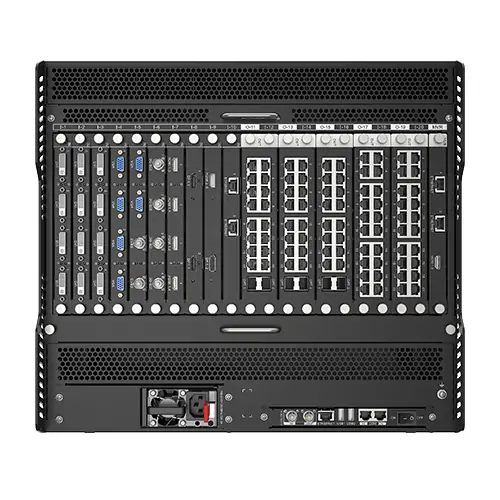
The NovaStar H9 is a 9U modular video wall splicer that arranges multiple sources into LED or conventional video-wall layouts. Compatible sending cards let it combine video processing and LED control in one chassis. Its usable pixel capacity depends on the fitted cards, chassis variant and operating mode (official H9 datasheet). For an integrator, the important question is not simply how many pixels the chassis can handle. It is whether the selected cards can carry the required sources, drive the actual cabinet layout, and support the operating workflow without running out of ports or processing resources.
This NovaStar H9 guide explains specifications, input and output selection, H9 Enhanced differences, price factors, and manual downloads. For the manual PDF, datasheet and updates, use NovaStar’s official H Series downloads or the document links in section 7. The setup checks cover control rooms, studios, conference spaces and exhibitions. Start with the screen’s pixel dimensions and signal list, then use the tables to develop a configuration that can be verified before purchase.
Specification references distinguish older and current card versions. The current reference is NovaStar’s H9 Video Wall Splicer Specifications V1.17.0, dated May 30, 2026. Capacity figures are maximums for defined configurations; they should not be treated as promises for every frame rate, bit depth, or redundancy arrangement.
1. What Is the NovaStar H9 LED Controller?
A NovaStar H9 processor takes incoming video, arranges it into a composition, and sends the result toward the display. With compatible LED sending cards, processing and sending can share the same chassis. With video output cards, it can feed a separate downstream display system. This distinction matters when reusing an existing installation: the output architecture must match the equipment already attached to the wall.
Think of the system as four linked decisions: source interfaces, composition, output transport, and receiving-card mapping. A correct choice at only one stage does not establish compatibility for the whole chain. For example, accepting a computer’s 4K signal does not tell you whether its desktop text will remain readable after scaling across an unusually wide LED screen.
The NovaStar H9 suits projects where layouts and sources change regularly. A control room might place a dashboard beside camera feeds; a conference room might switch between a full-screen presentation and several remote participants. If the job only requires one preformatted source on one wall, compare a simpler controller architecture as well. EagerLED’s MCTRL4K LED sending controller guide provides another starting point for that discussion.
2. Key NovaStar H9 Features and Planning Considerations
01. Modular design and source planning
The NovaStar H9 uses interchangeable input and output cards. Build a source schedule before choosing those cards: list each device, connector, resolution, frame rate, audio requirement, and whether it must be visible simultaneously with other sources. Keep spare capacity tied to a named expansion need, such as a future workstation or an additional screen, instead of buying unidentified spare ports.
Connector counts can be misleading. For example, NovaStar’s H_1xHDMI2.1+1xDP1.4 input card permits only one connector at a time. Request a slot drawing and a simultaneous-source demonstration for the proposed combination. A drawing is particularly useful when sending cards occupy more than one slot and reduce the room available for other modules.
02. Layers, presets, and operator workflow
In a NovaStar H9 layout, a layer is a placed video source with its own size and position. Count the layers required by the busiest layout, not only the default full-screen view. NovaStar bases layer usage on the configured connector capacity: a 1080p source on a 4K-capacity HDMI 2.0 connector can still consume a 4K layer allocation. Check the connector capacity on the Device page. A display with one main presentation, several camera windows, and a confidence feed can have a modest pixel count but a demanding composition.
Presets should represent real tasks. Name them by purpose, such as “daily dashboard,” “incident review,” or “guest presentation.” During acceptance, switch between the most demanding pairs and confirm the expected transition. Also document who may change screen geometry and who should only recall approved layouts; this makes day-to-day operation easier to control.
03. Image quality across the signal chain
For NovaStar H9 projects, agree on the source and display settings before evaluating picture quality. Use a test slide with small text, thin lines, grayscale steps, and familiar colors. Inspect it from the normal viewing distance. Scaling, chroma subsampling, or an incorrect video range can damage readability even when the image fills the wall correctly.
HDR and higher bit depth require a compatible path through the source, processing, sending, receiving cards, and display. An HDR label alone does not establish useful highlight detail or uniform low-brightness performance. Ask for the intended operating brightness during demonstrations, and include dark gradients and real presentation material in the test set.
04. Web control and monitoring
Access the NovaStar H9 web interface through the management IP shown on the front-panel LCD. For a direct PC connection, the manual requires the same subnet and different device addresses (web login instructions). Put the management connection on an approved network, label the device address, and record account ownership in the handover pack. For a staffed venue, separate routine preset recall from engineering changes so an operator can recover a familiar layout without rebuilding the system.
Do not confuse card status with a verified picture. Monitoring should help an operator identify the affected input or output, but the acceptance procedure should still check the final display. If remote source preview is required, make sure the quotation includes the H_2xRJ45+1xHDMI1.3 preview card rather than assuming monitoring hardware is included in every chassis package.
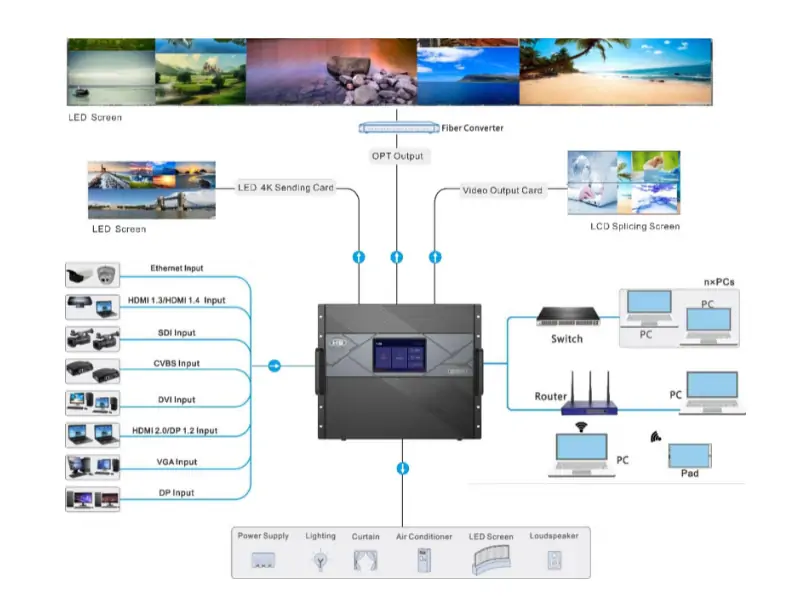
Read the signal-flow diagram from sources to displays: matched input cards feed the H9, then LED sending outputs reach LED cabinets directly or through a fiber converter. Conventional video-output cards feed the LCD wall. PCs and tablets provide network control through a switch or router. External equipment control requires the appropriate connected control interfaces.
05. Redundancy and maintenance
Design NovaStar H9 redundancy around an identified failure: a source loss, a cable break, an output-card fault, or a power interruption. Each needs an appropriate alternative path. Two cables following the same vulnerable route may provide little protection against physical damage, while a redundant power module cannot keep a failed source computer running.
Test failover before handover under an agreed maintenance procedure. Record what stays visible, what briefly disappears, and what action the operator must take. Hot-swappable cards improve service access, but their presence does not guarantee an uninterrupted picture during replacement. Keep the tested backup topology and recovery instructions beside the system diagram.
06. Rack space and service access
Allow space behind the NovaStar H9 for connectors, cable bend radius, labels, and card removal. The chassis is rack equipment, so the installation plan should include mechanical support, airflow, grounding, and safe access. Avoid relying on an attractive front elevation alone; a crowded rear cable area can turn routine maintenance into a lengthy shutdown.
Check the installed weight, rack loading, and electrical requirements against the supplied hardware. The chassis weight is not the shipping weight or the completed rack weight. For rental work, include the flight case, restraints, and transport procedure in the design review. These practical details often determine how quickly the equipment can be deployed.
3. NovaStar H9 Specs: Technical Specifications and Card Selection
The table separates the two chassis variants and the sending-card families. Maximum card counts and maximum loading figures describe configuration limits, not an assurance that every maximum is available simultaneously. Source: NovaStar H9 specifications V1.17.0, specification table. Confirm the final slot allocation with the supplier.
| Specification | H9 | H9 Enhanced |
|---|---|---|
| Rack size | 9U | 9U |
| Maximum input cards / channels | 15 / 60 | 15 / 60 |
| Maximum video output cards / channels | 5 / 20 | 10 / 40 |
| H_20xRJ45 configuration | 65 million pixels | 65 million pixels |
| Standard H_4xfiber configuration | 104 million pixels | 208 million pixels |
| Enhanced H_4xfiber configuration | 130 million pixels | 260 million pixels |
| Maximum video-output layers | 80 | 160 |
| Maximum LED 4K sending-card layers | 80 | 80 |
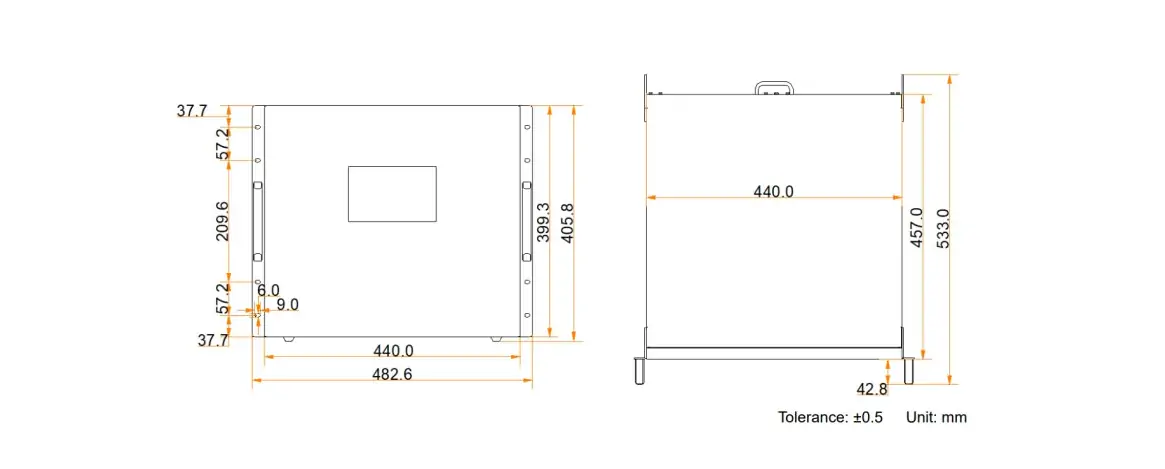
| Dimensions (W × D × H) | 482.6 × 533.0 × 405.8 mm | 482.6 × 533.0 × 405.8 mm |
| Chassis net weight | 27.2 kg | 27.2 kg |
| Specified power consumption | 450 W | 450 W |
| Operating conditions | 0–45°C; 0–80% RH, non-condensing | 0–45°C; 0–80% RH, non-condensing |
01. Match NovaStar H9 input and output cards to the job
Select an input card from the actual source specification, not merely the connector shape. A workstation, a broadcast feed, and a network camera have different timing and transport requirements. For IP video, ask which protocol, codec, stream settings, and simultaneous decode load the supplied card supports. A supported camera inventory is not the same as displaying every camera at full quality at once.
On the output side, identify whether the project needs direct LED sending, optical distribution, or conventional video outputs. For a fiber design, specify converters, transceivers, fiber type, connector type, route length, and backup mode as one package. NovaStar prohibits standard or enhanced fiber sending cards from sharing one screen with H_20xRJ45 or H_16xRJ45+2xfiber cards. It also prohibits standard and enhanced H_4xfiber cards from loading the same screen together (sending-card compatibility rules).
02. Calculate pixels before selecting port counts
For an illustrative 7,680 × 2,160 screen, the active pixel load is 16,588,800 pixels. This multiplication is only the first step. Divide the load by the documented per-port allowance for the chosen operating mode, round upward, then map whole cabinets to individual ports. Cabinet boundaries and routing can require more ports than the arithmetic minimum.
For example, using the H_20xRJ45 card’s documented 8-bit allowance of 650,000 pixels per Ethernet port gives a theoretical minimum of 26 ports. At its documented 10-bit allowance of 325,000 pixels, the same calculation gives 52 ports. At 20 ports per card, those arithmetic minimums require at least two or three cards, respectively. These are planning estimates; cabinet routing, receiving-card limits and backup assignments can increase the required card count. Confirm timing and screen dimensions before implementation.
A 10,752-pixel maximum width or height is a dimensional limit, not permission to multiply both numbers into a square canvas. Apply both the dimensional limit and the total load limit. Similarly, backup ports do not create extra independent screen capacity. Mark primary and backup assignments clearly on the port schedule.
4. NovaStar H9 vs H15: Choosing the Right Solution
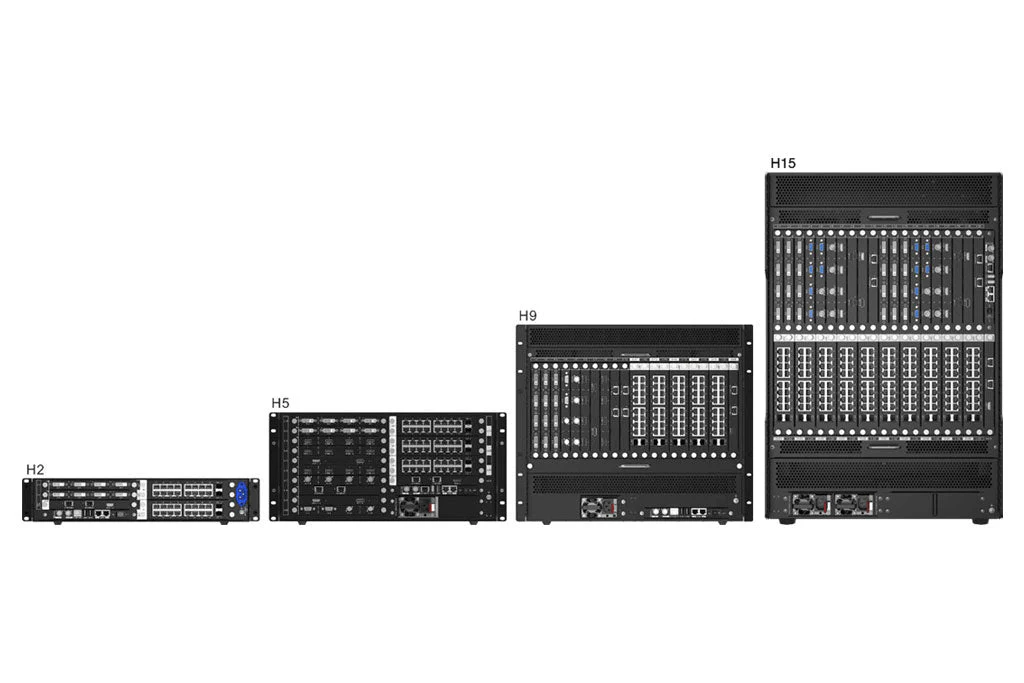
The NovaStar H9 vs H15 decision should follow an I/O and capacity schedule. The H15 provides more physical expansion, but a larger model does not automatically improve a picture that is already processed correctly. Compare the same output technology, bit depth, backup policy, and busiest preset when assessing the two platforms.
| Decision | H9 / H9 Enhanced | H15 / H15 Enhanced |
|---|---|---|
| Rack allocation | 9U | 15U |
| Maximum input cards | 15 | 30 |
| Maximum output cards | 5 / 10 | 10 / 16 |
| H_20xRJ45 maximum loading | 65 million pixels | 130 / 208 million pixels |
| Enhanced fiber maximum loading | 130 / 260 million pixels | 260 / 416 million pixels |
| Main selection question | Does the chosen configuration cover every screen and source? | Is the additional I/O and expansion space justified? |
These family-level figures follow NovaStar’s current H Series comparison. Final compatibility and usable capacity still depend on fitted cards. For an existing system, read the actual card labels before comparing its performance with a newer configuration advertised under the same chassis name.
01. When NovaStar H9 is the practical fit
Choose NovaStar H9 when a verified configuration covers the current screen layout, the busiest source composition, and a defined expansion allowance within the available rack space. Ask the integrator to identify the next likely upgrade and show which slots and ports remain available for it. This gives purchasing teams a concrete reason for the selected capacity.
02. When to evaluate H15
Evaluate H15 when the source schedule, independent outputs, or expansion plan exceeds a workable H9 configuration. Also compare whether one larger chassis or several independently controlled systems better matches the venue’s operating model. Consider service access, spare parts, commissioning effort, and the effect of a single failure, alongside the equipment price.
5. NovaStar H9 Price: What a Complete Quote Should Include
A reliable NovaStar H9 price is a configuration quote. An enclosure-only listing and a complete working system are different purchases. Request an itemized bill of materials with exact card model names and quantities, and ask the supplier to connect each item to the screen or source it serves. This avoids comparing prices for systems with different capabilities.
| Quote item | What to specify | Why it matters |
|---|---|---|
| Chassis | H9 or H9 Enhanced; supplied power modules | Identifies the expansion platform and power arrangement |
| Input cards | Source count, connectors, exact timing, audio | Establishes which sources can work together |
| Sending / output cards | Screen pixels, bit depth, port map, output mode | Connects cost to usable display capacity |
| Optical distribution | Modules, converters, fiber type and length | Prevents missing transport components |
| Preview and backup | Preview card, spare paths, failover scope | Defines operational visibility and resilience |
| Services and delivery | Configuration, training, warranty, freight, taxes | Makes the complete project cost comparable |
State the acceptance criteria in the request for quotation. Include the highest-load preset, normal operating brightness, required source switching, and a demonstration of backup recovery. If the supplier proposes an alternative card, ask for a revised port schedule and resource calculation rather than accepting a generic statement that the replacement is equivalent.
Operating cost also includes downtime, staff training, spare equipment, and the time needed to rebuild a configuration. A well-documented NovaStar H9 system can be easier to maintain because technicians have the approved settings and wiring drawings available. Treat those documents as deliverables, with clear ownership and a process for recording later changes.
For a tailored configuration review, send EagerLED your screen dimensions and source list. Include cabinet pixel resolution, receiving-card model, installation location, cable distances, and expected expansion. If only physical dimensions and pixel pitch are known, identify them as preliminary so the final pixel drawing can be confirmed before ordering.
6. Applications of the NovaStar H9 Video Wall Splicer
01. Command and control rooms
A NovaStar H9 control-room design should prioritize readable information and predictable recovery. Decide which feeds must remain visible during an incident, which can be reduced, and which need a dedicated full-screen preset. Test the smallest critical labels at the operator’s seat. Showing more windows is not useful if staff cannot read the information inside them.
02. Broadcast studios and live production
For a studio, test NovaStar H9 with the intended cameras, playback systems, and production timing. Evaluate the complete path to the visible LED wall, including receiving cards and panels. Check motion, camera exposure, synchronization, and audio alignment under show conditions. Do not translate a processor latency claim into a guaranteed camera-to-screen delay without measuring the entire chain.
03. Corporate and education spaces
For meeting rooms, create presets around the people who operate the system. A presenter should have a clear way to choose a laptop, remote meeting, or shared layout. Test common laptop output settings and small spreadsheet text. Provide a documented fallback input for guest devices, and make it obvious how to return to the standard room layout.
04. Exhibitions and multi-screen installations
For exhibitions, prepare a screen-by-screen content plan with pixel dimensions and aspect ratios. A NovaStar H9 can organize the display layout, but the content team still needs correct source assets and playback equipment. Confirm restart behavior after a power interruption, the daily opening procedure, and how staff will identify a missing source before visitors arrive.
7. NovaStar H9 Manual, Downloads, and Setup Checklist
Use the NovaStar H9 manual for operation and the datasheet for hardware selection. The documents below serve different purposes; choose the version that matches the installed cards and firmware. Keep the approved copies with the project files so future maintenance does not depend on remembering which online version was used. If a direct PDF link is restricted, select H9 Specifications or User Manual on NovaStar’s H Series download page.
- Current H9 datasheet: Specifications V1.17.0 — chassis and card details, including the enhanced fiber card.
- H Series User Manual V1.15.0 — current operating reference from NovaStar’s download listing.
- Archived H9 specifications V1.15.0 — useful for identifying earlier card descriptions; not the latest specification.
- Archived H Series manual V1.13.0 — retain only where relevant to the installed system.
01. Prepare before commissioning
Start a NovaStar H9 setup with the approved bill of materials, cabinet map, and source schedule. Confirm the chassis and card labels, then photograph and label the cable connections. Record firmware versions before making changes. Obtain the correct receiving-card configuration file from the display supplier instead of experimenting with unrelated files on the installed wall.
Establish a known-good source and one small verified display path first. Once that path works, expand systematically through the port map. This makes a fault easier to isolate than connecting every source and screen before checking any of them. In the web interface, use Configuration → New Screen to name the screen and set its rows and columns, then map the approved outputs (screen configuration procedure). Save the verified baseline before building complex presets.
02. Verify picture, control, and recovery
Commission NovaStar H9 with both test patterns and normal content. Inspect cabinet order, seams, aspect ratio, text clarity, grayscale, and motion. Exercise all approved presets and source changes. Confirm that an operator can identify a disconnected source, restore the default layout, and follow the agreed recovery procedure without needing to reconfigure screen geometry.
For firmware maintenance, first confirm the release’s compatibility and reason for installation. Use Settings → Backup Management → Export Configuration File to save the device settings (configuration backup instructions). Document a recovery plan and schedule the work when the wall can be taken out of service. Afterward, repeat the relevant acceptance checks. A firmware update is not a substitute for an incorrectly specified input card or overloaded output port.
03. Troubleshoot from the first failing stage
If the picture is black, establish whether the source is producing the expected signal before changing the wall mapping. If the source is detected but the image is cropped, compare source timing, crop settings, and the screen canvas. If only one cabinet chain is affected, inspect that chain’s port assignment, cable path, and receiving-card configuration.
Change one variable at a time and record the result. When requesting support, provide the source format, card models, firmware versions, screen map, affected ports, and a description of when the fault began. A reproducible symptom with a known-good comparison is more useful than a general report that the NovaStar H9 is not working.
8. NovaStar H9 FAQs
01. What is the maximum pixel capacity of NovaStar H9?
NovaStar H9 capacity depends on the installed sending cards, chassis version, bit depth, and output mode. The headline 65-million-pixel figure applies to the H_20xRJ45 configuration. The current enhanced fiber configuration reaches 130 million on H9 and 260 million on H9 Enhanced. These are configuration ceilings, not the guaranteed usable load of every assembled unit. Check each port and the complete cabinet map before ordering.
02. Where can I download the NovaStar H9 manual and datasheet?
The document links in Section 7 include the H9 specifications and the H Series user manual. Use the datasheet to identify card limits and the manual to understand operation. Keep a copy that matches your installed hardware and firmware; a document describing a newer card does not make that card available in an older chassis automatically.
03. How much does a NovaStar H9 system cost?
A useful NovaStar H9 price must identify the complete bill of materials. Ask whether the quote includes the chassis, input cards, sending cards, preview card, optical modules, converters, redundancy, and commissioning. Compare quotations against the same screen resolution and source list. A low enclosure price cannot be used as the budget for a working multi-screen installation.
04. Does NovaStar H9 support 4K and 8K inputs?
Support depends on the input card and the exact timing. Check resolution, frame rate, bit depth, chroma format, and connector mode together. For example, the specification lists DP 1.4 at 7680 × 4320 at 30 Hz for 8-bit RGB 4:4:4; at 10-bit RGB 4:4:4, that timing is limited to 24 Hz. See the input-format table. For an 8K proposal, request the exact card model and a demonstration with the intended source; also verify the layer and output budgets.
05. Can NovaStar H9 manage irregular or multiple screens?
Yes, the platform supports multi-screen management and irregular mosaics. The practical design must still respect sending-card compatibility, output dimensions, receiving-card capabilities, and cable routing. Supply an actual pixel drawing, including gaps and disconnected sections. Ask the integrator to show how each screen maps to ports and how presets behave when operators change layouts.
06. Is H9 Enhanced the same as an enhanced fiber card?
No. NovaStar H9 Enhanced identifies a chassis variant, while H_4xfiber sending card (enhanced) identifies an output card. The two terms describe separate parts of the configuration. Put both model names on the purchase order, and do not assume that changing firmware converts a standard chassis into an Enhanced chassis.
07. Does hot swapping guarantee uninterrupted video?
No. Hot swapping describes card serviceability; continuity requires a working backup path for the affected signal. Before servicing a live NovaStar H9 system, establish which sources, outputs, and power feeds would be lost. Rehearse the approved failover procedure and verify the result on the display, rather than relying only on status indicators.
9. Conclusion: Specify NovaStar H9 Around Your Screen
The strongest NovaStar H9 specification starts with the display and its daily operation: actual pixels, simultaneous sources, readable layouts, cable routes, and a tested recovery plan. Match those needs to the chassis and cards, then verify the result with the intended content. This approach makes capacity and price comparisons meaningful.
Before purchasing, confirm the exact H9 or H9 Enhanced model, output-card family, port loading, and included accessories. Keep the manual, approved configuration, and acceptance records together. With those details established, a NovaStar H9 video wall splicer can form a practical foundation for a maintainable multi-source LED display system.
 NovaStar MCTRL4K: 4K LED Controller Specs, Setup & Price
 NovaStar TU15 Pro: Specs, Manual, Setup and Price Guide
Related Posts






Fill In Your Needs In Detail
Fill in the screen usage scene and size you need in “Content”.You will get a quote.