The Novastar TCC160 sending card is an asynchronous LED control card that combines playback, sending and receiving functions with 16 HUB75E module connectors. It suits storefront signs and other displays with modest pixel counts. This guide explains its capacity limits, connections, software, specifications and buying checks, using NovaStar’s documentation rather than hands-on performance testing.
1. What Is the Novastar TCC160 and Why It Matters?
The TCC160 stores content for scheduled playback, so a computer need not remain connected during normal operation. Direct HUB75E connections reduce the need for separate receiving hardware in compatible designs. Select it by module driver IC, scan configuration and total pixels, not physical screen size alone.
Remote publishing and monitoring require a working network connection and the appropriate platform configuration. Local management and cloud access serve different needs: first commission the screen locally, then test remote updates before installation. For live-event rental LED displays, confirm that asynchronous playback matches the project’s source requirements.
Wi-Fi AP/Sta modes are built in; cellular and GPS functions need optional hardware. NovaStar lists CE, FCC, RoHS and NTRA in its TCC160 specification V1.0.8 (31 July 2026). Confirm documentation for your supplied model and destination rather than assuming every installation is covered.
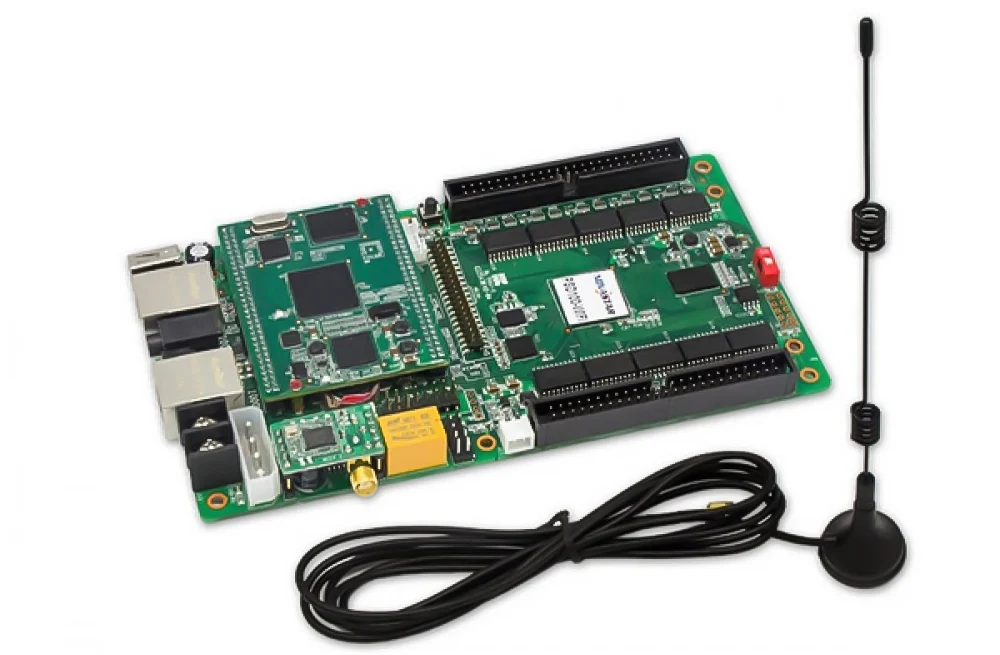
The practical advantage is integrated control for compact signs. The retained photo below is illustrative and differs from the 16-HUB75E board shown in the labelled hardware diagram; use that diagram and your unit’s markings for identification.
2. Novastar TCC160 Control Card Hardware Structure
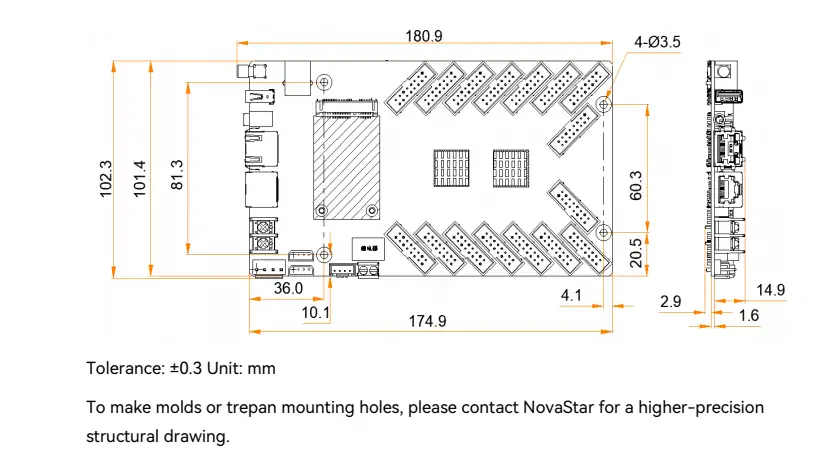
The specified board measures 180.9 × 102.3 × 19.4 mm and weighs 149.6 g. Allow additional space for power wiring, ribbon cables and the antenna. Check connector orientation before choosing mounting positions.
Key Hardware Components:
- Power: DC 5–12 V input; maximum consumption 12 W for the card, not the complete LED screen.
- 16 HUB75E connectors: Connect LED modules; up to 32 parallel RGB data groups or 64 serial groups, expandable to 128.
- LED OUT: Gigabit RJ45 for cascaded receiving cards and multifunction cards.
- ETHERNET: Fast Ethernet for the network or control computer. Keep this distinct from LED OUT.
- Audio: 3.5 mm output; no audio input.
- USB: Type-A for playback, upgrades and storage; Type-B for computer control.
- Wireless: 2.4 GHz antenna connector, optional 4G module slot and underside SIM slot.
- RS485: Two connections for compatible sensors. UART supports the documented GPS-module connection; check the required accessories.
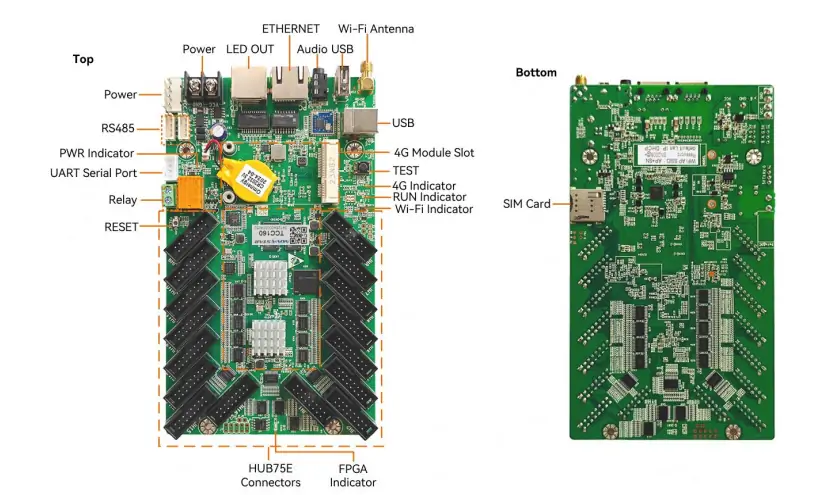
Indicators and Buttons:
Indicator names differ between the older diagram and V1.0.8, pages 7–8:
- PWR: Steady red means power is normal.
- SYS: A green flash every two seconds indicates normal system operation; older diagrams call this RUN.
- RUN: The current receiving-status indicator, previously labelled FPGA; one flash per second indicates normal reception with video.
- WiFi: Flashing every two seconds indicates a connected Sta network; steady means enabled but not connected.
- RESET: Hold five seconds for factory reset. Back up settings first.
The exposed board needs a suitable enclosure. Its operating-temperature specification does not establish waterproofing or guarantee reliable operation in direct rain, condensation or an overheated cabinet.
3. TCC160 Controller Features That Make It Stand Out
The following features are useful only when the modules, firmware and configuration support them. Test the intended media and screen layout before deployment.
3.1 High Pixel Capacity and Ultra-Long Screen Support
- Per card: 512 × 512 at 60 Hz with PWM driver ICs, or 512 × 384 with general driver ICs.
- Published limits: NovaStar also states 260,000 pixels per card and 2,048 pixels per side. Because 512 × 512 equals 262,144, confirm the exact supported configuration before specifying the maximum.
- Cascading: Up to 650,000 pixels per Ethernet port.
- Ultra-long mode: Up to 8,192 pixels wide or 2,048 high; these are dimension limits, not permission to load an 8,192 × 2,048 canvas. Follow the manufacturer’s ultra-long-screen configuration guide.
3.2 Advanced Video Decoding and Playback
The quad-core 1.4 GHz processor supports hardware video decoding. V1.0.8 lists these alternative playback workloads:
- 1 × 4K or 2 × 1080p videos;
- 4 × 720p, 4 × 480p or 20 × 360p videos.
These are not additive. Multi-screen synchronous playback halves decoding capability. A 4K media file does not increase the LED output’s pixel capacity.
3.3 Comprehensive Connectivity Options
- AP + Sta: Connect a phone or computer to the card’s hotspot while Sta connects to a router.
- 4G: Requires a separately purchased compatible module and cellular service.
- GPS: Positioning and GPS synchronization require the specified module and GPS antenna; NTP is another time-synchronization option.
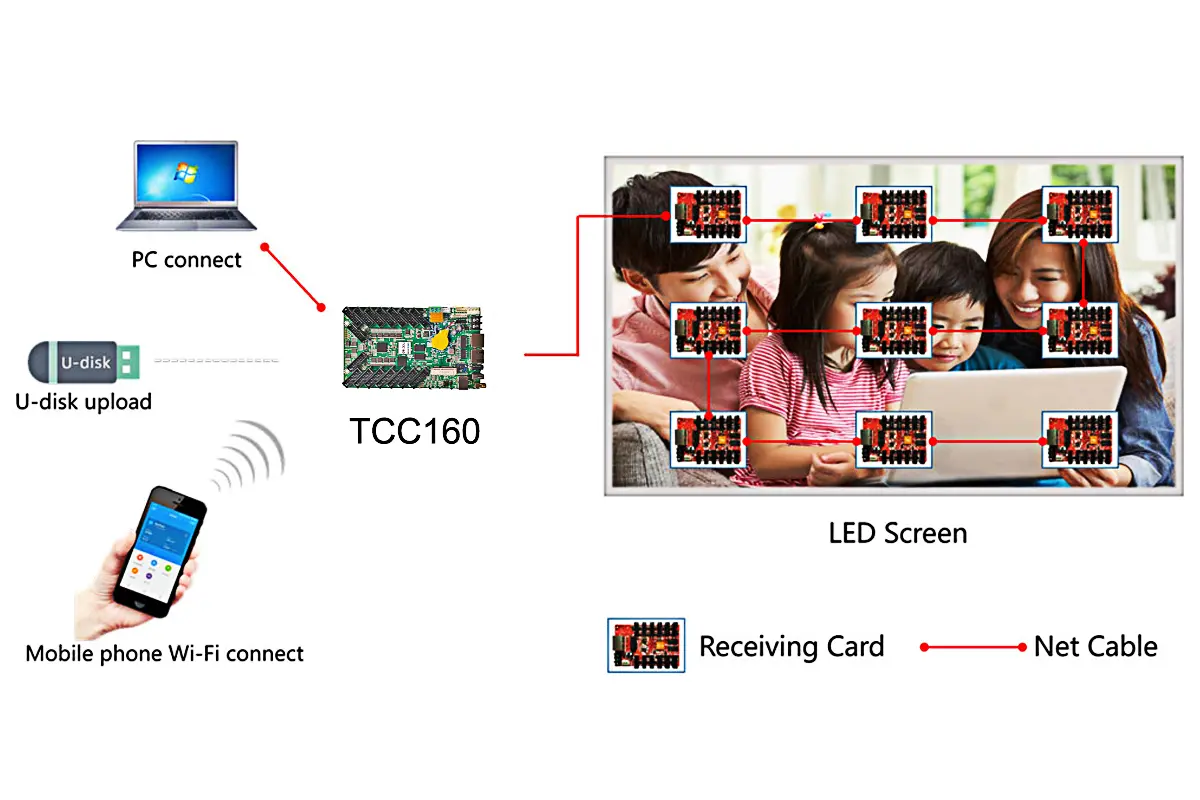
The diagram below shows PC, USB or phone publishing to the TCC160, then LED OUT feeding receiving cards. Direct HUB75E module connections are an alternative compatible layout.
3.4 Color Management and Image Enhancement
- 18bit+: Helps preserve grayscale at low brightness.
- RGB gamma: Adjusts the three channels individually with compatible control functions and NovaLCT.
- Color management: Supports Rec.709, DCI-P3, Rec.2020 and custom gamut settings. A selectable gamut does not guarantee the physical LEDs reproduce its full range.
3.5 Reliability and Maintenance Features
- Dual program backup: Provides a receiving-firmware fallback; it cannot guarantee that every update succeeds.
- Monitoring: Reports receiving-card temperature and voltage.
- Bit errors: Counts faulty packets to help diagnose communication problems; inspect cabling when errors increase.
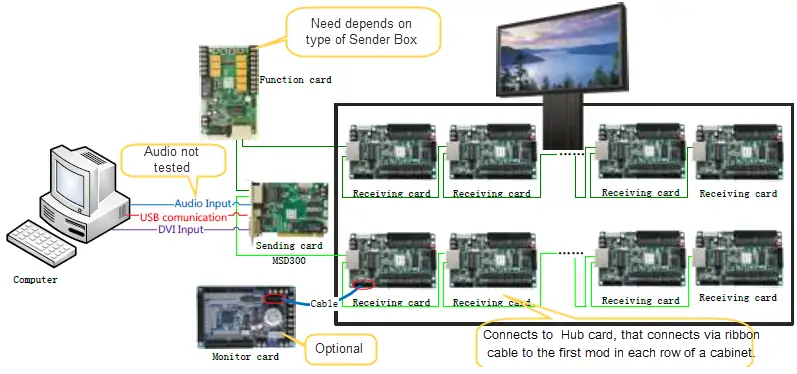
The retained diagram below depicts a separate MSD300 sending-card system, not TCC160 wiring. Its general flow is computer → sending card → receiving cards → modules, with optional function and monitoring cards. Do not treat its DVI connection as a TCC160 input.
4. Novastar TCC160 Specs Breakdown
The following figures come from NovaStar’s V1.0.8 specification. Confirm the document revision and firmware applicable to the supplied board.
1. Electrical Parameters:
- Input: DC 5–12 V.
- Maximum card consumption: 12 W; actual consumption varies with use.
2. Storage and Memory:
- RAM: 2 GB.
- Internal storage: 32 GB; allow space for system files and content updates.
3. Environmental Tolerance:
- Operating temperature: −40°C to +80°C.
- Humidity: 0–80% RH, non-condensing. Check conditions inside the installed enclosure.
4. Media Decoding Specifications:
- Images: JPEG, BMP, GIF, PNG and WEBP; format-specific limits apply.
- Current video list: H.264, H.265/HEVC, MPEG4, VP9 and VP8.
- Decode ceiling: Up to 4096 × 2304 for applicable formats; H.265 reaches 60 fps, while H.264 and VP9 reach 30 fps. GIF is limited to 1920 × 1088.
Check codec, container, frame rate and bitrate together in the specification’s media tables.
5. Dimensions and Weight:
- Overall dimensions: 180.9 × 102.3 × 19.4 mm.
- Net weight: 149.6 g; packaged gross weight: 348.6 g.
- Drawing: four Ø3.5 mm holes; dimensions in millimetres, tolerance ±0.3 mm. Obtain a precision drawing before machining mounting holes.
6. Additional Features:
- Image rotation: 0°, 90°, 180° or 270°.
- Low latency: one frame at the receiving end with driver ICs containing built-in RAM; disabled by default. This is not total system latency.
- Relay: maximum DC 30 V, 3 A switching limit; the relay supplies no output voltage.
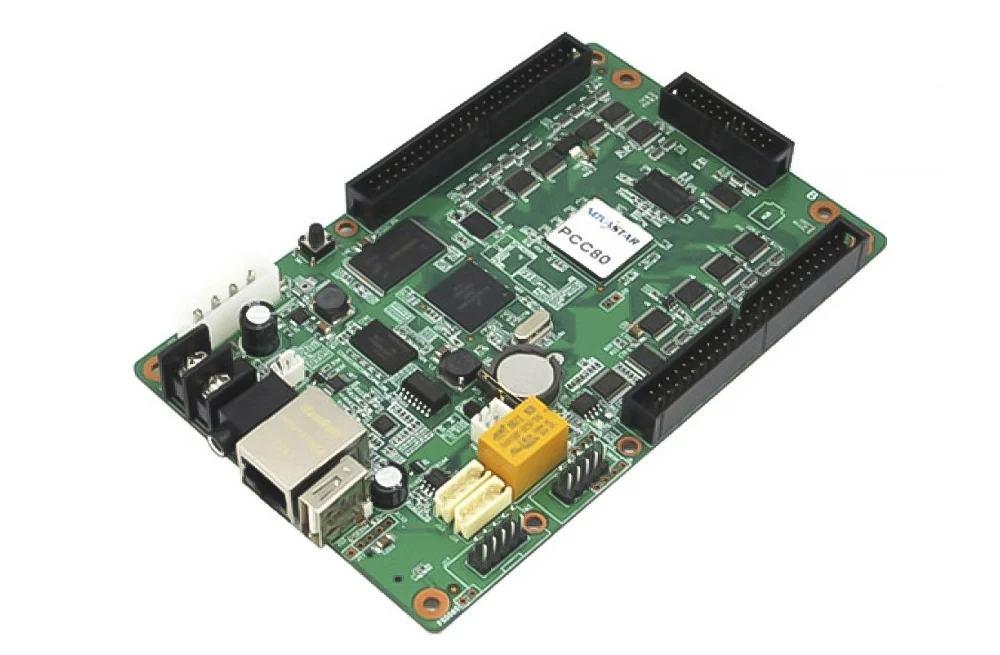
Check the board label when ordering. The retained photograph below is labelled TCC80 and is not a TCC160 reference image.
5. TCC160 LED Card Price and Value for Integrators
No verified current TCC160 selling price is quoted here. Request a dated, itemized offer specifying quantity, currency, delivery terms and warranty. Compare the complete installed cost rather than the card price alone.
- Hardware: Card, power supply, enclosure, cables and any receiving cards.
- Connectivity: Optional 4G/GPS hardware, SIM data charges and any cloud-service fees.
- Commissioning: Module configuration, media testing, installation and support.
Send EagerLED the screen’s pixel dimensions, driver IC, scan ratio and intended playback layout for a compatibility-based quote. Ask the supplier to demonstrate your actual content rather than relying on unsupported return-on-investment claims.
6. FAQs
7. Conclusion
The Novastar TCC160 is a practical candidate for scheduled signage when its module interfaces and pixel limits match the screen. Its integrated design and remote-management options can simplify a suitable installation.
Before purchase, confirm the hardware revision, software workflow, required accessories and enclosure conditions. Before handover, test the complete playlist, network reconnection and saved screen configuration.
Use the linked NovaStar specification as the technical reference and keep a copy of the working configuration for maintenance.
 Colorlight VX20 Configuration Guide: Setup & Specs
 Novastar MBOX600 Pro: Best Settings for LED Screens
Related Posts






Fill In Your Needs In Detail
Fill in the screen usage scene and size you need in “Content”.You will get a quote.