NovaStar TU4K Pro is an all-in-one LED playback control processor that combines Android 13 media playback, video processing and LED sending. It supports up to 13 million pixels with scaling, or 8.8 million pixel-to-pixel, through 20 Ethernet outputs and two 10G optical outputs. It suits meeting rooms, retail displays and showrooms that need local playback plus HDMI and wireless sources. This documentation-based guide explains its specifications, setup, limitations and buying considerations, with links to the manufacturer’s manuals.
1. What is Novastar TU4K Pro?
The NovaStar TU4K Pro combines functions that would otherwise require a media player and a compatible LED controller. Android handles stored content, apps and wireless mirroring; video processing adapts the selected source to the LED screen. Receiving cards inside the cabinets are still required. The TU15 Pro and TU20 Pro offer smaller loading capacities within the same broad product family.
Choose the processor around the actual cabinet resolution, receiving cards and source workflow. A screen’s physical size alone does not determine controller capacity. For an indoor GOB floor LED display, for example, confirm both its pixel count and any separate interactive system requirements before specifying the controller.
The hardware includes an eight-core ARM processor, 8 GB RAM and 128 GB storage. Inputs include two HDMI 2.0 ports, one HDMI 1.3 port and three USB ports. Wi-Fi and hotspot connections can operate together, while Bluetooth supports peripherals. Rated consumption is 53.9 W; actual use varies. See NovaStar’s TU4K Pro specifications V1.2.3 for connector and hardware details.
2. What Novastar TU4K Pro Actually Replaces
Compare the TU4K Pro and TU40 Pro by their documented features. NovaStar’s TU40 Pro specifications V1.1.4 already list 13 million pixels with scaling, 20 Ethernet outputs, two optical outputs, Android 13, 8 GB RAM and 128 GB storage. Those shared specifications mean the model name alone does not establish a capacity upgrade. Check the exact hardware, firmware and source requirements before replacing an installed TU40 Pro.
For a separate player feeding an LED processor, TU4K Pro can consolidate playback and sending when the input, scaling and control requirements fit. Some VX processors already include sending functions, so there is not necessarily a third sending box to remove. Compare the complete signal path before estimating space or cabling savings.
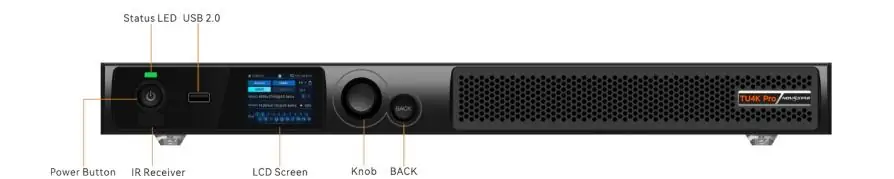
When moving from another controller brand, check receiving-card compatibility, staff familiarity, program migration and remote-management requirements. Request a demonstration using your own content. Front-panel operation uses the LCD, selection knob and Back button; the power button, IR receiver and USB port provide local access as shown below.
3. TU4K Pro Technical Specs that Matter
3.1 Pixel loading and output topology
A 3840 × 2160 wall contains 8,294,400 pixels, within the stated 8.8-million pixel-to-pixel limit. The 13-million figure applies with scaling. Maximum output width and height are 16,384 and 8,192 pixels respectively, subject to the total capacity; these are not dimensions you can use together at their maximum. The Android internal-source canvas has its own 8.8-million-pixel limit and dimension restrictions.
OPT 1 carries Ethernet ports 1–10 and OPT 2 carries ports 11–20. The optical ports are primary outputs, not Ethernet loop-backup ports. Optical modules are supplied separately: match the modules, fiber and converter before ordering. Do not size every port by dividing 13 million by 20; verify the cabinet mapping and output settings. The TU4K Pro user manual states that enabling 10-bit output reduces Ethernet-port capacity by 25%.

3.2 Inputs and video sources
The two HDMI 2.0 inputs support up to 4096 × 2160 at 60 Hz, but their custom-resolution support differs: HDMI 1 does not accept custom resolutions; HDMI 2 does. The current specification lists HDMI 3 (HDMI 1.3) up to 2048 × 1152 at 60 Hz. Confirm the complete timing, color format and bit depth, rather than treating maximum width and height as an unrestricted canvas. See NovaStar’s input specifications.
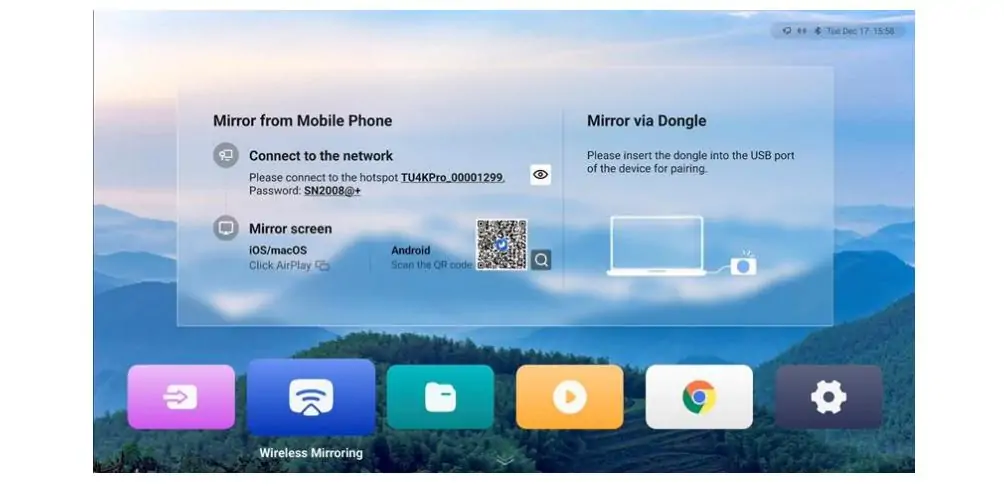
USB supports media and peripherals; test the exact drive format and files before installation. Wireless mirroring supports Windows, macOS, iOS and Android, with methods varying by platform and dongle. Use the network or QR-code instructions shown on the device. For live cameras or tightly timed presentations, use a wired source and measure end-to-end delay on the finished system; this guide does not claim a measured latency.
3.3 Video decoding horsepower
NovaStar’s current specification lists one 8K stream, two 4K streams or five 1080p streams. These are alternative playback configurations, not counts to add together. At standard 8K (7680 × 4320), H.265/HEVC is specified at 24 fps and 14 Mbps; VP9 at 30 fps and 51 Mbps. Intermediate resolutions between 4K and 8K are not supported. See the media decoding table.
8K decoding does not mean the controller drives a native 8K wall. Match exported files to the supported codec and container, then test the full playlist, audio and transitions. Document revisions such as V1.2.3 are specification versions, not firmware version numbers.
3.4 Spec table
| Parameter | Novastar TU4K Pro |
|---|---|
| Max pixel load | 13M with scaling; 8.8M pixel-to-pixel |
| Ethernet outputs | 20× RJ45 (1 Gbps each) |
| Optical outputs | 2× 10G OPT |
| HDMI inputs | 2× HDMI 2.0 + 1× HDMI 1.3 |
| USB ports | 1× USB 3.0 + 2× USB 2.0 |
| Max decode | 8K: HEVC 24 fps / VP9 30 fps; 4K: HEVC up to 60 fps |
| RAM / Storage | 8 GB / 128 GB |
| OS | Android 13.0 |
| HDR | HDR10; SMPTE ST 2084 / ST 2086 |
| Wireless | Dual Wi-Fi + Bluetooth 5.1 |
| Power | 53.9 W rated; 100–240 V AC |
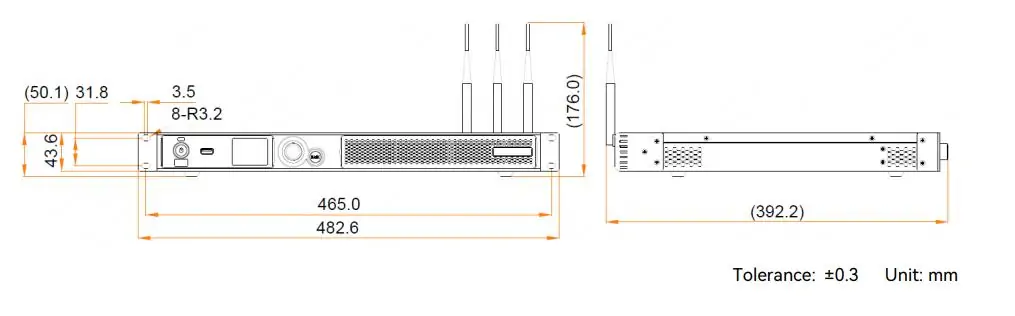
| Dimensions | 445 × 381.8 × 50.1 mm |
| Weight | 4.6 kg |
| Price | Request a current itemized quote |
Dimensions and net weight are reproduced as accessible text above; allow additional installation space for antennas, brackets and cables. Source: NovaStar specifications, physical and electrical data. No verified current selling price is quoted here. Ask whether optical modules, converters, dongles, licenses, taxes and shipping are included.
4. Novastar TU4K Pro Features Worth Paying Attention To
4.1 AI image enhancement
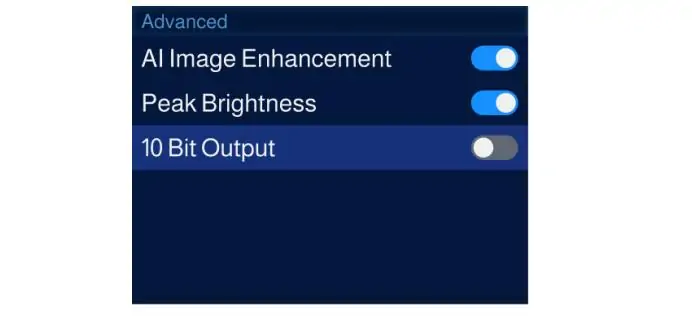
AI Image Enhancement adjusts the image dynamically, but the current specification limits it to the Android internal source and HDMI 1 during single-window video playback. It does not document the same behavior for every input or layout. On a curved rental LED display, compare enhancement on and off using small text, gradients and skin tones before accepting the settings.
Peak Brightness, previously described as Dynamic Engine, is a separate feature. The specification lists A10s Pro or A8s Pro receiving cards, while the manual gives an A10s Pro/Gamma setup condition. Confirm the supported combination with NovaStar for your firmware. Do not assume all AI processing has the same receiving-card requirement. See feature restrictions and the user manual.
4.2 Four display modes
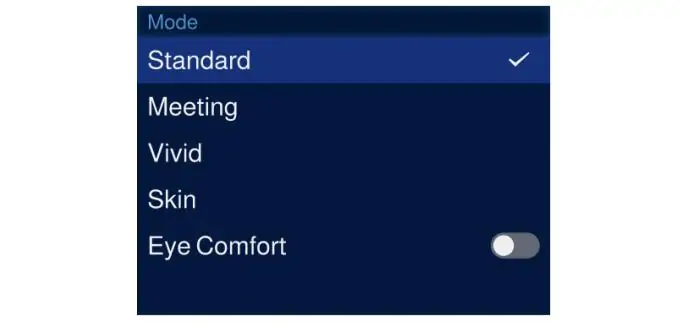
Standard, Meeting, Vivid and Skin are the four display modes shown below. Select a starting preset, then assess brightness, contrast, saturation and color temperature on the actual wall. For presentations, check small lettering against light and dark backgrounds; for video, check faces and shadow detail. The user manual’s Display and Effects section explains the controls. Preset names alone do not establish a specific gamma curve or guarantee accurate color.
4.3 VNNOX Care and cloud management
Use VNNOX for cloud publishing, ViPlex Handy for mobile program editing and playback control, and VNNOX Care for screen configuration and device monitoring. Choose the application that matches the task, and confirm its supported functions on your installed firmware. NovaStar’s Nova Cloud and software downloads provide the relevant applications and documentation.
For multiple sites, check account permissions, network access and publishing procedures during commissioning. Test one device first, record its configuration and verify that a published program plays correctly before deploying it across the fleet. Confirm any subscription, licensing or regional-service requirements with the supplier.
5. Setup: What the First Hour Actually Looks Like
Check mounting clearance using the 445 × 381.8 × 50.1 mm chassis dimensions. Allow space for ventilation, connections and the specified mounting hardware; check the rack or shelf dimensions before installation. Connect AC power, the planned cabinet data paths and your setup display or source.
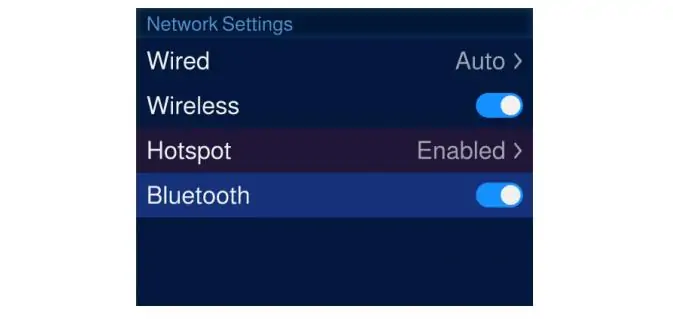
Complete the on-screen initialization prompts for language, remote pairing, service agreement, time zone, Wi-Fi and device name. For Bluetooth remote pairing, point the remote at the IR receiver and hold Home and Menu together until the pairing window appears. The screenshot below shows Bluetooth settings; Bluetooth pairs peripherals, not the internet connection. See NovaStar’s initialization and remote-pairing instructions.
Keep the cabinet supplier’s receiving-card configuration files and wiring map available. VNNOX Care supports screen configuration and photo-assisted topology; verify the detected layout instead of assuming every cabinet was recognized correctly. Check card order, color, brightness and test patterns before saving the configuration to hardware. Escalate unsupported or unusual layouts to the supplier.
For playback, choose USB media, internal storage, HDMI, wireless mirroring or VNNOX publishing according to the job. Test startup playback and recovery after a power cycle, then retain a known-good local program. The existing TU4K Pro user manual V1.2.0 (PDF) remains available; also consult NovaStar’s newer V1.2.1 manual for current instructions.
6. Where Novastar TU4K Pro Fits vs the Rest of the Taurus Lineup
| Model | Pixel Load | Ethernet Ports | Fiber Out | Max Decode | RAM/Storage | OS | Price |
|---|---|---|---|---|---|---|---|
| TU15 Pro | 2.6M | 4 | No | 4K up to 60 fps, codec-dependent | 4GB/32GB | Android 11 | Quote required |
| TU20 Pro | 3.9M scaling / 2.88M pixel-to-pixel | 6 | No | 4K up to 60 fps, codec-dependent | 4GB/32GB | Android 11 | Quote required |
| TU4K Pro | 13M scaling / 8.8M pixel-to-pixel | 20 | 2× 10G | 8K HEVC 24 fps / VP9 30 fps | 8GB/128GB | Android 13 | Quote required |
Sources: NovaStar TU15 Pro, TU20 Pro and TU4K Pro specifications. Decode resolution is not the same as LED output resolution. Scroll the comparison horizontally on smaller screens.
TU15 Pro and TU20 Pro suit smaller canvases; TU4K Pro provides more output capacity and optical connectivity. For right-angle rental LED walls, calculate cabinet pixels and confirm the mapping before choosing. Cloud control is not an exclusive reason to select TU4K Pro: smaller TU models also support networked workflows.
For a detailed comparison, see our TU15 Pro vs TU20 Pro vs TU4K Pro guide. If capacity, live switching or redundancy exceeds this unit’s limits, compare a suitable processor or modular system against those requirements; an H-series model is not automatically the only option.
7. What’s Annoying about the TU4K Pro
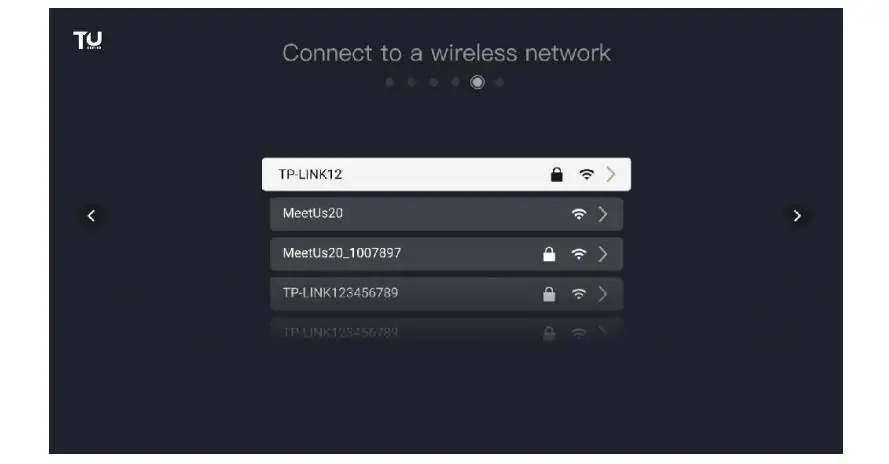
Initial connection needs planning. Record the device and hotspot names, credentials and network settings. The manual describes hotspot connection during LCD initialization as well as wired and wireless network settings. Allow time to configure the network and test access from the operator’s device. The Wi-Fi screenshot below corresponds to selecting a network and entering its password.
Android apps, source switching and restart behavior should be tested with the intended installation. Check how operators can restore a known-good program or source if playback stops, and record the recovery procedure. Keep configuration backups and test recovery without assuming local playback guarantees uninterrupted operation.
Image features have input, receiving-card and firmware restrictions. Verify them before quoting an enhancement or HDR workflow to a customer. For USB playback, the current specification lists FAT32 and NTFS; do not assume every file system or codec will work.
Power comes through a single AC inlet and switch, not an external power brick. The documented hardware does not provide dual hot-swappable power supplies. If continuity matters, specify a tested power and signal-backup arrangement for the complete installation. Optical outputs alone do not provide redundant Ethernet loops.
8. Who Should Buy Novastar TU4K Pro?
NovaStar TU4K Pro makes sense when:
- You need combined playback and sending for a compatible EA1000H8 rental LED display within the relevant pixel and port limits.
- You want centralized content publishing across locations and have checked network and account requirements.
- You use stored programs with HDMI sources and can validate the source-switching workflow.
- Your meeting room, retail space, museum or lobby benefits from Android apps and local playback.
- Guest presenters need wireless mirroring, with a wired fallback available.
Compare alternatives when:
- You require a production switcher’s preview, transitions or camera workflow.
- Your canvas exceeds the applicable scaling, pixel-to-pixel or per-port limits.
- Dual power supplies or hot-swappable hardware are mandatory.
- A live-camera application has a delay target that has not been verified on this system.
- Existing receiving cards or operational requirements favor another compatible controller.
9. FAQs
10. Conclusion
NovaStar TU4K Pro combines local playback, video processing and LED sending for installations that fit its source and output limits. Start with the cabinet pixel count, receiving cards and content format, then confirm the network, optical accessories and control workflow. Treat 8K decode, scaled loading and native output as separate specifications.
Before ordering, obtain an itemized quote and a compatible configuration file. Before handover, test the actual playlist, HDMI sources, wireless mirroring, restart behavior and any backup arrangement. Record the accepted settings and provide the operator with a recovery procedure and copies of the approved programs.
 How to Use an LED Pixel Pitch Calculator: 5 Steps
 How to Choose and Calculate LED Display Size for Your Projects?
Related Posts






Fill In Your Needs In Detail
Fill in the screen usage scene and size you need in “Content”.You will get a quote.