The NovaStar VX600 Pro is an all-in-one LED controller with six Gigabit Ethernet outputs and a stated 3.9-million-pixel load. Its HDMI 2.0 input accepts up to 4096 × 2160 at 60 Hz, but one unit cannot drive a native UHD LED wall. Choose it when the cabinet map, source formats, layer layouts and backup plan fit those limits; the guide below shows how to check them.
Below, you will find specifications, worked pixel calculations, a practical setup workflow, pricing questions, and answers about software and manuals. Hardware facts reference NovaStar documentation; the project examples are planning illustrations, not measured performance tests.
1. What Is the NovaStar VX600 Pro LED Video Processor?
The NovaStar VX600 Pro sits between your video sources and the LED receiving cards inside the cabinets. A source supplies a picture; the processor selects and sizes that picture; the sending outputs deliver mapped image data to the display. This distinction explains why a working laptop connection alone does not prove that the wall is configured correctly.
In a typical installation, the signal path is laptop or media server → processor input → layer layout → output mapping → receiving cards → LED modules. The control computer follows a separate management connection. Label both paths on the wiring drawing. Confusing a control connection with a display output can consume valuable commissioning time.
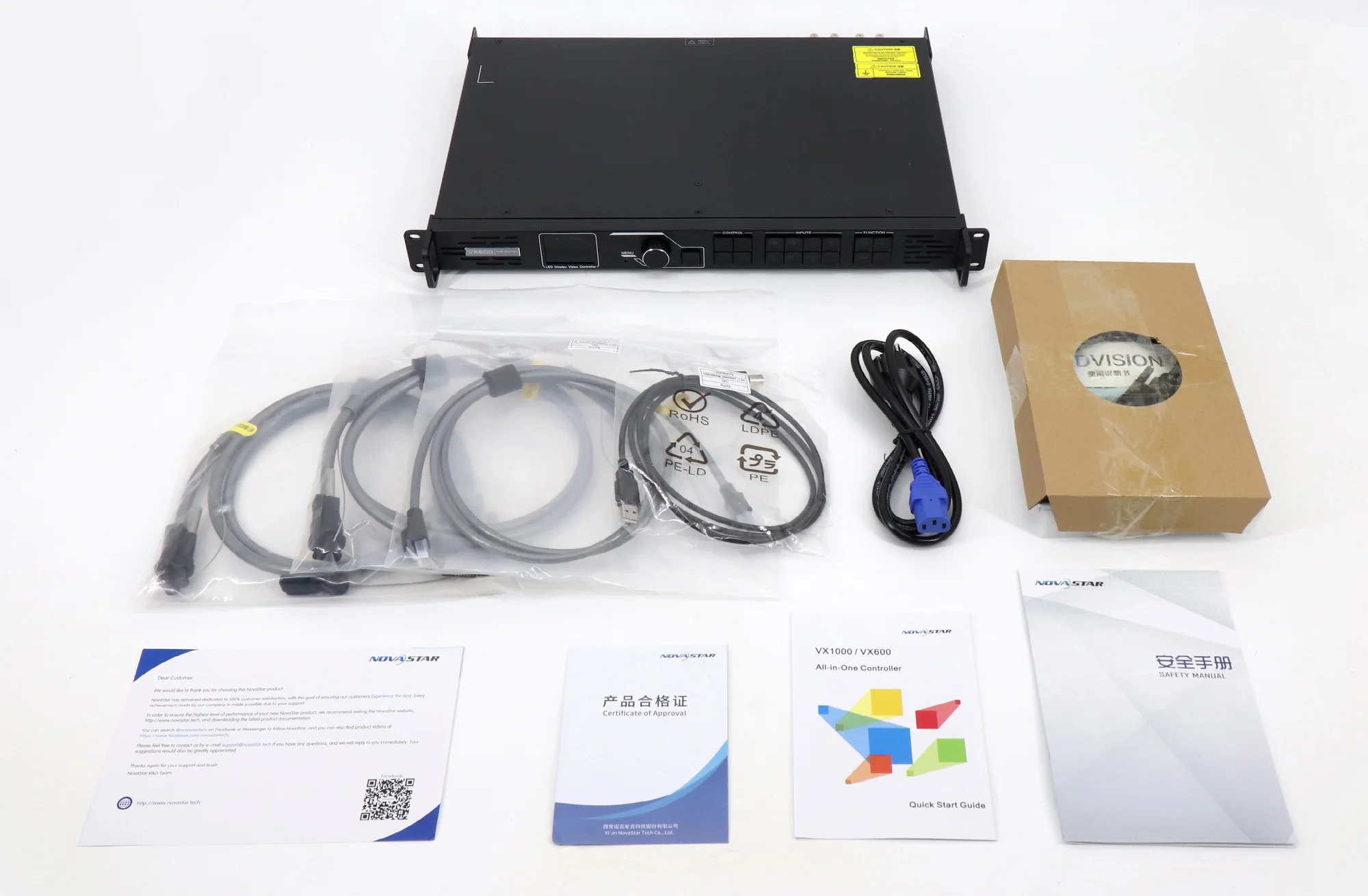
Choose the NovaStar VX600 Pro when one device can cover the required screen load and source workflow. Before ordering, collect the cabinet pixel dimensions, number of cabinets, receiving-card model, source timings, and required backup behavior. Physical screen dimensions and pixel pitch are useful context, but the actual cabinet pixel matrix should drive the final calculation.
For a dependable reference, use the official NovaStar VX600 Pro datasheet, version 1.2.0. Match its revision and the relevant manual to the firmware installed on your unit; later software may change available menus and supported combinations.
2. NovaStar VX600 Pro Specifications and Core Features
Read the NovaStar VX600 Pro specifications as a set of simultaneous constraints. Total pixels, individual port loading, source format, and layer resources all matter. A large number printed in one row does not cancel a limit elsewhere in the signal chain.
| Item | Documented capability | Planning implication |
|---|---|---|
| LED loading | 3.9 million pixels; six Gigabit Ethernet outputs | Calculate the whole wall and each cable run. |
| Output dimensions | Maximum width 10,240; maximum height 8,192 pixels | These are separate limits, not one supported rectangle. |
| HDMI inputs | One HDMI 2.0; two HDMI 1.3 | Use HDMI 2.0 for the documented 4K60 input. |
| Other source options | 3G-SDI, OPT 1, USB media playback | Verify the selected source and connection mode. |
| Monitoring | HDMI 1.3 monitoring output | Separate monitoring from LED sending. |
| Layer resources | Six 2K resources, or one 4K plus two 2K layers | Budget layer resources before building a show. |
| Presets | Up to 256 | Use descriptive names and a rehearsed cue order. |
01. NovaStar VX600 Pro inputs and source preparation
The NovaStar VX600 Pro does not provide native DVI, DisplayPort, or 12G-SDI inputs. Inspect the actual rear panel before specifying adapters. A computer with DisplayPort output needs a suitable conversion path to an available input; a broadcast chain delivering 12G-SDI needs compatible conversion or a different processor architecture.
Ask the source operator for the complete timing, not just “4K.” Resolution, refresh rate, color sampling, and bit depth form one format. Build a test file containing fine text, circles, gradients, and edge markers. If the image is cropped, soft, or distorted, that pattern makes the problem easier to identify than a full-screen promotional video.
02. Layers, scaling, and presets
NovaStar’s VX Pro Series overview explains the layer combinations and preset capability. The NovaStar VX600 Pro should not be described as offering six unrestricted 4K windows. Source resolution and resource allocation affect which layouts are possible.
Sketch each required scene before programming it. Mark the main presentation, camera window, background, and overlay positions in pixels. Preserve the source aspect ratio unless deliberate stretching is part of the design. Test the smallest text from the audience’s actual viewing distance, because a technically correct signal can still be unreadable in a venue.
For a conference, use clear preset names such as Opening, Presentation, Camera, and Holding Slide. Rehearse transitions with the real sources connected. A preset is useful only when the operator knows what it will display and how to recover if a source disappears.
03. Latency, fiber, and resilience
The NovaStar VX600 Pro datasheet lists 1–2 frames in video-controller mode with low latency enabled and zero device frames in ByPass with low latency enabled. ByPass disables video processing. These figures describe the device, not the complete camera-to-screen delay.
For live image magnification, test the whole chain: camera, switcher, converters, processor, receiving cards, and display. Film a common timing reference and compare the direct subject with the screen image. Record the operating mode used for the test so a later change to scaling or processing does not invalidate the result.
Fiber can solve a venue’s cable-routing problem, but it does not add another independent screen-load budget. Confirm optical modules, fiber type, converters, and backup behavior as one bill of materials. Ask the technician to demonstrate the intended failure response before the audience arrives, then document the recovery procedure.

3. NovaStar VX600 Pro vs VX600: Upgrade Decisions
The NovaStar VX600 Pro vs VX600 decision is mainly about source handling and operating workflow. Both models have six Ethernet outputs and a stated 3.9-million-pixel loading capacity. Replacing the older model with the Pro therefore does not automatically solve a screen that needs more output pixels.
| Decision point | VX600 | VX600 Pro |
|---|---|---|
| Ethernet outputs / total load | Six / 3.9 million pixels | Six / 3.9 million pixels |
| HDMI generation | HDMI 1.3 inputs | Adds HDMI 2.0 input for 4K60 |
| DVI input | Available | No native DVI connector |
| Layers | Three layers | Six 2K resources; combinations depend on source size |
| Presets | Ten | Up to 256 |
| USB media source | Not a documented playback feature | USB playback supported |
Comparison references: the original VX600 user manual and NovaStar’s Pro documentation. Treat the existing comparison illustration below as a visual reference; use the documented specifications and text table for purchasing decisions.
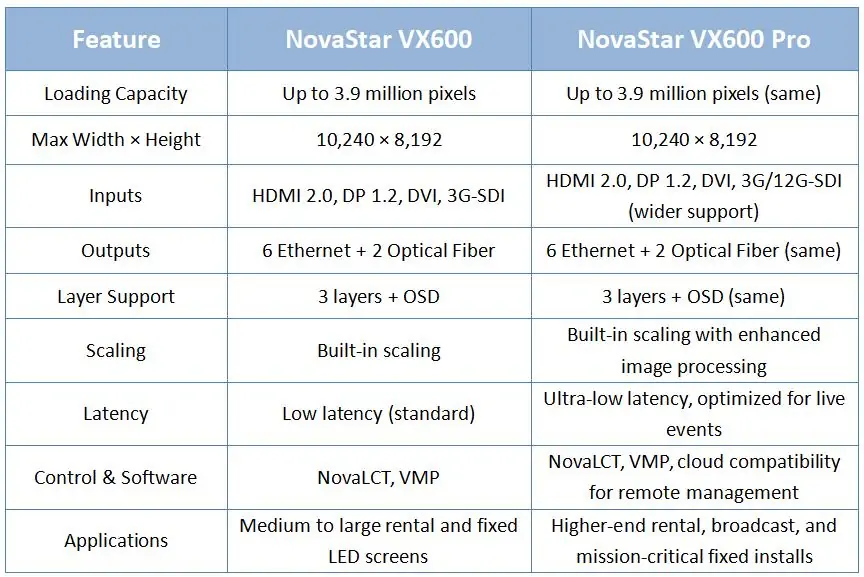
Choose the NovaStar VX600 Pro when the new source or layout requirements justify it. Keeping a working VX600 can make sense for an established system whose inputs, capacity, and support arrangements remain suitable. Test any replacement with the existing cabinets before removing the original controller from service.
For a fuller model-by-model discussion, read our NovaStar VX600 Pro vs VX600 upgrade guide. This article focuses on specifying and setting up the Pro. If the limiting factor is output load, compare the original VX400, VX600 and VX1000 capacity limits and reassess the controller design instead of assuming a newer model name guarantees more capacity.
4. Applications and LED Screen Capacity Planning
The NovaStar VX600 Pro can fit rental stages, conference backdrops, and fixed indoor displays when the complete configuration stays within its limits. Screen area alone is a poor selection rule: two walls of the same physical size can have very different pixel counts.
01. Calculate the pixel load before choosing cabinets
For a rectangular wall, multiply cabinet columns by cabinet pixel width, then cabinet rows by cabinet pixel height. Multiply those two results for the total pixels. Use the cabinet supplier’s actual pixel matrix; a rounded marketing pixel pitch can introduce errors if you reverse-calculate the resolution from millimeters.
For example, assume a cabinet contains 192 × 192 pixels. A layout of 10 cabinets across and five high produces 1920 × 960 pixels, or 1,843,200 pixels. This is an illustrative calculation, not a specification for every cabinet of a particular physical size.
| Example canvas | Total pixels | Initial conclusion |
|---|---|---|
| 1920 × 960 | 1,843,200 | Below the headline load; still check port mapping. |
| 3840 × 960 | 3,686,400 | Below the headline load, with limited spare capacity. |
| 2560 × 1536 | 3,932,160 | Above 3.9 million; revise the design. |
| 3840 × 2160 | 8,294,400 | A native UHD wall exceeds one unit’s load. |
The NovaStar VX600 Pro also requires a workable allocation across individual outputs. Do not divide total pixels by six and assume the result proves compatibility. Whole cabinets, cable direction, receiving-card limits, and the selected operating settings can create an overloaded route even when the overall wall appears to fit.
02. Match the workflow to the venue
For a rental LED display, prioritize repeatable cabling, readable port labels, spare signal cables, and a known holding image. A show technician should be able to reconstruct the approved layout from the drawing without relying on the previous operator’s memory.
For a fixed indoor LED screen, agree on startup behavior, access to the rack, ventilation, and who can change presets. Place the NovaStar VX600 Pro where routine operation and maintenance are practical. The processor does not determine whether the LED cabinets themselves are suitable for an outdoor environment.
For irregular walls, draw both the physical arrangement and the video canvas. Specify whether blank spaces belong in the content or in the mapping. Confirm the receiving-card compatibility required for free-topology features. A written map helps the content designer avoid placing a speaker’s face, subtitle, or sponsor logo across a physical gap.
5. NovaStar VX600 Pro Setup, Software, and Troubleshooting
A reliable NovaStar VX600 Pro setup begins with cabinet documentation and a recoverable configuration. The workflow below is a commissioning checklist rather than a substitute for the model-specific manual. Menu names and supported functions can differ with firmware, so record versions before changing the system.
01. Find the correct manual and software
Use NovaStar’s VX Pro Series user manual, version 1.2.0 for detailed operating procedures. It covers several Pro models; follow the VX600 Pro entries when ports or capacities differ. The NovaStar VX600 Pro software options documented by the manufacturer include NovaLCT, Unico, and the VICP app, alongside front-panel operation.
Start from the manufacturer’s documentation when obtaining software. Check the supported device list and release notes before installing a version on the show computer. Do not assume that VMP instructions written for another controller family apply to the NovaStar VX600 Pro. Keep a copy of the known working installer and configuration with the project handover.
02. Prepare hardware and establish a known signal
Photograph the cabinet labels and record receiving-card types. Confirm mains requirements from the unit label, provide appropriate power distribution, and leave space for ventilation. Connect the planned source to the correct input, then verify the source timing and a recognizable test image before introducing a complex presentation.
Separate display-data cables from management cables in the labeling scheme. Identify each output route by port number, first cabinet, and last cabinet. For fiber, document both ends and any converter. This simple inventory makes it possible to describe a fault precisely when the screen is already assembled.
03. Map the screen and save the configuration
Obtain the correct receiving-card configuration from the cabinet supplier. Back up an existing working system before loading new parameters. Avoid experimenting with unknown cabinet files during a live event: a correct processor model cannot compensate for the wrong module wiring or scan configuration.
In the NovaStar VX600 Pro commissioning process, verify the cabinet matrix and connection order with test patterns. Trace the route on the physical wall, not only on the software diagram. Check all corners, rows, and transitions between ports. When the image is correct, save the settings using the applicable manual procedure and retain a separate project copy.
04. Build layers and verify content quality
Begin with one full-screen source. Set the intended canvas and scaling behavior, then add camera windows or other layers one at a time. Check each source’s crop and aspect ratio before saving a preset. If a layout fails only after adding another window, investigate the available layer resources and input settings first.
Use the NovaStar VX600 Pro with actual presentation material during acceptance testing. Small spreadsheets, thin lines, dark gradients, and skin tones expose problems that a bright demo loop can hide. Ask the client to approve readability from the expected viewing positions and record any content-design changes required.
05. Test backup and diagnose faults systematically
Save a simple recovery scene and rehearse selecting it. Test the approved backup arrangement, then restore the normal wiring and verify it again. Schedule a controlled restart before handover to confirm that saved settings return as intended. Record the procedure and responsible contact for future service.
| Symptom | First checks | Useful evidence to record |
|---|---|---|
| Entire screen blank | Source presence, selected input, layer visibility, screen power, and output state | Input timing and whether a test pattern displays |
| One area missing | Assigned port, first failed cabinet, cable route, and receiving-card power | Port number and last working cabinet |
| Image scrambled | Cabinet parameters and physical connection order | Mapping drawing and supplier configuration file |
| Text cropped or stretched | Source canvas, scaling, crop, and aspect ratio | Source and output pixel dimensions |
| Camera feels delayed | Complete signal chain and processing mode | Measured delay and test configuration |
Change one variable at a time and note the result. If a replacement cable restores a cabinet route, label the failed cable immediately. If only one source fails, compare its timing with a known working source before changing receiving-card parameters. This method reduces the risk of creating a second fault while investigating the first.
6. NovaStar VX600 Pro Price and Buying Checklist
The NovaStar VX600 Pro price should be confirmed in a dated quotation for the exact supply package. An old online price cannot establish today’s delivered cost, warranty terms, or availability. This guide does not present an unverified price as a current offer.
01. Compare the complete supply package
Ask whether the quote includes optical modules, converters, signal cables, a case, configuration assistance, and commissioning. Separate optional accessories from the controller price. Also confirm the shipping destination, taxes, lead time, warranty provider, and procedure for a unit that arrives faulty.
A useful comparison places equivalent packages side by side. A cheaper controller-only offer may require additional hardware or engineering time before it can run the planned wall. Conversely, a comprehensive rental package may include services that a fixed-installation team already provides internally. Compare the costs relevant to your project rather than assuming every extra is necessary.
02. Send a project brief that supports an accurate quote
For a NovaStar VX600 Pro quotation, provide the cabinet model, pixel matrix, row and column count, receiving-card type, and source formats. Add a cable-route drawing and state whether you need live cameras, multiple layers, long-distance fiber, or backup. Include the installation date and the person responsible for commissioning.
Request written confirmation that the proposed configuration fits, including the port allocation and accessories. For a replacement, identify the existing controller and software versions. For a new installation, agree on an acceptance test covering all sources, approved presets, restart behavior, and the specified backup response.
You can contact EagerLED with your screen layout to discuss the controller and LED display as one project. Keep the final drawing and quotation together so purchasing, installation, and support teams work from the same configuration.
7. NovaStar VX600 Pro FAQs
These answers summarize the purchasing and setup questions most likely to affect a project. Expand each question for the relevant limitation or next step.
01. Does the NovaStar VX600 Pro support 4K?
Yes, its HDMI 2.0 input supports up to 4096 × 2160 at 60 Hz. Input acceptance and LED output loading are different specifications. Calculate the native wall pixels independently; a 3840 × 2160 LED wall contains 8,294,400 pixels and exceeds the stated load of one controller.
02. How many pixels can the NovaStar VX600 Pro control?
The stated total is 3.9 million pixels. The wall must also satisfy width, height, individual output, receiving-card, and operating-mode constraints. Treat a total-pixel calculation as the first screening step, then confirm the actual cabinet allocation across outputs before approving the design.
03. Where can I find the NovaStar VX600 Pro manual and datasheet?
Use the official NovaStar datasheet linked in section 1 and the VX Pro Series user manual linked in section 5. Check the document revision against your firmware. A series manual covers several devices, so verify that a connector description or capacity figure applies specifically to your model.
04. Which NovaStar VX600 Pro software should I use?
The documented control options include NovaLCT, Unico, and VICP. Select the tool and compatible version for the task described in the manual. Obtain cabinet configuration files from the display supplier, and keep the working configuration available before making changes or attempting a firmware update.
05. Can the NovaStar VX600 Pro show six video layers?
It provides six 2K layer resources; higher-resolution layers use more of that budget. NovaStar lists a combination of one 4K layer plus two 2K layers. Plan the actual source sizes and layout, rather than interpreting six layers as six unrestricted 4K inputs.
06. Is the NovaStar VX600 Pro a zero-latency processor?
Zero device-frame delay is conditional on ByPass with low latency enabled, according to the cited datasheet. Video-controller processing has a different delay. Cameras, conversion devices, receiving cards, and the display can add latency, so measure the complete installation when live image timing matters.
07. Can I play media from a USB drive?
USB media playback is supported, but the file extension alone does not prove compatibility. Check the manual’s codec, resolution, frame-rate, bitrate, and drive-format requirements. Test the exact media files on the actual unit before a show and keep a known working source ready for recovery.
08. Does upgrading from VX600 increase screen capacity?
The two models share the same stated 3.9-million-pixel total load. The Pro upgrade changes source and workflow capabilities, including HDMI 2.0 and additional layer resources. If your wall is too large, recalculate the controller architecture and port plan instead of relying on the upgrade alone.
8. Conclusion: Is the NovaStar VX600 Pro Right for You?
The NovaStar VX600 Pro is a practical option when your LED load, sources, layer layouts, and operating requirements fit one integrated controller. Its value comes from matching those capabilities to a documented project, not from treating “4K,” “six layers,” or “low latency” as unrestricted promises.
Start with the cabinet pixel matrix, calculate the total and port loads, and confirm the source formats. Then build the required scenes, test the actual content, and rehearse the recovery procedure. Keep the manual revision, software versions, cabinet configuration, and final wiring drawing in the handover package.
Before purchasing a NovaStar VX600 Pro, send the supplier a complete screen plan and ask for a configuration-specific quotation. That gives the installation team a clear basis for commissioning and gives the owner a usable record for maintenance, future content changes, and replacement equipment.
 EagerLED Mid-Autumn Festival and National Day Holiday Notice
 Times Square 3D Billboard: Costs, Locations, Effectiveness & EagerLED Solutions
Related Posts
Fill In Your Needs In Detail
Fill in the screen usage scene and size you need in “Content”.You will get a quote.