For the original NovaStar VX1000, NovaStar VX600 and NovaStar VX400, shortlist the VX400 for a wall within 2.6 million pixels, the VX600 within 3.9 million, and the VX1000 within 6.5 million. These totals are only the first check: cabinet routing, each output load, source timing, layers and backup allocation must also fit. Choose the larger model when it resolves a specific limit in that complete design.
This NovaStar VX1000 vs VX600 vs VX400 comparison covers the original models, without the Pro suffix. The VX400 has four Ethernet outputs and two layers; the VX600 has six outputs and three layers; the VX1000 has ten outputs and three layers. Input connectors and supported timings also differ. Use the comparison table and worked calculations to validate the complete configuration before ordering.
The guide below combines documented specifications with calculated examples and practical commissioning checks. It explains the difference between input resolution and LED output capacity, where an upgrade helps, and what information your supplier needs to validate a complete system. Examples are planning illustrations, not measurements from an installed project.
1. What are the NovaStar VX1000, VX600, and VX400?
The NovaStar VX1000, NovaStar VX600, and NovaStar VX400 are synchronous LED display controllers: they receive a live video signal and deliver display data to compatible receiving cards inside the LED cabinets. Their integrated processing allows an operator to crop, scale, and arrange content before sending it to the screen. The controller sits between the video source and the LED receiving system.
A typical signal path is media computer or presentation switcher, controller input, controller LED output, receiving card, and LED modules. The control computer is used to configure that path. Keep the management connection separate in your planning from the output connections that carry LED data; similar-looking network sockets can perform different jobs.
01. NovaStar VX400: start with a defined screen layout
The NovaStar VX400 is a candidate when a wall fits its four-port architecture and needs a main image plus one picture-in-picture layer. It should not be dismissed as a standard-definition device or restricted to permanent installations. A compact rental wall, meeting-room display, or exhibition screen can all be suitable, provided the actual load and source requirements fit.
For a fixed layout, buying unused capacity may add little value. For a rental inventory, however, check the largest expected cabinet arrangement and the practical cable routes. The same cabinets might be assembled as a wide backdrop one day and several separated scenic sections the next, creating different port demands.
02. NovaStar VX600: more ports and another layer
The NovaStar VX600 adds output capacity and a third layer compared with the VX400. This makes it worth evaluating when the wall grows beyond the smaller model’s capacity, when more cable runs are needed, or when the presentation needs a background and two inset images. It is a selection based on requirements, not a universal recommendation for every medium-size event.
For example, a conference may show slides, a live speaker image, and a remote participant simultaneously. Describe that layout before purchasing. If a production switcher already combines those elements into one finished signal, the controller itself may need fewer layers than the number of original sources suggests.
03. NovaStar VX1000: higher loading and wider input options
The NovaStar VX1000 offers the largest output capacity of these three original models. Its additional outputs are useful for denser walls, longer backdrops, or layouts requiring more independently cabled sections. Its HDMI 1.4 input capability also differs from the HDMI 1.3 connections on the smaller units.
Do not interpret that difference as an automatic picture-quality improvement on an unchanged wall. Perceived sharpness still depends on native screen resolution, content preparation, scaling, calibration, and viewing distance. Upgrading the controller cannot create physical pixels that the cabinets do not contain.
2. NovaStar VX1000 vs VX600 vs VX400: detailed comparison
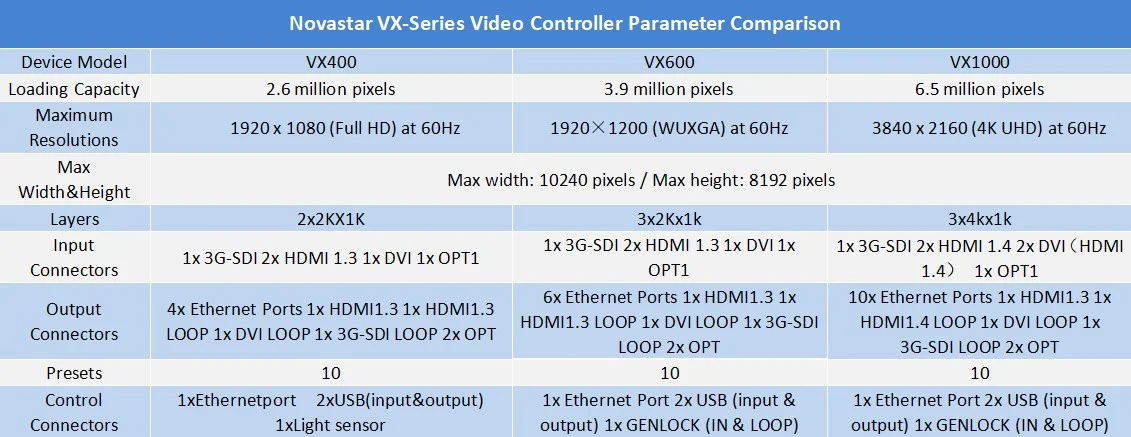
The following table summarizes the original models. Published maximum dimensions and total pixel capacities are separate limits that must be satisfied together. The listed width and height cannot be multiplied to claim an enormous supported canvas. Verify any unusual timing or feature combination against the documentation for the supplied hardware and firmware.
| Specification | NovaStar VX400 | NovaStar VX600 | NovaStar VX1000 |
|---|---|---|---|
| Published total loading capacity | 2.6 million pixels | 3.9 million pixels | 6.5 million pixels |
| Gigabit Ethernet LED outputs | 4 | 6 | 10 |
| Maximum output width / height | 10,240 / 8,192 pixels | 10,240 / 8,192 pixels | 10,240 / 8,192 pixels |
| Layers | 1 main + 1 PIP | 1 main + 2 PIP | 1 main + 2 PIP |
| HDMI inputs | 2 × HDMI 1.3 | 2 × HDMI 1.3 | 2 × HDMI 1.4 |
| Other video input connectors | 1 DVI, 1 3G-SDI, OPT1 | 1 DVI, 1 3G-SDI, OPT1 | 2 DVI, 1 3G-SDI, OPT1 |
| Optical ports | 2; OPT1 has input/output roles | 2; OPT1 has input/output roles | 2; OPT1 has input/output roles |
| User presets | 10 | 10 | 10 |
Specification basis: NovaStar’s original VX-series comparison and model specification documents: VX1000 V1.6.0, VX600 V1.7.1, and VX400 V1.2.0. These figures describe the original devices; they are not a specification table for VX Pro models.
01. Input resolution is different from output pixel capacity
A source resolution describes the video entering the controller. Output capacity describes the LED pixels the controller can drive. A full-HD source can be scaled across a larger LED canvas, but scaling does not restore detail absent from the source. Conversely, receiving a high-resolution input does not guarantee that one controller can drive an LED wall with the same pixel dimensions.
The NovaStar VX1000 specification lists HDMI input at 3840 × 1080 at 60 Hz or 3840 × 2160 at 30 Hz. It should not be described as accepting a standard 3840 × 2160 signal at 60 Hz through one original-model HDMI input. The NovaStar VX400 and NovaStar VX600 documentation lists standard HDMI/DVI input up to 1920 × 1200 at 60 Hz, with additional custom-resolution conditions.
Specify width, height, refresh rate, connector, and color format together. The term “4K” alone is incomplete. A wide, shallow video canvas and a full UHD frame can both be described informally as 4K, yet require different bandwidth and processing arrangements. Test the actual source computer, adapter, cable, and controller as one chain.
02. Layers, scaling, and content preparation
Think of a layer as a separately positioned image within the controller’s composition. Count the images that must be visible simultaneously, then decide where they will be combined. Three source devices connected to the system do not necessarily mean three layers are required if only one appears at a time.
For a presentation wall, prepare slides to match the intended visible aspect ratio and keep essential text inside safe margins. Stretching a 16:9 slide across an extremely wide backdrop distorts faces and graphics. Letterboxing preserves the original proportions; cropping fills the display while removing part of the image. Choose that tradeoff deliberately with the content designer.
Where small text matters, a native-resolution workflow can avoid unnecessary resampling. Request a test file with fine lines, a grid, and representative typography. Inspect it on the actual screen from the intended audience distance. A photograph of a colorful video is a poor substitute for checking whether spreadsheet labels and presentation notes remain readable.
03. Latency, synchronization, and feature combinations
Latency matters when viewers can see both a performer and the live image. Assess the whole path, including camera processing, switching, conversion, controller processing, and LED scanning. A controller’s quoted low-latency figure is not the delay of the complete camera-to-screen system.
The NovaStar VX1000 documentation gives a 20-line input-to-receiving-card delay when both low latency and Bypass are enabled. That operating condition matters: Bypass removes video processing, and mapping restrictions apply. The same document describes restrictions involving Genlock, low latency, 3D, and mosaic functions. Ask the integrator to validate the exact combination needed for the show.
Do not assume that all advertised functions operate together. In particular, using a mosaic source can restrict picture-in-picture operation. Create a short acceptance test describing each required screen state: full-screen presentation, camera inset, backup source, and any special synchronized mode. Confirm the transitions as well as the still images.
04. Original VX models versus VX Pro
The NovaStar VX400 Pro, VX600 Pro, and VX1000 Pro are separate products. Their input and layer specifications must not be copied into an article or quotation for the original NovaStar VX400, NovaStar VX600, or NovaStar VX1000. Ask for the full model name on the quotation, carton, and device label.
For a new purchase, compare current availability and the capabilities of both generations; our NovaStar VX600 Pro specifications and setup guide explains the newer model’s input and layer limits. For an existing fleet, consider common operating procedures, spare units, receiving-card compatibility, and tested configuration files. A familiar model can have operational value, but that value should be weighed against the specific source formats and layouts needed for future projects.
3. How to choose the right NovaStar LED controller
01. Calculate native pixels from the cabinet arrangement
Start with the cabinet’s native pixel dimensions, not its marketing pitch label. Multiply cabinet columns by pixels per cabinet horizontally, then cabinet rows by pixels per cabinet vertically. Multiply those two totals to obtain the wall’s native pixel count. For irregular layouts, also document the output mapping and any gaps between visible sections.
Worked example: a cabinet measuring 192 × 192 pixels arranged 12 cabinets wide and 6 high produces a 2304 × 1152 canvas. The load is 2,654,208 pixels. That exceeds the NovaStar VX400’s published total, even though the difference is only 54,208 pixels. The NovaStar VX600 becomes the next candidate, subject to input, mapping, and individual port checks.
Pixel pitch is useful when comparing physical screen sizes. For an approximate estimate, divide width in millimeters by pitch in millimeters, and repeat for height. Use the manufacturer’s actual module and cabinet resolution for the final calculation because rounded pitch names can introduce errors. Review cabinet options alongside the indoor LED screen range before locking the controller specification.
| Native LED canvas | Calculated pixels | Initial candidate | What still needs checking? |
|---|---|---|---|
| 1920 × 1080 | 2,073,600 | NovaStar VX400 | Port distribution, layers, backup allocation |
| 2304 × 1152 | 2,654,208 | NovaStar VX600 | Cabinet routing and source scaling |
| 2560 × 1440 | 3,686,400 | NovaStar VX600 | Input timing and limited expansion headroom |
| 3840 × 1080 | 4,147,200 | NovaStar VX1000 | Source format, cable map, redundancy |
| 3840 × 2160 | 8,294,400 | None as a single unit | Higher-capacity or engineered multi-controller system |
These are arithmetic comparisons with published total capacities, not approved wiring designs. A candidate can pass this table and still fail because one output is overloaded, a required source timing is unsupported, or the backup arrangement consumes the available connections.
02. Validate every Ethernet output and cable route
Divide the wall into real cabinet chains. Record which cabinets connect to each output, their total pixels, and the direction of data flow. Do not simply divide the overall pixel count by four, six, or ten and assume the result describes an achievable installation.
For example, a 2,073,600-pixel wall split evenly across four outputs would average 518,400 pixels per output. That average is only a starting calculation. If the physical wiring places a much larger group on one output, the average conceals the problem. Rebalance the chains or evaluate a controller with more available outputs.
Ask the supplier to return a port-by-port loading drawing for the agreed operating mode. Include receiving-card limits, cabinet orientation, and the intended frame rate. Keep a labeled copy with the system so technicians can rebuild the arrangement without reconstructing the design during installation.
03. Choose by application and recovery needs
For a conference, prioritize readable content, predictable source switching, and a tested backup presentation feed. For a rental LED display, consider cabinet flexibility, repeated setup, and the largest realistic configuration. For an advertising LED screen, confirm how the external playback device delivers scheduled content and how staff recover from a failed source.
The NovaStar VX400 may be sufficient for a compact, well-defined system. The NovaStar VX600 becomes useful when capacity, routing, or a third layer is required. The NovaStar VX1000 is a candidate when the larger loading budget or its input capabilities solve a documented need. None of these decisions should rely solely on labels such as “small event” or “professional venue.”
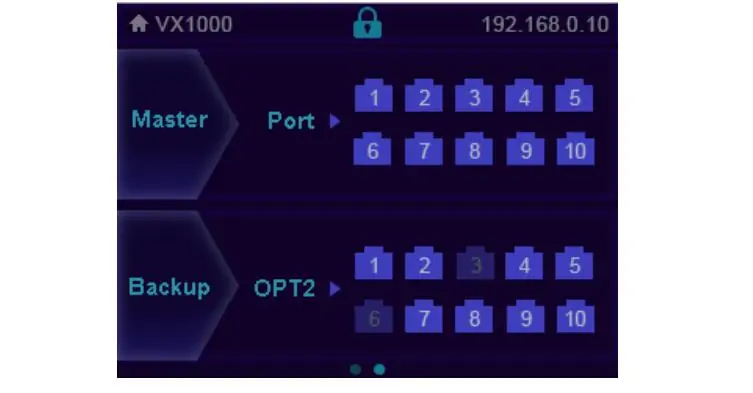
Distinguish spare equipment from automatic redundancy. A spare controller in a case still requires someone to reconnect and configure it. An engineered backup arrangement requires suitable cabling, compatible receiving equipment, stored settings, and a tested changeover procedure. Reserve the necessary capacity rather than counting backup connections as additional independent output.
04. Compare the complete cost and expansion plan
Request like-for-like quotations for the NovaStar VX1000, NovaStar VX600, and NovaStar VX400 configurations that pass the technical checks. Include optical modules where needed, compatible converters, signal adapters, cabling, spare equipment, setup support, shipping, and the applicable warranty terms. There is no reliable universal controller price independent of those purchasing conditions.
Define expansion as an actual future layout. “We may add cabinets” is less useful than a drawing showing the maximum columns and rows, their resolution, and the extra outputs needed. Buying additional capacity can be sensible when that future configuration is known. If the planned wall already exceeds 6.5 million pixels, compare a different architecture instead of assuming one NovaStar VX1000 will accommodate it.
4. Specification references, manuals, and setup checks
01. Match documentation to the exact device
Keep the controller model, hardware revision, firmware version, receiving-card model, and software version in the project handover record. A PDF version number describes a document; it is not necessarily the firmware version installed in the device. Use the manual that matches the equipment, and retain the working configuration before changing firmware or screen settings.
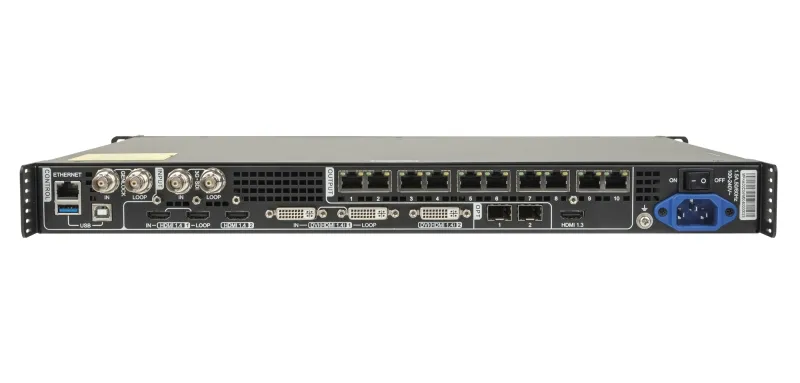
The specification comparison above was checked against NovaStar’s published original-model documents. The existing reference image below is retained for continuity. Use the text table and model-specific documentation when checking a figure, rather than relying on a small image or an undated sales description.
Archived manuals hosted by EagerLED: NovaStar VX1000 user manual V1.2.1 (PDF); NovaStar VX600 user manual V1.2.1 (PDF); NovaStar VX400 user manual V1.0.0 (PDF). These are historical reference copies, not a claim that they are the latest releases. Obtain the matching current documentation before changing an installed system.
Start with the EagerLED download center and request the matching NovaStar VX1000, NovaStar VX600, or NovaStar VX400 manual when the required revision is unclear. Avoid installing a firmware package merely because its filename contains a similar model number. Confirm the update procedure and keep a recovery plan appropriate to the installed system.
02. Commission the display in a repeatable order
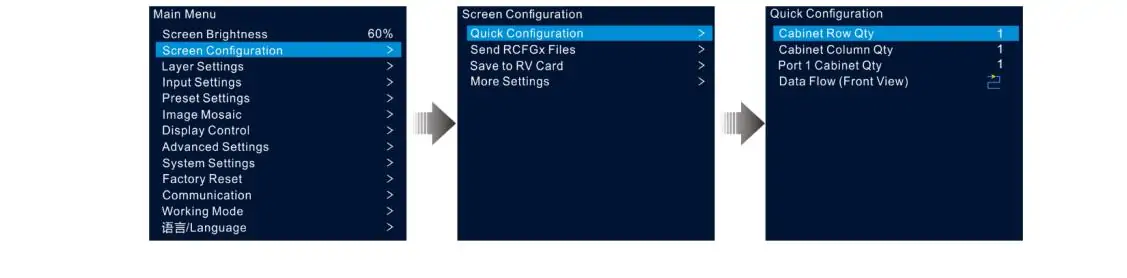
First confirm the cabinet inventory, native resolution, receiving-card configuration, and labeled data connections. Then establish a known supported source signal. Configure the screen map before adjusting creative layouts, so an incorrect cabinet order is not mistaken for a cropping or scaling problem.
Next check solid colors, grayscale steps, gradients, a pixel grid, and representative video. Inspect cabinet boundaries, color consistency, fine text, and motion. Save the validated configuration and create clearly named presets for the real presentation states. Test those presets using the actual laptops and adapters that will be used on site.
Finally, simulate the expected recovery actions during rehearsal. Change to the backup source, reconnect a known cable path, and confirm that technicians can restore the intended screen state. Record what was tested, the operating mode, and any limitations. A documented recovery procedure is more valuable than an unqualified claim that the system has “seamless backup.”
03. Diagnose the symptom before changing hardware
A missing picture across the entire wall suggests checking source selection, input detection, output state, and the signal chain first. A missing section suggests checking its assigned output, cable path, cabinet power, and receiving configuration. A scrambled but illuminated wall suggests a mapping or cabinet-configuration issue. Change one variable at a time and preserve a known working setup.
If an image is stretched or clipped, compare source resolution, crop region, layer dimensions, and the wall’s native aspect ratio. If cameras show bands, assess camera shutter settings, LED refresh behavior, brightness, scan configuration, and synchronization together. A camera artifact is not proof that the controller lacks enough total pixels.
5. NovaStar VX1000, VX600, and VX400 FAQs
01. What is the main difference between the NovaStar VX1000, VX600, and VX400?
The main selection differences are total loading capacity, output-port count, input capability, and layers. The original NovaStar VX400, NovaStar VX600, and NovaStar VX1000 provide four, six, and ten LED Ethernet outputs respectively. Choose using the native wall resolution and wiring plan, then check the simultaneous images and source formats required by the production.
02. Is the NovaStar VX1000 a 4K controller?
The original NovaStar VX1000 accepts 3840 × 1080 at 60 Hz or 3840 × 2160 at 30 Hz through its specified HDMI inputs. Those are different from full UHD at 60 Hz. Its 6.5-million-pixel output rating is also below the 8,294,400 pixels in a native 3840 × 2160 LED wall. Check input timing and output loading independently.
03. Can the NovaStar VX400 run a full-HD LED wall?
A 1920 × 1080 wall contains 2,073,600 pixels, below the NovaStar VX400's 2.6-million-pixel published total. That makes it a candidate, not an automatic approval. The four output chains, receiving cards, operating mode, and any reserved backup connections must also support the proposed design. Prepare a cabinet map before confirming the purchase.
04. When should I choose the NovaStar VX600 instead of the VX400?
Evaluate the NovaStar VX600 when the wall exceeds the smaller controller's total capacity, needs more output connections, or requires a main image with two PIP layers. A third layer can justify the change even when the total pixel count is modest. If an upstream switcher creates the complete composition, assess whether that extra controller layer is actually needed.
05. Can one NovaStar VX1000 drive multiple LED sections?
Multiple physical sections can form part of an engineered screen map, provided the total load, per-port limits, source arrangement, and mapping constraints are satisfied. Ten output ports do not mean ten independent video programs. Show every section and its content requirement in the design drawing so the integrator can determine whether one composition or multiple controllers are appropriate.
06. How do you unlock the NovaStar VX1000 front panel?
The original NovaStar VX1000 specification instructs users to hold the rotary knob and ESC button simultaneously for at least three seconds to lock or unlock the front-panel buttons. This addresses the button lock only. If the display remains blank afterward, continue with input detection and signal-path checks rather than assuming the lock caused every symptom.
07. What shutter speed should I use with the NovaStar VX1000?
Shutter speed is a camera setting, so there is no single VX1000 shutter-speed specification. Test the camera's exposure timing against the actual LED wall's refresh and scan behavior, the content frame rate, and any synchronization arrangement. Use the production cameras during rehearsal and check moving footage as well as still frames before settling on settings.
08. Does fiber increase the controller's pixel capacity?
Fiber changes how display data is transported; it does not add an independent pixel budget to the controller. Plan the supported optical mode, matching modules, converter, cable type, and destination. A copied or backup output carries an existing signal. Do not add optical capacity to Ethernet capacity when calculating how many unique LED pixels one unit can drive.
09. Are NovaStar VX Pro specifications interchangeable with original VX specifications?
No. NovaStar VX1000 Pro, VX600 Pro, and VX400 Pro are distinct products. Similar naming and output counts do not make their inputs, layers, software workflow, or firmware interchangeable. Compare the exact model documents and request an unambiguous quotation. Existing owners should also verify receiving-card compatibility and preserve their working configuration before considering a migration.
6. Conclusion: match the controller to the complete system
The NovaStar VX1000 vs VX600 vs VX400 decision becomes clearer when you work from a complete signal and cabinet plan. Start with native pixels, validate each output chain, identify the source format, count simultaneous layers, and reserve resources for the required backup method. This sequence avoids buying a controller that looks adequate in a headline comparison but fails a practical installation requirement.
Use the NovaStar VX400 for a compatible layout within its capacity and layer requirements. Evaluate the NovaStar VX600 when more loading, ports, or an additional layer is needed. Consider the NovaStar VX1000 when its higher capacity and input capabilities match the project. For full UHD LED output or requirements beyond these models, request a different controller architecture.
To obtain a configuration recommendation, send EagerLED your cabinet resolution, cabinet quantity and layout, video sources, required frame rate, and backup expectations. Include future expansion and cable distances. Those details allow the proposed controller, receiving system, and supporting equipment to be checked together before you commit to the order.
 COB vs SMD LED Display: Which is Best
 48Pcs Large EA1000TOR Outdoor Rental Transparent LED Walls
Related Posts






Fill In Your Needs In Detail
Fill in the screen usage scene and size you need in “Content”.You will get a quote.