
NovaStar VX600 Pro vs VX600: both controllers support a maximum of 3.9 million LED pixels and six Gigabit Ethernet outputs. The Pro adds HDMI 2.0 input up to 4K/60, six 2K layer resources, USB media playback, Unico web control, and 256 presets instead of 10. It does not increase the maximum LED pixel count.
Choose the Pro when those input or operating features solve a project requirement. An existing VX600 can remain suitable for supported HD sources and simpler layouts. This comparison uses manufacturer documentation; it is not a hands-on latency or image-quality benchmark.
- 1. VX600 and VX600 Pro: what each one actually is
- 2. VX600 Pro vs VX600 specs: what changed and what didn’t
- 3. 4K vs 1080P input: HDMI 2.0 is the biggest reason to pick the VX600 Pro
- 4. 6 layers, 12-bit processing, and 3D: where the VX600 Pro pulls ahead
- 5. Unico web control, USB playback, and 256 presets: running the VX600 Pro on site
- 6. VX600 Pro price vs VX600: is the upgrade worth it, and who should buy what
- 7. Common VX600 Pro misconceptions and FAQ
- 8. FAQs
- 9. Conclusion
1. VX600 and VX600 Pro: what each one actually is
1.1 VX600 — discontinued all-in-one controller
The VX600 combines video processing, scaling, and LED sending in one controller. It has six Ethernet outputs and a maximum loading capacity of 3.9 million pixels. Its HDMI 1.3 and DVI inputs support 1920 × 1200 at 60 Hz as a standard resolution, with limited custom formats. See the VX600 specifications V1.7.1.
NovaStar lists the VX600 under Discontinued in its download catalog. Manuals and firmware remain available there. For remaining stock or a used unit, verify condition, firmware, warranty, and local support with the seller rather than assuming that every offer has the same coverage.
1.2 VX600 Pro — new hardware, not a firmware bump
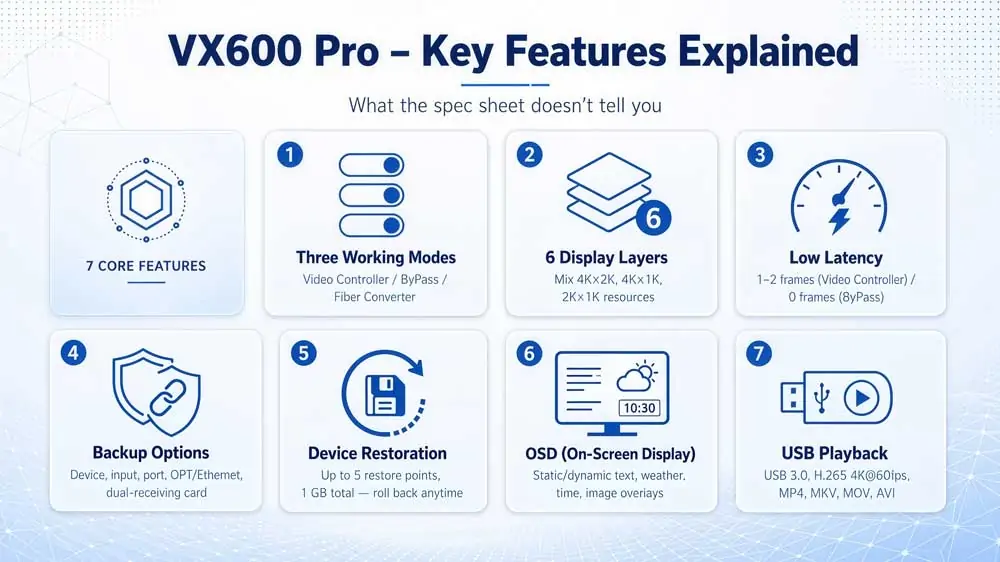
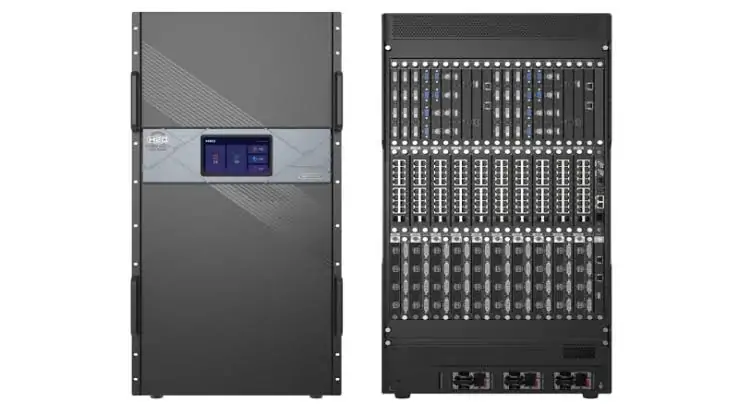
The VX600 Pro is a separate model with different connectors and functions. It retains two HDMI 1.3 inputs and adds HDMI 2.0; the VX600’s DVI input is absent. Unico web/client control and USB playback are further differences. The feature image below summarizes these capabilities; the text and table explain their limits. Reference: VX600 Pro specifications V1.4.0.
2. VX600 Pro vs VX600 specs: what changed and what didn’t
| Feature | VX600 | VX600 Pro |
|---|---|---|
| Max standard input | 1920 × 1200/60 Hz via HDMI 1.3 or DVI | 4096 × 2160/60 Hz via HDMI 2.0; format limits apply |
| Video inputs | 2 HDMI 1.3, DVI, 3G-SDI, adaptive OPT 1 | HDMI 2.0, 2 HDMI 1.3, 3G-SDI, adaptive OPT 1, USB playback |
| Layers | 3 layers | 6 × 2K resources; a 4K layer uses 4 |
| User presets | 10 | 256 |
| Color depth | 8-bit HDMI/DVI formats in the datasheet | Up to 12-bit input; LED output selectable at 8/10-bit |
| 3D support | No dedicated 3D connector listed | 3D function; compatible emitter and glasses required |
| USB media playback | Not listed | Decodes up to 4K files; USB source fixed at 1920 × 1080/60 Hz |
| Audio I/O | HDMI embedded input; output via multifunction card | Independent 3.5 mm input/output plus embedded audio support |
| Bypass latency | 20 lines with Low Latency and Bypass enabled | 0-frame device delay with Low Latency and ByPass enabled |
| Control | Front panel, NovaLCT, V-Can | Front panel, NovaLCT, Unico web/client, VICP app |
| Pixel capacity | Up to 3.9 million | Up to 3.9 million |
| Ethernet outputs | 6 × Gigabit | 6 × Gigabit |
| Optical ports | 2 × 10G; OPT 1 input/output, OPT 2 output | 2 × 10G; OPT 1 input/output, OPT 2 output |
| Maximum output axes | Width 10,240 or height 8,192 pixels | Width 10,240 or height 8,192 pixels |
| Dimensions (W × D × H) | 483.6 × 351.2 × 50.1 mm | 482.6 × 302.2 × 50.1 mm |
| Net weight | 4.0 kg | 3.9 kg |
| Price | Request dated stock/used quote | Request dated new-unit quote |
Sources: VX600 datasheet, VX600 Pro datasheet, and VX Pro user manual V1.4.1. Maximum width and height are separate limits, not a 10,240 × 8,192 canvas. Total pixels, port loading, frame rate, topology, and enabled functions still constrain the screen. A 4K input does not mean either unit can send a full 4K UHD wall at the stated 3.9-million-pixel limit.
3. 4K vs 1080P input: HDMI 2.0 is the biggest reason to pick the VX600 Pro
3.1 VX600 input resolution limits
The VX600 accepts more than 1080p: its standard HDMI/DVI limit is 1920 × 1200/60 Hz. The datasheet also lists 3840 × 648/60 Hz as a custom format. That wide format is not full 3840 × 2160 UHD. Set a laptop or media server to a supported output, or use a suitable upstream scaler when the source must remain 4K.

3.2 The Pro does proper 4K
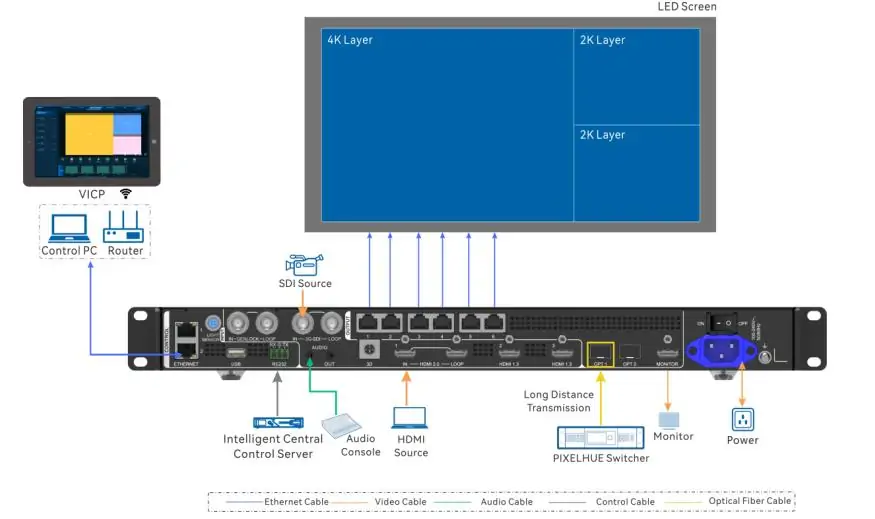
The Pro’s HDMI 2.0 input accepts up to 4096 × 2160/60 Hz with supported color formats and HDCP 1.4/2.2. It retains both HDMI 1.3 inputs. The two rear-panel images show this connector difference.
Both models already have adaptive OPT 1 for compatible optical input or output; fiber input is not a Pro-only addition. Plan the matching upstream/downstream hardware and optical modules. The Pro’s front USB port adds file playback, with different limits from its HDMI 2.0 input.
3.3 Check your source formats
List each source’s actual resolution, frame rate, HDCP requirements, and color format. Then test negotiation, scaling, and recovery after reconnecting it. Choose the Pro if direct 4K HDMI input is required. If the source can supply a supported HD output and the wall fits the loading limits, the VX600 may already cover the job.
4. 6 layers, 12-bit processing, and 3D: where the VX600 Pro pulls ahead
4.1 3 layers vs 6, on an actual show
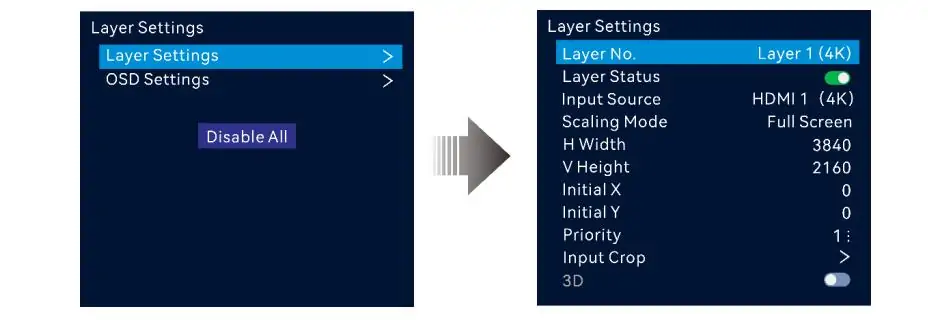
The VX600 offers three layers. The Pro provides six 2K × 1K layer resources, not six unrestricted 4K layers. A 4K × 2K layer consumes four resources; a 4K × 1K layer consumes two. The selected input-connector capacity determines the resource use.
For example, one 4K layer plus two 2K layers uses all six resources. Sketch the required layout before buying. The layer-setting screenshot illustrates position and size controls; check source availability as well as layer count. A backup source need not occupy a visible layer, and a scrolling text OSD is a separate function.
4.2 12 bit color: sometimes obvious, sometimes invisible
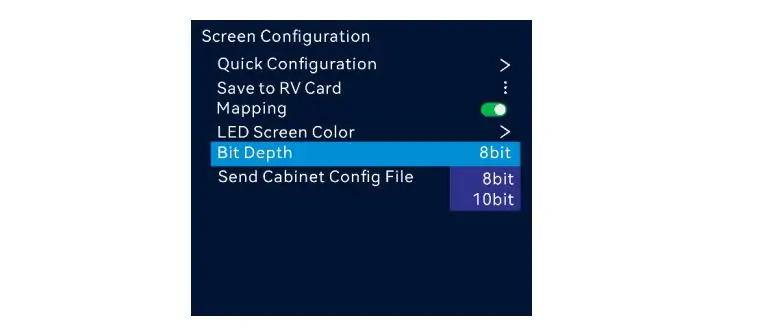
Eight-bit values provide 256 levels per channel; 12-bit values provide 4,096. However, input bit depth is not the same as LED output bit depth. The Pro manual lists 8-bit and 10-bit output choices. Its HDMI 2.0 table supports 4K 4:4:4 at 60 Hz for 8-bit, while 12-bit 4:4:4 at that resolution is limited to 30 Hz. See Video Source Features and the output bit-depth settings.
For a wall or LED podium display, test gradients with the actual source, receivers, and panels. The bit-depth screenshot shows a selectable setting, not a guarantee of visible improvement.
4.3 3D: niche, but there if you need it
The Pro supports stereoscopic 3D. NovaStar specifies EMT200 Pro via Ethernet, or a compatible third-party emitter through the dedicated 3D connector, with matching glasses. Side-by-Side and Top-and-Bottom formats halve output capacity when 3D is enabled. Confirm receiver compatibility and required frame rate before specifying an exhibit. This glasses-based function is different from a perspective-based “naked-eye 3D” video or an ordinary virtual-production backdrop.
5. Unico web control, USB playback, and 256 presets: running the VX600 Pro on site
5.1 The VX600: front-panel and desktop control
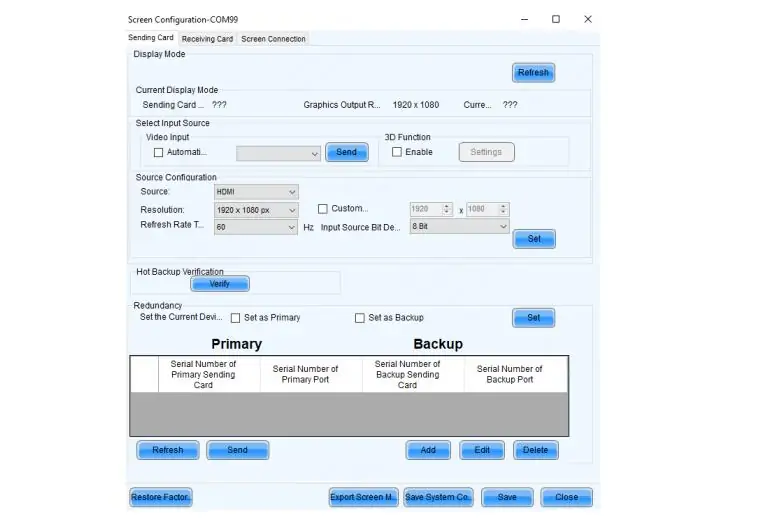
The VX600 supports front-panel operation, NovaLCT, and V-Can; it is not limited to adjustments made while standing at the rack. Its Ethernet control connection supports a control computer. Plan the control-network connection and use the appropriate software for mapping, layers, and presets. The NovaLCT image illustrates the configuration software. These options are listed in the VX600 datasheet.
5.2 The Pro: control it from an iPad across the room
The Pro adds Unico web and client control, VICP mobile control, and an optional remote. For web operation, connect the control device to a network that can reach the processor and open its configured IP address. A tablet can be useful near the screen, but check browser behavior and available functions on the actual device. Keep a saved configuration and a fallback control method for events.
5.3 10 presets vs 256
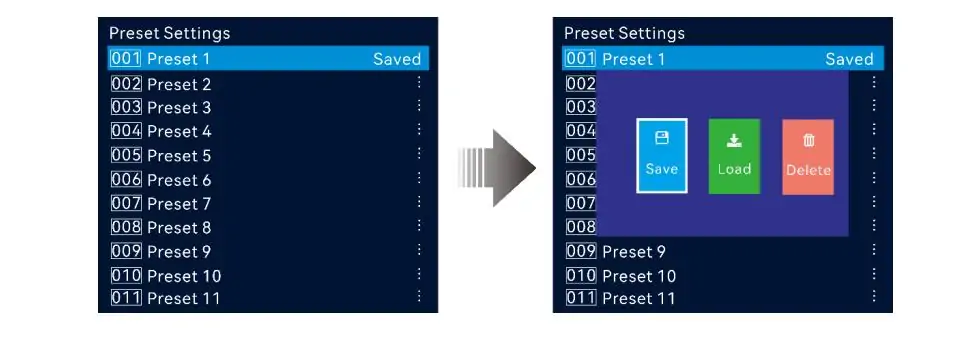
The VX600 stores up to 10 user presets; the Pro stores up to 256. The additional slots help retain more layouts, but they are not unlimited and do not replace configuration backups. Use names that identify the venue, source layout, and intended screen. After changing cabinet mapping or source formats, verify each required preset before the event. The screenshot shows the Pro’s preset controls.
5.4 USB playback and zero frame bypass
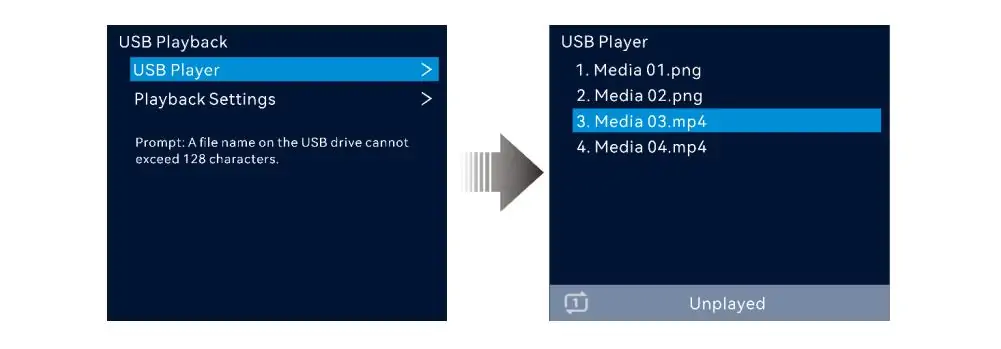
The Pro decodes H.264 files up to 3840 × 2160/30 fps and H.265 up to 3840 × 2160/60 fps, but the resulting USB source is fixed at 1920 × 1080/60 Hz. Supported file systems include NTFS, FAT32, and exFAT on a single-partition drive. Test files and looping behavior before using it for an exhibition or right-angle rental display.
NovaStar specifies zero-frame device delay only with ByPass and Low Latency enabled. In video-controller mode it lists 1–2 frames with Low Latency. This does not mean zero camera-to-screen delay. Genlock and Low Latency cannot run together in ByPass. Check the latency and function-limitation tables and measure the complete signal chain for IMAG.
6. VX600 Pro price vs VX600: is the upgrade worth it, and who should buy what
6.1 What the extra money actually buys
A fixed $200–$400 premium or percentage saving cannot be assumed across countries, sellers, and used-unit conditions. Request dated quotes with the same tax, shipping, warranty, accessories, and support terms. No universal retail price is established by the technical documents used here.
Compare the total system cost: the Pro may avoid an external scaler or playback computer in a suitable workflow. An existing VX600 may need neither. Price the equipment your project actually requires.
6.2 Get the Pro if
- You need supported 4K HDMI input directly into the processor.
- Your layout exceeds the VX600’s three layers and fits the Pro’s six-resource budget.
- Unico control or additional presets simplify a tested operating workflow.
- USB playback meets the required file formats and 1080p source-output limit.
6.3 The VX600 still works for
- Fixed installations or indoor LED church displays with supported HD sources, adequate pixel capacity, and suitable layouts.
- An existing system that passes image, control, and reliability checks. Retain configuration backups and plan support or replacement before a failure.
7. Common VX600 Pro misconceptions and FAQ
7.1 Misconceptions that keep floating around
“The Pro drives more pixels.” Both list up to 3.9 million. For a larger wall, select a controller or synchronized system that meets the actual pixel and port requirements.
“Any 3840-pixel input is full 4K.” A wide custom VX600 timing is not UHD. Check both dimensions and frame rate.
“The Pro is a firmware upgrade.” It is a separate hardware model; installing Pro firmware does not add its connectors or functions.
“Always buy the Pro.” Match source formats, layer resources, playback, and control needs to the project. Also verify the receiving cards and intended operating modes before replacing a working controller.
8. FAQs
9. Conclusion
The VX600 Pro’s main advantages are direct 4K HDMI input, more layer resources and presets, USB playback, and newer control options. Its output pixel ceiling remains the same as the VX600’s.
Choose from a verified source list, screen map, and operating workflow. Compare complete quotes, test the required modes, and keep configuration backups. For related mapping concepts, see the NovaStar VX1000 setup guide, while following the manual for your exact controller model.
 Novastar VX1000 Setup Guide: Working Modes, Backup Config, and Tips
 Grayscale in LED Displays: Complete Guide to Image Quality
Related Posts
Fill In Your Needs In Detail
Fill in the screen usage scene and size you need in “Content”.You will get a quote.



