The NovaStar BR460-1 combines an LED receiving card and an AC-to-DC power module on one board. It accepts 90–264 VAC and supports up to 512 × 384 pixels at 60 Hz, depending on controller and source bit depth. This specification-based review explains compatibility, installation limits, and buying checks for your LED display; it does not present hands-on performance tests.
1. What is the NovaStar BR460-1 LED Receiving Card?
NovaStar designed the BR460-1 to receive display data and power compatible screen modules within an LED cabinet. It still needs a compatible sending controller, module configuration, and correctly engineered cabinet. See NovaStar’s BR460-1 specification V1.2.1 for the documented capacities.
The board includes electrical protection functions, but these do not replace correct grounding, insulation, and thermal design. For outdoor displays, check the complete cabinet’s environmental protection; a temperature range alone does not establish weather resistance.
2. Key Features of the BR460-1 LED Control Board
2.1 Power Module and Receiving Card Integration
Combining power conversion and data reception can reduce separate components. Before replacing an existing board, verify module voltage, current demand, connector pinout, and mounting dimensions. Physical fit alone is insufficient.
2.2 Advanced Color Management
Color management supports Rec.709, DCI-P3, Rec.2020, and custom gamuts. Select the setting that matches the content and display calibration. A supported gamut setting does not establish the LEDs’ actual color coverage.
2.3 18bit+ Grayscale Enhancement
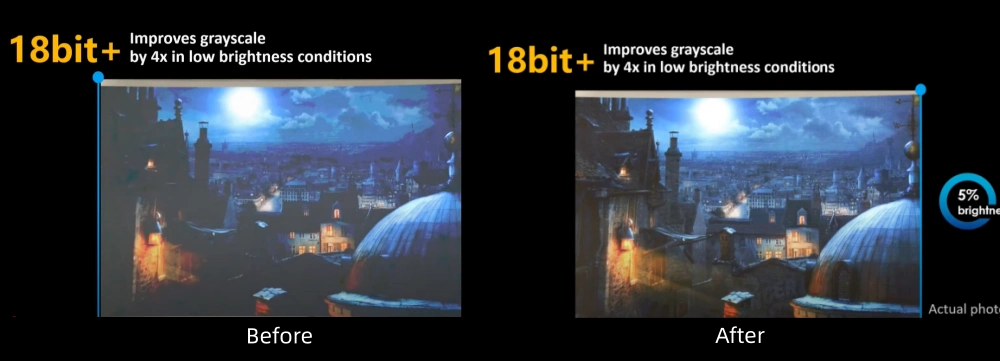
NovaStar describes 18bit+ as a fourfold grayscale improvement at low brightness. Treat this as a manufacturer feature claim, not a measured result from this review. Check dark gradients at the intended brightness.
2.4 HDR Support
The documented HDR formats are HDR10 and HLG. Confirm HDR support throughout the source, controller, and display configuration before purchase. See the manufacturer’s image-processing features; the board alone cannot guarantee a particular HDR viewing result.
2.5 Pixel-Level Calibration
Pixel-level brightness and chroma calibration works with NovaStar’s calibration system. Keep the correct calibration data for the modules in service, and check uniformity again after replacing modules or mixing production batches.
2.6 Low Latency and Loop Backup
NovaStar specifies one-frame latency at the receiving-card end, only with driver ICs that have built-in RAM. Total system latency includes other devices. Loop backup requires primary and backup cabling; it is not protection against every failure. Feature conditions.
2.7 Smart Module Compatibility
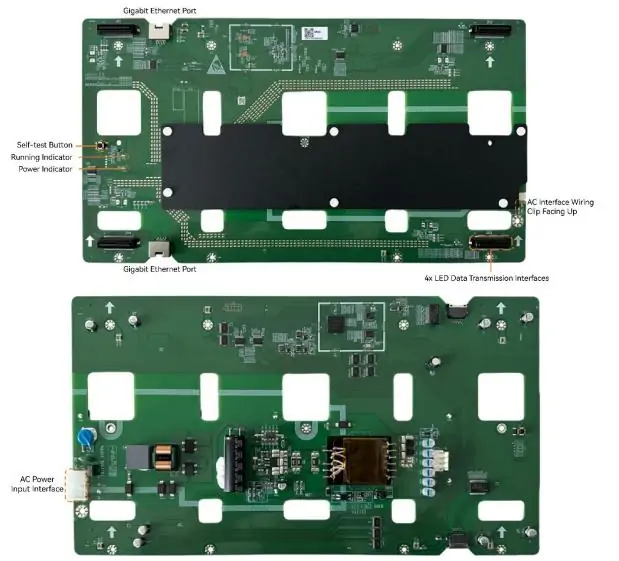
Smart-module functions require dedicated firmware and compatible modules. The diagram below identifies two Gigabit Ethernet ports, four LED data interfaces, an AC input, a self-test button, and running/power indicators. Verify connector orientation against the supplied hardware.
3. NovaStar BR460-1 Specifications Overview
The following are manufacturer specifications, not independent test measurements. Source: BR460-1 V1.2.1 electrical and physical specifications.
- AC input: 90–264 VAC
- Rated output current: 15.5 A
- Output voltage: default 3.0 V; jumper settings 3.8/4.0/4.2 V
- Maximum load per card, PWM driver ICs, 60 Hz:
- M3: 512 × 384 (8-bit); 512 × 256 (10/12-bit)
- COEX: 512 × 384 (8/10-bit); 512 × 256 (12-bit)
- Operating temperature: −20°C to +70°C; derate load 1.5% per °C above 60°C
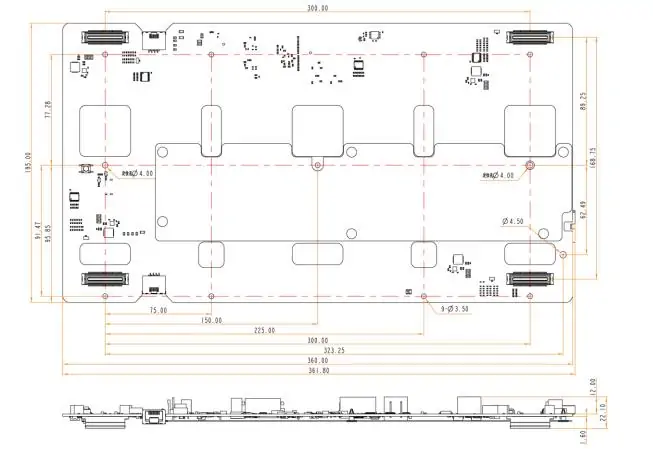
- Dimensions: 361.8 × 195.0 × 22.1 mm
- Net weight: 328 g
The drawing below shows board dimensions and mounting positions in millimetres. Use NovaStar’s high-precision structural drawing for cabinet cutouts, rather than scaling this image. Confirm the hardware revision and clearance requirements before fabrication.
4. Benefits of Using the NovaStar BR460-1 LED Receiving Card
4.1 Simplified Installation
Fewer separate parts can simplify cabinet assembly. Have the installer check AC wiring, protective earth, insulation, thermal pads, and module load before energizing the system. Preserve a known-good configuration before replacing any receiving card.
4.2 Enhanced Reliability
Configuration and firmware backups provide recovery options. They do not guarantee continuous operation. Keep an external copy of the working configuration and test the recovery procedure before using the screen for a critical event.
4.3 Image Quality in Practice
For rental LED video walls, evaluate shadow detail, uniformity, and motion with representative content. The illustration below compares 18bit+ before and after at low brightness; it is illustrative, not evidence of a benchmark performed here.
4.4 Real-Time Monitoring
Temperature, voltage, and communication monitoring can help diagnose faults. Record normal readings during commissioning, then investigate changes alongside cable connections, cooling, and power conditions instead of assuming every visual fault is a receiving-card failure.
4.5 Versatility
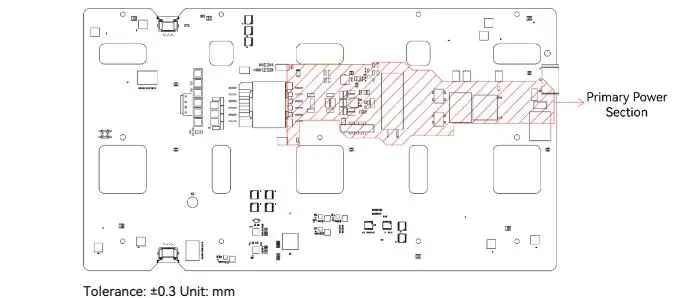
PWM modules, 3D, and smart-module functions each need a compatible system. The drawing below marks the primary power section. NovaStar specifies at least 5 mm clearance to cabinet metal there, or suitable additional insulation, and 2 mm elsewhere. Follow the complete installation notes.
5. What Is the NovaStar BR460-1 Price?
No verified fixed retail price is provided here. Request a quote for the exact NovaStar BR460-1, including quantity, firmware, accessories, warranty, shipping, and taxes. The BR460 Pro and BR460-1 Pro are different models; do not treat their prices or specifications as interchangeable.
6. FAQs
7. Conclusion
The NovaStar BR460-1 is worth evaluating when an integrated power-and-receiving board fits the cabinet design. Base the choice on electrical compatibility, required pixel capacity, controller support, and service access. Those checks are more useful than a feature list alone.
Before ordering, send the supplier the module model, driver IC, cabinet resolution, controller, and required features. Ask for written compatibility confirmation and the matching configuration file. Use the contact form below to discuss an EagerLED display project.
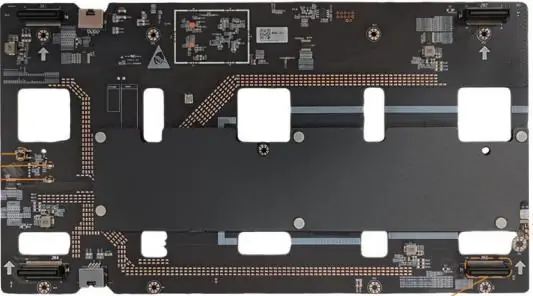 Novastar BR460-1 Pro: Full Specs and Key Features Guide
 2026 Top 12 LED Video Wall Suppliers in Germany
Related Posts






Fill In Your Needs In Detail
Fill in the screen usage scene and size you need in “Content”.You will get a quote.