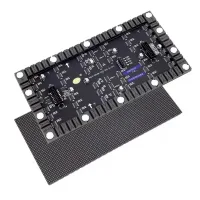
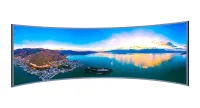
LCD vs LED: most “LED” TVs and monitors are LCD displays with LED backlights. LCD describes the liquid-crystal image layer; LED describes a light source. A direct-view LED display is different: its LEDs form the visible pixels, without an LCD layer. Knowing which meaning a supplier uses is the first step to a fair comparison.
For a desk monitor or television, compare complete models rather than treating LCD and LED as competing categories. For a video wall, the meaningful comparison is usually an LED-backlit LCD panel system versus a modular direct-view LED wall. These have different installation, resolution and maintenance requirements.
ENERGY STAR explains the LED-backlit LCD distinction, while LG describes direct-view LED pixels. Neither label alone establishes better color accuracy, lower running costs or a longer service life. Those claims need model-specific specifications and comparable test conditions.
This guide keeps both meanings clear, then compares nine buying factors, LCD and LED advantages, selection criteria and MicroLED. Specialized products such as transparent LED displays add further trade-offs between visibility, transparency and pixel density; they should not be treated as interchangeable with ordinary monitors.
1. What is an LCD Display?
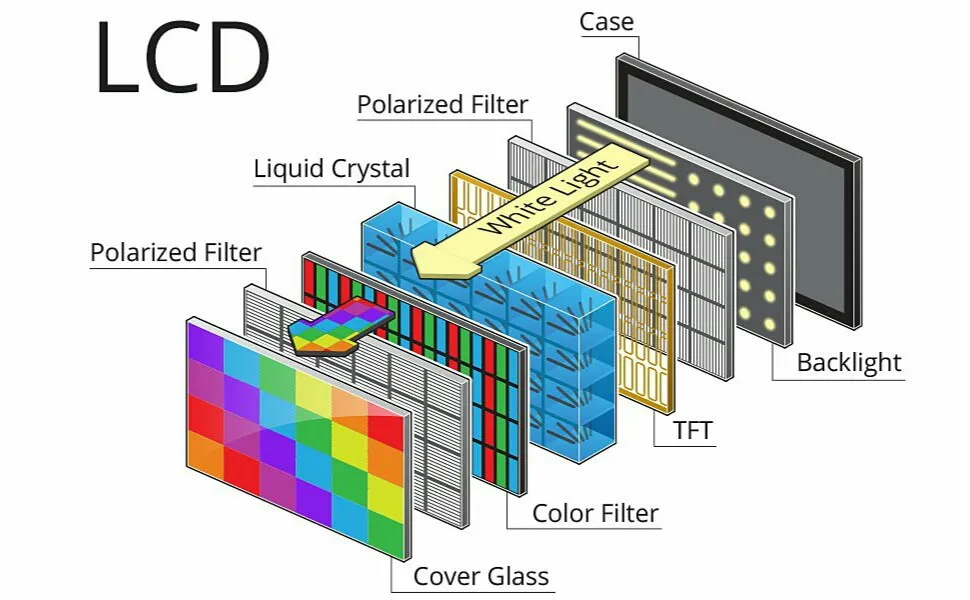
LCD means liquid crystal display. An electric signal changes how a liquid-crystal layer controls light passing through polarizers. In a color screen, red, green and blue subpixels form the image. The liquid crystals modulate light; they do not generate it.
Most LCD TVs and monitors use a backlight behind the panel or LEDs positioned around its edges. Older designs often used cold-cathode fluorescent lamps (CCFLs). The diagram below shows a backlight, polarizers, a TFT control layer, liquid crystals, color filters and cover glass; it is a simplified explanation of the image-forming layers.
Not every LCD requires a backlight: reflective calculator and watch displays can use ambient light. In this guide, comparisons with video walls refer to backlit LCD TVs, monitors and commercial panels. Their performance depends on panel design, backlight control, coatings and image processing.
LCD technology is used in:
- TVs and desktop monitors, often sold as LED models.
- Laptop and tablet screens.
- Commercial signage and tiled video walls.
- Calculators, watches and instrument displays, including reflective designs.
For purchasing, check the actual panel resolution, operating hours, brightness and intended installation. A commercial LCD designed for a control room is not equivalent to a home television. The availability of LCD technology does not mean every model supports portrait mounting, continuous operation or outdoor exposure.
2. What is an LED Display?
LED means light-emitting diode. In an LED-backlit LCD, LEDs illuminate a separate liquid-crystal panel. In direct-view LED, red, green and blue emitters create the visible image. The latter is common in modular signage and video walls, where cabinets or modules join to form a larger display surface.
LED backlighting offers several design options:
- Edge lighting: LEDs sit at the panel edges and light is distributed across it.
- Direct or full-array lighting: LEDs sit behind the panel; local dimming is a separate feature to check.
- Mini-LED backlighting: smaller emitters can enable more dimming zones, but the image layer remains LCD.
Local dimming adjusts regions of an LCD backlight rather than giving every LCD pixel its own light source. Zone size and control affect halos around bright objects. Sony’s backlight explanation describes the difference between edge lighting and independently controlled regions.
QLED TVs generally combine an LCD panel, LED backlight and quantum-dot color technology. OLED instead uses organic self-emitting pixels. These are not simply premium versions of the same backlight. Samsung explains the QLED and OLED architectures; MicroLED is discussed separately in section 7.
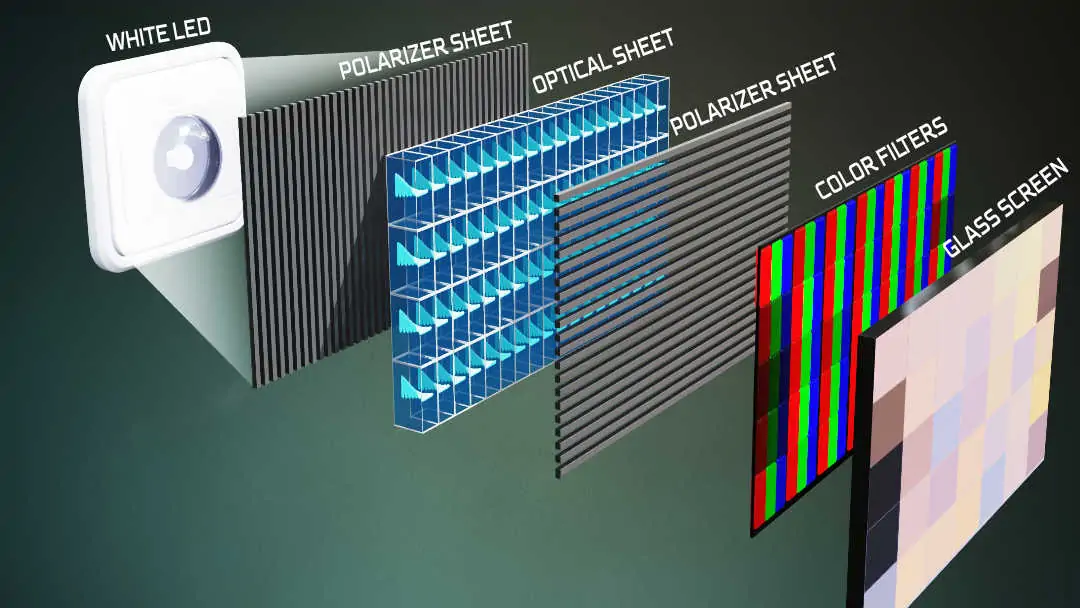
The following “LED Display Technology” illustration shows white LEDs illuminating optical and color-filter layers: it depicts an LED-backlit LCD, not a direct-view LED wall. Ask a supplier to identify the architecture explicitly before comparing brightness, price, screen thickness or service requirements.
3. LCD vs LED: Key Differences
3.1 Technology and Backlighting
For a modern monitor, “LCD vs LED” may describe the same device from two angles. For signage, an LCD panel filters a backlight, whereas a direct-view LED wall emits light at the image pixels. This structural distinction matters more than the broad marketing label.
A tiled LCD wall has panel boundaries; a direct-view LED wall can form a continuous image across aligned modules. Neither is automatically higher resolution. Specify the required pixel count at the chosen physical size and inspect module joins, panel bezels and calibration in a real demonstration.
3.2 Brightness and Visibility
Compare usable brightness in cd/m² (nits) under the intended lighting. Outdoor direct-view LED models can suit sunlit signs, but indoor LED products are not automatically outdoor-ready. High-brightness LCD signage also exists, so “LCD cannot work in sunlight” is an inaccurate general rule.
For example, Samsung’s OH55A outdoor display specifies 3,500-nit typical brightness and IP56 protection. Those figures describe that product, not all LCDs. Compare reflections, sustained brightness and automatic dimming as well as the headline brightness number.
3.3 Image Quality and Color Accuracy
Color accuracy is not guaranteed by the LED label. Compare color gamut, calibration, white balance and grayscale at the brightness you will use. LCD black levels depend partly on panel contrast and backlight control; direct-view LED contrast also depends on ambient light and the reflectivity of the screen surface.
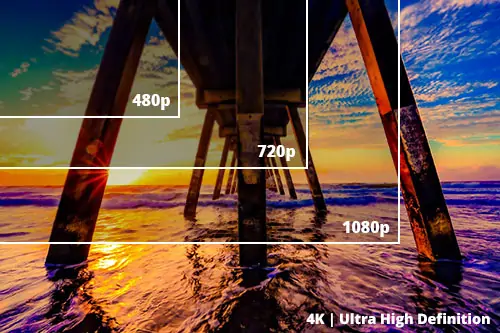
For close viewing, pixel density and text rendering are critical. A large wall with coarse pixel pitch can show less detail than a smaller high-resolution LCD. Use the screen-resolution guide to relate content resolution to display pixels, then inspect your smallest text at the nearest viewing position.
3.4 Thickness and Design
An LCD panel contains optical layers, while a direct-view LED system needs modules, electronics, a supporting structure and service access. Removing a backlight does not prove that the complete LED installation is thinner or lighter. Compare installed depth and total weight, including mounts, cabling and power equipment.
Before ordering, confirm wall loading, ventilation, cable routes and maintenance clearance. Front-service LED cabinets can help where rear access is restricted, but the required clearance and replacement procedure must still be checked for the specific product.
3.5 Energy Efficiency
LED backlights can improve efficiency over older CCFL designs, but this does not establish that a direct-view LED wall always consumes less electricity than an LCD wall. Compare equal display area, usable brightness, content and operating hours. Include controllers, standby use and any additional cooling in the comparison.
ENERGY STAR display criteria distinguish operating modes and account for product characteristics. For a project estimate, energy in kWh equals average power in kW multiplied by operating hours. Use measured or supplier-documented typical power; maximum input power is chiefly needed for electrical sizing.
3.6 Lifespan and Durability
Both LCD backlights and direct-view LEDs age, and electronics can fail independently of the light source. A rated light-source lifetime is not a warranty for the complete display. Ask what brightness loss the stated lifetime allows, at what temperature and brightness it was measured, and what the warranty actually covers.
For continuous use, choose a model rated for the required schedule and environment. Compare spare-module availability, replacement-panel matching, repair turnaround and calibration after repair. These practical service conditions can matter more to uptime than an unsupported claim that one technology always lasts longer.
3.7 Viewing Angles
Viewing-angle behavior depends on the LCD panel type and optical design or, for direct-view LED, the emitter package, mask and surface treatment. Check both horizontal and vertical angles. A quoted viewing angle alone may not reveal color shifts, reduced contrast or uneven brightness across the audience area.
Evaluate a sample from the nearest, farthest and most off-axis viewing positions. For a wide meeting room or concourse, use actual slides, skin tones and dark scenes. Agree on acceptable uniformity before purchase rather than relying on “wide viewing angle” as a complete specification.
3.8 Price and Availability
A standard LCD monitor or signage panel often has a lower entry cost than a custom direct-view LED installation. However, there is no universal LCD-to-LED price ratio. Screen area, pixel pitch, resolution, processing, installation complexity and service terms can change the comparison substantially.
Request itemized quotations covering the display, controller, mounting, electrical work, commissioning, freight, spares and ongoing support. Compare the complete system over the same ownership period. No current market price or guaranteed payback is implied by the technology comparison in this guide.
3.9 Indoor vs Outdoor Use
Indoor and outdoor suitability is a product rating, not an inherent consequence of LCD or LED. For exterior installations, verify water and dust protection, operating temperature, sunlight readability, thermal management and the protection of connections. A weather-resistant display still needs an appropriate mounting and electrical design.
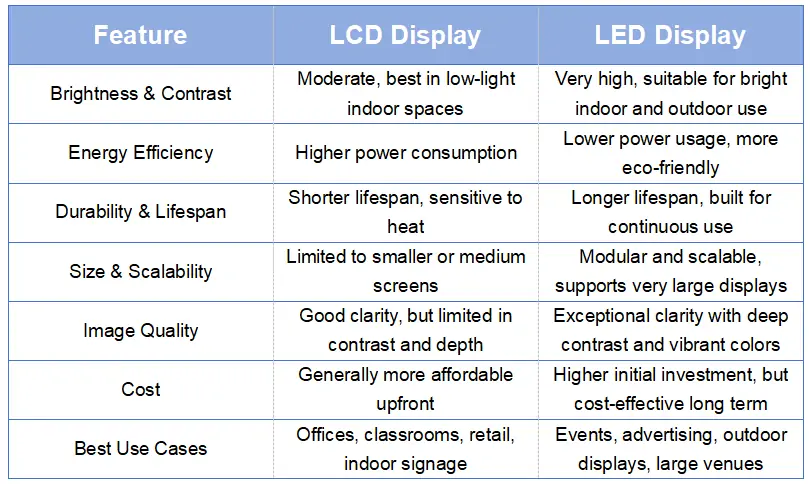
Corrected comparison: the original graphic below simplifies several claims. Use this accessible summary instead of treating LED as universally more efficient, durable or economical. Outdoor use and image quality must be checked for the chosen model.
| Factor | LED-backlit LCD | Direct-view LED |
|---|---|---|
| Light source | Backlight filtered through liquid crystals | LED emitters form image pixels |
| Brightness and contrast | Model, local dimming and reflections matter | Model, surface reflectivity and ambient light matter |
| Energy | Compare measured power at matched settings | Include controller and cooling requirements |
| Durability | Check duty rating, warranty and panel replacement | Check duty rating, warranty and module service |
| Size and detail | Fixed panel sizes; tiled walls have bezels | Modular size; pixel pitch determines density |
| Cost | Often practical for standard screen sizes | Quote the complete installed system |
| Applications | Desks, rooms, signage; rated outdoor models exist | Large walls, events, signage; select indoor/outdoor models |
4. Advantages of LED Displays
Direct-view LED is worth considering when a project needs a large continuous image or a format that standard panels cannot provide conveniently. It can suit stages, concourses and advertising installations. The advantage is the ability to configure a display around the space, provided the available pixel pitch supports the audience distance.
Serviceable modules can allow a damaged section to be replaced without replacing the entire wall. That is a maintenance advantage, not a guarantee of uninterrupted operation or lower energy bills. Plan matching spares and calibration, and check how technicians will safely reach each part of the installation.
Flexible LED screens offer curved-format options where supported by the module and mounting system. Other cabinets are intended for flat or specific corner arrangements. Confirm permitted curvature and structural tolerances instead of assuming any LED product can be bent or assembled into any shape.
For a commercial shortlist, compare indoor LED screen options against the required canvas size, resolution and access method. A useful demonstration should show the planned content at normal operating brightness, with a close inspection of joins and low-brightness grayscale.
5. Advantages of LCD Displays
LCD remains a practical option for standard-size screens and detailed content viewed nearby. A single panel provides a fixed, clearly specified pixel grid and can simplify purchasing, mounting and replacement. For offices, schools and small retail spaces, compare the whole installation rather than assuming a modular wall is necessary.
LCD is not restricted to dim rooms or basic image quality. Select brightness and surface finish for the environment, then verify contrast and color performance. For dashboards, spreadsheets and menu boards, test the actual font sizes and scaling settings; a headline resolution alone does not guarantee readable content.
Standard mounts and familiar inputs can simplify integration, but compatibility still needs checking. Specify the orientation, operating schedule, remote control, player or computer connection and warranty. If several panels form a wall, include bezel width and whether a matching replacement model is likely to remain available.
Frequent content updates are possible on both LCD and LED systems through suitable players and content-management software. LCD should not be chosen only for static content. The better fit is the system that satisfies the image, installation and service requirements at a supportable total cost.
6. Which Should You Choose?
Start with a brief: screen width and height, closest viewer, smallest text, ambient light, operating hours, content sources and installation location. Then set acceptance criteria for resolution, brightness, service access and budget. This turns an LCD vs LED discussion into a comparison of complete, testable systems.
Choose direct-view LED if: you need a large continuous canvas, a supported custom format or an outdoor sign for which a suitable rated LED system meets the brief. Match pixel pitch to viewing distance and verify the resulting native resolution before approving the dimensions.
For events, also evaluate assembly time, rigging, transport protection and spare modules. For permanent installations, prioritize maintenance access and control-system integration. Request a demonstration with the final content format; an impressive promotional video does not establish that small text will be readable.
Choose LCD if: a standard panel size or a tiled panel arrangement meets the space and content needs. It can be a straightforward choice for close-viewed information, meeting rooms and individual signage screens. Confirm commercial operating-hour and orientation ratings where relevant.
For a consumer TV or monitor, an “LED” model may already be an LCD. Compare panel type, native resolution, local dimming, refresh rate, inputs and ergonomics. Neither content-update frequency nor the LED label alone should determine the purchase.
7. Next Evolution: MicroLED
7.1 MicroLED Basics and How It Works
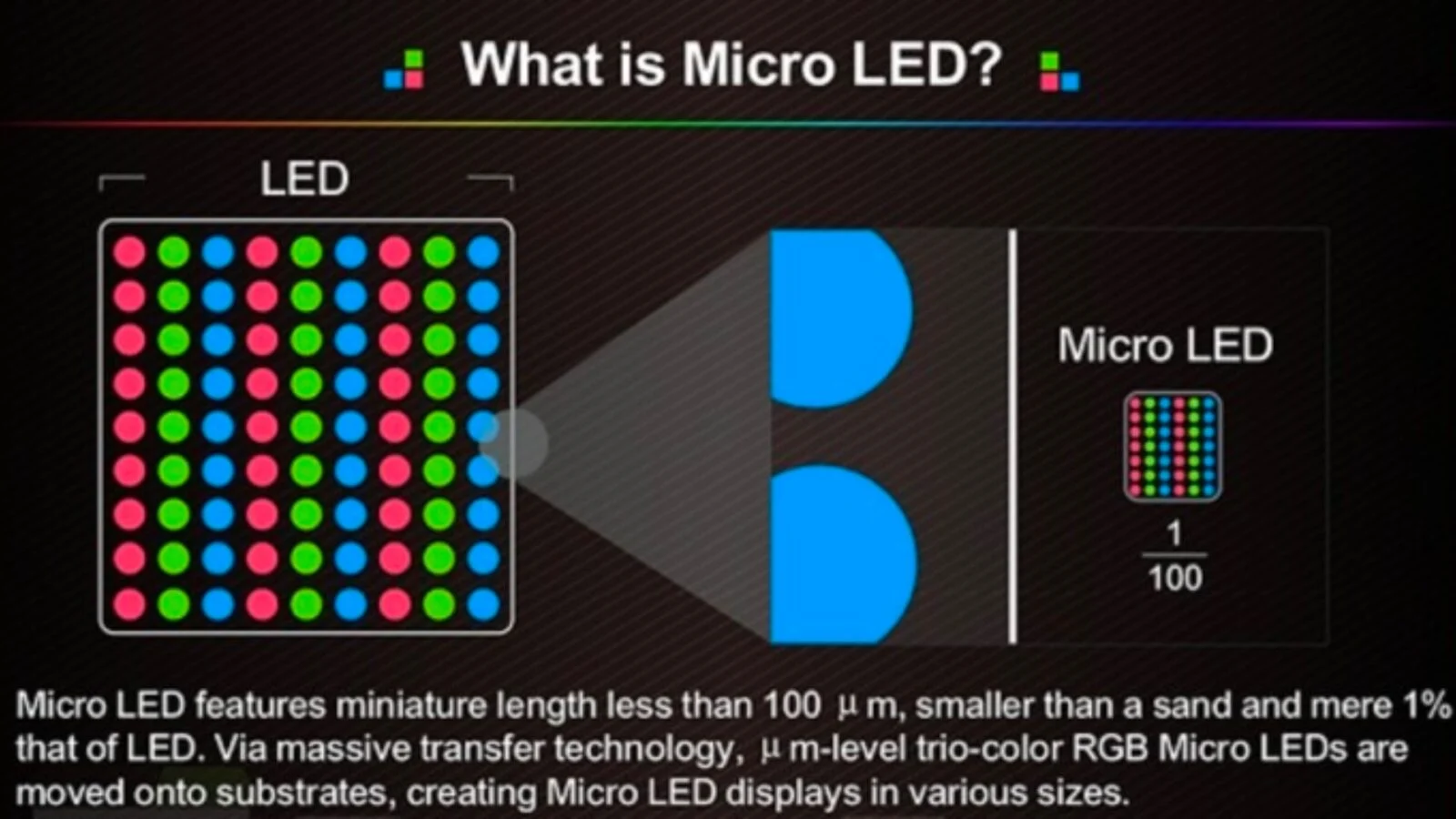
MicroLED is a form of self-emissive display using very small inorganic LED emitters. RGB implementations use red, green and blue emitters to form pixels without an LCD backlight. Samsung’s engineering account describes its chip placement and module assembly. MicroLED should not be confused with Mini-LED backlighting.
7.2 Why MicroLED Is Gaining Interest
MicroLED attracts interest because small emitters and individual light control can support dense pixel layouts and strong contrast. That potential does not make it a universal replacement for LCD, OLED or other LED systems. Product maturity, yield, cost and serviceability still determine whether it is appropriate for a particular installation.
7.3 Potential Advantages of MicroLED
Smaller emitters can enable finer pitch, but chip size and pixel pitch are different measurements. Adding modules increases the canvas and pixel count; it does not automatically improve pixels per unit area. Ask for the native resolution at the quoted dimensions and compare measured image performance at your intended brightness.
7.4 Current limitations
Manufacturing involves precise placement, testing and repair of many emitters, followed by consistent module alignment and calibration. These are practical cost and service considerations. Obtain a current product-specific quote and delivery commitment rather than relying on forecasts that MicroLED will soon become inexpensive or replace every alternative.
7.5 Potential for large-format B2B displays
For B2B buyers, evaluate MicroLED for the same reasons as any large display: content detail, audience distance, reliability requirements and support. The illustration below shows miniaturized RGB emitters and transfer to a substrate. Its “1/100” size claim is illustrative, not a universal specification; request the actual chip dimensions and pixel pitch.
8. FAQS
9. Conclusion
The useful difference between LCD and LED depends on the meaning of LED. Most LED TVs and monitors are LED-backlit LCDs; direct-view LED walls are a separate architecture. LCD can suit standard-size, close-viewed content, while modular LED can suit large continuous canvases. Brightness, efficiency, durability and value remain product- and installation-specific.
To compare a proposed LED installation, share the screen dimensions, viewing distances, ambient light, content and operating schedule with EagerLED. Ask for native resolution, typical and maximum power, service access, warranty and an itemized quotation. A documented specification makes it easier to assess an LED proposal alongside an LCD alternative.
 HD Screen Resolution for LED: Types, Applications & Comparison
 LED Wavelength Guide: Color Chart, Formula & Binning
Related Posts
Fill In Your Needs In Detail
Fill in the screen usage scene and size you need in “Content”.You will get a quote.