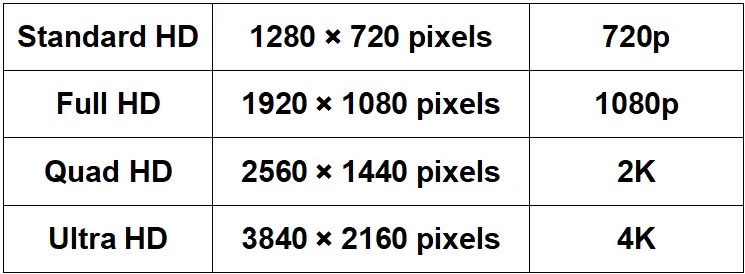
HD screen resolution usually means 1280 × 720 pixels (720p). Full HD is 1920 × 1080, QHD is 2560 × 1440, and 4K UHD is 3840 × 2160. These numbers describe image dimensions, not physical screen size.
For a modular LED wall, the useful specification is its native pixel width × height. The wall’s active dimensions and pixel pitch determine that count; accepting a 4K video input does not make a lower-resolution wall a native 4K display.
Choose the resolution that makes your actual content readable at the intended viewing distance. More pixels can show finer detail, but they do not automatically improve brightness, color accuracy or audience engagement.
For example, a retail screen showing large product photographs may need less detail than a similarly sized wall displaying small prices and dense product specifications. Test both with the same content and from the nearest and furthest customer positions.
Compare proposals using active screen size, native resolution, pixel pitch, brightness and processing capability. A resolution label alone cannot explain why one installation looks clearer than another.
This guide compares HD, Full HD, QHD and 4K UHD for LED projects. It separates established pixel dimensions from illustrative project examples, so you can distinguish a format specification from a supplier’s marketing description.
Start with the resolution chart below, then use the application examples and buying criteria to select a suitable pixel canvas. The existing sections cover the same formats in order, followed by practical questions about HD and 4K.
1. What is LED Screen Resolution?
LED screen resolution is the number of addressable image pixels across the completed display: horizontal pixels × vertical pixels. Total pixels are the product of those two numbers.
An LED wall with 1920 columns and 1080 rows has 2,073,600 pixels. More pixels across the same physical area can reproduce finer detail when the content, processing and viewing distance support it. Enlarging a wall without adding pixels makes each pixel occupy more space.
Modular LED cabinets combine into a larger native pixel grid. For a rectangular installation, multiply cabinet resolution by the number of cabinets in each direction. Check the completed grid against the content aspect ratio; a custom wall does not have to use a standard 16:9 format.
Pixel pitch is the center-to-center distance between adjacent pixels, usually in millimeters. Pixel density is the number of pixels per unit area; it is not the same measurement. Smaller pitch increases density. Planar’s pixel-pitch explanation connects pitch, display dimensions and viewing distance.
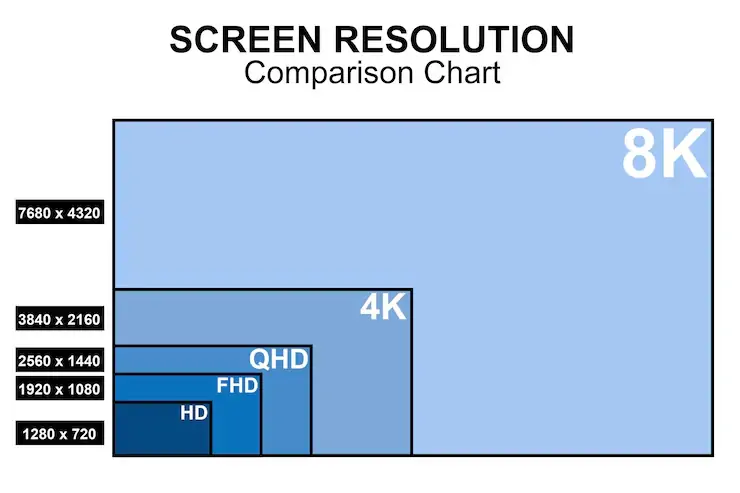
The nested chart below compares 1280 × 720 HD, 1920 × 1080 Full HD, 2560 × 1440 QHD, 3840 × 2160 4K UHD and 7680 × 4320 8K UHD. These are pixel dimensions, not physical screen measurements.
2. HD Screen Resolution from 720p to 4K
These four common 16:9 formats provide a useful starting point. HD is also used broadly for high-definition video, but in a product comparison “HD” commonly identifies 720p and “Full HD” identifies 1080p. The letter “p” denotes progressive scanning.
HD screen resolution sizes list: pixel counts below are calculated as width × height. Samsung’s resolution comparison documents the four formats.
| Format | Width × height (pixels) | Total pixels | Pixels relative to 720p |
|---|---|---|---|
| HD / 720p | 1280 × 720 | 921,600 | 1× |
| Full HD / 1080p | 1920 × 1080 | 2,073,600 | 2.25× |
| QHD / 1440p | 2560 × 1440 | 3,686,400 | 4× |
| 4K UHD / 2160p | 3840 × 2160 | 8,294,400 | 9× |
The original graphic is retained below. Use the text table for accessible dimensions; QHD and cinema 2K are different formats, as explained in section 3.3.
3. HD Screen Resolution Types Explained
- Standard HD: consider it for simple video and large text when a viewing test confirms readability.
- Full HD: provides more detail for presentations and signage at the same screen size.
- Quad HD: adds pixel workspace for dashboards and detailed desktop content.
- 4K UHD: supports a larger pixel canvas, provided the wall, processor and source can use it.
3.1 Standard HD Screen Resolution
Standard HD is 1280 × 720 pixels, commonly called 720p. It contains 921,600 pixels in a 16:9 image. Its suitability depends on what viewers need to see, rather than a universal indoor or outdoor classification.
- Resolution: fewer pixels than Full HD can reduce processing requirements, but the installation price also depends on size, pitch, cabinet design and servicing.
- Screen format: 16:9 matches common video. A differently shaped LED wall needs an appropriate content canvas or deliberate scaling.
- Clarity: 720p can suit large text and simple graphics; fine lines and small text need an actual viewing test.
- Brightness: choose the model’s output for ambient light. The 720p label specifies no brightness level.
- Color accuracy: assess calibration, grayscale and color reproduction separately from pixel count.
- Pixel pitch: there is no fixed pitch range for HD. The same native resolution can be built at different physical sizes.
Illustrative calculation: at exactly 2.5 mm pitch, a 1280 × 720 pixel canvas measures 3.2 × 1.8 m. This is a geometry example, not a customer installation or a product quotation.
3.1.1 Applications Of HD Screen Resolution
720p can be adequate when the content remains legible at the intended distance. These are possible applications, not evidence that HD dominates a market.
1. Delivering Messages
Transport hubs, airports and shopping malls can use large, high-contrast messages. Test the smallest text and longest destination names from the furthest viewing point.
2. Exhibitions
For rental displays, specify handling weight, rigging, setup and servicing separately. A 720p canvas does not by itself make cabinets lighter or easier to install.
3. Broadcasting
720p remains an HD video format. At otherwise comparable encoding settings, fewer pixels can reduce the data requirement, but bitrate also depends on frame rate, codec, compression and content.
4. Retail Displays
For large product imagery or short promotional messages, HD may be sufficient. Detailed labels and fine product textures can benefit from a larger native pixel canvas.
5. Education
Test lecture slides and diagrams from the back of the room. Use large type; higher resolution alone will not make physically small text readable at a distance.
3.2 Full HD Screen Resolution
Full HD is 1920 × 1080 pixels, or 1080p. Its 2,073,600 pixels are 2.25 times the pixel count of 720p, not simply double. At the same screen size, it offers more samples for fine detail; perceived sharpness is not a fixed numerical improvement.
Compare Full HD and HD using the same source material, screen dimensions and viewing position. Sony’s resolution explanation confirms the 1920 × 1080 Full HD format and its relationship to 4K UHD.
1. Clarity
Full HD provides more space for text and diagrams than 720p. Preserve native mapping where possible: scaling a low-resolution source cannot recreate detail that was never captured.
2. Color Accuracy
Resolution does not specify gamut, calibration, contrast or brightness. For a clothing display, test representative fabric colors and shadow detail rather than assuming that 1080p guarantees accurate color.
3. Pixel Pitch
- Outdoor Full HD LED: select pitch from active size and viewing distance, then specify weather protection and brightness independently.
- Indoor Full HD LED: confirm fine text readability at the closest required distance; there is no mandatory Full HD pitch.
Illustrative calculation: 1920 × 1080 pixels at exactly 2.5 mm pitch require an active area of 4.8 × 2.7 m. A supplier must confirm the realizable cabinet arrangement and exact pitch.
3.2.1 Applications Of Full HD Screen Resolution
Full HD can be a practical presentation format when source files are 1080p and the completed screen provides enough detail for the audience. The following uses still require project-specific checks.
Corporate Headquarters & Boardrooms: assess spreadsheets, charts and video calls at the smallest intended text size. Match the computer output and processor mapping to the wall.
Luxury Retail Stores: photographs and motion graphics may benefit from Full HD detail, but lighting, content quality and calibration remain separate requirements. For portrait signage, follow the LED poster content and pixel-canvas guide.
Healthcare & Training: general teaching and meeting displays can use Full HD content. Resolution alone does not establish suitability for diagnostic image interpretation; that requires application-specific display specifications and validation.
Choose Full HD for the detail it can deliver in the planned installation, rather than treating it as a universal marker of professional quality.
3.3 Quad HD Screen Resolution
Quad HD (QHD) is 2560 × 1440 pixels, also called 1440p. It has four times the pixels of 720p and approximately 77.8% more pixels than 1080p, calculated from the dimensions. That does not mean “77.8% clearer.” QHD is sometimes marketed as “2K,” but the DCI cinema specification defines a 2K container as 2048 × 1080. Use exact dimensions to avoid ambiguity.
3.3.1 Real Life Applications of Quad HD
QHD adds detail and workspace when the source and display support 2560 × 1440. It does not change the physical screen dimensions.
1. Larger Screens Without Blur
- On a larger screen with the same resolution, pixels are physically larger. Full HD has no universal 17-inch or 27-inch cutoff.
- At the same size and viewing distance, QHD provides a denser pixel grid than Full HD; test whether the extra detail is useful.
2. More Working Space
- At the same scaling settings, QHD can fit more windows or chart detail on the desktop.
- Operating-system scaling can make text larger, reducing the usable workspace advantage.
3. Gaming & Visual Media
- Higher resolution increases rendering workload. Compare frame rate, latency and refresh behavior separately.
- For an LED event wall, verify the media server and processor support the intended canvas and frame rate.
4. Premium Devices
- A QHD label identifies pixel dimensions, not overall product quality.
- Compare actual panel performance, connectivity, serviceability and source compatibility before choosing a system.
3.4 UHD Screen Resolution (4K)
4K UHD is 3840 × 2160 pixels, totaling 8,294,400 pixels. It has four times the pixels of Full HD. It is not the highest resolution available, and it should not be confused with the wider 4096 × 2160 DCI cinema container. For LED procurement, confirm native wall resolution as well as supported input resolution.
3.4.1 How Does 4K UHD Stand Out?
Features: assess these separately when comparing 4K systems.
1. Fine Detail
4K can show more source detail at a given display size. A wider-than-16:9 wall may need a custom canvas rather than a stretched 4K picture.
2. High Dynamic Range & Color Depth
HDR, bit depth and color gamut are independent specifications. A 4K label does not guarantee HDR performance; verify compatible content, processing and display capability.
3. Service Life
Resolution does not determine durability or useful life. Review component support, spare parts, calibration and maintenance access. Choose capacity for planned content, not an unsupported future-proofing claim.
4. Smooth Motion
More pixels do not guarantee less blur or higher refresh rates. Check source frame rate, processing latency and the LED refresh specification separately; test camera capture if the wall will appear on video.
3.4.2 Real Life Applications of UHD Screen Resolution
- High-End Showrooms: detailed imagery may justify 4K when visitors are close enough to see the difference and the content is produced at suitable resolution.
- Immersive Experiences: a larger pixel canvas can support scenic content and multiple visual zones. Plan content mapping for the actual shape of the wall.
- High-End Gaming: 4K can display more detail, but the rendering system must sustain the required frame rate. QHD or Full HD may be preferable when responsiveness matters more than added detail.
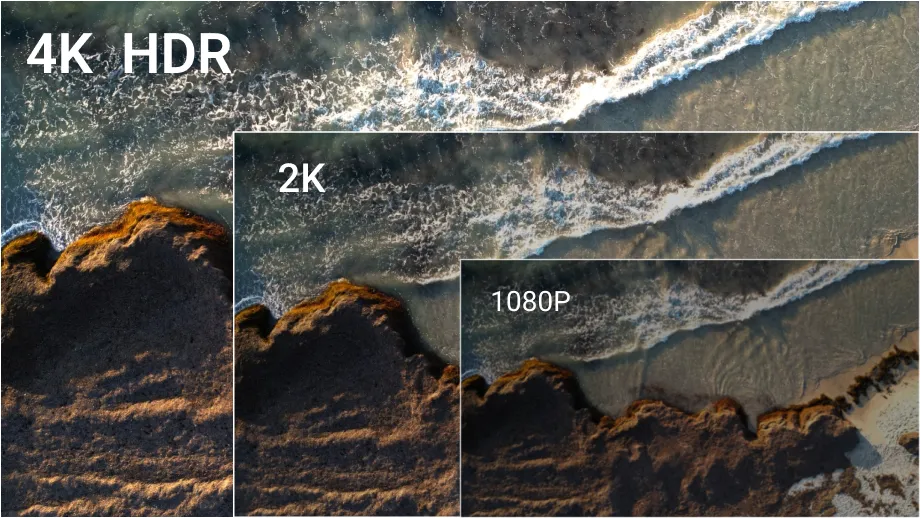
The retained illustration uses the labels “4K HDR,” “2K” and “1080p.” It is a schematic comparison, not a calibrated demonstration: HDR is separate from resolution, and “2K” is ambiguous without exact dimensions.
3.5 Side-by-Side Comparison Table
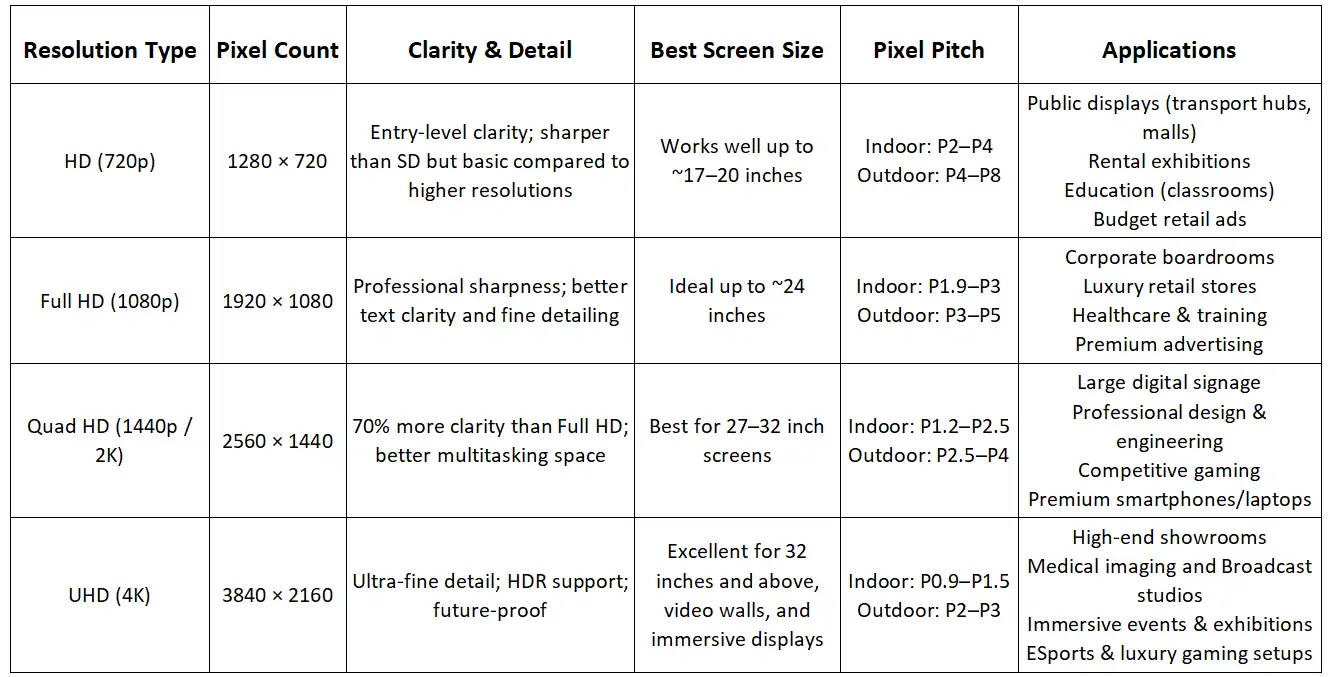
Use this comparison to shortlist a format, then validate a cabinet layout and content sample. It replaces blanket claims that resolution dictates brightness, pitch or business results. The original comparison image remains below; use the accessible guidance here where those claims differ.
| Format | Potential fit | What to test | Pitch and brightness |
|---|---|---|---|
| HD / 720p | Large text and simple video | Smallest text at viewing distance | Project-dependent |
| Full HD / 1080p | Slides, signage and 1080p sources | Detail, scaling and source quality | Project-dependent |
| QHD / 1440p | Dashboards and desktop workspace | Application scaling and processor support | Project-dependent |
| 4K UHD / 2160p | Detailed content and larger pixel canvases | Native wall pixels and complete signal chain | Project-dependent |
4. Which HD Resolution Screen Is Best?
The best resolution is the one that makes the required content readable in your installation. Record the active screen dimensions, closest and furthest viewers, content type and ambient lighting before requesting quotes. Then compare these five criteria.
4.1 Viewing Distance
- For nearby viewers, smaller pixel pitch can make the pixel structure less noticeable. Test actual content rather than choosing by an HD or 4K label alone.
- For distant viewers, larger pitch may be adequate, but text must still be physically large enough to read.
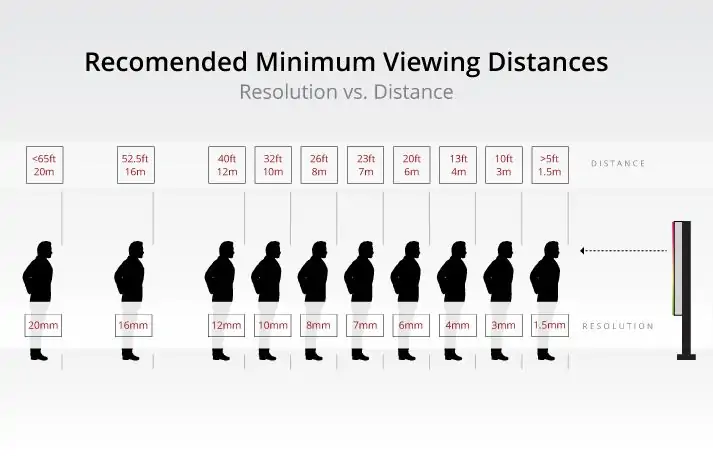
- Treat distance charts as estimates, not universal thresholds. Planar explains several viewing-distance methods; content and visual requirements affect the result.
The retained chart shows the approximate pitch/distance pairs 20 mm/20 m, 16 mm/16 m, 12 mm/12 m, 10 mm/10 m, 8 mm/8 m, 7 mm/7 m, 6 mm/6 m, 4 mm/4 m, 3 mm/3 m and 1.5 mm/1.5 m. Its “resolution” axis actually lists pixel pitch. These are the graphic’s rough recommendations, not validated minimum distances for every viewer or project; confirm readability with a sample.
4.2 Screen Size
For a given pitch, a larger active area contains more pixels. For a fixed pixel count, a larger screen has larger pixels. Approximate pixel width = active width in millimeters ÷ pitch in millimeters; use the same calculation for height. Rounded pitch labels can introduce error, so the cabinet’s documented pixel matrix is the final check.
4.3 Pixel Pitch
- Specify native pixel dimensions, exact pitch and cabinet count together. A 4K-compatible input cannot increase the number of physical pixels.
- For a documented example, the EA169F3 specification lists a 300 × 168.75 mm P1.25 module with 240 × 135 pixels. Eight such modules across and eight down calculate to 1920 × 1080 pixels over 2.4 × 1.35 m; verify the cabinet design before ordering.
- Finer pitch often increases hardware cost at the same area. Compare like-for-like quotations including processing, structure, installation and service.
4.4 Brightness Levels
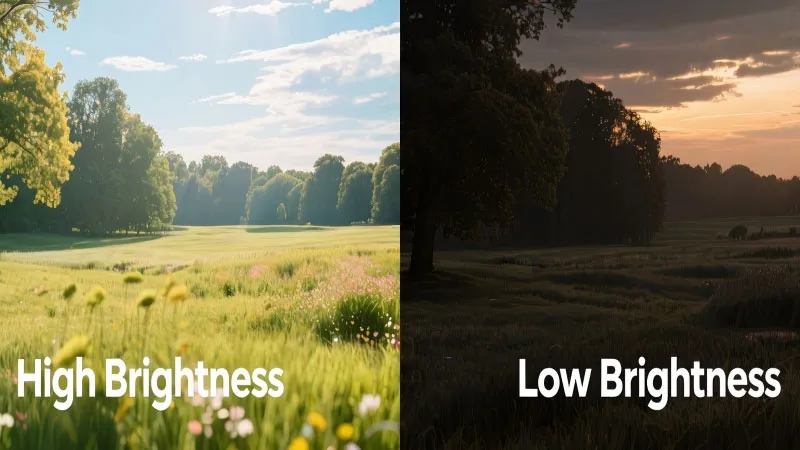
Brightness is measured in nits (cd/m²) and must suit ambient light, viewing conditions and any local restrictions. The earlier fixed indoor and outdoor ranges are not universal requirements. Request a model-specific brightness specification, dimming behavior and an on-site demonstration. More brightness is not always better in a dim room, and brightness is independent of HD versus 4K.
4.5 Warranty and Support
Ask for written warranty coverage, exclusions, spare-module availability, repair turnaround and calibration procedures. Confirm who supports the controller and content workflow. Include structural access, power, cooling and routine maintenance in the budget; resolution alone does not determine ownership cost.
For an EagerLED project assessment, provide the desired screen size, viewing distances, indoor or outdoor location and sample content. Contact EagerLED with your LED display requirements so the proposal can state the native pixel canvas and equipment scope clearly.
5. FAQs
6. Conclusion
HD screen resolution is a useful starting point: 720p, Full HD, QHD and 4K UHD describe different pixel canvases. For an LED wall, combine that information with active size, pixel pitch, viewing distance and content needs. Verify the complete signal chain and compare a real content sample before buying. Ask EagerLED for a project-specific resolution proposal that separates native pixels from supported video inputs.
 What Is a MiP LED Screen? Technology, Price & Trends
 Difference Between LCD and LED Display: Complete Guide
Related Posts
Fill In Your Needs In Detail
Fill in the screen usage scene and size you need in “Content”.You will get a quote.