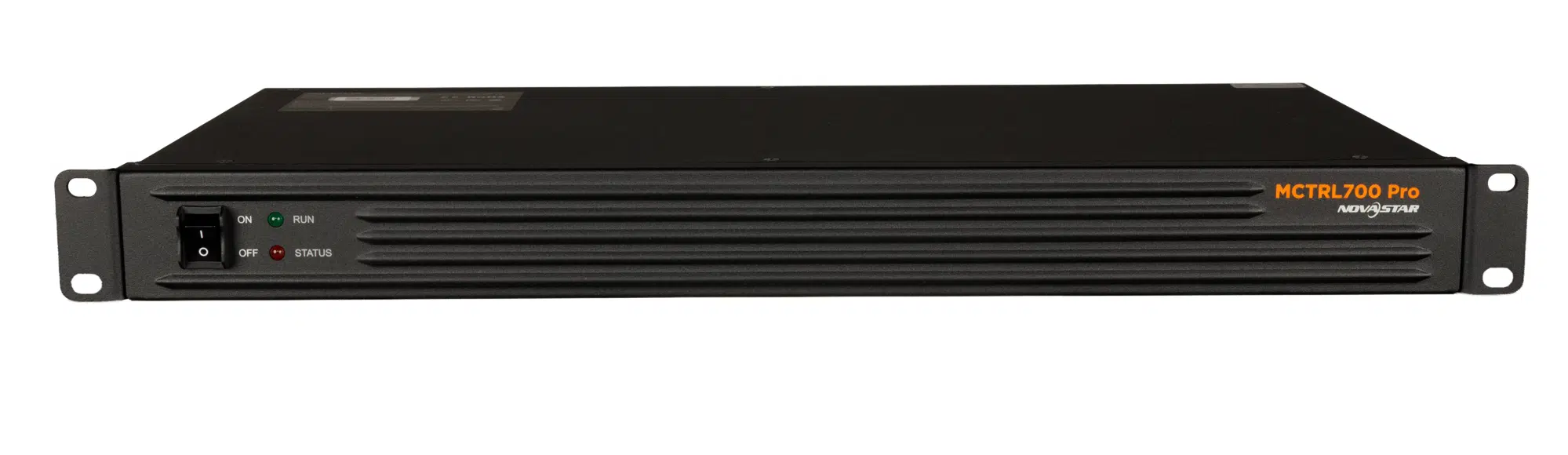
The Novastar MCTRL700 Pro is an LED display controller that sends HDMI or DVI video to LED receiving cards through six Gigabit Ethernet outputs. Its standard maximum resolution is 1920×1200 at 60 Hz. For high-resolution LED walls, successful setup depends on input timing, cabinet mapping and each output’s pixel load. This guide explains those limits, NovaLCT setup, low-latency requirements and purchasing considerations.
1. What Is the Novastar MCTRL700 Pro LED Display Controller?
The MCTRL700 Pro connects a video source to an LED display’s receiving cards. It provides one HDMI 1.3 input, one single-link DVI input and one 3.5 mm audio input, plus six Ethernet outputs. NovaStar specifies 1920×1200 at 60 Hz for standard input resolutions and also documents custom timings. See the official MCTRL700 Pro specifications before designing the screen canvas.
NovaLCT and NovaStar’s calibration platform support pixel-level brightness and chroma correction. The controller also offers low-latency operation and Ethernet control of up to 20 cascaded units. These features require correct wiring and configuration; cascading the control network does not automatically combine video canvases.
2. Key Features of the Novastar MCTRL700 Pro Video Controller
Check the source format, output loading and control connections separately when selecting the Novastar MCTRL700 Pro.
2.1 Multiple Input Options
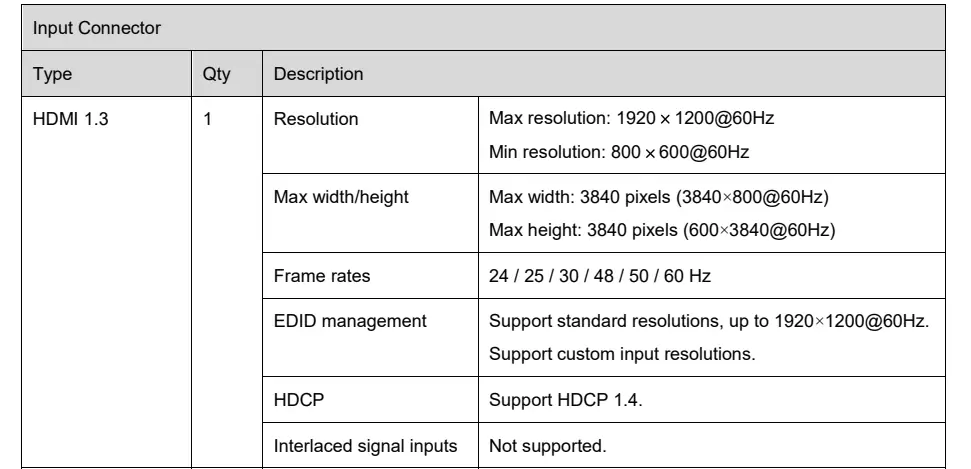
HDMI 1.3 and single-link DVI accept 8-bit RGB 4:4:4 signals. Standard resolutions reach 1920×1200 at 60 Hz; the documented minimum is 800×600 at 60 Hz. HDMI supports HDCP 1.4, but interlaced signals are not supported. Match the source’s output timing before connecting it, and use the separate 3.5 mm input when required for audio.

2.2 High-Capacity Outputs
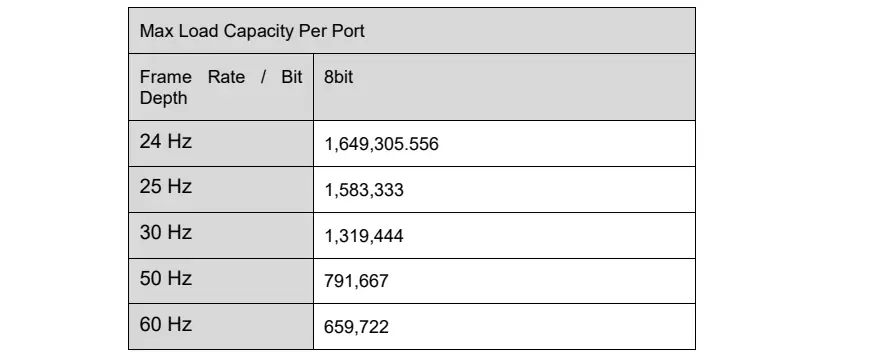
Each of the six Gigabit output ports is rated for 650,000 pixels at 8-bit, 60 Hz. Ports 1 and 2 support audio output with a multifunction card. Do not multiply six port ratings to infer the controller’s supported input resolution.
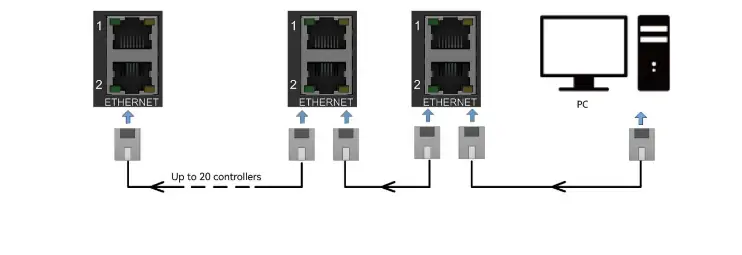
The image below lists theoretical 8-bit bandwidth figures: approximately 1,649,306 pixels at 24 Hz; 1,583,333 at 25 Hz; 1,319,444 at 30 Hz; 791,667 at 50 Hz; and 659,722 at 60 Hz. Use the specified 650,000-pixel operational rating at 60 Hz and validate other timings against NovaStar’s requirements. The following diagram shows the separate Ethernet control cascade.
2.3 Efficient Control & Connectivity
Two ETHERNET control ports connect the controller to a PC and other controllers. Their built-in switching supports a control chain of up to 20 units without a separate router. Assign each device a unique IP address on the same subnet. These control ports are distinct from the six numbered LED output ports.
2.4 Advanced Video Processing
Both video inputs use 8-bit RGB 4:4:4 sampling at up to 1920×1200 at 60 Hz for standard timings, as shown below. NovaLCT provides screen configuration, while NovaStar’s calibration software supports correction coefficients. The low-latency mode reduces controller processing delay only when its cabinet-layout requirements are met.

3. How the MCTRL700 Pro Ensures Image Quality
For rental LED video walls, source quality, receiving-card configuration and calibration all affect the final image. The controller’s specifications alone do not guarantee uniform color or smooth playback.
3.1 Pixel-Level Calibration
Pixel-level brightness and chroma calibration compensates for differences between LEDs using measured correction data. Use NovaLCT with the compatible NovaStar calibration platform and receiving cards. Check gray levels and color uniformity after applying coefficients; calibration is a setup process, not an automatic guarantee of identical output.
3.2 Low Latency Mode
NovaStar specifies a minimum processing delay of 0 frames, or less than 1 ms, with low latency enabled. Every Ethernet output must load cabinets vertically, with all output Y coordinates set to 0. This is controller processing delay, not total camera-to-screen latency. See the official low-latency conditions before planning live video.
3.3 Supported Input Frame Rates
Supported input frame rates are 24, 25, 30, 48, 50 and 60 Hz. Choose a rate compatible with the source and display configuration. These input rates are different from the LED panel’s refresh rate; a high panel refresh specification does not raise the controller’s 60 Hz maximum input rate.
3.4 Wide Resolution Range
Standard input resolution reaches 1920×1200 at 60 Hz. NovaStar separately lists custom examples of 3840×800 at 60 Hz and 600×3840 at 60 Hz. Maximum width and height are separate limits, not support for a 3840×3840 canvas. Confirm the chosen custom timing and cabinet loads with NovaStar before specifying an unusually wide or tall screen.
4. Novastar MCTRL700 Pro Drives High-Resolution LED Walls Step by Step
Use NovaLCT 5.7.0 or later and follow the official MCTRL700 Pro quick-start guide. Record cabinet dimensions and receiving-card parameters before configuration.
Step 1: Connect Inputs
Connect the HDMI or DVI source, then wire the numbered output ports to the receiving cards. Use a supported progressive timing. Connect external audio to the 3.5 mm input if needed.
Step 2: Configure Network Settings
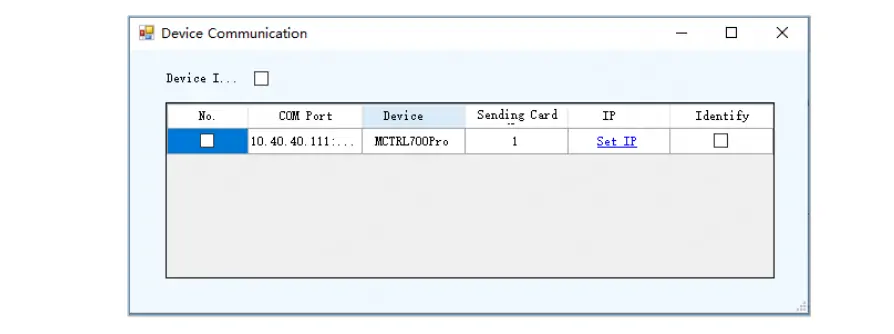
Connect the PC to an ETHERNET control port. The factory address is 192.168.0.10 with subnet mask 255.255.255.0. Give the PC an unused address on that subnet. In NovaLCT, open Tools > Device Communication > Set IP, as illustrated below.
Step 3: Calibrate the Display
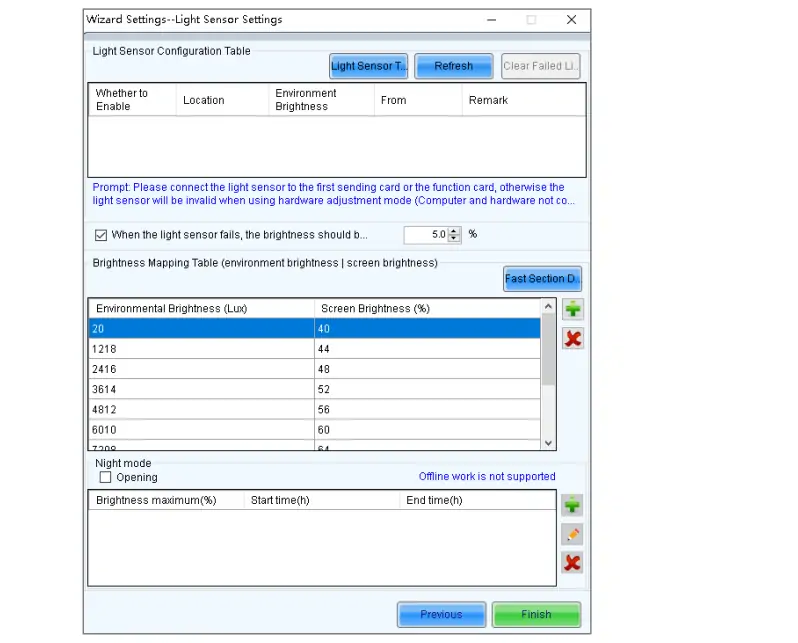
Configure cabinet mapping and apply suitable brightness/chroma correction data. The screenshot below shows automatic brightness settings, a separate function requiring a compatible NovaStar light sensor. Under Brightness > Auto Adjustment > Wizard Settings, test the sensor, set the ambient-light/brightness mapping and save. The pictured values are examples, not recommended settings for every installation.
Step 4: Cascade Devices (Optional)
Link the control ports of up to 20 units, using unique IP addresses on the same subnet. Configure each controller’s source and screen mapping separately; the control cascade does not itself establish synchronized video playback.
Step 5: Test and Optimize
Check cabinet order, per-port pixel totals, gray levels and motion using test content. NovaStar’s calibration software supports checkerboard calibration. Test low latency with the required vertical mapping, then save the validated configuration.
5. Novastar MCTRL700 Pro Video Controller Price
Request a current written quote from an authorized supplier; NovaStar’s cited documents do not publish a retail price. Compare the controller, receiving cards, multifunction card, sensor, setup service, warranty and delivery terms. Confirm that the quotation is for the MCTRL700 Pro.
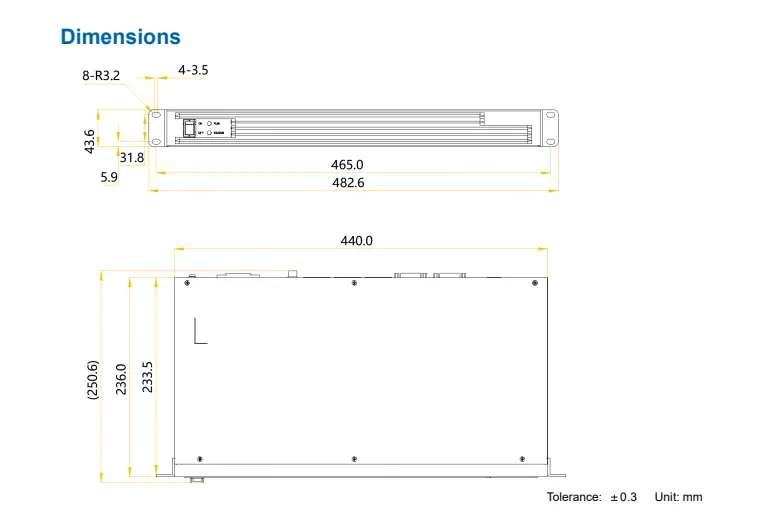
For rack planning, the documented overall dimensions are 482.6 × 250.6 × 43.6 mm, net weight 2.6 kg and rated consumption 17 W. Install the controller horizontally and allow access for cables and ventilation.
6. Real-World Applications of Novastar MCTRL700 Pro
Potential applications depend on the source timing and screen layout:
- Concerts and rental events: prepare cabinet maps and verify low-latency conditions during rehearsal.
- Sports venues: validate live-source compatibility and end-to-end delay before use.
- Control rooms: check text readability, source resolution and the required backup design.
- Corporate events: test presentation aspect ratios and audio routing in advance.
7. FAQs
8. Conclusion
The Novastar MCTRL700 Pro suits LED walls whose source format and cabinet loads fit its documented limits. Plan around six sending outputs, separate Ethernet control and NovaLCT configuration. Confirm custom timings, calibration compatibility and low-latency wiring before purchase. Those checks provide a more useful basis for selection than resolution or latency claims viewed in isolation.
 Novastar CX40 Pro LED Controller: Practical Guide for Buyers
 Novastar MBOX600 Industrial Controller: What You Need to Know
Related Posts






Fill In Your Needs In Detail
Fill in the screen usage scene and size you need in “Content”.You will get a quote.