The Novastar MCTRL660 Pro is an independent LED controller with HDMI, DVI and 3G-SDI inputs, six Gigabit Ethernet outputs and optical connectivity. Choose it when your LED wall needs those connections, supported low-latency operation or fiber conversion. It accepts up to 1920 × 1200 at 60 Hz with 8-bit input; higher bit depths change the limits. This guide compares it with the MCTRL600 and explains compatibility, setup and purchasing checks.
1. What is Novastar MCTRL660 Pro?
The MCTRL660 Pro sends video data to compatible receiving cards in rental or fixed LED walls. It is an independent controller, not a general-purpose video scaler. NovaStar’s V1.4.2 specifications list custom timings such as 3840 × 600 at 60 Hz and 800 × 3840 at 30 Hz. Maximum width and height are separate limits, not a combined 3840 × 3840 canvas.
Key features:
- Inputs: one each of 3G-SDI, HDMI 1.4a and single-link DVI.
- Outputs: six Gigabit Ethernet ports and two optical ports.
- Loop outputs: SDI, HDMI and DVI.
- Input depth: 8, 10 or 12 bits, subject to input and loading limits.
- Working modes: sending card or fiber converter.
- Image controls: mirroring, gamma adjustment and supported pixel calibration.
Check the complete source-to-receiving-card configuration before purchase. A connector match alone does not confirm every image-processing function.
2. Why the MCTRL660 Pro Independent Controller Stands Out?
The useful differences are in signal handling, adjustment and connection options. Evaluate each against the actual cabinet layout rather than treating every feature as essential.
2.1 Ultra-High Color Depth Inputs
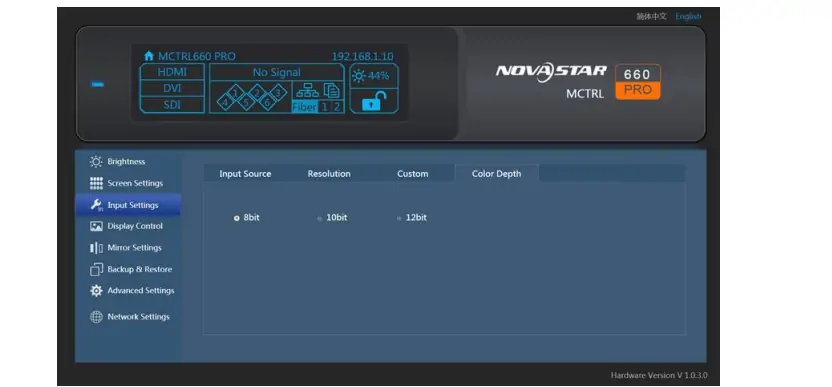
HDMI and DVI accept 10-bit/12-bit sources up to 1920 × 1080 at 60 Hz. Higher bit depth can preserve smoother gradients when the source and display chain support it. Twelve-bit RGB allows 4096 times as many theoretical color combinations as 8-bit RGB. This is a mathematical distinction, not a measured image-quality improvement or a 10-bit benefit.
2.2 Low Latency
Distinguish controller delay from whole-system latency. The manual, section 6.7.9, gives under 1 ms at image start position 0, with vertical cabinet wiring and no more than 512 pixels of loading width per port. It excludes simultaneous mirroring, interlaced SDI and Genlock. The current specification describes one frame from source to receiving card with low latency and input-source sync enabled. Test your full signal chain.
2.3 Individual Gamma Adjustment for RGB
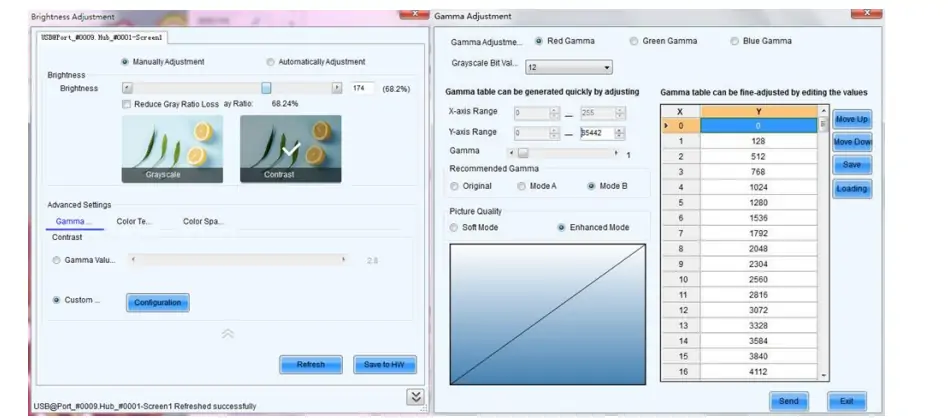
NovaStar lists separate red, green and blue gamma adjustment for 10-/12-bit input in the feature description. Confirm the receiving card, firmware and software workflow support the intended adjustment. Inspect dark gradients and neutral grays after changing settings.
2.4 Dual Working Modes
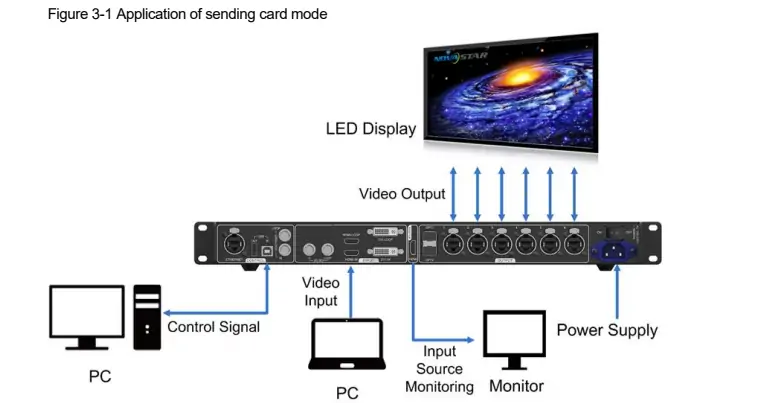
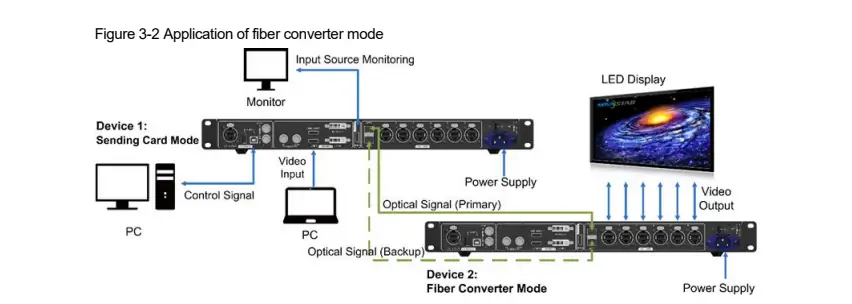
The two working modes use the same hardware differently:
- Sending card: source video enters HDMI, DVI or SDI, then display data leaves through Ethernet or optical connections.
- Fiber converter: display data is converted between the optical and Ethernet connections.
In the illustrated fiber arrangement, one unit sends and the remote unit converts. Match the optical modules, fiber type and link budget before installation.
2.5 Web Control and Auto Configuration
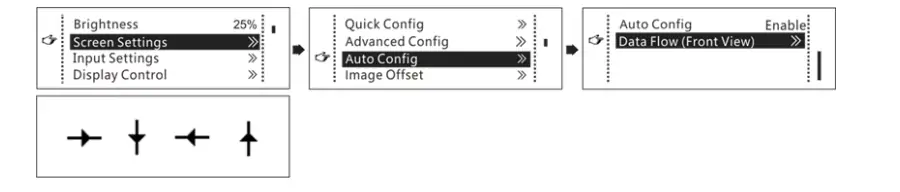
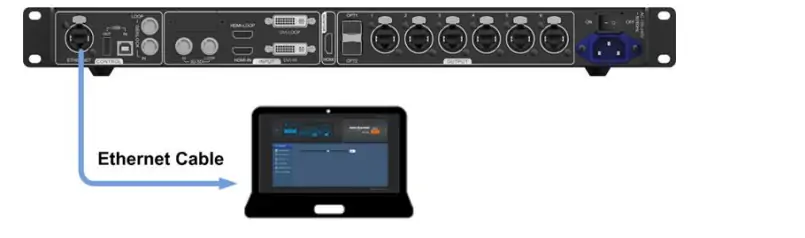
Web control provides browser-based configuration through the control network. Auto configuration is intended for each Ethernet port loading a complete row or column of cabinets. Check the selected data-flow direction against the physical cabling; it does not automatically validate an arbitrary wall layout.
3. Novastar MCTRL660 Pro vs MCTRL600: Pros and Cons
Both controllers support more than 8-bit input. The practical differences include deep-color input resolution, output connections and control options. Sources: MCTRL660 Pro specifications and MCTRL600 specifications V2.3.2.
| Feature | MCTRL660 Pro | MCTRL600 |
|---|---|---|
| 8-bit input resolution | 1920 × 1200 at 60 Hz | 1920 × 1200 at 60 Hz |
| 10-/12-bit input | 1920 × 1080 at 60 Hz | 1440 × 900 at 60 Hz |
| Low latency | Conditional mode; see section 2.2 | No equivalent mode listed in the cited specification |
| Gamma adjustment | Individual RGB adjustment listed | 10-bit gamma adjustment listed; do not assume identical controls |
| Working modes | Sending card and fiber converter | LED display controller; no fiber ports |
| Web control | Supported | USB PC control documented |
Reasons to choose the MCTRL660 Pro:
- Higher documented HDMI/DVI input resolution at 10 or 12 bits.
- A configurable low-latency mode within its restrictions.
- Six Ethernet outputs, optical transport and SDI input.
- Browser control alongside PC configuration tools.
When to choose the MCTRL600: Consider it for a standard LED wall that fits its four Ethernet outputs and input limits. Compare actual quotations; do not pay for optical or SDI connections your installation will not use.
4. Novastar MCTRL660 PRO Compatibility
Confirm source timing, bit depth, receiving-card compatibility and port loading together. Test the selected combination before applying it across the whole wall.
4.1 Input Sources
- 3G-SDI: up to 1920 × 1080 at 60 Hz; input resolution and bit depth are not adjustable on this input.
- HDMI 1.4a: verify source timing and HDCP requirements.
- Single-link DVI: use a supported digital source timing.

4.2 Output Ports
- Six Ethernet outputs: V1.4.2 lists 650,000 pixels per port at 8 bits or 325,000 at 10/12 bits.
- Optical ports: OPT1 carries the six-port data; OPT2 provides its backup path, not additional independent canvas capacity.
The older web product table states 320,000 pixels for deep color. Use the linked current specification and confirm firmware-specific limits with NovaStar.
4.3 Cascading Capability
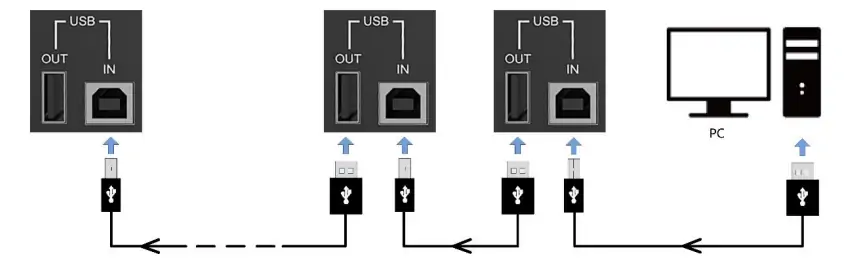
Up to eight units can be cascaded for PC control through USB IN/OUT. Video distribution and synchronized output also require the appropriate video-loop and sync connections. The USB chain alone does not distribute video or guarantee synchronization.
4.4 Software Integration
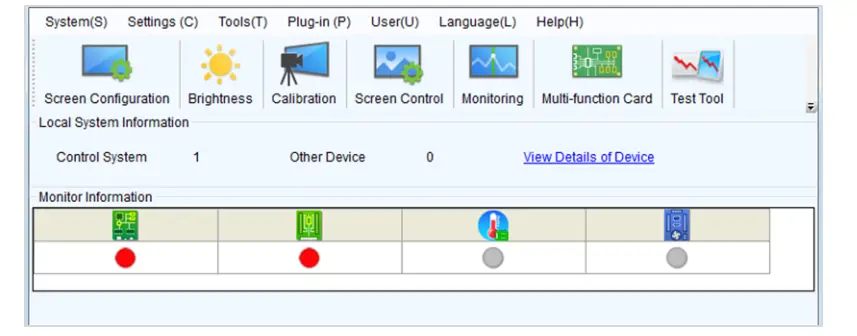
NovaLCT and SmartLCT provide supported configuration workflows. Use versions approved for the controller and receiving cards. Our NovaStar software download guide links software and manuals; back up your working configuration before changes.
5. NOVASTAR 660 Pro Manual & Setup Overview
Follow the official MCTRL660 Pro manual for your cabinet arrangement. Start with one verified cabinet configuration and keep a copy of the original settings.
5.1 Quick Screen Configuration
- Select input: match HDMI, DVI or SDI to the connected source.
- Check resolution: verify the actual source timing; SDI does not offer custom input settings here.
- Check bit depth: allow for reduced per-port loading at 10/12 bits.
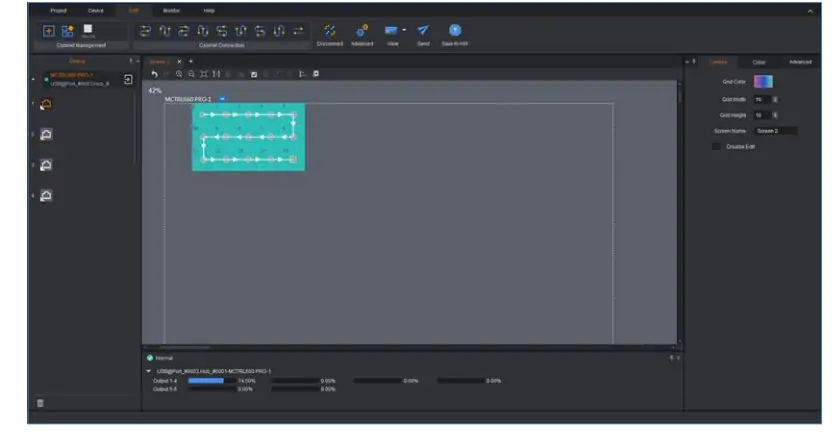
- Configure the screen: set cabinet rows, columns, port assignments and data flow. Display a mapping pattern and save the verified configuration.
5.2 Advanced Settings
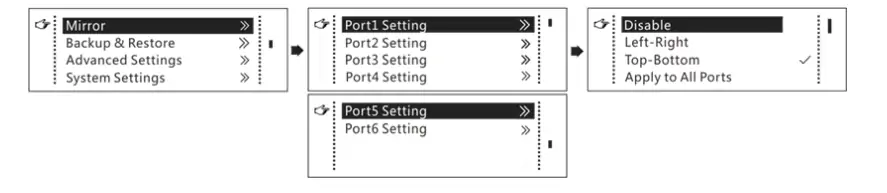
- Mirroring: check the image orientation and its incompatibility with low-latency mode.
- Calibration: use the appropriate NovaStar calibration workflow and inspect brightness/chroma uniformity.
- Gamma: adjust within the supported workflow, then test dark detail at the intended screen brightness.
5.3 Firmware Updates
- Back up settings and obtain the firmware package for the exact MCTRL660 Pro model from NovaStar’s official downloads.
- Connect the controller to the PC and follow the manual’s NovaLCT or SmartLCT update procedure.
- Keep power stable, then verify firmware, mapping and required features before returning the wall to service.
6. MCTRL660 Pro Price & Value Analysis
No verified current MCTRL660 Pro price is quoted here. Request a dated quotation specifying quantity, delivery location, warranty and included accessories. A higher price alone does not establish better reliability or suitability.
Compare total project cost:
- Required source resolution and bit depth.
- Optical modules, fiber and any remote conversion hardware.
- Backup controller, spare cables and commissioning support.
- Shipping, taxes and applicable certification documents.
Is it worth the investment? For rental LED screens, value depends on whether optical transport, SDI, web control and the supported latency mode solve an actual requirement. Compare a fully specified system rather than the controller price alone.
7. FAQs
8. Conclusion
The Novastar MCTRL660 Pro suits installations that need its combination of video inputs, optical transport and configuration controls. Its benefit over the MCTRL600 is not simply “more color depth”: both accept deep-color sources, with different resolution limits and connection options.
Before ordering, validate the source timing, port map, receiving cards, firmware and backup plan. Use a practical commissioning test to assess latency and image quality on your own LED wall.
 Novastar ET1S-G Media Server: Everything You Need to Know
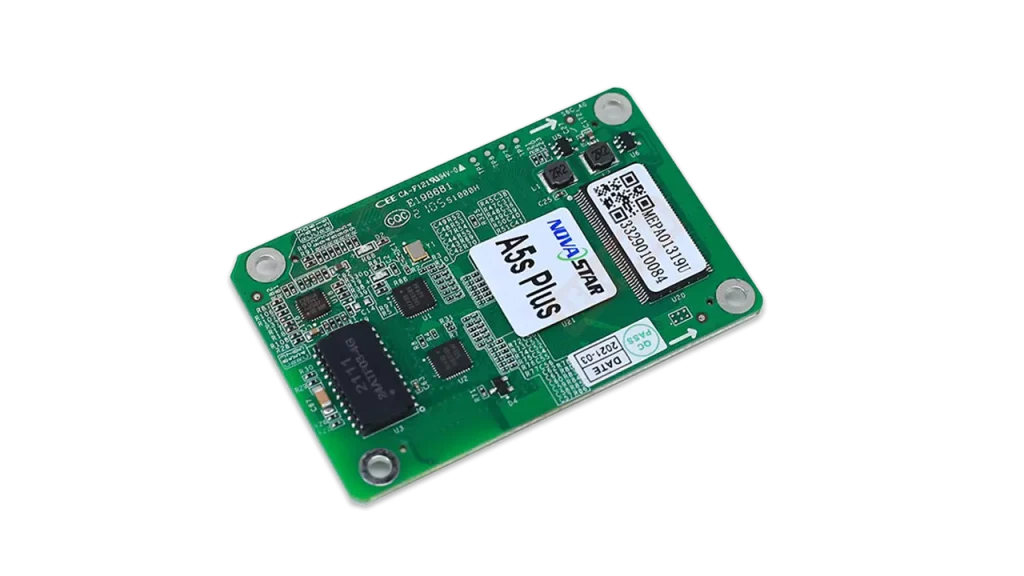 Is Novastar A5s Plus Worth It? Full Receiver Review
Related Posts

Fill In Your Needs In Detail
Fill in the screen usage scene and size you need in “Content”.You will get a quote.