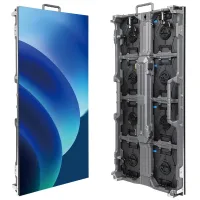
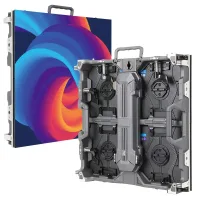
NovaStar HDR Master 4K is a video processor that converts between SDR and HDR10/HLG, scales video and converts signal interfaces. It is used ahead of display equipment in rental, stage and indoor LED screen systems. This guide covers its connections, HDR workflow, resolution limits and purchasing checks. The result depends on the source, settings and downstream display.
1. What is Novastar HDR Master 4K?
The HDR Master 4K combines dynamic-range conversion with NovaStar’s SuperView III scaling. Its role is video processing: plan the LED display controller and receiving system separately. NovaStar’s product catalog, pages 41–42, distinguishes full-link HDR from image enhancement for screens without HDR support.
Check the exact input and output format before designing an ultrawide canvas. NovaStar’s product page and V2.1.0 specifications differ on some input limits. The specifications explicitly list 8192 × 1080 at 60Hz for HDMI output; confirm unusual input timings with NovaStar for your firmware.
2. Novastar HDR Master 4K LED Tech Specs
Key Features:
- Inputs: one HDMI 2.0, one DP 1.2 and four 12G-SDI.
- Outputs: two HDMI 2.0, four 10G optical ports and four 12G-SDI across two cards.
- Resolution: 4K-class processing at 60Hz; supported timing depends on connector and color format.
- Conversion: SDR to HDR10/HLG and HDR10/HLG to SDR.
- Bit depth: 8, 10 or 12 bits, subject to format limits.
- Scaling: SuperView III.
- Image tools: mosaic, crop, mask and flip.
The output cards carry the same content synchronously. See specifications V2.1.0; connector count is not an independent-program-output count.
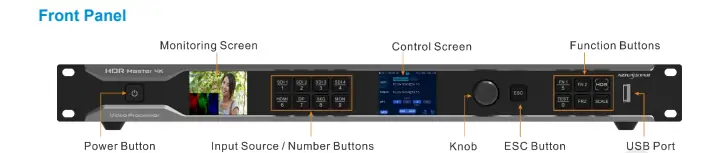

Electrical and Physical Specifications:
- Power: 100–240V AC, 3A, 50/60Hz; 120W maximum consumption.
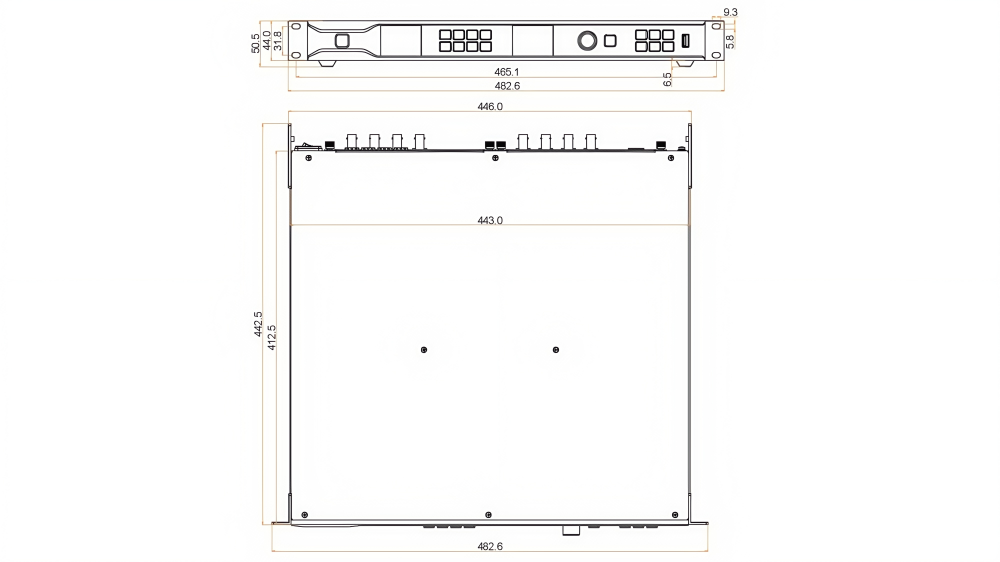
- Dimensions: 482.6 × 442.5 × 50.5mm.
- Weight: 7.5kg net; 12.1kg gross.
- Operating temperature: 0–45°C.
- Listed certifications: CE, FCC, IC and RoHS; confirm requirements for your destination.
These published values accompany the dimension drawing below. Allow installation space for connectors and ventilation.
3. What is HDR? HDR VS SDR
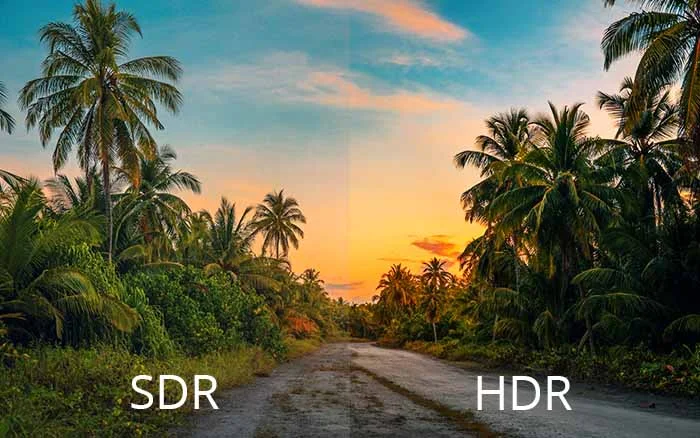
High dynamic range describes a wider range of image luminance than SDR. HDR television also uses defined color and signal parameters. ITU-R BT.2100 specifies the PQ and HLG systems; “HDR” alone does not identify a display’s brightness or color capability.
- Brightness: actual highlights depend on the display and content, not just an HDR label.
- Color: wide-gamut signals require suitable processing and display capability.
- Gradation: bit depth affects available tonal steps, but cannot recover missing source information.
The comparison image below is illustrative, not a measurement of your screen. NovaStar describes Image Enhancement for non-HDR displays in its product catalog. This does not turn an SDR panel into a native HDR display. Likewise, the processor’s peak-brightness setting does not increase the panel’s physical output.
4. Core Advantages of HDR Master 4K LED Controller
The useful advantages depend on the installation. Evaluate conversion quality, scaling, signal routing and recovery behavior with your own content before choosing a configuration.
4.1 Exquisite Color Reproduction
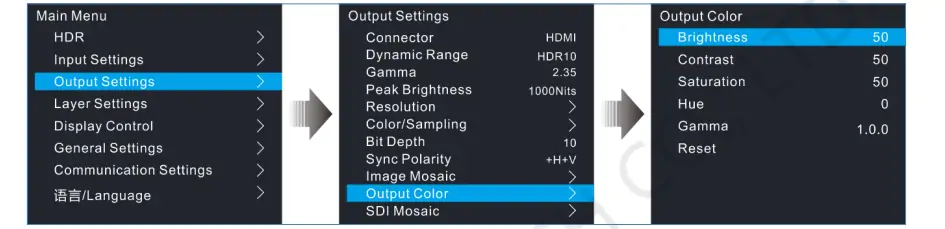
Color adjustments can help match the processed signal to the display. Compare skin tones, saturated graphics, gradients and shadow detail against a known reference. The color-setting screenshot is a menu example, not a recommended preset for every LED wall.
4.2 Advanced Scaling Technology
SuperView III provides content-adaptive scaling. Avoid interpreting scaling as lossless restoration: enlarging a low-resolution image cannot recreate detail absent from the source. Check fine text, diagonal lines and moving edges at the final viewing distance.
4.3 Versatile Connectivity
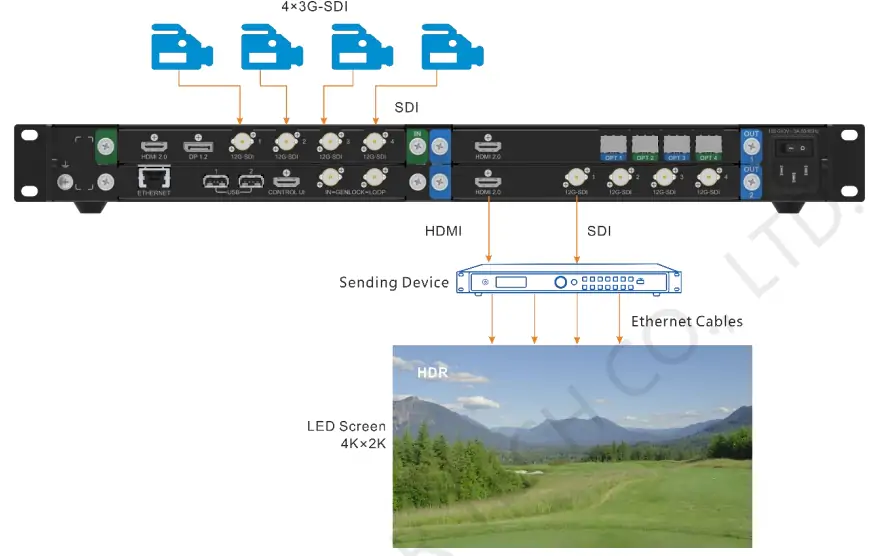
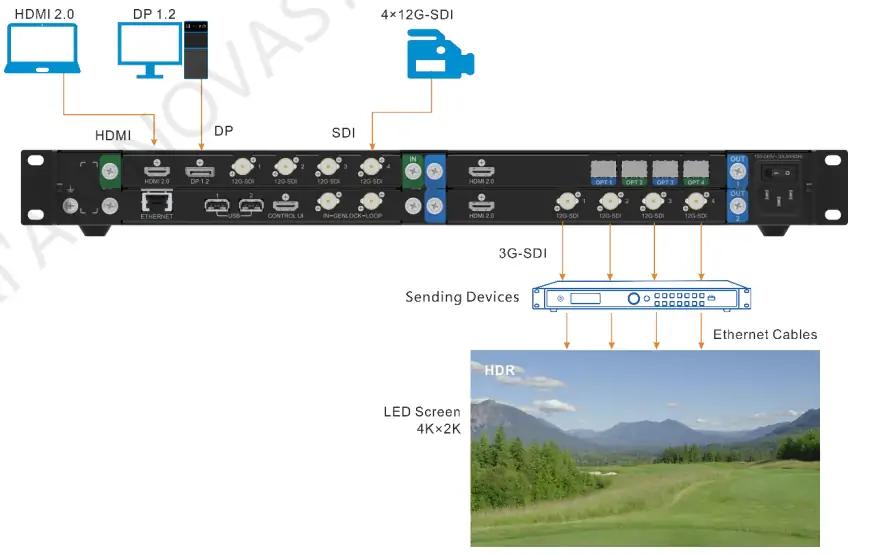
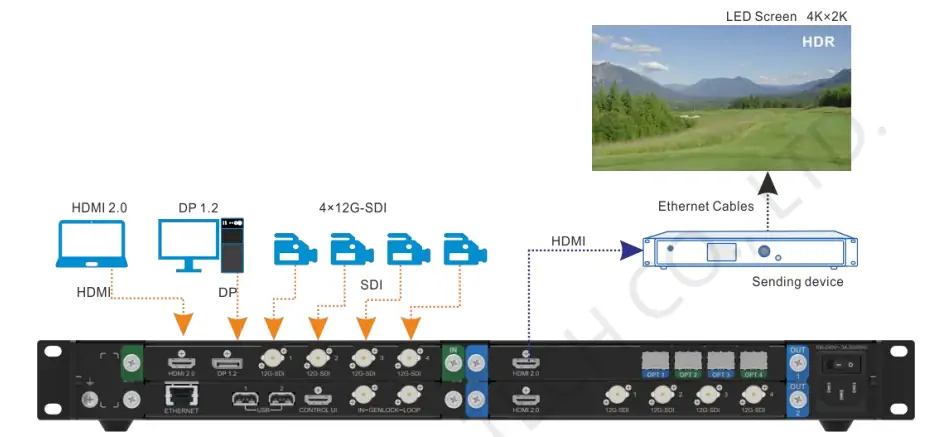
The official connector descriptions cover HDMI, DisplayPort, SDI and optical paths. SDI mosaic combines or divides image sections using supported 3G/HD/SD-SDI modes. The diagrams below show input and output arrangements; label each cable by its image section and confirm the matching format at both ends.
4.4 Intelligent Monitoring and Backup
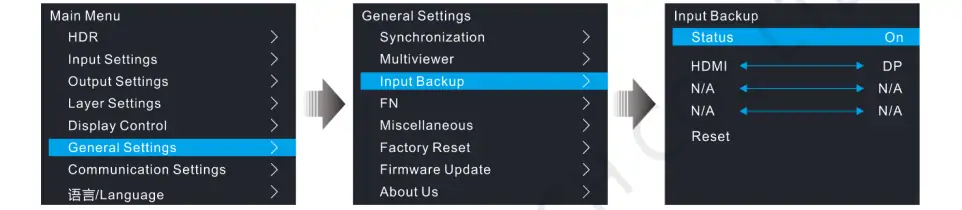
The monitoring display and input-backup function help operators detect and respond to source problems. Configure the primary/backup pair and test a source disconnection during rehearsal. Input backup does not protect against every processor, power or downstream failure. See the user manual’s General Settings section.
4.5 Customizable Output Settings
Output color space, chroma sampling and bit depth must match the receiving device. Higher bit depth may restrict the available resolution. Adjust contrast and low-grayscale gain while checking for clipped highlights and crushed blacks, rather than maximizing each setting.
5. How Novastar HDR Master 4K LED Video Processor Works?
Use the following sequence as a commissioning checklist alongside the HDR Master 4K user manual. Record the firmware version and keep a copy of the working settings before making changes.
5.1 Input Source Selection
Connect and select the intended HDMI, DP or SDI source, then check its detected format. The HDMI diagram below illustrates the downstream output path; input selection and output configuration are separate steps. Confirm the complete source-to-screen signal chain.
5.2 SDR to HDR Conversion
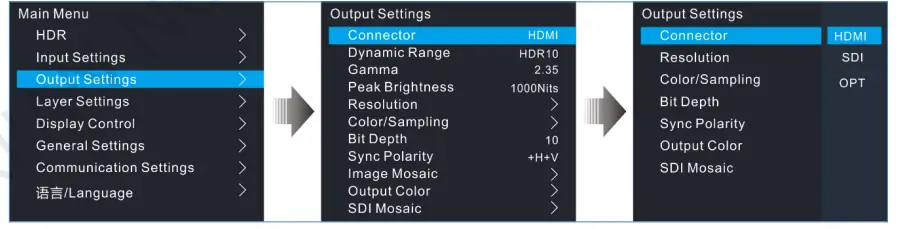
Enable conversion and choose the required output dynamic range. NovaStar’s manual, Output Settings, documents SDR, HDR10, HLG and Auto. Match the chosen mode to the downstream equipment and review the image before accepting the conversion.
5.3 Image Scaling and Optimization
Set the layer size and position for the output canvas, then check crop and mask boundaries. Use a grid or fine-text test image to spot unintended stretching. Adjust black level and gain cautiously while comparing several scenes.
5.4 Output Configuration
Choose the output path, resolution, color format and bit depth as a compatible combination. For example, the specifications list 3840 × 2160 at 60Hz with 10/12-bit YCbCr 4:2:2, while 10/12-bit RGB 4:4:4 is limited to 2560 × 1600 at 60Hz. See the input/output feature table. Apply settings and verify the receiver locks to the signal.
5.5 Monitoring and Control
Use the LCD and front-panel controls to check status during rehearsal. USB supports firmware updates and BKG/LOGO imports. Obtain the correct firmware package through NovaStar’s downloads, schedule downtime and recheck the saved configuration after updating.
6. Novastar HDR Master 4K Price
Request a current written quotation for the NovaStar HDR Master 4K. The cited manufacturer documentation does not provide a verified current price. Compare the included cards, optical accessories, warranty, delivery, taxes and support rather than comparing headline prices alone. Send the required input/output formats, display equipment and destination to EagerLED for a configuration-specific quote.
7. FAQs
8. Conclusion
NovaStar HDR Master 4K provides dynamic-range conversion, scaling and signal-interface options for professional video workflows. For fine-pitch COB LED walls, validate the controller, receiving system and panel capabilities together before promising an HDR result.
Choose the unit against a tested signal plan: source format, output timing, color settings, downstream compatibility and backup behavior. An acceptance test with your actual content is more useful than broad claims about image quality or future compatibility.
 Colorlight VX10 Guide: Basic Configuration and Hardware Overview
 What is Novastar Vunit 3000? A Complete Beginner’s Guide
Related Posts






Fill In Your Needs In Detail
Fill in the screen usage scene and size you need in “Content”.You will get a quote.