
Colorlight VX10 LED Video Controller is a versatile, high-performance video processor designed for professional-grade LED display control. Whether you’re managing large-scale installations, rental staging, or broadcast environments, the VX10 offers advanced features like UHD video processing, multi-layer display support, and robust signal management. This guide will walk you through the basics of configuring and connecting the Colorlight VX10 Video Processor, ensuring optimal performance for your projects.
1. What is the Colorlight VX10 LED Video Controller?
Colorlight VX10 LED Video Controller is a cutting-edge device that combines ultra-high-definition (UHD) video signal processing with powerful LED display control capabilities. Housed in a compact 1U rack-mount form factor, it supports up to 6.5 million pixels (16,384 × 8,192 resolution) and handles both 4K and 2K video inputs seamlessly.
Key features include:
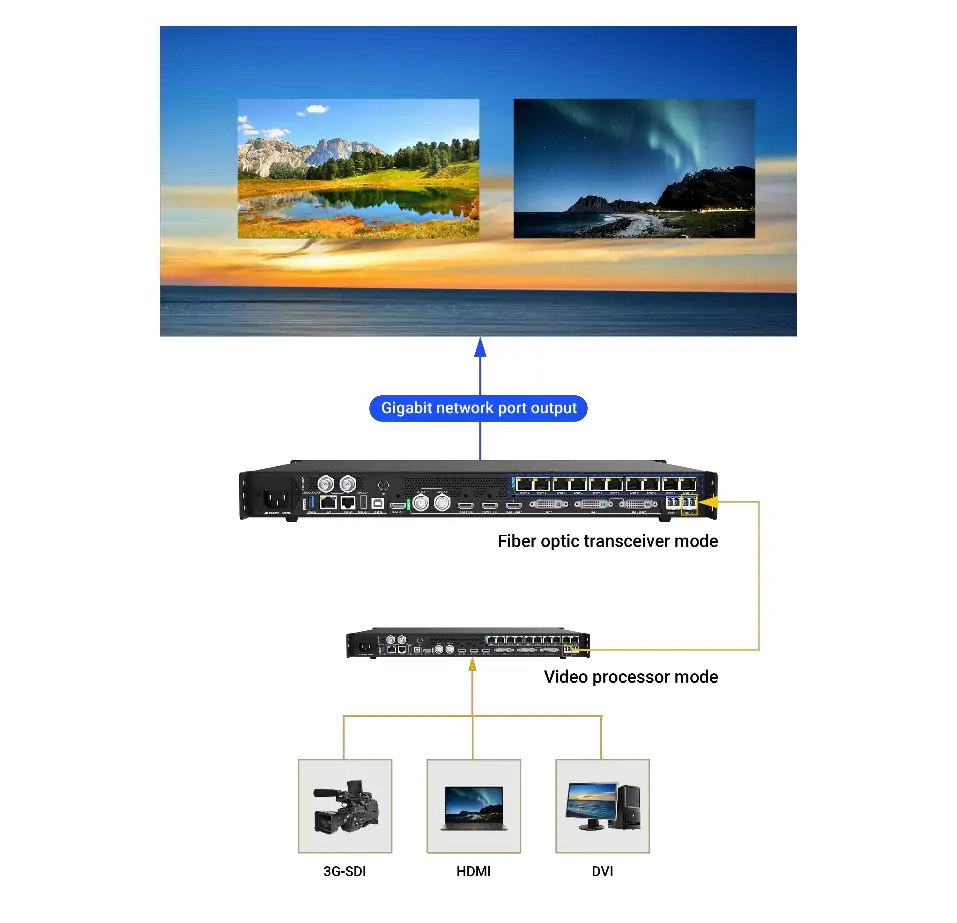
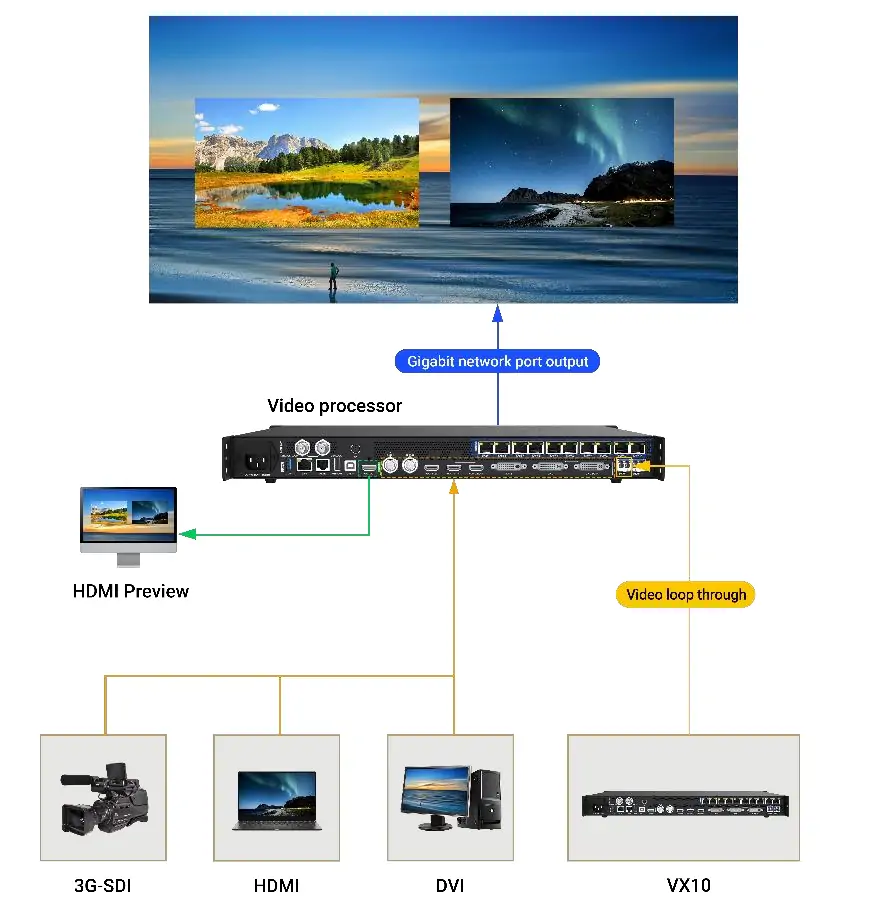
- Multi-format input support: HDMI 2.0, HDMI 1.4, DVI, 3G-SDI, and fiber ports.
- Advanced video processing: HDR support, 3-layer display, and precise color management.
- Flexible output options: Ethernet and dual 10G fiber outputs with redundancy.
- Real-time control: Web-based interface for easy configuration and management.
With its ability to handle demanding applications such as live events, film production, and commercial installations, Colorlight VX10 Video Processor is an ideal choice for professionals seeking reliability and precision.
2. Colorlight VX10 Video Processor Hardware Overview
2.1 Input and Output Ports
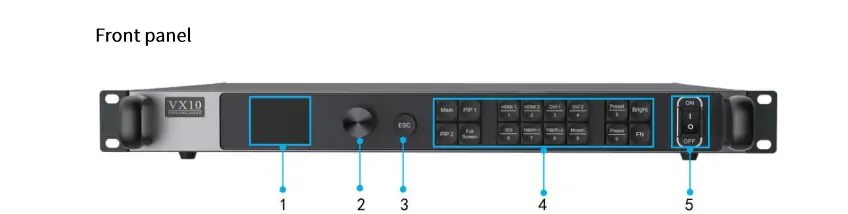
The VX10 Video Processing Controller is equipped with a variety of input and output ports to accommodate diverse signal sources and display requirements:
Inputs:
- 1× HDMI 2.0 (HDCP 2.2 compatible)
- 1× HDMI 1.4 (IN & LOOP)
- 2× DVI (one IN & LOOP)
- 1× 3G-SDI (IN & LOOP)
- 1× 10G fiber port (Fiber1)
Outputs:
- 10× Gigabit Ethernet ports
- 2× 10G fiber ports (Fiber1 and Fiber2)
- 1× HDMI 1.3 for previewing or video output
2.2 Key Specifications
- Resolution: Up to 4096×2160@60Hz input and output.
- Frame Rate: Supports 23.98Hz to 240Hz.
- Video Bit Depth: 8-bit and 10-bit video signals.
- HDR Support: Enhanced dynamic range for vivid visuals.
- Latency: Virtually zero latency in bypass mode.
2.3 Control and Connectivity
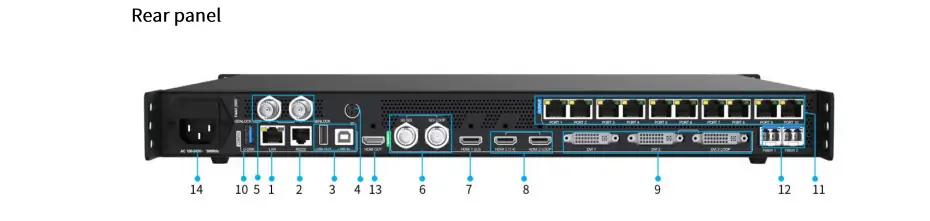
The Colorlight VX10 offers multiple control options:
- LAN Port: Connect via a network cable to access the web-based control platform.
- USB Port: For cascading and firmware updates.
- RS232 Serial Communication: For integration with third-party systems.
- Front Panel Display: Provides quick access to IP settings and status information.
3. Basic Configuration of VX10 Video Processing Controller
Configuring the Colorlight VX10 involves setting up LED display parameters, adding signal windows, and adjusting advanced settings. Follow these steps for a smooth setup:
3.1 Connecting to the VX10
Network Connection:
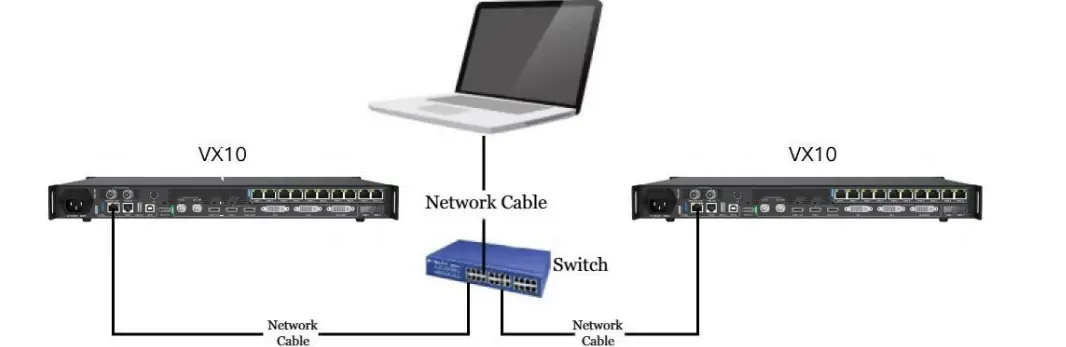
- Use a LAN cable to connect your PC directly to the VX10 or via a switch/router.
- Enter the VX10’s default IP address (168.1.10) into a supported browser (e.g., Chrome, Firefox).
- Log in using the default credentials: username 123456 and password 123456.
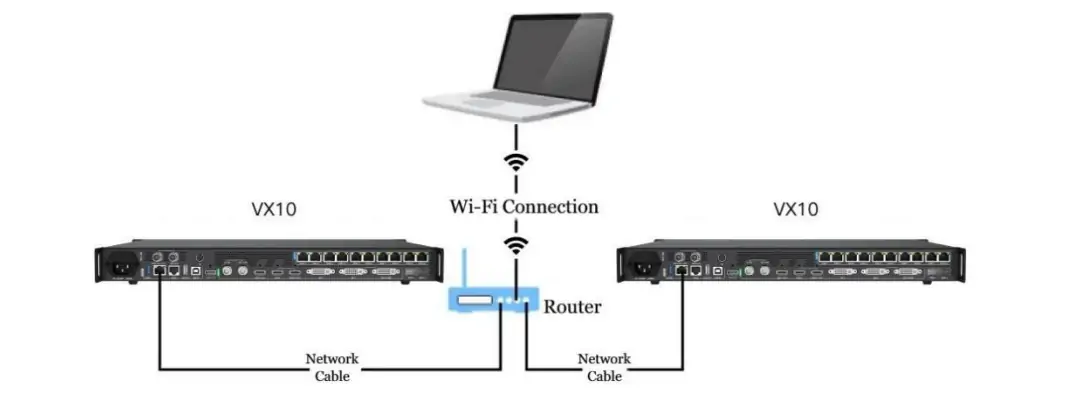
Wi-Fi Setup (Optional):
- Connect the VX10 to a router via the LAN port.
- Ensure your PC is on the same gateway as the VX10.
- Access the web control platform using the VX10’s IP address.
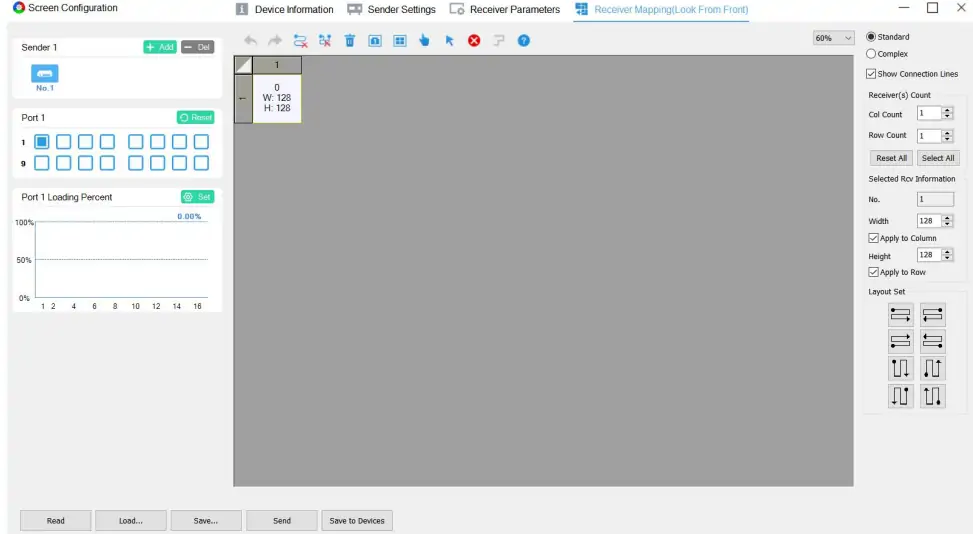
3.2 Setting LED Display Parameters
- Launch the LEDVISION software to configure receiver parameters and mapping based on your LED screen’s specifications.
- Ensure the LED display operates correctly before proceeding.
3.3 Adding Signal Windows
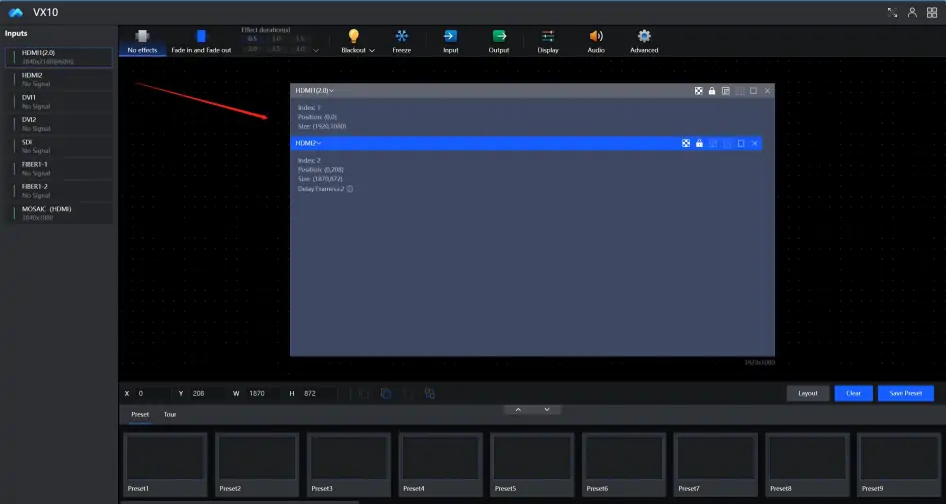
- Drag an input signal from the Inputs list to the canvas to create a signal window.
- Adjust the position and size of the window using the parameters (X, Y, W, H) below the canvas.
3.4 Advanced Settings
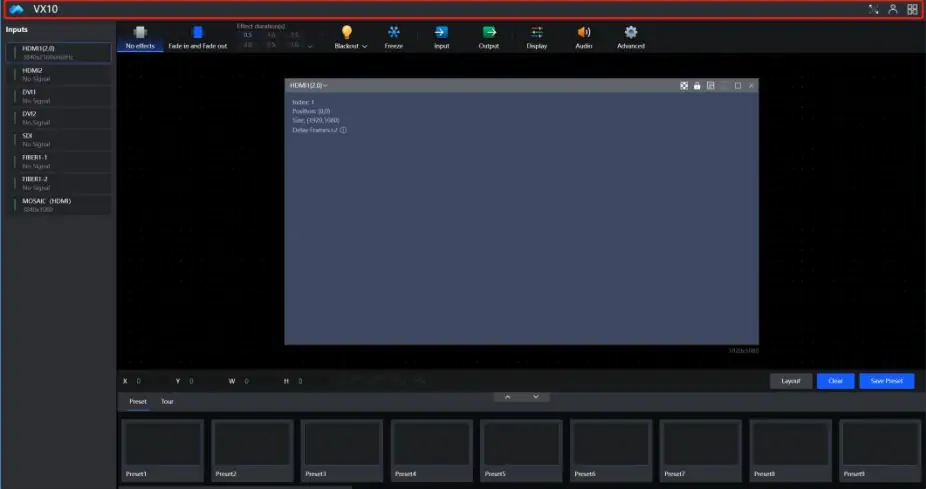
- Title Bar: Access full-screen mode, account settings, language preferences, and firmware upgrades.
- Input Settings: Configure color adjustment, cropping, EDID, and other signal-specific settings.
- Output Settings: Choose between Bypass Mode, HDMI Output Mode, and Fiber Output Mode.
- Display Settings: Fine-tune brightness, contrast, color temperature, and RGB components.
- Audio Settings: Select audio sources from HDMI or external inputs.
4. Colorlight VX10 LED Processor Cost
The Colorlight VX10 LED Processor typically sits in the mid-range professional video processor category, with prices most commonly seen around US $1,600 – $2,100 depending on the seller and regional availability. Many online LED equipment retailers list the VX10 at about $1,650 USD to about $2,049 USD, which reflects its combination of UHD video processing and LED control capabilities in one unit.
Actual Colorlight VX10 LED Processor cost can vary considerably based on distributor pricing, shipping, tax, and stock, and some sources note street price estimates even around $2,000 – $3,000 USD in certain markets. For exact current pricing it’s best to check specific reseller listings or request a quote, as LED controller pricing often fluctuates with supply and demand.
5. Typical Applications of Colorlight VX10 Video Processor
Colorlight VX10 Video Processor excels in a wide range of scenarios, thanks to its versatility and advanced features:
5.1 Rental Staging and Live Events
- Handle complex video setups with ease, supporting multiple layers and seamless transitions.
- Achieve low-latency performance in bypass mode for real-time displays.
5.2 Broadcast Studios
- Deliver broadcast-quality visuals with HDR support and precise color management.
- Integrate with existing studio equipment via HDMI, SDI, and fiber connections.
5.3 Film Production
- Use the VX10’s 3D settings and test patterns for pre-production calibration.
- Ensure consistent color accuracy across different shooting environments.
5.4 Commercial Installations
- Power large-scale LED walls in shopping malls, airports, and corporate spaces.
- Leverage Ethernet and fiber outputs for reliable data transmission.
6. FAQs
7. Conclusion
The Colorlight VX10 LED Video Controller is a powerhouse of innovation, combining advanced video processing with intuitive control. Whether you’re setting up a small-scale installation or managing a large-scale event, the VX10’s robust features and user-friendly interface ensure seamless operation. By following this guide, you can unlock the full potential of the Colorlight VX10 Video Processor, delivering stunning visuals and reliable performance every time.
 Novastar MBOX600 Industrial Controller: What You Need to Know
 Novastar HDR Master 4K: Specs, Price and How it Works
Related Posts
Fill In Your Needs In Detail
Fill in the screen usage scene and size you need in “Content”.You will get a quote.



