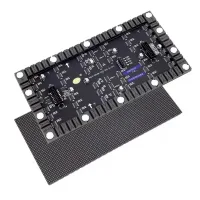
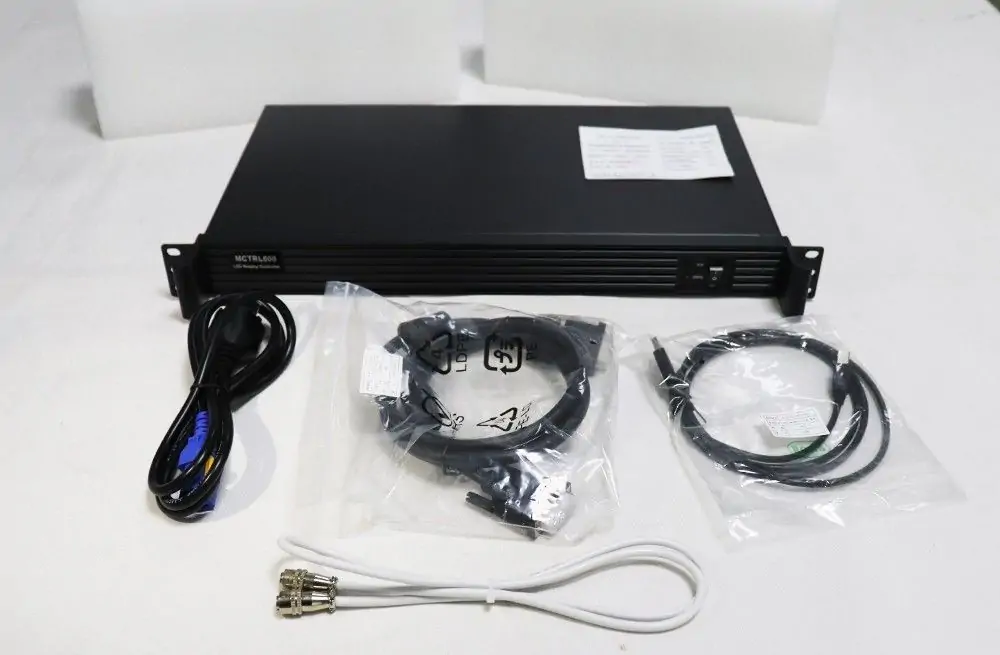
The NovaStar MCTRL600 is a synchronous LED sending controller with HDMI 1.3 and single-link DVI inputs, four Ethernet outputs and USB configuration control. Its documented 8-bit input reaches 1920×1200 at 60 Hz; 10/12-bit input is limited to 1440×900 at 60 Hz. It sends a live video source to LED receiving cards. It does not replace a media player or upstream scaler. Check source timing, bit depth and each cabinet chain before choosing it.
This NovaStar MCTRL600 guide explains the specifications that affect a real installation, where to find manual and software resources, how to connect and configure the system, and how to diagnose a blank or incorrectly mapped display. It also explains why a 3840-pixel custom dimension is not a 3840×3840 canvas, and why UART cascading does not replace video distribution. Use the worked examples as planning checks, then validate the finished design with your screen supplier.
1. What Is the NovaStar MCTRL600 LED Controller?
The NovaStar MCTRL600 sits between the video source and the LED cabinets. The source creates the picture; the sending controller routes image data; the receiving cards translate that data into signals for the modules. Understanding these separate jobs prevents the common mistake of expecting configuration software or a USB cable to carry the live picture.
A typical signal chain is: computer or video processor → HDMI/DVI → NovaStar MCTRL600 → LED data cables → receiving cards → LED modules. A separate USB connection lets a computer configure the controller. Once the correct settings are stored, the configuration computer can be disconnected, provided a video source continues feeding the controller.
This arrangement suits an installation where the video format and wall layout are already defined. For a rental LED display, record the cabinet arrangement and cable order for each build. For a permanent wall, retain a copy of the final configuration so a replacement component can be commissioned consistently.
The NovaStar MCTRL600 is not a playlist player, and it should not be treated as an all-in-one presentation switcher or scaler. If several laptops, cameras or different image sizes must be managed, plan the upstream processing separately. When native 4K input is a requirement, review an appropriate NovaStar MCTRL4K sending controller guide instead of assuming custom timing support provides equivalent capability.
2. Core Features of the NovaStar MCTRL600
01. NovaStar MCTRL600 input and output connections
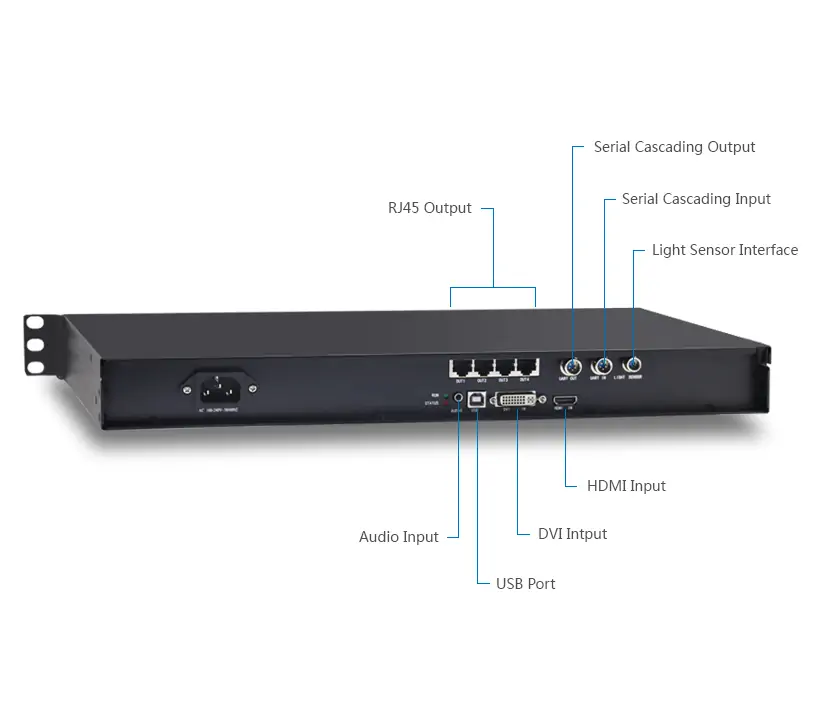
The NovaStar MCTRL600 provides HDMI and single-link DVI video inputs, an audio input, four Gigabit Ethernet outputs, USB control and a light-sensor connection. The sockets perform different functions. Label the cables at the rack and first cabinet so a technician can distinguish video input, configuration, display data and control cascading without tracing the whole installation.
The four RJ45 outputs serve the LED receiving-card system. Do not connect them to an ordinary office network or assume a standard network switch can distribute the display signal. Use the connection method approved for the controller and receiving cards. Treat AUDIO as an input; route the venue sound system according to its own design.
02. NovaStar MCTRL600 resolution and pixel capacity
Three checks determine whether a layout fits: the accepted input timing, the pixels assigned to each output, and the receiving-card limits. Passing only the total-pixel calculation is insufficient. A narrow, tall wall can have fewer pixels than a conventional HD image yet still require a custom timing that the source must actually produce.
The standard 8-bit reference of 1920×1200 at 60 Hz contains 2,304,000 pixels. Four ports rated at 650,000 pixels give an arithmetic sum of 2,600,000, but that sum does not establish a supported 2.6-million-pixel input format. For the NovaStar MCTRL600, check the documented timing as well as every physical data chain.
03. Calibration, brightness and image quality
The NovaStar MCTRL600 supports pixel-level brightness and chroma calibration with the appropriate NovaLCT workflow and calibration platform. Calibration data helps correct differences between LEDs; simply moving a brightness slider does not measure or create those corrections. Keep the screen’s calibration files with its receiving-card and connection files.
Set operating brightness for the venue and content, then assess white, gray gradients and saturated colors across cabinet boundaries. A light sensor can support automatic brightness adjustment when correctly installed and configured. It does not remove the need to commission suitable levels or check how the screen behaves under changing ambient conditions.
04. UART control and redundancy
UART cascading allows control of up to 20 NovaStar MCTRL600 units. Connect the first unit to the PC through USB, then use each UART OUT to the next UART IN with the specified cascading cable. Source: MCTRL600 specifications V2.3.5, control connector table. This is a control path. Each controller still needs the correct video feed and assigned screen region. Plan video distribution, image offsets and timing separately when several controllers share one wall.
Ethernet-port redundancy is also a designed feature, not an automatic guarantee that every cable failure is covered. Allocate the required ports and receiver connections, configure the backup relationship and simulate the expected failure during commissioning. Keep records of which failures the tested design covers, including any remaining single points of failure upstream.
3. Technical Specifications of the NovaStar MCTRL600
The table uses NovaStar’s MCTRL600 LED Display Controller Specifications V2.3.5, released April 17, 2026. It is the revision linked from the manufacturer’s product download section when checked on October 14, 2026. NovaStar’s product-page table still lists 16 W and 2.9 kg, while this dated PDF lists 6.6 W and 2.5 kg. The values below follow the PDF; confirm which documentation applies to the supplied unit.
| Item | Documented value | Planning implication |
|---|---|---|
| Video inputs | 1× HDMI 1.3; 1× single-link DVI | Provide a compatible progressive signal. |
| 8-bit input | 1920×1200 at 60 Hz | Use this standard timing as the initial capacity reference. |
| 10/12-bit input | 1440×900 at 60 Hz | Higher source bit depth reduces the documented maximum input resolution. |
| Custom timing examples | 3840×600 or 500×3840 at 60 Hz | Maximum width and height are separate examples, not simultaneous dimensions. |
| LED outputs | 4× Gigabit Ethernet; up to 650,000 pixels per port | Check each output allocation and receiver chain. |
| Control | USB Type-B; UART IN/OUT | USB configures; UART cascades control. |
| Power | AC 100–240 V, 50/60 Hz; 6.6 W, measured with one unit, HDMI input and all four Ethernet outputs, without cascading | Controller consumption excludes the LED wall. |
| Physical size | 482.0×268.5×44.4 mm; 2.5 kg | Allow space for connectors, ventilation and rack servicing. |
| Operating conditions | −20°C to +60°C; 10–90% RH, non-condensing | Use protected housing and horizontal placement. |
Source note: Hardware values above are from NovaStar’s dated specification document, especially the connector, physical and video-source tables. The document lists RGB 4:4:4, YCrCb 4:4:4 and YCrCb 4:2:2 formats. HDMI is HDCP 1.4 compliant. Both inputs require progressive signals. A compatible connector alone does not establish support for every timing and bit-depth combination.
01. Worked NovaStar MCTRL600 screen-load example
Assume a wall has ten cabinets across and six down, with each cabinet containing 192×192 pixels. The physical canvas is 1920×1152 pixels, or 2,211,840 pixels in total. Fifteen cabinets on each of four outputs would produce 552,960 pixels per output. Those arithmetic checks fit the documented 8-bit input reference and nominal per-port ceiling.
That calculation is a starting point, not a certified design. At 10/12-bit, the documented 1440×900 input contains only 1,296,000 pixels, so this 2,211,840-pixel wall cannot reuse the same native full-wall timing. Review the input architecture before changing color depth. Also verify receiver loading, cable sequence and refresh requirements. A 1920×1200 source could contain the wall’s 1920×1152 image region with 48 unused rows; map the intended region explicitly and design the content to avoid accidental cropping.
Now consider assigning twenty of those cabinets to one output: 20×192×192 equals 737,280 pixels. That port would exceed the stated ceiling even though the whole wall still fits the total-pixel check. Redistribute the cabinets across outputs before troubleshooting software or replacing hardware.
02. Custom-resolution and color-depth checks
The NovaStar MCTRL600 custom-width example of 3840×600 contains 2,304,000 pixels. A 3840×3840 square would contain 14,745,600 pixels, which is an entirely different demand. Never combine two separate maximum-dimension statements into a single supported canvas.
Also distinguish video frame rate from LED refresh rate. A 60 Hz source sends sixty frames per second; the module’s scanning and PWM behavior determine how the LEDs refresh within those frames. Camera banding, gray-scale quality and flicker depend on the broader receiving-card and driver configuration, so a controller input specification alone cannot guarantee a particular filmed result.
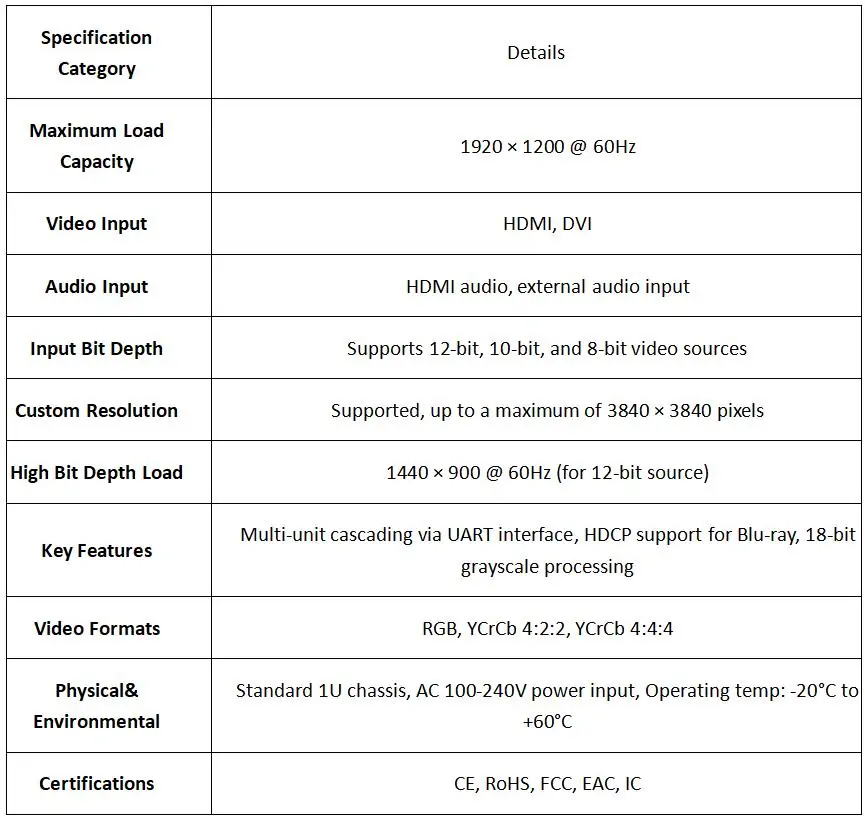
The retained illustration incorrectly states a maximum 3840×3840 canvas. NovaStar specifies separate 3840×600 and 500×3840 examples at 60 Hz; they cannot be combined. Use the dated table above for current specifications. The illustration’s older certification list also differs from V2.3.5; confirm approvals for the supplied unit.
4. NovaStar MCTRL600 Price and Buying Checklist
A meaningful NovaStar MCTRL600 price comparison needs a dated quotation with the same scope. An advertised controller-only price may exclude freight, tax, local warranty, cables or commissioning. Rather than treating an old price range as a current offer, ask for the delivered cost and availability for your destination and quantity.
For a new installation, include the equipment needed around the NovaStar MCTRL600: source computer or player, any scaler or switcher, compatible receiving cards, data cabling, rack space and technical setup. For a replacement, confirm that the supplied model and firmware can work with the existing screen and preserved configuration.
| Quotation item | Question to ask | Why it matters |
|---|---|---|
| Hardware identity | Is this the exact MCTRL600 model, and is its condition new or used? | Similar product names do not guarantee identical functionality. |
| Included accessories | Which power, USB, HDMI and cascading cables are included? | Avoid missing a required connection during installation. |
| Compatibility | Has the supplier checked the source timing and receiving cards? | A low unit price is irrelevant if the system cannot meet the design. |
| Support and warranty | Who handles configuration help, returns and repairs? | Define responsibilities before a live event or permanent installation. |
| Delivered cost | Are shipping, tax and import charges included? | Compare quotations on the same basis. |
| Acceptance test | Can the supplier verify mapping, restart behavior and any backup path? | A working demonstration is more useful than a feature list. |
When asking EagerLED for a controller and screen configuration quotation, provide the wall’s pixel width and height, cabinet resolution, cabinet count, receiving-card model, source connection and installation use. Include the required frame rate and any redundancy requirement. These details make the NovaStar MCTRL600 selection and cost estimate far more specific than screen dimensions in meters alone.
5. How to Use the NovaStar MCTRL600: Manual, Software and Setup
Commission the NovaStar MCTRL600 in a controlled sequence: document the wall, establish the video and USB connections, validate one cabinet, map the complete display, and save the tested configuration. The steps below are a practical workflow; exact menu labels vary with NovaLCT version and connected hardware.
01. Find the NovaStar MCTRL600 manual and software
For hardware details, use the official NovaStar MCTRL600 specifications PDF, V2.3.5. For software procedures, consult NovaStar’s NovaLCT synchronous control system user manual V5.6.1, an existing reference for configuration procedures. Use instructions appropriate to the installed release rather than treating this older manual as the latest software download. The specification sheet describes hardware; it is not a substitute for the configuration manual.
Our NovaStar software download guide provides a starting point for NovaLCT and related resources. Check the package description and supported equipment before installation. Do not confuse a controller firmware package with the Windows configuration application or the receiving-card file supplied for a cabinet.
Before changing a working NovaStar MCTRL600 installation, record the software version, controller firmware, receiving-card model and cabinet wiring. Read back and retain the existing settings where supported. Store the files with a dated diagram and photographs of labeled connections; this makes restoration much easier than relying on memory after a replacement.
02. Connect the video source, USB and LED cabinets
Position the NovaStar MCTRL600 horizontally in a dry, ventilated equipment location. Check the power arrangements and inspect cables before connecting. Use HDMI or DVI from a known working source, connect USB Type-B to the setup computer, and connect the LED output ports to the appropriate first receiving cards.
Follow the cabinet supplier’s IN/OUT markings and planned data direction. A cable physically connected to the wrong cabinet can produce a convincing but scrambled image after mapping. Label each chain by controller number and output port, particularly when several identical controllers occupy the same rack.
Start with a simple progressive test signal at a documented timing and compatible bit depth. Avoid diagnosing a new installation with several unverified adapters, a protected streaming source and a complex processor preset simultaneously. Change one part of the chain at a time so the result identifies a useful next action.
03. Configure one cabinet in NovaLCT
In NovaLCT V5.6.1, use Settings → Screen Configuration, select the communication port, choose Configure Screen, then Next. Confirm that the NovaStar MCTRL600 is detected. These labels follow the linked NovaLCT manual, section 5.2.1; other versions may differ. If detection fails, check the USB data cable, computer port, installed driver and controller power before changing screen parameters. Video detection and USB communication are separate checks.
On the Receiving Card tab, use Load from PC for the receiving-card file supplied for the exact cabinet (NovaLCT manual, section 5.2.2.1). Module resolution, driver IC, scan mode and internal wiring matter as much as pixel pitch. The RCFG and RCFGX configuration guide explains file matching. If the correct file is unavailable, obtain the cabinet specification and supplier assistance before using Smart Setting.
Test a single cabinet at conservative brightness with solid red, green, blue, white and gray patterns. Check for swapped colors, repeated blocks, missing rows and abnormal brightness. Resolve those issues before extending the configuration to the full wall. Screen mapping cannot repair an incorrect module-driving configuration.
04. Map the screen and save the configuration
On Screen Configuration → Screen Connection, set the receiving-card rows and columns, select each output port, and assign cards in physical cable order. Enter their actual pixel dimensions (NovaLCT manual, section 5.2.3). Map each NovaStar MCTRL600 output to its intended image area. Confirm the port loads using the same cabinet dimensions used in the drawing, rather than estimating from physical cabinet size.
Use a test image with numbered regions, an outer border and clear horizontal and vertical lines. It should reveal mirrored cabinet order, misplaced rows, overlapping regions or missing edge pixels. Check the entire perimeter as well as the center; a mostly correct picture can conceal an incorrect final cabinet.
For the screen connection, use Send to HW, then Save to retain the settings. Save to File creates a local connection backup. Keep the receiving-card RCFGX file separately. Sending, hardware saving and local export are different operations (NovaLCT V5.6.1 manual, sections 5.2.2.1 and 5.2.3). Verify persistence with a planned restart.
05. Set the video canvas and verify normal operation
Set the source output and content canvas deliberately. Desktop duplication can force a compromise timing shared with another monitor; an extended desktop often allows more control over the LED output. Check operating-system display settings and the application’s output selection so the intended content reaches the correct screen.
For the NovaStar MCTRL600, keep source resolution, bit depth and frame rate within the verified combination. If content must be resized to fill the wall, perform that scaling in suitable upstream equipment or software. Confirm that text remains legible and that circular graphics retain their shape instead of being stretched.
Finally, test startup order, source reconnection, brightness and representative show content. If a backup path is configured, deliberately interrupt its primary connection and confirm recovery in a controlled test. Document the result and restore normal cabling before handing the installation to its operator.
06. Troubleshoot the NovaStar MCTRL600 systematically
Use the observed symptom to decide where to test first. A black wall does not identify the failed component by itself. Record the NovaStar MCTRL600 indicator behavior, whether NovaLCT sees the hardware, and whether the fault affects every cabinet or only one chain.
| Observed symptom | First check | Next useful action |
|---|---|---|
| Green RUN flashes once every two seconds | No video input is available | Verify active source, supported timing and video cable. |
| Green RUN flashes four times per second, but wall is black | Video input is detected | Check blanking, brightness, receiver power and screen mapping. |
| Green RUN flashes rapidly, about 30 times per second | The startup image is being displayed | Check the configured startup behavior and live source before changing the map. |
| Red STA indicator is off | Power is absent or abnormal | Check outlet, cable and switch; arrange service if needed. |
| NovaLCT cannot detect the controller | USB communication path | Try a known working data cable and inspect driver/device detection. |
| Only one chain fails | First failed cabinet and its incoming connection | Check power and substitute a known working cable before remapping. |
| Image sections appear in the wrong places | Cabinet order and screen connection map | Compare the configured route with the physical wiring diagram. |
| Colors or scan lines are wrong | Receiving-card file and module parameters | Restore the verified cabinet file and test one cabinet. |
| Settings disappear after restart | Hardware save was not completed | Reapply verified settings, save correctly and repeat the restart test. |
The indicator meanings follow NovaStar’s specification document; the troubleshooting sequence is practical diagnostic guidance. A breathing RUN indicator signifies that Ethernet-port redundancy has taken effect. It should prompt a check of the primary path, rather than being dismissed as normal operation without investigation.
For intermittent faults, keep a short log of source changes, cable movement, temperature and the affected area. Test the simplest known working source and one cabinet before rebuilding the full chain. Avoid factory resets as a first response: they can erase useful configuration evidence and add another variable to the diagnosis.
6. NovaStar MCTRL600 FAQs
01. Where can I find the NovaStar MCTRL600 manual PDF?
Section 5 contains the existing official links to MCTRL600 Specifications V2.3.5 and the NovaLCT V5.6.1 synchronous-system manual. The first describes hardware; the second covers input settings, receiving-card files, mapping and saving. Match the manual to your installed software and receivers. The software download guide is separate from either PDF and from the controller firmware package.
02. Which NovaStar MCTRL600 software do I need?
NovaLCT is the configuration tool used for the NovaStar MCTRL600 workflow described here. Connect the control computer through USB Type-B, confirm communication, then configure receiving cards and screen connections. Video still enters separately through HDMI or DVI. A successful USB connection alone cannot put a computer desktop on the wall.
03. Can the NovaStar MCTRL600 display 4K video?
Do not specify it as a native 3840×2160 at 60 Hz controller. The documented 3840-pixel custom width applies to a narrow canvas, not a full 4K frame. Downscale a 4K source upstream to a supported timing or select equipment designed for the required 4K input and screen load.
04. Why does my NovaStar MCTRL600 show no signal?
Start with the green RUN indicator. Slow flashing means no video input is available. Test an active, unprotected progressive source with a known working cable and supported timing. If input is detected but the wall stays black, inspect brightness, blanking, output cabling, receiver power and the saved screen connection map.
05. Does UART cascading increase video resolution?
UART links provide control communication between controllers. They do not transport HDMI pictures or convert several units into a single unrestricted input. A multi-controller system needs a planned video feed for each unit, assigned image regions, compatible timing and a verified cabinet map. Test the whole arrangement before delivery.
06. Can I play videos from a USB flash drive?
The NovaStar MCTRL600 USB Type-B connection is for computer control. It is not a USB media-player socket. Use an external computer or media player to provide continuous HDMI or DVI video. Saving screen settings preserves configuration; it does not store your presentation or playlist inside the controller.
07. Can the NovaStar MCTRL600 control an outdoor LED screen?
It can form part of an outdoor display system, but the controller needs a suitable protected equipment location. Outdoor cabinets and a rack controller have different exposure requirements. Provide dry, ventilated housing, appropriate power distribution and protection from condensation. An operating-temperature range does not establish weatherproofing.
08. Can I reuse an RCFGX file from another LED wall?
Only after the screen supplier confirms that the receiving card, module resolution, driver IC, scan mode and cabinet wiring match. Pixel pitch alone is insufficient. Back up the existing files, test one cabinet at conservative brightness and confirm correct operation before applying a file to the full display.
09. Should I update NovaStar MCTRL600 firmware before every event?
No. Keep a proven configuration unless an identified issue or required feature justifies a supported update. Check model compatibility and release notes, retain a recovery plan, and schedule testing outside production hours. Recheck mapping, brightness, source timing and any backup paths after the change.
7. Conclusion
The NovaStar MCTRL600 can be a practical sending controller when the source timing, per-port allocation and receiving-card configuration match the LED wall. Reliable operation comes from checking those limits together, preserving the correct cabinet files and verifying the complete system through a restart and realistic content test.
Before ordering or commissioning a NovaStar MCTRL600, prepare the pixel dimensions, cabinet map, source format and support requirements. Use the dated specification reference for hardware decisions and the appropriate NovaLCT manual for setup. That preparation turns a controller purchase into a documented display system that operators can use and technicians can maintain.
 Times Square 3D Billboard: Costs, Locations, Effectiveness & EagerLED Solutions
 NovaStar MCTRL4K: 4K LED Controller Specs, Setup & Price
Related Posts

Fill In Your Needs In Detail
Fill in the screen usage scene and size you need in “Content”.You will get a quote.