NovaStar MRV208-N LED Receiving Card receives display data from a compatible controller and drives LED modules through eight HUB75E connectors. It supports up to 16 parallel RGB data groups. Capacity depends on the controller, driver IC and source bit depth; with M3 controllers and PWM driver ICs, the documented maximum is 512×512 at 60 Hz for 8-bit video. The manufacturer is NovaStar Tech Co., Ltd.
This guide covers MRV208-N specifications, the JH1 pinout, price-quote requirements and troubleshooting. Check the exact “-N” model on the board: similarly named MRV208 and MRV208-1 products should not be assumed interchangeable.
1. What Is Novastar MRV208-N Receiving Card?
The MRV208-N supports Color Management, 18bit+ grayscale enhancement and pixel-level brightness/chroma calibration. For outdoor fixed LED displays, confirm the cabinet configuration and weather protection; the bare card is not an outdoor enclosure.
Key MRV208-N capabilities and their conditions include:
- Module connections: Eight HUB75E connectors carry up to 16 parallel RGB groups; match the module pinout and scan configuration.
- Maximum load: NovaStar specifies separate limits for PWM and common driver ICs with M3 controllers. Use the bit-depth-specific figures in section 2.6.
- Display adjustment: Seam correction, multi-batch brightness adjustment and 90° rotation aid setup. 18bit+ is grayscale processing, not an 18-bit video-input specification.
- Low latency: As low as one frame at the receiving-card end, only with driver ICs containing RAM; this is not total system latency.
- Maintenance and backup: Temperature/voltage monitoring, loop backup and dual firmware copies support diagnosis and recovery. Test the configured backup path.
Check NovaStar’s feature conditions before specifying performance. 3D needs a supporting controller; separate RGB gamma adjustment needs NovaLCT and controller support. Calibration also depends on the module and available coefficients.
2. MRV208-N Receiving Card Specifications
The ratings below are from MRV208-N specifications V1.0.1 (26 March 2025). Use them to check power, cabinet clearance and loading before ordering.
2.1 Electrical Parameters
- Input voltage: DC 3.8–5.5 V.
- Rated current: 0.5 A.
- Rated power consumption: 2.5 W.
Current and power vary with settings, use and environment. Check polarity and the supply voltage at the card under load.
2.2 Operating Environment
- Temperature: −20°C to +70°C.
- Humidity: 10–90% RH, non-condensing.
Provide cabinet cooling and protection against moisture; temperature tolerance alone does not establish outdoor suitability.
2.3 Storage Conditions
- Temperature Range: –40°C to +85°C
- Humidity: 0% RH to 95% RH (non-condensing)
2.4 Physical Dimensions
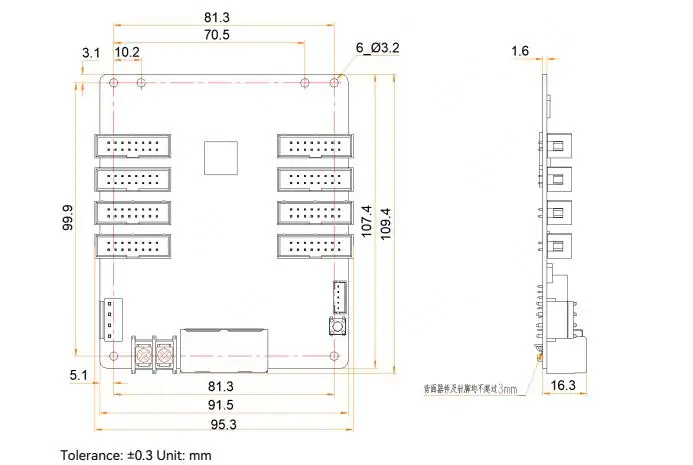
- Size: 95.3 × 109.4 × 19.3 mm.
- Weight: 70.2 g per card.
- Board thickness: ≤2.0 mm.
- Total thickness: ≤20.0 mm.
The drawing shows six 3.2 mm mounting holes and ±0.3 mm tolerance. Obtain a precision structural drawing before machining mounting points.
2.5 Certifications
- RoHS.
- EMC Class A.
These are listed in NovaStar’s certification section; confirm documentation for the supplied product and destination.
Either Gigabit Ethernet port can serve as input or output. Loop backup requires the controller and receiving cards to be connected and configured with primary and backup paths.
2.6 Maximum Resolution
- PWM Driver ICs (M3 Controller):
- 512×512@60Hz (8-bit video sources)
- 512×256@60Hz (10-bit video sources)
- Common Driver ICs (M3 Controller):
- 512×384@60Hz (8-bit video sources)
- 512×192@60Hz (10-bit video sources)
These are per-card limits with M3 controllers. Do not apply the 8-bit figure to a 10-bit source or assume the same limit for another controller. Confirm the exact configuration before allocating cabinet pixels.
3. Novastar MRV208-N Receiver Card Pins
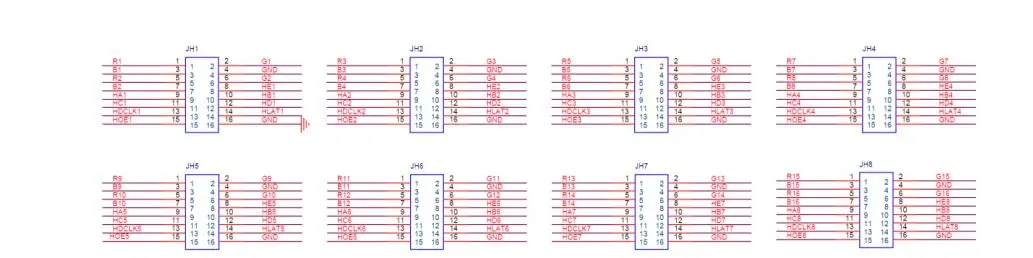
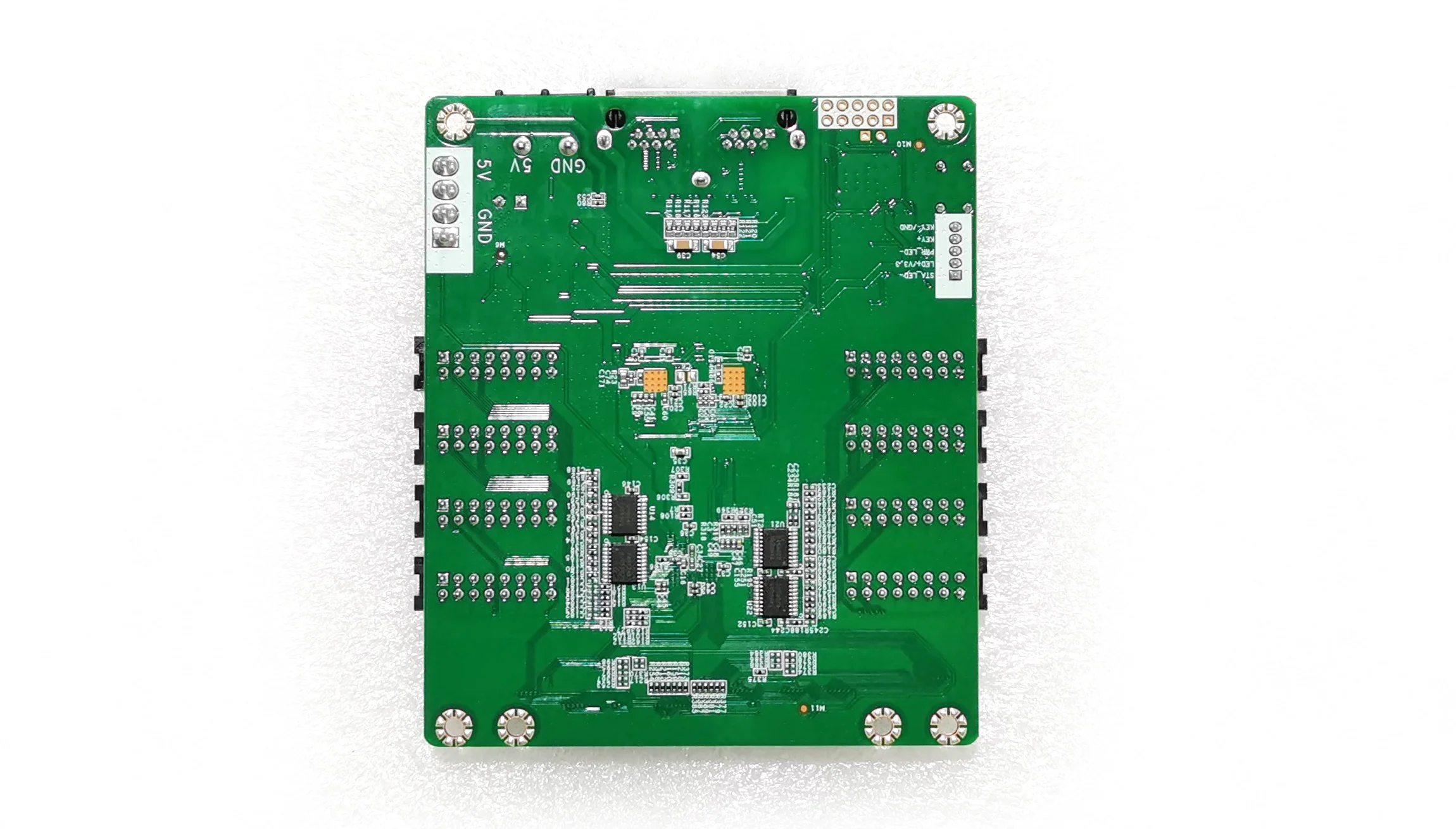
The table below reproduces the JH1 signal assignments from NovaStar’s pin definitions. Match the pin-1 marking and connector orientation before wiring; physical connector fit alone does not prove module compatibility. On narrow screens, scroll the table horizontally; keyboard users can focus it and use the arrow keys.
Pin Definitions (JH1 as an Example)
| Pin Number | Function | Description |
|---|---|---|
| 1 | R1 | Red signal line |
| 2 | G1 | Green signal line |
| 3 | B1 | Blue signal line |
| 4 | GND | Ground |
| 5 | R2 | Secondary red signal line |
| 6 | G2 | Secondary green signal line |
| 7 | B2 | Secondary blue signal line |
| 8 | HE1 | Line decoding signal |
| 9 | HA1 | Line decoding signal |
| 10 | HB1 | Line decoding signal |
| 11 | HC1 | Line decoding signal |
| 12 | HD1 | Line decoding signal |
| 13 | HDCLK1 | Shift clock |
| 14 | HLAT1 | Latch signal |
| 15 | HOE1 | Display enable signal |
| 16 | GND | Ground |
Key Connectors:
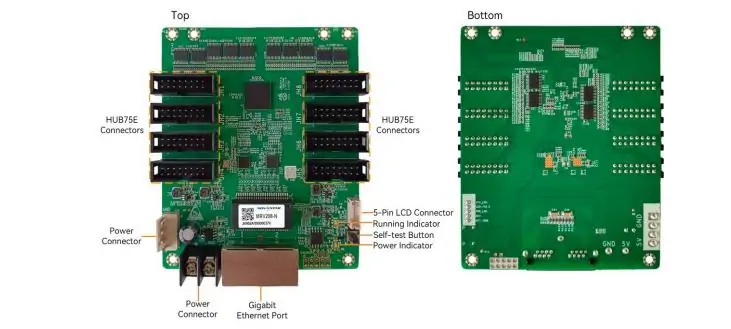
- HUB75E: Connects compatible LED modules.
- Gigabit Ethernet: Connects the sender and cascades receiving cards.
- Power: Either input connector may be chosen; two connectors do not by themselves establish redundant power.
- 5-pin LCD: Connects a compatible cabinet LCD for card readings and run time.
The board diagram also labels the running/power indicators and self-test button. With Ethernet disconnected, press self-test twice to show a pattern, then again to change it. Connector and self-test instructions. Power off before reseating cables.
4. How Much Does the Novastar MRV208-N Receiver Card Cost?
No fixed MRV208-N price is verified here. Request a dated quote stating quantity, currency, taxes, shipping, stock and lead time. An advertised unit price may exclude accessories or support.
Ask whether ribbon cables, power leads, configuration work and spare cards are included. Compare equivalent packages and written warranty terms; a volume discount should be confirmed in the quote.
Supply the exact card model, controller, module driver IC and cabinet pixel dimensions. Have the supplier confirm compatibility before purchase, especially when replacing an older MRV208-family board.
5. FAQs About Novastar MRV208-N Receiving Card
These answers address common selection and maintenance decisions.
6. Conclusion
NovaStar MRV208-N is a receiving-card option for compatible HUB75E LED cabinets. Its loading limits are conditional, and its image-processing features do not replace correct module configuration or calibration.
Before installation, confirm the driver IC, source bit depth, sender and pinout. Retain known-good configuration and calibration backups, test one cabinet, and verify redundancy before extending changes across the display.
For unusual layouts such as spherical LED displays, confirm mapping and hardware requirements with the display supplier. Use the exact MRV208-N datasheet and board revision for final integration decisions.
 Top 11 LED Screen Manufacturers in the World 2026
 10 LED Screen Suppliers for South Korea: 2026 Guide
Related Posts






Fill In Your Needs In Detail
Fill in the screen usage scene and size you need in “Content”.You will get a quote.