
For controlling LED displays, precision, connectivity, and ease of use are paramount. That’s where the Novastar KU20 shines. As part of the innovative COEX series from NovaStar Technology, the KU20 is designed to meet the demands of modern, high-performance display systems. Whether you’re managing a small creative display or a large-scale installation, this controller delivers unmatched flexibility and reliability.
In this article, we’ll dive deeper into the features and capabilities of the Novastar KU20 LED Video Processor, exploring how its design, specifications, and software compatibility can transform the way you manage LED displays. Ready to learn more about what makes the KU20 stand out? Let’s get started!
1. What Is the Novastar KU20 LED Video Processor?
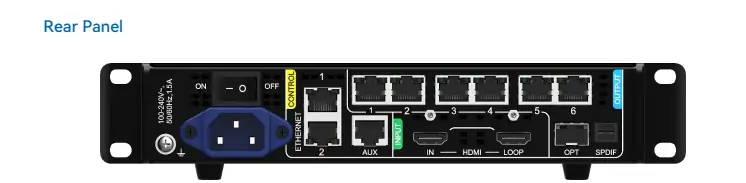
The Novastar KU20 LED Screen Controller is an advanced LED display controller that redefines visual excellence. Designed as part of NovaStar’s COEX series, the KU20 offers a robust combination of hardware and software solutions for seamless LED screen management. With 6 Ethernet ports, 1 HDMI input, and 1 optical output, it supports versatile connectivity options for a wide range of applications.
One of its standout features is its compatibility with the Vision Management Platform (VMP), NovaStar’s latest software solution. VMP enhances the user experience by providing intuitive controls, smart device management, and real-time monitoring. Whether you’re setting up a rental display, configuring irregular screens, or calibrating pixel-level brightness, the KU20 ensures precision and efficiency in every step.
2. Core Features That Make the KU20 LED Display Controller Stand Out
2.1 Advanced Image Scaling
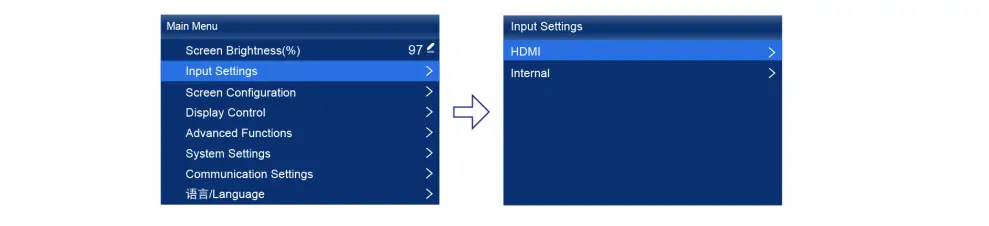
The Novastar KU20 supports two image scaling modes: custom scaling for flexible adjustments and pixel-to-pixel scaling for precise image reproduction. This feature allows users to adapt content seamlessly to their display requirements, ensuring optimal clarity and detail.
2.2 Full Grayscale Calibration
Paired with NovaStar’s high-precision calibration system (CC3) and scientific-grade cameras like the CC60 or C3200, the KU20 generates unique calibration coefficients for each grayscale level. This ensures uniformity across all grayscales, dramatically improving image quality and consistency.
2.3 Low Latency Performance
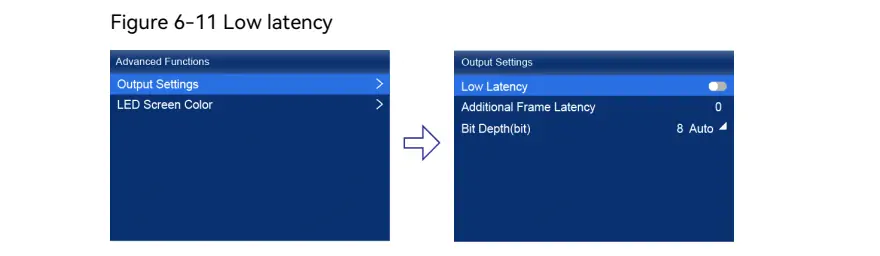
For applications requiring minimal delay, the KU20 excels with 0-frame latency (less than 1 ms) in Send-Only Controller mode. Additionally, users can add zero to two frames of latency to synchronize with high-latency equipment, making it ideal for live events and dynamic displays.
2.4 Frame Rate Adaptability
The KU20 adapts seamlessly to various video input frame rates, ranging from 23.98 Hz to 480 Hz. It also supports custom frame rates with precision down to 0.01 Hz increments, ensuring smooth playback and consistent brightness across different frame rates.
2.5 No Rectangle Restriction
Unlike traditional controllers, the KU20 eliminates rectangle restrictions for irregular screens. Blank pixels do not count toward the total capacity, allowing for flexible resolution planning and efficient load distribution.
2.6 Dual Working Modes
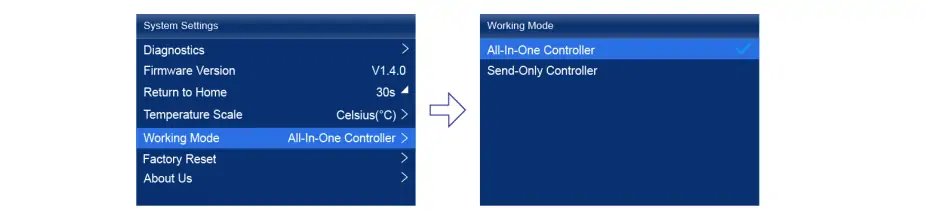
The KU20 supports two working modes:
- All-In-One Controller Mode: Enables layer creation and scaling functions.
- Send-Only Controller Mode: Focuses on streamlined data transmission without additional layers.
This versatility makes the KU20 suitable for both simple and complex display setups.
3. Novastar KU20 LED Video Processor Specs Overview
3.1 Inputs and Outputs
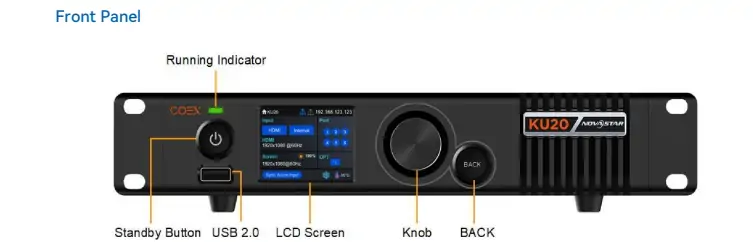
- HDMI Input: 1x HDMI 1.3 input with loop-through capability.
- Video Inputs: Supports both 8-bitand 10-bit video inputs (10-bit requires customization).
- Ethernet Outputs: 6x Gigabit Ethernet ports, with a maximum load capacity of 9 million pixels.
- Optical Output: 1x 10G optical output for long-distance, high-speed transmission.
3.2 Resolution Support
The Novastar KU20 Resolution capabilities include:
- Maximum resolution: 1920×1200@60Hz.
- Maximum width/height: 3840 pixels(width), 2560 pixels (height).
3.3 Physical Specifications
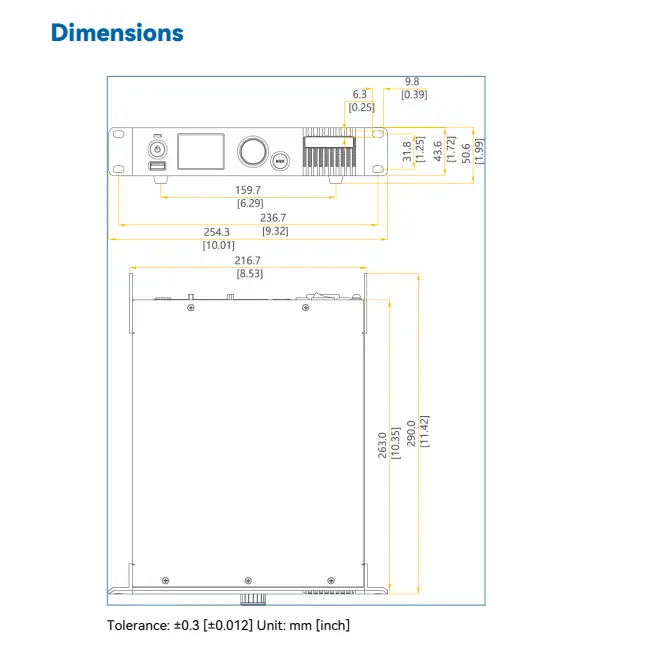
- Dimensions: 3 mm × 50.6 mm × 290.0 mm.
- Weight: 1 kg(net), 3.1 kg (gross).
- Operating temperature: –20°C to +45°C.
3.4 Advanced Connectivity
- Gigabit Ethernet Control Ports: Support TCP/IP protocol and star topology, enabling cascading of up to 20 KU20 deviceswithout additional switches or routers.
- Central Control Protocol: Integrates with central control systems for enhanced functionality.
4. Novastar KU20 Performance Capabilities
4.1 Load Capacity and Scalability
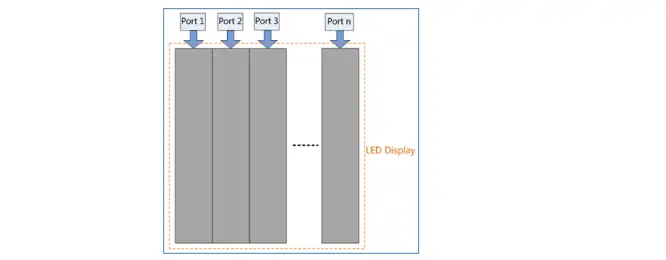
Each Ethernet port on the KU20 supports a maximum load capacity of 659,722 pixels at 8-bit@60Hz. The total load capacity across all six ports reaches 3.9 million pixels, making it suitable for large-scale installations. For optimal performance, ensure vertical cabinet placement and uniform Y coordinates when enabling low latency.
4.2 Real-Time Monitoring and Diagnostics
The KU20 provides active monitoring of device status and screen health. Any faults or alarms are reported instantly, ensuring reliable operation. Users can perform diagnostics via the LCD interface or export logs to a USB drive for further analysis.
4.3 Seamless Software Integration
The Vision Management Platform (VMP) elevates the KU20’s capabilities by offering:
- Intuitive UI for quick configuration.
- Real-time preview of screen adjustments.
- Smart group management for multi-screen setups.
5. Typical Applications of the Novastar KU20 LED Screen Controller
5.1 Rental Installations
With its compact 1U half-width design, the KU20 is perfect for touring and rental projects. Its portability and ease of setup make it a favorite among event organizers.
5.2 Creative Displays
The KU20’s ability to handle irregular screen shapes and resolutions makes it ideal for creative installations, such as art exhibits and stage designs.
5.3 Modular Screen Setups
For modular LED walls, the KU20 simplifies configuration and calibration, reducing setup time significantly.
5.4 Budget-Conscious Projects Seeking High Value
As a cost-effective solution, the MCTRL300 offers strong performance without a high price tag . It provides essential functionalities like:
5.5 Long-Distance Transmission
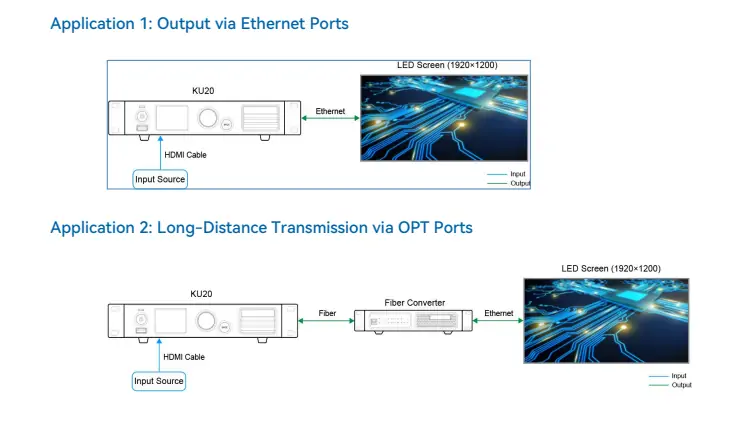
Equipped with a 10G optical output, the KU20 ensures high-speed, long-distance data transmission, making it suitable for large venues and outdoor displays.
6. Novastar KU20 Controller Price
While pricing may vary based on region and supplier, the Novastar KU20 Controller Price reflects its exceptional value. For accurate and up-to-date pricing, visit authorized distributors or NovaStar’s official website. Consider factors such as customization options, accessories, and warranty coverage when evaluating cost versus value.
7. FAQs
8. Conclusion
The Novastar KU20 LED Video Processor is a game-changer in the world of LED display control. Its advanced features, robust performance, and seamless integration with VMP software make it an indispensable tool for professionals and enthusiasts alike. Whether you’re managing a small creative display or a large-scale installation, the KU20 delivers precision, flexibility, and reliability.
Ready to elevate your LED display projects? Explore the possibilities with the Novastar KU20 LED Screen Controller today!
 Novastar MX30 Review: Features, Specs, and Price
 Novastar MX20: A Complete Guide for LED Display Systems
Related Posts
Fill In Your Needs In Detail
Fill in the screen usage scene and size you need in “Content”.You will get a quote.



