The Novastar MX30 is a COEX LED display controller that combines video processing and sending, accepts 4K video, and drives up to 6.5 million pixels. It offers three layers, HDR and VMP control. Actual output capacity depends on bit depth, frame rate and receiving cards.
This documentation-based review explains specifications, setup and purchasing checks for LED display projects. It does not present hands-on test results or a verified selling price.
1. What Is the Novastar MX30?
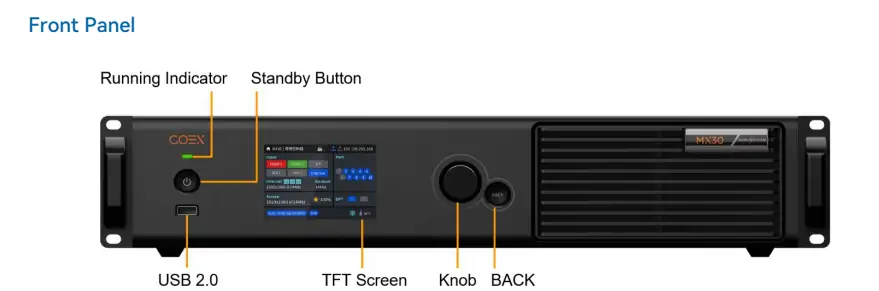
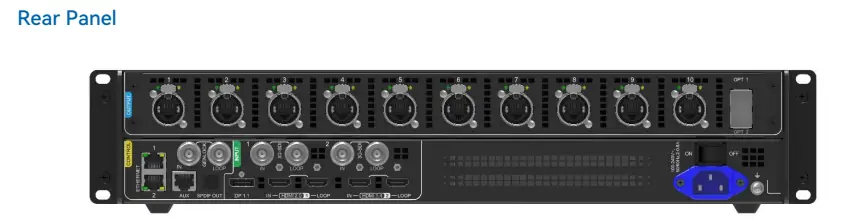
The MX30 has five video inputs: one HDMI 2.0, one HDMI 1.4, one DP 1.1 and two 3G-SDI. Ten Gigabit Ethernet outputs connect to LED receiving cards; two 10G optical outputs support fiber transmission.
4K input is not full 4K output capacity. A 3840 × 2160 LED wall has 8,294,400 pixels, exceeding the advertised 6.5-million-pixel limit. Calculate the actual cabinet load before selecting a controller. See NovaStar’s MX30 specification V1.5.1.
2. Key Features of the Novastar MX30 LED Controller
The following features matter when matching the MX30 to a screen, source and control workflow.
2.1 Versatile Inputs and Outputs
- Inputs: HDMI, DisplayPort and SDI accept different resolutions; check the port-specific limits below.
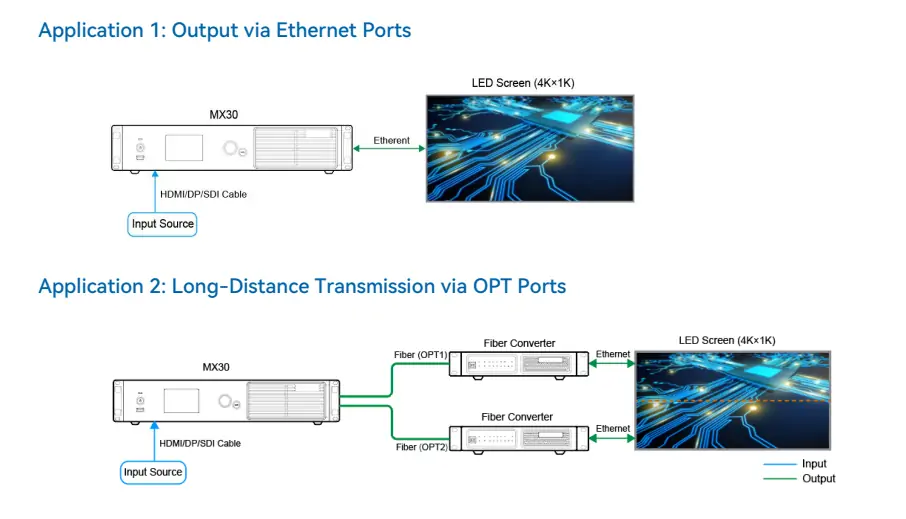
- Outputs: OPT1 carries the ten Ethernet ports’ data; OPT2 duplicates OPT1 rather than adding capacity.
- Audio: SPDIF can output audio selected from HDMI or DP on supported firmware.
2.2 Advanced Image Processing
- Three layers: Position and prioritize independent video layers.
- Scaling: Choose custom, pixel-to-pixel, snap-to-canvas or fill-screen sizing.
- 14-channel correction: Adjust hue, saturation and brightness for color matching; this does not replace panel calibration.
2.3 High Dynamic Range (HDR) Support
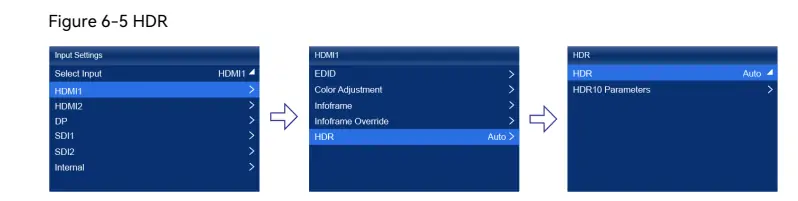
HDMI 2.0 supports HDR10 and HLG. The pictured menu path is Input Settings → HDMI1 → HDR, with HDR10 parameters below. Validate the source, firmware and receiving cards together. HDR does not automatically halve capacity with A10s Pro/A8s Pro cards; bit depth still affects loading. See the current HDR and loading notes.
2.4 Low Latency Performance
NovaStar specifies minimum controller latency below 1 ms in the supported configuration, not end-to-end system latency. Send-Only mode removes one processing frame compared with All-In-One mode. Low Latency and Genlock cannot operate simultaneously. Test the complete camera-to-screen chain before a live production. See NovaStar’s latency and Genlock restrictions.
2.5 Frame Rate Adaptation
Frame-rate support depends on input timing and resolution. Do not interpret high-refresh support as 4K at 240 Hz. Adaptive frame rate also needs compatible A10s Pro-series cards and driver ICs; confirm the cabinet configuration with the supplier.
2.6 Dual Working Modes
- All-In-One Controller: Use internal layers and scaling.
- Send-Only Controller: Use an externally prepared canvas when internal processing is unnecessary; verify mapping before switching modes.
2.7 System Monitoring and Control
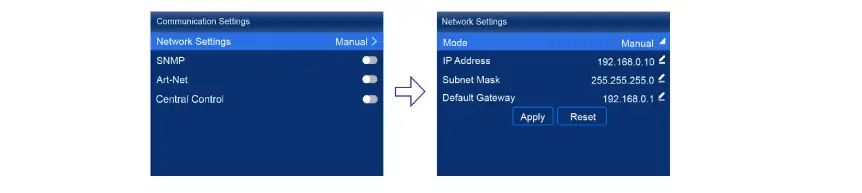
The MX30 monitors fan speed, temperature, voltage and operating status, and supports SNMP, Art-Net and central control. In the illustrated Communication Settings menu, Network Settings exposes IP address, subnet mask and gateway. Use addresses appropriate to your network; the pictured values are examples.
3. Detailed Specs – Novastar MX30 Video Processor
These MX30 specifications summarize NovaStar’s documentation. Input examples below are at 60 Hz; they are not interchangeable across ports or color formats.
Electrical Specifications
- Input: 100–240 V AC, 50/60 Hz.
- Maximum power consumption: 55 W.
Video Source Compatibility
- HDMI 2.0: 4096 × 2160 at 60 Hz or 8192 × 1080 at 60 Hz with supported forced timings.
- HDMI 1.4 and DP 1.1: 4096 × 1080 at 60 Hz.
- 3G-SDI: 1920 × 1080 at 60 Hz.
Output Capacity
- Ten Gigabit Ethernet outputs: up to 6.5 million pixels overall.
- At 60 Hz, 10-bit loading is approximately 494,000 pixels per port with A10s Pro/A8s Pro-series cards, or 330,000 with other supported Armor cards.
- Two 10G optical ports; optical modules are separate.
Environmental Tolerance
- Operating: −20°C to +45°C; storage: −30°C to +80°C.
- Humidity: 0–80% RH, non-condensing. IP20 protection requires a dry, protected installation.
Physical Dimensions
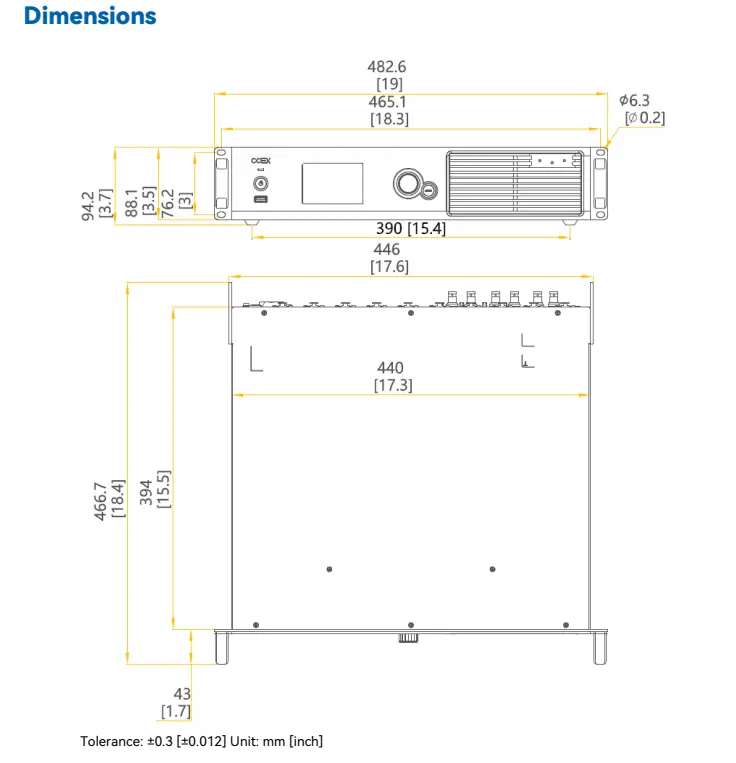
- Width × height × depth: 482.6 × 94.2 × 466.7 mm, including foot pads.
- Net weight: 7.2 kg; gross weight: 10.2 kg.
Check the official input-format and port-loading tables for the exact planned combination.
4. How the Novastar MX30 Works
Plan the signal path first: source → MX30 → Ethernet, or fiber converter → receiving cards → LED modules. Keep configuration backups before changing a working installation.
4.1 Initial Setup
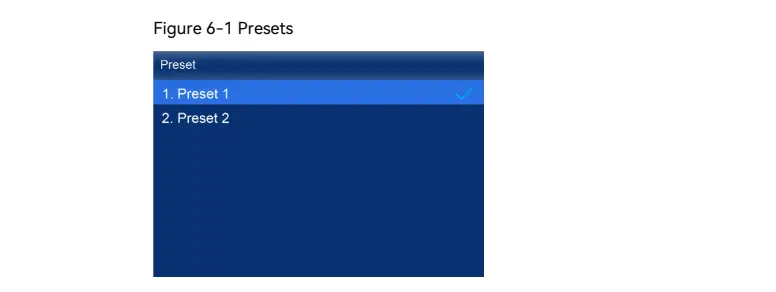
Use the 3.5-inch TFT, rotary knob and BACK button, or connect VMP over Ethernet. The front panel also has a status indicator, standby button and USB port for diagnostic export. The pictured Preset menu selects a saved configuration; label presets clearly before operation.
4.2 Input Configuration
Select the connected input and match source resolution, frame rate and color format to the controller’s supported timing.
- For 4K at 60 Hz, use HDMI 2.0 and verify EDID and source output settings.
- For text-heavy graphics, check chroma sampling carefully: 4:2:0 may reduce colored-edge detail. Do not assume every resolution supports every 10-bit format.
4.3 Layer Management
In All-In-One mode, position up to three layers and check their stacking order. Test cropping and scaling using the actual screen canvas. Save and recall a preset only after confirming that every cabinet displays the intended content.
4.4 Calibration and Optimization
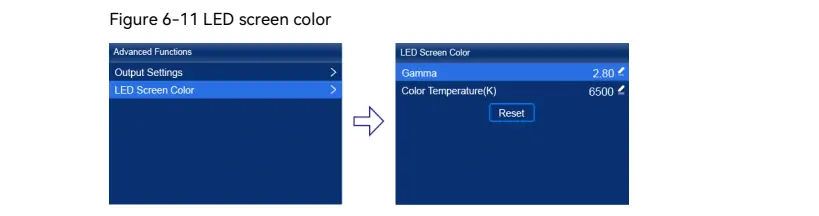
Full grayscale calibration requires compatible cards, camera and software; NovaStar’s current documentation specifies CC3 with CC60 or C3200. The pictured LED Screen Color menu exposes gamma and color temperature. Its 2.80 gamma and 6500 K are example settings, not universal targets.
4.5 Remote Management
VMP provides networked configuration and monitoring. Treat it as the controller-management tool; scheduled media playback requires a suitable external player or content system. Use the official MX30 downloads to match software and firmware versions before an upgrade.
5. MX30 LED Display Controller Price
A current MX30 price requires a supplier quotation. No verified official public price was established for this review. Prices can differ with region, accessories and support, so an unsourced price range is not a dependable purchasing budget.
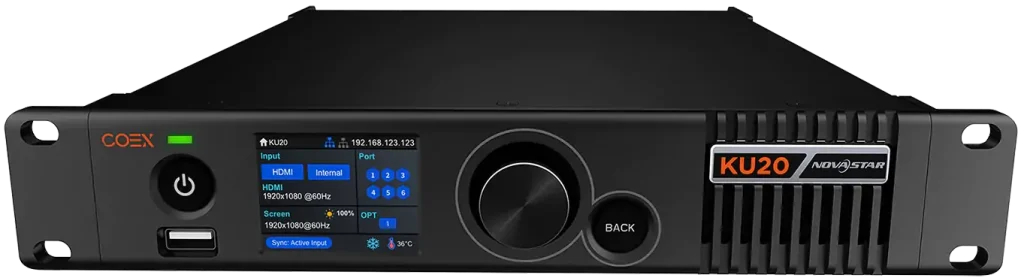
Request an itemized quote covering controller, optical modules, fiber converters, receiving cards, freight, taxes and warranty. Compare systems with the same pixel load, bit depth and support requirements. For a smaller COEX option, review the NovaStar KU20 specifications; it is not a capacity-equivalent substitute.
6. Applications of Novastar MX30 Video Processor
Suitability depends on the entire LED system and operating conditions, not the controller’s feature list alone.
6.1 Stage Performances and Live Events
For rental LED displays, presets and layers can simplify switching layouts. Rehearse input changes, backup routing and recovery before the audience arrives; a duplicated optical output alone does not prove a complete failover design.
6.2 XR Virtual Production
For XR, verify camera synchronization, receiving-card features and panel scan behavior together. Decide whether Genlock or Low Latency is required, then test for scan lines and tearing at the actual shutter settings.
6.3 Commercial Advertising
For advertising LED screens, calibration and color adjustment help match cabinets. Do not rely on Color Replacement: NovaStar removed that feature from its April 2026 specification. Confirm firmware-specific functions before promising them to a client.
6.4 Smart City Installations
Protect the controller from weather and provide an external content source. The diagram shows either direct Ethernet to cabinets or optical output through fiber converters. OPT2 duplicates OPT1; budget for compatible converters and test the intended backup path.
7. FAQs
8. Conclusion
The MX30 is worth considering when five inputs, ten sending ports and three layers fit the project. For XR production, its value depends on compatibility and measured system performance.
Before ordering, confirm cabinet resolution, receiving-card model, bit depth, frame rate, cable distances and synchronization requirements. Obtain a configuration-specific quote and a demonstration using your source material.
Use NovaStar’s official MX30 documentation for current manuals and firmware. This article covers the MX30; verify the exact model name on any quotation.
 Merry Christmas – EagerLED LED Display Factory
 Novastar KU20 Breakdown: What Makes It Stand Out
Related Posts






Fill In Your Needs In Detail
Fill in the screen usage scene and size you need in “Content”.You will get a quote.