The Huidu HD-B8H is an LED poster display controller that supports up to 2.6 million pixels per card and an 8.8-million-pixel HDMI-spliced canvas. It combines stored-content playback with HDMI input, local program editing, and network management. Compared with the HD-B6L poster controller, it offers more loading capacity, but the right choice still depends on your screen resolution, receiving cards, cabinet space, and operating workflow. This guide explains specifications, setup, price considerations, and the B8L comparison using Huidu documentation.
1. What is HD-B8H?
The HD-B8H is an Android-based multimedia player and control card for LED poster screens. It stores programs for standalone playback and accepts an HDMI source for live content. Typical uses include retail signage, exhibition displays, and linked poster installations.
Huidu lists a maximum of 14 spliced units for the B8H, with a total canvas limit of 8.8 million pixels. These are separate limits: adding cards does not multiply the supported canvas indefinitely. Its 2.6-million-pixel single-card capacity is twice the B8L/B6L rating. See the manufacturer’s poster-controller comparison.
2. Key Advantages of HD-B8H LED Poster Screen Control System
2.1 2.6-Million-Pixel Loading Capacity
Calculate the actual screen resolution before selecting a controller: horizontal pixels × vertical pixels = total pixels. For example, a 1,600 × 900 screen contains 1,440,000 pixels, above the B8L’s 1.3-million limit and below the B8H’s 2.6-million limit. This is a calculation, not a guaranteed configuration. Receiving-card mapping, scan mode, and output allocation must also be checked. Pixel pitch alone does not determine whether an upgrade is needed.
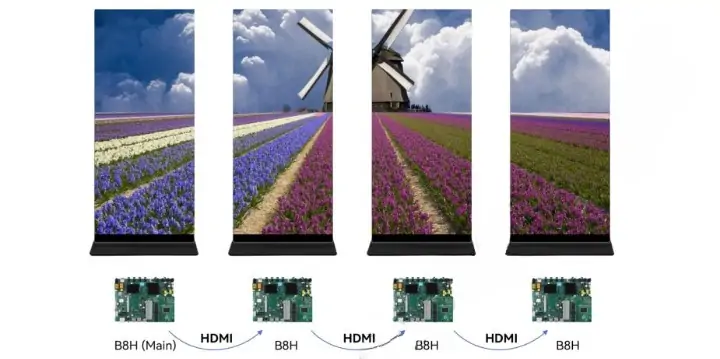
2.2 HDMI Cascade up to 8.8 Million Pixels
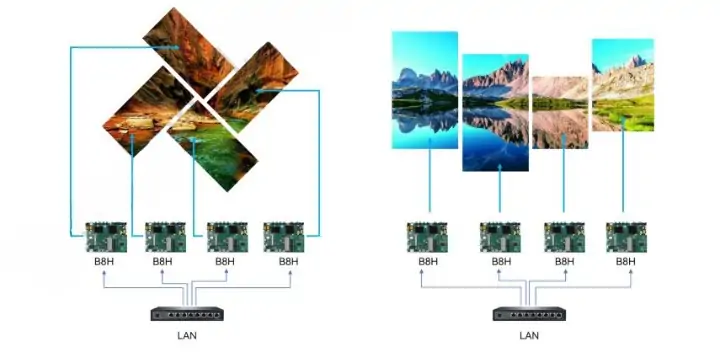
HDMI cascading links multiple posters into a coordinated display. Huidu documents adaptive scaling and synchronization of receiving-card connection parameters and brightness, with up to 14 units and 8.8 million pixels overall. Commission the first screen, verify the chain and layout, then test content across every seam. Automatic parameter sharing does not replace checking the physical cabinet order or the final image.
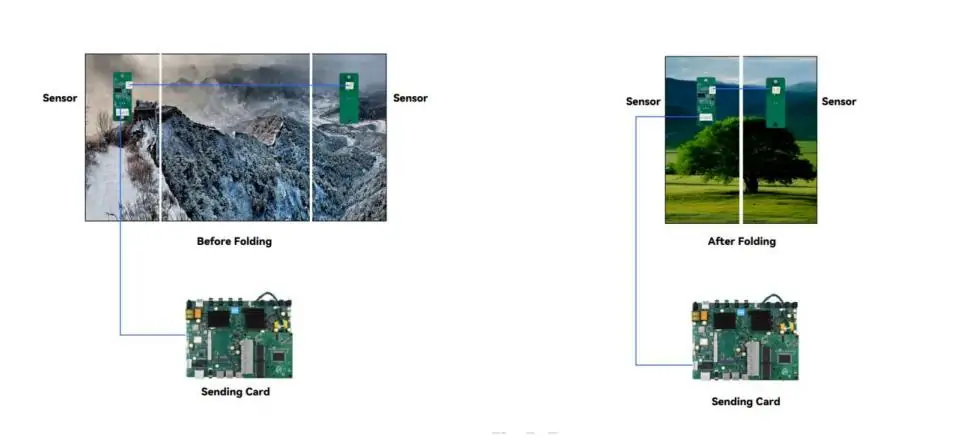
2.3 Folding Screen Auto-Switching
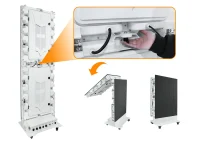
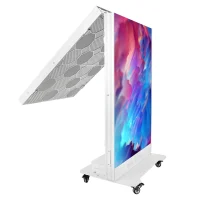
With a compatible infrared sensor, the B8H can switch programs when a folding poster display changes between open and folded states. Huidu’s HD-IR-Sensor documentation covers two-fold and three-fold screens. Prepare content for each visible surface. A static image is not automatically a low-power mode; any energy saving depends on brightness, content, panel electronics, and power control.

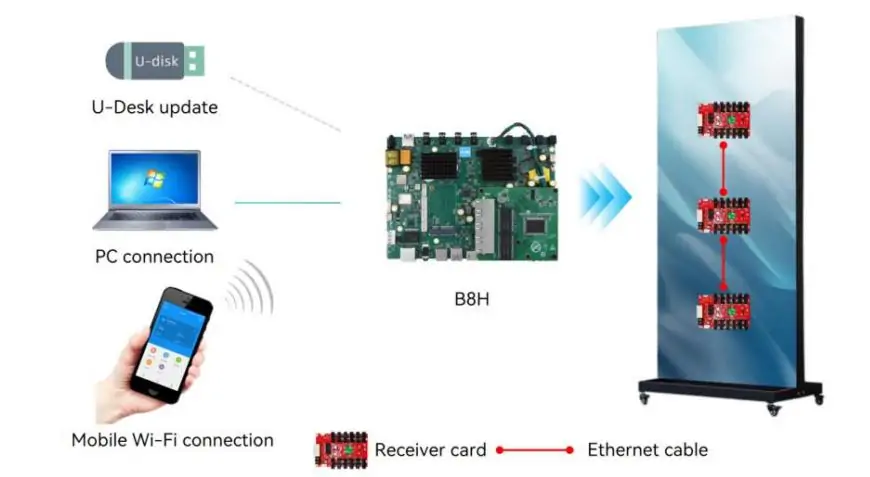
2.4 Local program editing without a PC
The built-in program editor lets staff import media and create programs locally using suitable peripherals. This can help with on-site updates when a Windows PC is unavailable. Prepare media in advance and test the local interface before deployment. It is an additional workflow alongside HDPlayer and mobile publishing, rather than evidence that every earlier Huidu controller required a PC for every update.
2.5 Bluetooth and Voice Control
Bluetooth peripheral support and voice recognition are related but separate settings. The user manual describes enabling speech recognition under General → Voice control and using a remote control or external microphone. Check the supplied remote, supported language, and command demonstration on the actual device. Do not assume that pairing any Bluetooth device enables arbitrary custom voice commands.
2.6 Built-in Wi-Fi with Mobile App Publishing
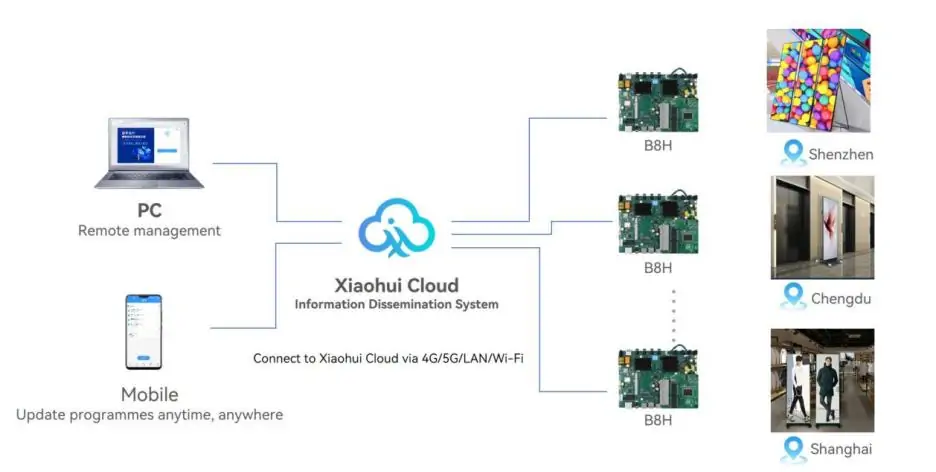
The B8H supports 2.4 GHz and 5 GHz Wi-Fi, including hotspot and client networking. LEDArt supports mobile publishing, while XiaoHui Cloud provides remote management when the controller has internet access. Choose a stable network for large uploads, secure device access, and test connectivity with the poster installed inside its cabinet; metalwork and placement can affect wireless reception.
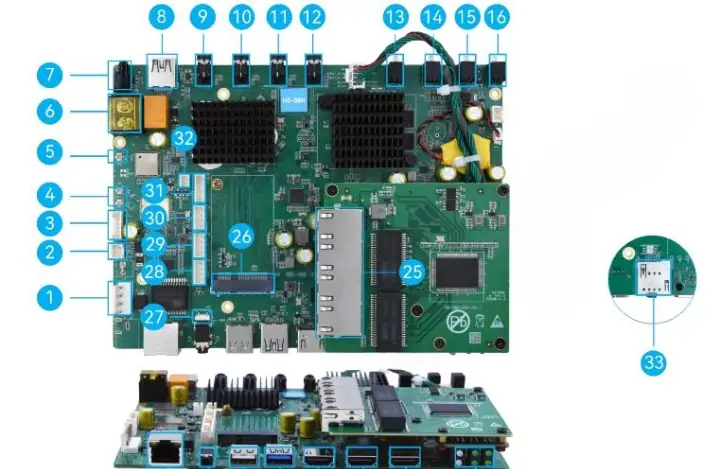
3. HD-B8H Technical Specifications
The following specifications are from Huidu’s HD-B8H Specification V1.0 (PDF, hosted by EagerLED). The board uses Android 11, 4 GB RAM, and 64 GB storage. Check the hardware revision and supplied accessories when ordering.
| Specification | Detail |
|---|---|
| Single-card loading | Up to 2.6 million pixels |
| Maximum width / height | 65,536 pixels wide or 8,192 pixels high; total pixel limit still applies |
| HDMI-spliced canvas | Up to 8.8 million pixels; maximum 14 units |
| HDMI inputs | HDMI IN and HDMI LOOP IN; different input limits |
| HDMI output | Loop output / external monitor connection |
| Ethernet | 1 Gigabit network input + 4 Gigabit outputs to receiving cards |
| Wi-Fi | Dual-band 2.4 GHz / 5 GHz; hotspot and client modes |
| USB | USB 2.0 and USB 3.0; OTG interface also provided |
| Bluetooth | Peripheral support; voice function requires suitable input device |
| Sensor / serial interfaces | TTL sensor, RS232 and RS485; follow the pinout |
| Relay | K0 relay interface |
| Mobile network | Optional regional 4G/5G module; confirm compatibility |
| Folding detection | Compatible sensor and configuration required |
| Local editing | Built-in program editor with supported peripherals |
| Power input | DC 5 V; specification lists 5 V / 6 A |
| Board dimensions | 189.86 × 137.92 × 33.01 mm |
| Protection | IP20; use an appropriate cabinet |
Do not confuse video decoding with HDMI input. The specification lists up to 4K/60 fps decoding for selected codecs, but HDMI IN accepts up to 3840 × 2160 at 30 Hz; HDMI LOOP IN has a separate 2048 × 1152 at 60 Hz maximum. Supported image formats include JPEG, BMP, GIF, PNG, and WebP. Test the actual codec, frame rate, and simultaneous layers; maximum decoding performance is not a promise for every file.
4. How to Setup the HD B8H Control Card
4.1 Hardware Installation
Power off the equipment before wiring. Check the 189.86 × 137.92 mm board footprint, connector clearance, and mounting drawing; do not treat this as a drop-in B6L/B8L replacement. Connect the specified 5 V supply with correct polarity, the required receiving-card outputs, and antennas. The network input and receiving-card outputs serve different purposes. For HDMI splicing, follow the manual’s HDMI OUT-to-LOOP IN diagram rather than choosing a socket by appearance. Verify one cabinet before extending the chain.
4.2 Software Setup
Use EagerLED’s controller download resources or the official Huidu software downloads to obtain an HDPlayer version that supports your controller. Connect the PC and B8H through the documented network method. Obtain the cabinet’s receiving-card configuration from its supplier, then set screen dimensions and connection mapping. Back up a known-working configuration before changing it; pixel pitch alone is not sufficient for configuration.
4.3 Content Publishing
Create a program at the configured screen resolution, add media, and set the schedule. Send it to the selected device and confirm that the transfer completes. Check orientation, cropping, audio, brightness, and playback after a restart. For a cloud-managed installation, verify device binding and internet access before scheduling a fleet-wide update. Keep a local test program available when diagnosing network or media problems.
4.4 Folding Screen Sensor Setup
Use a sensor and wiring harness confirmed for the B8H and your cabinet. The HD-IR-Sensor uses 5 V TTL serial communication; arbitrary infrared sensors are not interchangeable. Have the supplier identify the correct connector and firmware settings. Configure the open and folded programs, then repeatedly test both physical states and sensor alignment before installing the display in public.
4.5 Bluetooth Pairing and Voice Setup
Pair a supported remote in the local Bluetooth settings. Enable speech recognition in General → Voice control, then consult System → Novice Guide → Intelligent speech for the device’s demonstration. The HD-B8H User Manual V1.0 describes this workflow on pages 43–44. Test recognition in the installation’s ambient noise and keep ordinary remote or software controls available.
4.6 Local Editing Setup
Connect supported input peripherals and an HDMI monitor as required. In the local interface, open Program Control, import media, then select Program → Create. Build and save a small test program before replacing the active playlist. The user manual’s Program Broadcast section explains import, creation, playback, and management. Available screens and menu wording may vary with firmware.
5. What is the Price of Huidu B8H?
HD-B8H pricing is quote-based in this guide. The manufacturer documents reviewed do not establish a current retail price, so a dollar or RMB range would be an unsupported estimate. Request a dated quote for the exact board revision, quantity, destination, and required accessories.
Compare the complete delivered cost: controller, power supply, compatible sensor, remote, receiving cards, optional mobile-network module, shipping, tax, and commissioning. Ask which items are included rather than assuming that every distributor bundle is identical. For multiple units, request the actual quantity discount in writing.
Confirm software and service terms separately. Huidu’s specification lists optional activation items for certain mirroring functions; this does not support a blanket promise that every feature, cloud service, or future update is free for life. Include warranty, technical support, and replacement lead time in the buying decision.
6. Huidu B8H vs Huidu B8L: What is the Difference?
The clearest verified B8H versus B8L difference is loading capacity. Both belong to Huidu’s poster-controller family. The table separates published limits from features that need model-specific confirmation, avoiding unsupported claims that the B8L lacks every newer workflow.
| Feature | HD-B8L | HD-B8H |
|---|---|---|
| Single-card pixels | 1.3 million | 2.6 million |
| Spliced canvas / units | 5.24 million / up to 14 | 8.8 million / up to 14 |
| Maximum width | 65,536 pixels | 65,536 pixels |
| Maximum height | 8,192 pixels | 8,192 pixels |
| Adaptive HDMI splicing | Supported | Supported |
| Wi-Fi | Supported; verify bands for supplied revision | 2.4 GHz / 5 GHz |
| Bluetooth / voice | Confirm required feature with supplier | Documented; suitable peripheral required |
| Folding detection | Confirm controller, sensor and firmware combination | Documented with compatible sensor |
| Local program editing | Confirm workflow in model-specific manual | Built-in editor documented |
| Sensor interfaces | Check B8L pinout | TTL / serial interfaces; check pinout |
| Mobile network | Optional; confirm module | Optional; confirm regional module |
| Mechanical fit | Check B8L mounting drawing | 189.86 × 137.92 × 33.01 mm |
Capacity and splicing figures follow Huidu’s current product comparison. Neither maximum width nor height overrides the total pixel budget. If your screen fits within 1.3 million pixels, compare the B8L’s confirmed workflow and delivered quote before buying the B8H. For an upgrade, verify mechanical fit and receiving-card compatibility as well as capacity.
7. When Can You Choose HD-B8H?
Consider the HD-B8H when one or more of these requirements applies:
- Your screen exceeds 1.3 million pixels. Calculate the module-based resolution. A screen between 1.3 and 2.6 million pixels may suit one B8H, subject to output mapping and configuration limits.
- You need a larger linked canvas. Check both the total pixel count and the number of units. Plan cabinet order, HDMI routing, scaling, and seam tests before installation.
- You operate folding posters. Confirm the sensor, wiring, firmware, and programs for each folded state. Test the complete assembly instead of buying the controller in isolation.
- Staff need local updates. Trial the built-in editor with the media and peripherals they will actually use. Keep a backup of the approved playlist and screen configuration.
- You need voice operation. Verify the supported commands, input device, language, and noise tolerance. Demonstrate the feature on the supplied hardware before relying on it.
- A defined upgrade needs extra capacity. Allow room for a known future screen resolution, but compare that benefit with the delivered price and installation cost. Extra capacity alone does not guarantee compatibility with a future panel.
A B6L or B8L may remain suitable for a lower-resolution display with an established workflow. Ask the cabinet supplier to validate the complete system. Avoid selecting solely by pixel pitch, model number, or an unverified feature checklist.
8. HD-B8H Software and Resource Download
8.1 HDPlayer (PC control software)
HDPlayer is Huidu’s Windows tool for configuration and content publishing. Select a release that explicitly supports the B8H, read its notes, and keep the installer version with your project backup.
Official download: Huidu download center. Prefer manufacturer downloads over unidentified mirrors.
8.2 Spec sheet PDF Download
Use the HD-B8H Specification V1.0 PDF hosted by EagerLED for dimensions, interfaces, and rated limits. The official product page also provides model documentation, including the user manual. Keep the revision with your installation records and check for updates before purchasing.
8.3 Firmware Updates
Obtain firmware matched to the exact B8H hardware and current version from Huidu or your supplier. The user manual describes a local system-upgrade workflow under Settings → System; follow the supplied package instructions. Back up programs and configuration, use stable power, and verify playback afterward. Android system firmware and FPGA packages are different components: do not substitute one for the other or apply an undocumented password-based procedure.
8.4 Cloud Platform
XiaoHui Cloud supports remote display management. Confirm device support, account access, service region, storage or traffic limits, and current charges with the provider. Test one display before adding a fleet, and document who can publish or change schedules. Internet access is required for remote updates; local playback and cloud connectivity should be tested separately.
9. HD-B8H FAQs
10. Conclusion
Choose the Huidu HD-B8H when its 2.6-million-pixel capacity, larger spliced canvas, local editor, or supported folding-screen workflow meets a defined requirement. Start with actual screen resolution and receiving-card configuration, then verify cabinet fit, media performance, peripherals, and network access.
For a buying decision, request a complete quote and a demonstration of any essential feature. The B8L and B6L remain alternatives for suitable lower-capacity projects. A documented configuration and tested workflow are more useful than an assumed price, a blanket compatibility promise, or unused capacity.
 Huidu B6L Poster Control Card: Price, Usage, and Download
 Mini Jumbotron: Complete Buying Guide and 9 Expert Tips
Related Posts





Fill In Your Needs In Detail
Fill in the screen usage scene and size you need in “Content”.You will get a quote.