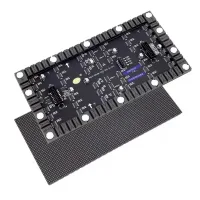
NovaStar BR460-1 Pro is an LED display control board that combines a receiving card with an AC-to-DC power module. It powers compatible LED modules from a 90–264 VAC input. With PWM driver ICs, its capacity depends on source bit depth and controller type. This guide explains the specifications, feature conditions, installation checks and quote requirements.
1. What is the Novastar BR460-1 Pro?
The BR460-1 Pro receives display data and supplies module power within the cabinet. It still needs a compatible sending controller and correctly matched modules. For rental LED display projects, confirm the cabinet’s actual control-board configuration before specifying a replacement.
Its protection circuits cover undervoltage, overvoltage, overcurrent, overpower and short circuits. These protections do not guarantee uninterrupted operation or a longer service life. NovaStar revised the standard 10/12-bit capacity after the first specification; use the current limits in section 3.2. See NovaStar specifications V1.1.0, change history (manufacturer PDF hosted by Olympian LED).
For a new installation, check the module driver IC, scan configuration, connector pinout, supply voltage and cabinet dimensions together. A matching pixel count alone does not establish compatibility. Keep the exact BR460-1 Pro model name on purchase orders and configuration records.
2. Key Features of Novastar BR460-1 Pro Receiving Card
The NovaStar BR460-1 Pro receiving card supports the features below. Availability and results depend on the driver IC, controller, firmware and calibration workflow.
2.1 Integrated Power Module
The integrated supply converts AC input to DC for compatible LED modules. Verify voltage, pinout and current requirements before connection. Integration reduces separate power components but still requires appropriate insulation, heat transfer and cabinet wiring.
2.2 Image Booster Technology
Image Booster addresses color and low-brightness grayscale. Its effects depend on the module’s driver IC; check support before promising a particular visual result.
- Color management: Rec.709, DCI-P3, Rec.2020 and custom gamut support; the LEDs still determine the achievable gamut.
- Precise grayscale: Correction across 65,536 driver-IC grayscale levels helps address low-level brightness and color unevenness.
- 22bit+: NovaStar describes a 64-fold grayscale enhancement, not a 22-bit input-video format. Image Booster specifications.
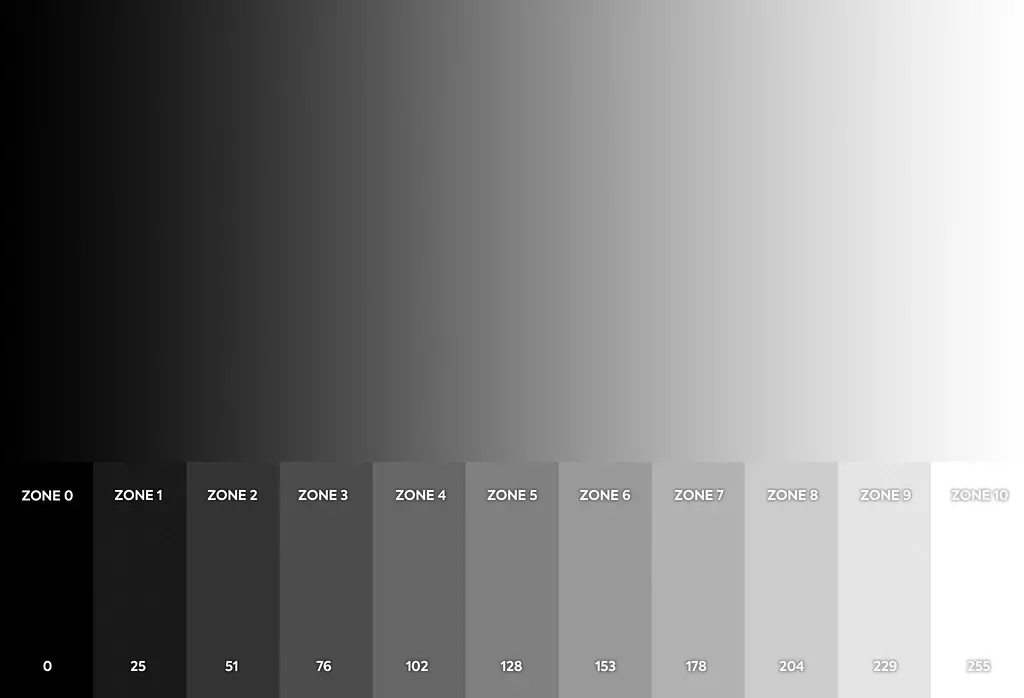
The illustration shows a black-to-white ramp with reference values 0, 25, 51, 76, 102, 128, 153, 178, 204, 229 and 255.
2.3 HDR Support
HDR10 and HLG are supported, with HDR10 referencing SMPTE ST 2084 and ST 2086. Check the source and controller’s HDR setup, then assess highlights and shadow detail on the actual screen.
2.4 Thermal Compensation 2.0
Thermal Compensation 2.0 uses NovaStar’s calibration system and per-pixel compensation data to address visible patterns caused by uneven cabinet temperature. It complements proper cooling; it does not replace thermal design.
2.5 Pixel-Level Calibration
Pixel-level brightness and chroma calibration helps match pixels across the display. Ask whether calibration data is included and preserve it when replacing modules or changing configuration.
2.6 Low Latency and 3D Output
NovaStar specifies latency as low as one frame at the receiving-card end with driver ICs that have built-in RAM. This is not total camera-to-screen latency. 3D output requires a controller supporting 3D. Low-latency and 3D requirements.
2.7 Smart Module Compatibility
Smart-module functions require dedicated firmware. Supported functions include module IDs, calibration-data storage and monitoring of temperature, voltage and ribbon-cable communication. Confirm the module and firmware combination with the supplier.
2.8 Loop Backup and Dual Program Backup
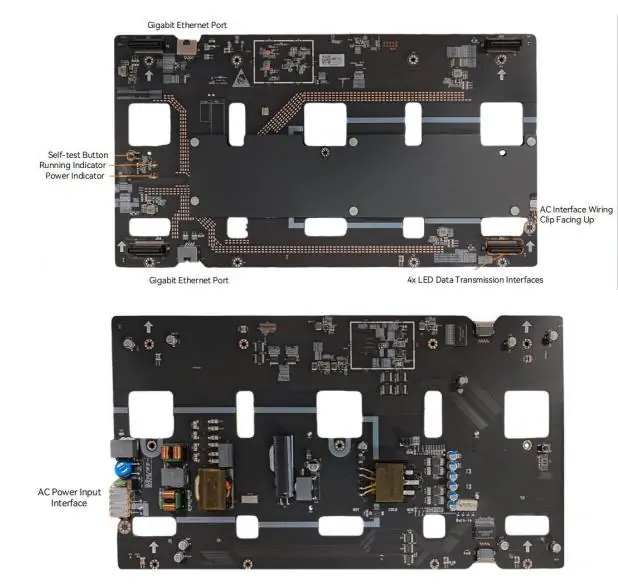
Loop backup provides an alternate data path when correctly connected to the controller. Dual program backup stores firmware copies for recovery from update problems; neither feature guarantees survival of every hardware fault. The board illustration labels Ethernet ports, four LED data interfaces, the self-test button, running/power indicators and AC input.
3. NovaStar BR460-1 Pro Technical Specifications
The following ratings refer to the BR460-1 Pro, not the similarly named BR460 or BR460 Pro. Confirm the specification revision and operating conditions with your supplier.
3.1 Input and Output Specifications
- AC input: 90–264 VAC; nominal 100–240 VAC.
- DC output: selectable 3.8/4.0/4.2 V, plus a 3.0 V low-voltage output.
- Rated output current: 32 A, subject to derating.
Between 100 and 90 VAC, reduce load by 1.5% for each 1 V decrease. Electrical specifications.
3.2 Maximum Resolution
- 8-bit source: 512×512 at 60 Hz.
- 10/12-bit source: 512×256 at 60 Hz.
- COEX controller with a 10-bit source: 512×512 at 60 Hz.
These limits apply to PWM driver ICs. V1.1.0 capacity and revision history supersede the earlier 512×384 figure for standard 10/12-bit operation.
3.3 Operating Environment
- Temperature: −20°C to +70°C; above 50°C, reduce load by 1.5% per additional degree.
- Humidity: 10–90% RH, non-condensing.
- Altitude: −60 to +5,000 m; above 2,000 m, reduce maximum temperature by 0.5°C per 100 m.
These environmental limits are not a weatherproof rating. Operating conditions.
3.4 Safety and Protection
- Undervoltage: the datasheet lists thresholds above 70 VAC and below 65 VAC; normal input remains 90–264 VAC.
- Overvoltage: <6.5 V, with self-recovery.
- Overcurrent/overpower: 1.3–1.6 times rated current.
- Short circuit: self-recovery.
Protection thresholds are fault limits, not operating targets. Protection specifications.
3.5 Physical Dimensions
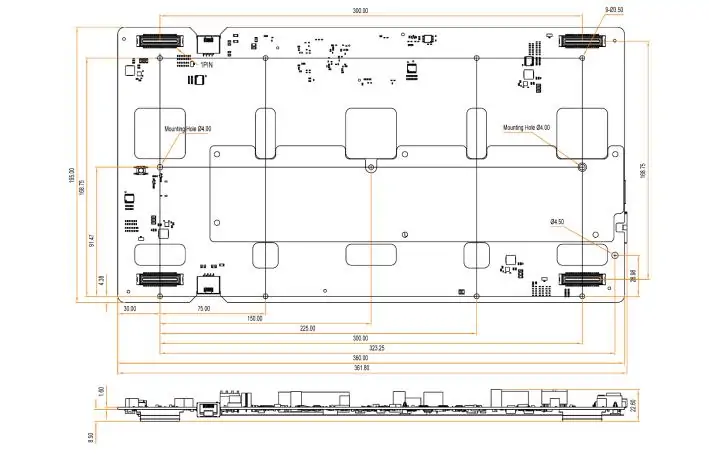
- Dimensions: 361.8 × 195.0 × 22.6 mm.
- Net board weight: 365 g.
The drawing below shows the mounting layout. Obtain NovaStar’s precision structural drawing before machining cabinet holes; do not scale this web image.
4. NovaStar BR460-1 Pro vs Other Novastar Receiving Cards
Compare the BR460-1 and other receiving cards by exact model, power design and supported functions. Similar names do not establish interchangeability.
4.1 Integration of Power Module
BR460-1 Pro combines power and receiving functions. Compare cabinet fit, module connectors and service access with a separate receiving-card/power-supply arrangement before deciding which is easier to maintain.
4.2 Advanced Image Processing
Compare Image Booster, HDR and calibration support under the same driver IC and source settings. Use low-brightness gradients and familiar video for acceptance tests instead of assuming every newer card looks better.
4.3 Enhanced Reliability
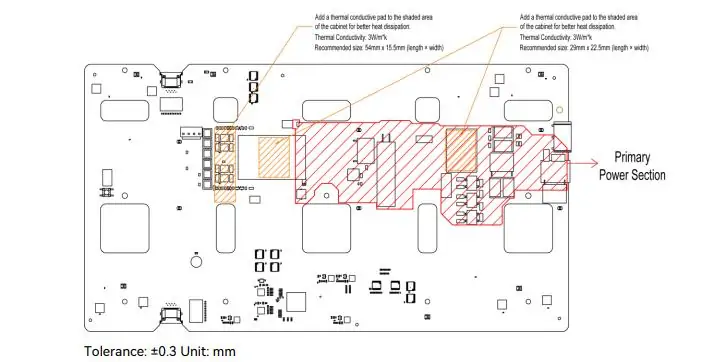
Test backup behavior during commissioning and retain a known-good configuration. The diagram below marks the primary power area and thermal-pad positions. Pads are not supplied; follow the specified insulation and clearance requirements. NovaStar installation drawing and notes.
5. How Much Does the NovaStar BR460-1 Pro Cost?
No verified fixed price is provided here. Request a written BR460-1 Pro quote stating quantity, currency, taxes, shipping, lead time and warranty. Include your module and controller details so the supplier can check compatibility.
Compare total installed cost, including pads, wiring, configuration work and spare boards. A lower board price can be outweighed by cabinet modifications or commissioning time.
6. FAQs
7. Conclusion
NovaStar BR460-1 Pro suits projects needing integrated module power and receiving functions, provided the cabinet and modules match. Its specifications describe capabilities, while practical results depend on the complete LED display system.
Before ordering, verify source bit depth, controller type, module configuration, electrical load and thermal conditions. Before commissioning, save configuration and calibration data and test normal operation and backup behavior.
For maintenance planning, see our NovaLCT receiving-card firmware guide. Use only firmware confirmed for the exact board and module combination.
 NovaStar AT32 Receiving Card: Smart Choice for LED Screen Control
 NovaStar BR460-1 Review: Performance, Specs, and Benefits
Related Posts






Fill In Your Needs In Detail
Fill in the screen usage scene and size you need in “Content”.You will get a quote.