Calculate LED display size by multiplying horizontal and vertical pixel counts by pixel pitch. Divide millimeters by 1,000 for meters. A 1920 × 1080 screen at P2.5 is 4.8 m wide × 2.7 m high, with an area of 12.96 m², before cabinet constraints.
To choose a suitable size, check the nearest and farthest viewers, the smallest text they must read, and the available installation space. Then select a buildable cabinet layout and verify its native resolution. This guide covers the formulas, reference tables, and practical checks for indoor and outdoor projects.
1. What Determines LED Display Size?
LED screen size is never a single-variable decision. Four factors interact, and changing any one of them shifts the others.
1.1 Viewing Distance
Closest viewing distance helps determine how fine the pixel pitch should be. Farthest viewing distance and content detail help determine image height. These are related decisions, but a single distance multiplier cannot guarantee readable text.
Planar’s viewing-distance guidance distinguishes subjective comfort from visual acuity. Its 20/20 visual-acuity estimate is distance (m) ≈ pitch (mm) × 3.438. Use this as a planning reference, then view actual content on a sample display.
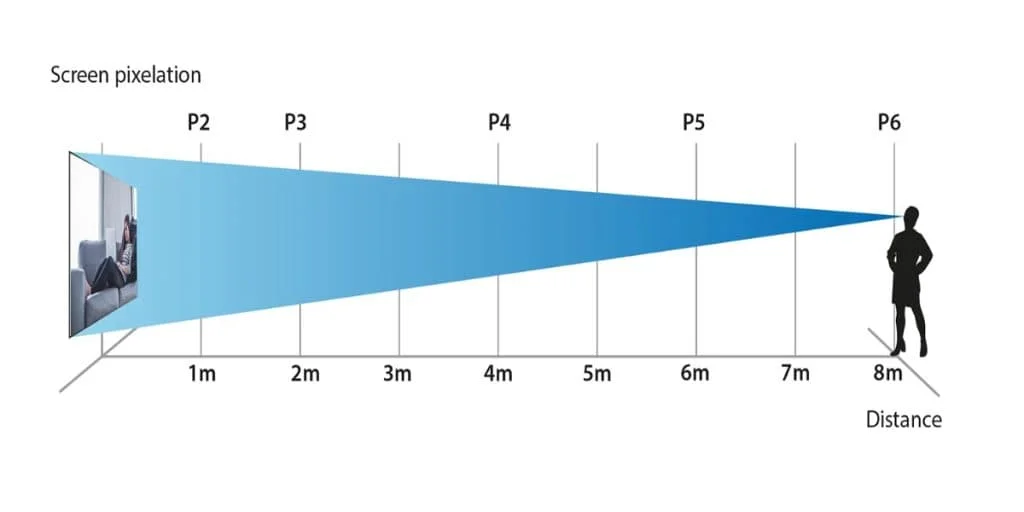
The illustration below labels P2 at 1 m, P3 at 2 m, P4 at 4 m, P5 at 6 m, and P6 at 8 m. These are illustrative positions, not guaranteed viewing thresholds.
1.2 Pixel Pitch
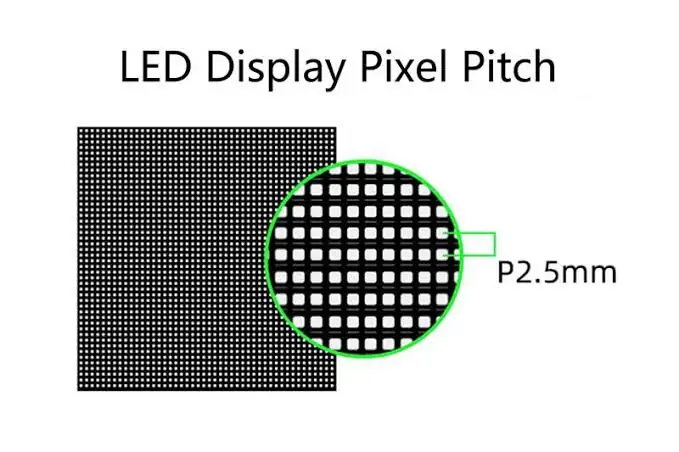
Pixel pitch is the center-to-center distance between adjacent pixels, measured in millimeters. P2.5 means 2.5 mm; it does not describe cabinet width. A smaller pitch provides more pixels within the same LED display size and generally costs more. Compare pixel-pitch options using real content and quotations: finer pitch can benefit close viewers or detailed graphics, but there is no fixed price multiplier.
1.3 Content Resolution
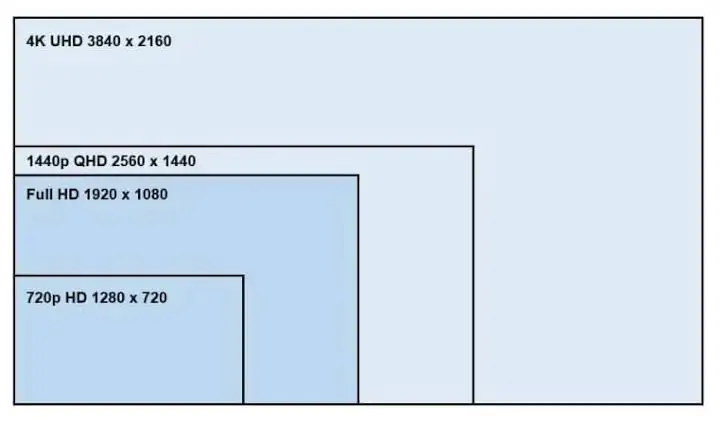
Full HD is 1920 × 1080 pixels; 4K UHD is 3840 × 2160. Those physical pixel counts are needed for one-to-one display of the full image. A compatible processor can scale a higher-resolution input to a lower-resolution wall, but it cannot preserve every source pixel.
At exactly 1920 × 1080 pixels, calculated area is 4.67 m² at P1.5, 33.18 m² at P4, and 207.36 m² at P10. For outdoor billboards, choose the required detail and viewing distance before specifying native resolution. The diagram also shows 720p (1280 × 720) and 1440p (2560 × 1440).
1.4 Physical Space
Measure usable installation width and height before selecting cabinets. Native 4K UHD at P4 requires 15.36 × 8.64 m of active display area. It cannot fit an 8 m-wide wall at that pitch. Choose a finer pitch, a lower native resolution, or a different layout. Include the mounting structure, trim, ventilation, and the manufacturer’s service clearances in the space plan.
2. The Core LED Display Size Formulas
These formulas describe a rectangular display with equal horizontal and vertical pixel pitch. Use the exact manufacturer specification: a marketed pitch such as P3.9 may be rounded. Cabinet pixel counts give the final buildable resolution.
2.1 Physical Size From Pixel Pitch and Resolution
- Screen width (mm) = Horizontal pixel count × Pixel pitch (mm)
- Screen height (mm) = Vertical pixel count × Pixel pitch (mm)
Example: 1920 × 2.5 = 4,800 mm wide; 1080 × 2.5 = 2,700 mm high. Divide by 1,000: 4.8 × 2.7 m. Area = width × height = 12.96 m². This is a calculated active area; confirm a cabinet or module arrangement can deliver it.
2.2 Pixels Per Square Meter
Pixels per m² = 1,000,000 ÷ (pixel pitch in mm)²
P2.5: 1,000,000 ÷ 6.25 = 160,000 pixels per square meter. P4: 1,000,000 ÷ 16 = 62,500 pixels per square meter. Useful for quick cost-per-pixel estimates and comparing panel density across pitches.
2.3 Module and Cabinet Count
- Modules wide = target width ÷ module width
- Modules high = target height ÷ module height
- Total modules = whole modules wide × whole modules high
LED panels use fixed module and cabinet dimensions. Keep units consistent and calculate each level separately. For a maximum opening, round counts down to fit; for a minimum image size, round up only if space permits. Recalculate width, height, aspect ratio, and resolution after choosing whole units. A 4.73 m-wide opening can fit nine 500 mm cabinets (4.5 m), not ten (5 m).
3. LED Display Size by Resolution: a Practical Reference
Calculated active areas below use area = horizontal pixels × vertical pixels × pitch² ÷ 1,000,000, rounded to one decimal place. Values assume exact nominal pitch and exclude cabinet rounding, structure, and clearances. Area alone does not tell you whether the required width and height fit.
| Resolution | Pixels (W×H) | P1.5 | P2.0 | P2.5 | P3.0 | P4.0 | P6.0 | P10 |
|---|---|---|---|---|---|---|---|---|
| 720p | 1280×720 | 2.1 m² | 3.7 m² | 5.8 m² | 8.3 m² | 14.7 m² | 33.2 m² | 92.2 m² |
| 1080p | 1920×1080 | 4.7 m² | 8.3 m² | 13.0 m² | 18.7 m² | 33.2 m² | 74.6 m² | 207.4 m² |
| 4K | 3840×2160 | 18.7 m² | 33.2 m² | 51.8 m² | 74.6 m² | 132.7 m² | 298.6 m² | 829.4 m² |
4. How to Choose LED Screen Size: Step by Step
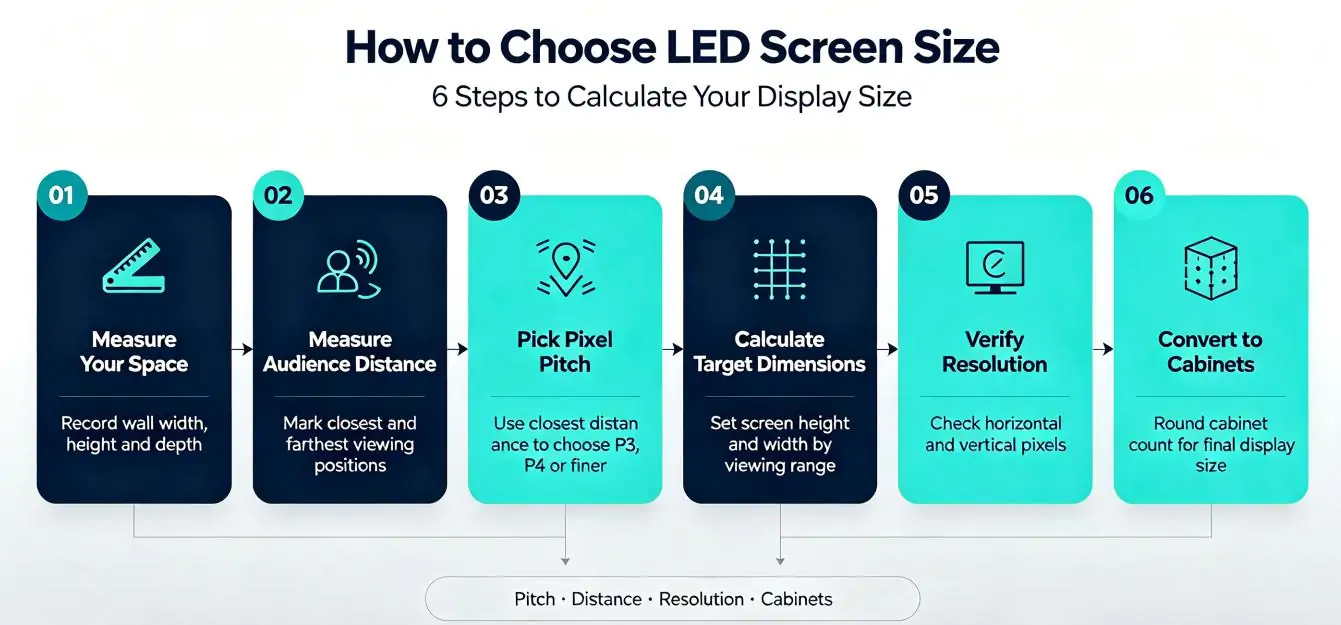
Step 1: Measure your space
Document the wall’s usable width, height, and depth. Obtain the selected product’s mounting, ventilation, cable-bend, and maintenance requirements. Front-service and rear-service systems need different access arrangements; there is no universal 0.6–1 m clearance around every LED wall.
Mark columns, doors, light fixtures, and HVAC vents. Check the structural load, power supply location, and access route before deciding on the final cabinet count.
Step 2: Measure your audience
Stand where the closest viewer will stand and measure the distance to where the screen will be. Do the same for the farthest viewer. These two distances drive pixel pitch and screen height, respectively.
Step 3: Pick your pixel pitch
- Visual-acuity planning distance (m) ≈ pixel pitch (mm) × 3.438
- Pitch for that criterion (mm) ≈ viewing distance (m) ÷ 3.438
At 3 m, this criterion gives approximately 0.87 mm pitch. That is a stringent pixel-visibility estimate, not a mandatory purchase specification. Coarser pitches may be acceptable for video; test small text and line graphics at the closest seat. Avoid treating the viewing distance as a “minimum pitch”: a smaller pitch means finer detail.
Step 4: Calculate target dimensions
- Preliminary image height (m) ≈ farthest distance (m) ÷ 6, only as an initial estimate
- Screen width (m) = image height × aspect ratio (width ÷ height)
For 16:9, multiply height by 16 ÷ 9; for 4:3, use 4 ÷ 3. Choose the aspect ratio to suit your content. The distance ÷ 6 shortcut does not guarantee text readability. Use AVIXA’s DISCAS guidance to assess image height, viewer positions, and the smallest content elements. Test the actual presentation from the back row.
Step 5: Verify resolution
Take the physical dimensions from step 4 and calculate how many pixels they deliver at your chosen pitch:
- Horizontal pixels = Screen width (mm) ÷ Pixel pitch (mm)
- Vertical pixels = Screen height (mm) ÷ Pixel pitch (mm)
Compare both dimensions with your native-resolution target: 1920 × 1080 for Full HD or 3840 × 2160 for 4K UHD. If short, increase size, choose finer pitch, or accept scaling to a lower native resolution. Confirm the processor supports the input format, total pixel load, and required output dimensions.
Step 6: Convert to cabinet counts
Divide target dimensions by cabinet dimensions and choose whole counts that fit. For example, ten × six 500 mm cabinets make a 5 × 3 m wall: 60 cabinets and 15 m². If each cabinet is 200 × 200 pixels, native resolution is 2000 × 1200, with a 5:3 aspect ratio. Plan letterboxing or cropping for 16:9 content. Confirm cabinet pixel counts before ordering.
5. Pixel Pitch by Viewing Distance: a Quick-Reference Table
These ranges are preliminary examples for shortlisting products, not guaranteed minimum viewing distances. Indoor or outdoor location does not change the pixel-visibility geometry; outdoor suitability also depends on product protection and brightness. Demonstrate candidate pitches at the nearest distance in each range.
| Viewing distance | Indoor pitch | Outdoor pitch | Typical application |
|---|---|---|---|
| 1–2 m | P0.8–P1.5 | Check suitable fine-pitch products | Control rooms, luxury retail, boardrooms |
| 2–4 m | P1.5–P2.5 | P3–P4 | Conference rooms, trade show booths |
| 4–8 m | P2.5–P4 | P4–P6 | Auditoriums, retail, houses of worship |
| 8–20 m | P4–P6 | P6–P10 | Concert stages, indoor arenas |
| 20–50 m | Project-dependent | P10–P16 | Outdoor stadiums, building facades |
| 50 m+ | Project-dependent | P16–P25 | Highway billboards |
6. Indoor vs Outdoor LED Display Size Considerations
Indoor and outdoor LED displays use the same size formulas, but environment and service access affect the installation.
Indoor displays often serve closer viewers. Select pitch for the content, and assess brightness against room lighting and reflections. Check dimming performance for comfortable viewing; a maximum brightness specification is not a recommended operating level.
Outdoors, assess direct sunlight, rain exposure on both sides, dust, temperature, drainage, and wind loads. Specify brightness and ingress protection for the actual site and selected product. Do not assume one front/rear IP rating suits every installation. Request a model-specific installation drawing and structural assessment.
Compare complete quotations including cabinets, processor, mounting, power distribution, cooling, access, and maintenance. A fixed percentage premium for outdoor screens is not reliable without equivalent product and installation specifications.
7. Common LED Display Size Mistakes
Choosing pitch based only on price. Compare the proposed screen at the nearest viewing position using your smallest text and detailed graphics. Two pitches may look similar from far away but visibly different nearby. Ask for a demonstration before trading image detail for a lower initial price.
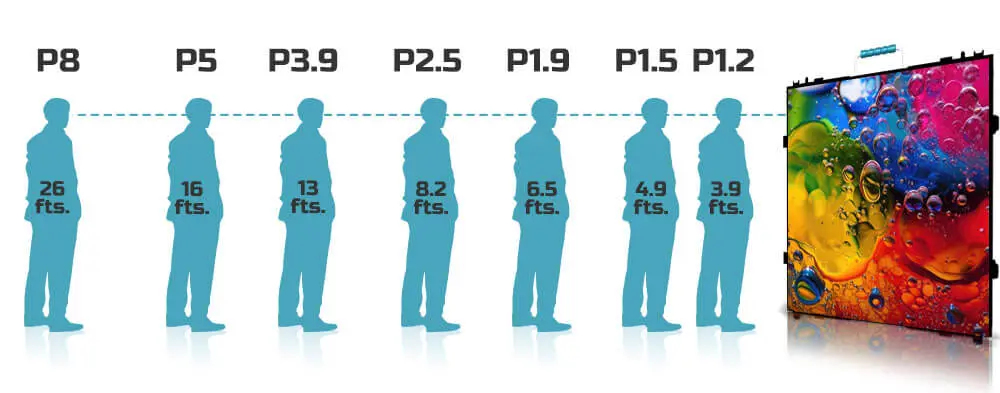
The image above gives approximate pairs: P8–26 ft, P5–16 ft, P3.9–13 ft, P2.5–8.2 ft, P1.9–6.5 ft, P1.5–4.9 ft, and P1.2–3.9 ft. These illustrate roughly one meter per millimeter of pitch; they are not the stricter visual-acuity criterion in section 1.
Calculating size from pixel pitch alone. A native 1080p P1.5 screen is 2.88 × 1.62 m. Whether viewers 15 m away can read it depends on text size and the viewing task, not simply audience count. Validate the smallest required detail.
Forcing a resolution that does not fit. A 4 m-wide lobby wall may benefit from finer resolution for nearby text, while distant video viewers may not need it. Scaling 1080p to a 720p wall reduces detail. Check the result with real content instead of assuming every installation needs 4K.
Ignoring cabinet dimensions in the final spec. A 4.73-meter-wide screen isn’t buildable from 500 mm cabinets. Rounding up to 5.0 meters or down to 4.5 meters changes the pixel count, the aspect ratio, and the mounting plan. Always lock in the cabinet count before ordering.
Forgetting maintenance access. Confirm how modules, power supplies, and receiving cards are replaced. For a rear-service display, reserve the manufacturer’s specified access space. Front-service designs still need room for tools and safe removal. Include access costs in the installation quote.
8. LED Display Size FAQs
9. Choosing the Right LED Display Size: Final Checklist
Before you place an order, run through these items:
- Closest and farthest viewing distances are documented in meters
- Pixel pitch is checked at the closest viewer position using actual content
- Physical dimensions fit the installation wall with clearance for maintenance
- Native resolution and processor scaling are checked with actual content
- Cabinet count is rounded to whole units and final dimensions are recalculated
- Aspect ratio matches the primary content source (16:9 for video, 4:3 for legacy)
- Indoor vs outdoor requirements (brightness, IP rating) are confirmed
- Total cost of ownership includes mounting structure, power, cooling, and maintenance access
10. Conclusion
A reliable LED display size specification connects viewing needs with a buildable cabinet layout. Calculate active width, height, and area; confirm the exact pitch and native pixel count; then test content from the nearest and farthest positions.
Before requesting a final quote, prepare the wall measurements, viewing distances, sample content, indoor or outdoor conditions, and service-access plan. Ask the supplier to return cabinet counts, finished dimensions, resolution, processor capacity, and installation requirements. That makes proposals comparable and catches sizing conflicts before equipment is ordered.
 Novastar TU4K Pro Guide: The All-in-One LED Controller
 Direct LED vs Edge LED: Which Backlight Technology Should You Choose?
Related Posts
Fill In Your Needs In Detail
Fill in the screen usage scene and size you need in “Content”.You will get a quote.