Choose LED display pixel pitch by the closest viewing distance, the detail in your content, and the resolution required at your screen size. Compare suitable pitches using your actual text and video before buying. Smaller pitch fits more pixels into the same area; a larger pitch can be sufficient for distant viewers. Brightness, contrast, calibration, and source quality also affect the result, whether the installation is a conference room or a large outdoor billboard.
Start with the nearest regular viewer, then calculate the pixel dimensions available within the installation space. Use viewing-distance formulas to shortlist options, not to guarantee readability. This guide explains pixel pitch, resolution, and density; compares indoor and outdoor needs; and gives a practical selection process. The application ranges are planning examples, with FAQs for common purchasing questions.
- 1. What Is Pixel Pitch?
- 2. Why LED Pixel Pitch Matters for LED Displays
- 3. Pixel Pitch vs. Resolution vs. Pixel Density
- 4. How Viewing Distance Affects Pixel Pitch
- 5. Indoor vs. Outdoor LED Display Pixel Pitch
- 6. How to Choose the Best Pixel Pitch
- 7. Common Pixel Pitch Recommendations by Application
- 8. A Quick Way to Avoid the Most Common Mistake
- 9. FAQs
- 10. Conclusion
1. What Is Pixel Pitch?
Pixel pitch is the distance, measured in millimeters, from the center of one LED pixel to the center of the next one. That’s the short version. If the pixels are packed closely together, the pitch number is smaller. If they’re spaced farther apart, the pitch number is larger.
You’ll usually see it written as something like P1.2, P2.5, P4, or P10. The “P” just stands for pitch, and the number tells you the spacing in millimeters. So P2.5 means the pixels are 2.5 mm apart.
That measurement matters because it gives you a quick idea of how detailed the image can look from different distances. Smaller pitch generally means more pixels in the same area, which usually means a sharper image. But there’s a trade-off, and that trade-off is cost. Smaller pitch tends to be more expensive because more LEDs and more driving components are packed into the same surface area.
Compare center-to-center pixel spacing, rather than the width of an LED package or the gap between cabinets. See Sharp/NEC’s pixel pitch guide (PDF) for the definition and selection factors.
2. Why LED Pixel Pitch Matters for LED Displays
Pixel pitch matters because it affects how the display looks to the viewer. If the pitch is too large for a close viewing distance, the image can look grainy or obviously pixelated. That may be fine for a roadside screen seen from far away, but not great for a control room where people sit a few feet from the wall.
It also affects the budget. This is where people sometimes get carried away. A very fine pitch sounds like the safest option, but if the audience is never going to stand close enough to notice the extra detail, you may be paying for performance you won’t use.
There’s another side to it too: the content itself. If you’re showing videos, live data, graphics, text, or mixed content, the pixel pitch should support the level of detail that content needs. Fine text and detailed UI elements usually need a tighter pitch than large-format video.
Ask the supplier to show your smallest text, charts, and typical video at the intended brightness and viewing distance. A specification alone cannot confirm that the content is readable.
3. Pixel Pitch vs. Resolution vs. Pixel Density
When comparing LED displays, three terms are often confused: pixel pitch, resolution, and pixel density. While they are closely related, they describe different aspects of image quality and viewing performance.
3.1 Pixel Pitch
Pixel pitch refers to the distance between the centers of two adjacent LED pixels, usually measured in millimeters (mm). A smaller pixel pitch means the pixels are packed closer together, resulting in sharper and more detailed images at close viewing distances.
For example:
- P1.5 LED screen = 1.5 mm pixel pitch
- P4 LED screen = 4mm pixel pitch
- P10 LED screen = 10mm pixel pitch
Smaller pixel pitch displays are commonly used for indoor applications such as conference rooms, TV studios, and retail displays, where viewers stand relatively close to the screen. Larger pixel pitch screens are more suitable for outdoor billboards or stadium displays viewed from long distances.
3.2 Resolution
Resolution refers to the total number of pixels displayed on the screen, expressed as width × height.
For example:
- 1920 × 1080 = Full HD
- 3840 × 2160 = 4K UHD
Higher native resolution provides more addressable pixels for detail, provided the source and processor support it. It does not by itself improve motion smoothness, contrast, or color accuracy. A large 4K screen can still show visible pixel structure when viewed close up.
Native width in pixels ≈ active width in mm ÷ pixel pitch in mm; use the same calculation for height. For example, a 4,800 × 2,700 mm active area at exactly 2.5 mm pitch contains 1,920 × 1,080 pixels. Confirm the cabinet pixel matrix: nominal pitch labels may be rounded, and the final wall uses whole modules.
3.3 Pixel Density
Pixel density can be expressed per unit area as pixels per square meter, or along a line as pixels per inch (PPI). For a square pixel grid with pitch p in millimeters: pixels/m² = (1,000 ÷ p)² and PPI = 25.4 ÷ p. These are different units.
Higher pixel density results in:
- Sharper text and graphics
- Smoother image edges
- Better close-up viewing experience
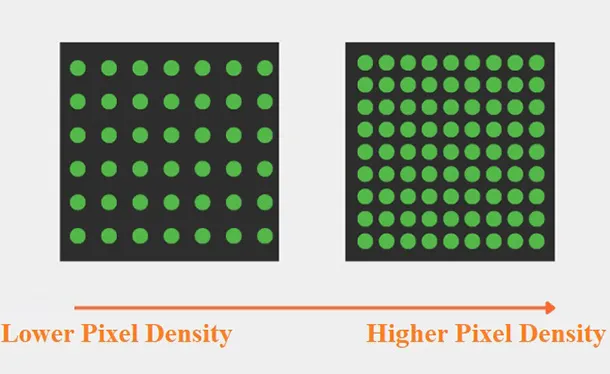
For example, P2.5 has 160,000 pixels/m², while P5 has 40,000 pixels/m². Halving pitch quadruples pixel count within the same area. The illustration below shows fewer, widely spaced pixels on the left and more, closely spaced pixels on the right.
Choosing the right balance depends on viewing distance, installation environment, and budget. Indoor fine-pitch LED displays prioritize high density and resolution, while large outdoor LED billboards focus more on brightness, durability, and viewing range.
4. How Viewing Distance Affects Pixel Pitch
This is the part that matters most in practice. The ideal pixel pitch depends heavily on how far people will sit or stand from the screen. If viewers are close, they can spot individual pixels more easily, so you need a smaller pitch. If viewers are far away, a larger pitch is usually fine.
The “1 mm pitch per 1 meter” rule is only a rough screening estimate, not a pixel-free viewing guarantee. Planar distinguishes comfortable viewing from a 20/20 visual-acuity estimate: distance in meters ≈ pitch in mm × 3.438. For P2, its chart gives approximately 3.44 m for comfortable viewing and 6.88 m for visual acuity. These are estimates, not universal minimums. Source: Planar viewing-distance chart (PDF).
That said, viewing distance is not the only factor. Content type, ambient light, screen size, and user expectations also matter. A corporate lobby display and a sports arena screen might both be visible from distance, but they won’t need the same pitch. People tend to stand closer to lobby signage, and they usually expect a cleaner image.
Here’s a practical way to think about it:
| Pixel Pitch | Illustrative Applications |
|---|---|
| P1.2–P1.8 | Close viewing, control rooms, premium indoor spaces |
| P2.0–P2.5 | Conference rooms, retail, studio environments |
| P2.5–P4.0 | Mid-range indoor or semi-outdoor spaces |
| P4.0–P6.0 | Large indoor venues, stages, some outdoor-use cases |
| P6.0 and above | Long-distance outdoor viewing |
This table is only a guide. It helps you start in the right range, but it doesn’t replace the actual conditions of the site.
5. Indoor vs. Outdoor LED Display Pixel Pitch
Indoor installations often need finer pitch because viewers stand closer. Outdoor billboards often use coarser pitch because the audience is farther away. However, pixel pitch does not specify brightness or weather resistance: check rated luminance, dimming, ingress protection, and operating conditions separately. Close-viewed outdoor signage can also require fine pitch.
For indoor use, you’ll often see pitches like P0.9, P1.2, P1.5, P1.8, P2.5, or P3. These are used where the audience is close and image quality matters a lot. Conference rooms, control centers, high-end retail, and broadcast environments are good examples.
P4, P6, P8, and P10 are examples to compare for longer-distance outdoor advertising, rather than limits for every outdoor project. A pavement-level sign and a highway billboard have different needs. Specify the nearest viewer, available reading time, and letter size before selecting pitch, then verify the proposed product’s outdoor rating.
A quick comparison helps:
| Factor | Indoor LED Display | Outdoor LED Display |
|---|---|---|
| Viewing distance | Closer | Farther |
| Common pixel pitch | Smaller | Larger |
| Brightness needs | Moderate | High |
| Weather resistance | Not always required | Essential |
| Content detail | Often text-heavy or detailed | Often bold, simple, large-format |
The big mistake is assuming outdoor always means lower quality. That’s not really it. It just means the screen is designed for a different viewing condition. A P10 billboard can be the right choice if people are seeing it from a long distance. It’s not “worse” because it has a larger pitch. It’s just built for the job.
6. How to Choose the Best Pixel Pitch
Choosing the right pixel pitch starts with a few basic questions. Where will the display be installed? How far away will people be when they view it? What kind of content will be shown? And how much space and budget do you actually have?
The easiest way to narrow it down is to work from the viewing distance first. If you know how close the audience will be, you can rule out pitches that are too coarse. Then you can decide whether a finer pitch is really worth the extra cost. In many cases, people jump straight to the smallest pitch available, and that usually leads to overspending.
Here’s a simple process that works well in real projects:
6.1 Identify the closest typical viewing distance
Not the farthest. Not the average. The closest common viewing position is the important one, because that’s where a poor pitch will be noticed fastest.
6.2 Match the pitch to that distance
For a conservative visual-acuity shortlist, divide viewing distance in meters by 3.438 to estimate pitch in millimeters. At 3 m, that is about 0.87 mm; acceptable viewing may allow a coarser pitch. Compare candidates in person rather than treating either this estimate or the 1:1 rule as a purchase specification. Planar explains the different viewing criteria.
6.3 Think about the content
Text, dashboards, charts, and UI-heavy content usually benefit from finer pitch. Full-motion video can tolerate a bit more spacing, especially at distance.
6.4 Check the budget honestly
Compare complete installed costs for the shortlisted options: cabinets, controller capacity, installation, spare modules, and maintenance access. Finer pitch increases pixel count, but price does not follow a fixed multiplier. Ask for the same warranty and service scope on each quotation.
6.5 Consider the screen size
Calculate native resolution before selecting a cabinet layout. At exactly P2.5, a 3,840-pixel-wide display needs 9.6 m of active width; at P1.25 it needs 4.8 m. A 4K input does not make a lower-resolution wall native 4K. Check scaling and the LED screen resolution requirements with the processor supplier.
There’s no universal “best” number. The best pixel pitch is the one that balances image quality, viewing distance, and cost without going overboard. For screening rooms and auditoriums, our cinema LED pixel pitch and viewing distance guide explains how to evaluate screen dimensions, native pixels, and seating together.
7. Common Pixel Pitch Recommendations by Application
The ranges below are illustrative starting points, not standards or guaranteed viewing distances. The same application can need a finer or coarser pitch depending on the nearest viewer, smallest text, and total active screen size.
For control rooms and monitoring centers, smaller pitches are usually the right direction. People often sit close to the screen and spend long hours looking at detailed information. P1.2, P1.5, or P1.8 are common choices depending on the exact setup.
For conference rooms, compare P1.8–P2.5 where seating distance allows, and finer options when viewers sit close or need dense spreadsheets. Verify the smallest presentation text from the nearest and farthest seats; a room label alone does not determine the correct pitch.
Retail stores often land somewhere around P1.5 to P3.0. It depends on whether the display is meant for close-up product messaging or just general visual impact from a few meters away.
For stage backdrops and event spaces, P2.5–P4.0 can be a useful comparison range. Check the closest audience position and test any planned camera setup for moiré and scan artifacts; lens, shutter settings, refresh behavior, and camera distance matter alongside pitch.
Outdoor advertising usually uses larger pitches like P4, P6, P8, or P10. These are suited to longer viewing distances, faster traffic movement, and bigger-format messages.
It helps to think in terms of use, not just category name. A “retail display” in a luxury storefront is not the same as a “retail display” in a warehouse outlet. The pitch should follow the actual viewing behavior.
8. A Quick Way to Avoid the Most Common Mistake
A common purchasing mistake is comparing pitch numbers without comparing the finished image. Prepare a test file with the smallest text, fine lines, dark scenes, and typical video. View two shortlisted pitches at the intended distance, using comparable brightness and the same source.
If the viewer will never get close enough to notice the extra resolution, then the added cost may not bring much real value. On the flip side, choosing a pitch that is too large for a near-viewing application can reduce text legibility even when the panel is well built.
So the safest mindset is this: start with distance, then think about content, then check budget. Not the other way around.
9. FAQs
10. Conclusion
Choosing the best pixel pitch for an LED display is all about balance. The right screen should match the viewing distance, display content clearly, and stay within budget. A common mistake is assuming that a smaller pixel pitch is always better, when in reality it only matters if viewers are close enough to notice the extra detail.
If the audience is near the screen and fine image quality is important, a smaller pitch is ideal. For longer viewing distances, a larger pitch is often the more practical and cost-effective option. Understanding this relationship makes it easier to select an LED display that fits the space, audience, and application.
Learn more about related information: LED screen resolution.
 SMD VS COB LED Display: Key Differences and Comparison Guide
 Screen Aspect Ratio Guide for LED Displays: 16:9 vs 4:3
Fill In Your Needs In Detail
Fill in the screen usage scene and size you need in “Content”.You will get a quote.