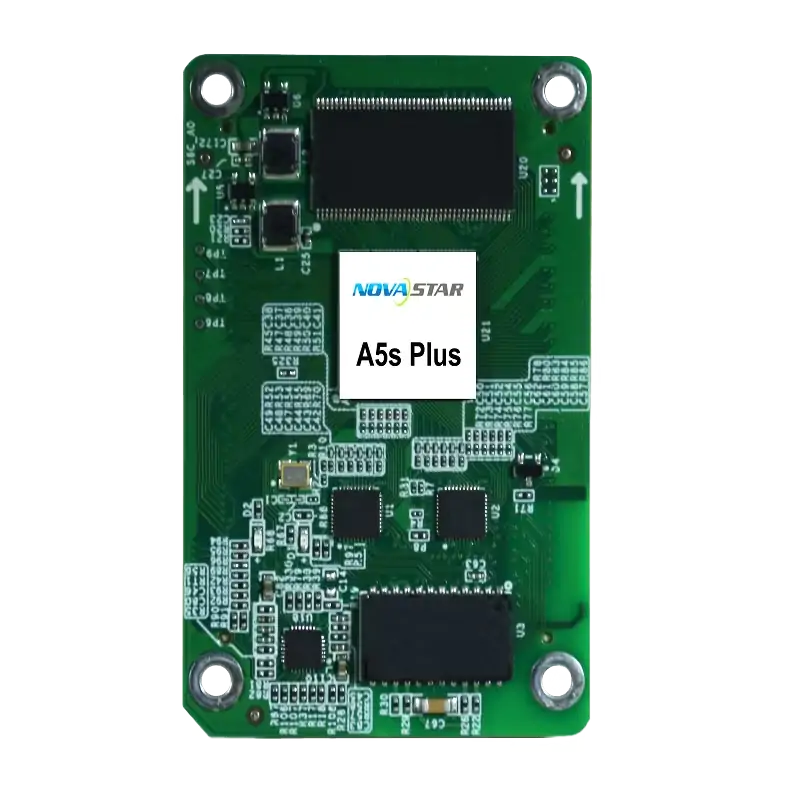
The Novastar A5s Plus is a compact LED receiving card rated for up to 512 × 384 pixels at 60 Hz with an 8-bit source and PWM driver ICs. It is worth considering when your cabinet needs calibration, grayscale control and supported backup functions. Confirm the HUB board, driver IC and firmware before buying. This specification-based review covers features, setup, compatibility and price considerations; it does not claim hands-on performance testing.
1. What is the Novastar A5s Plus?
The A5s Plus receives display data from a compatible NovaStar controller and passes it to LED modules through a matching HUB board. It is one component of a complete display system. For outdoor LED screens, the cabinet design and module configuration determine suitability.
Key A5s Plus receiving card capabilities include:
- Up to 512 × 384 at 60 Hz with PWM ICs and 8-bit video.
- Pixel-level brightness and chroma calibration.
- Multi-batch brightness adjustment for modules or cabinets.
- Low-latency operation and image rotation in 90° steps.
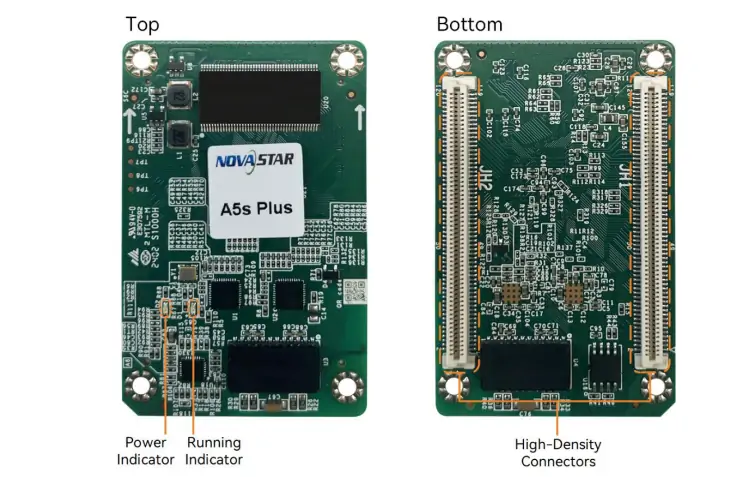
High-density connectors link the card to its HUB board. NovaStar describes this design as reducing the effects of dust and vibration; it does not establish an outdoor weatherproof rating for the bare card.
2. Novastar A5s Plus Receiving Card: Core Features
These features address image consistency and maintenance. Results depend on the modules, controller, configuration and firmware, so validate the functions your project needs before ordering.
2.1 Color Management
Color management supports Rec.709, DCI-P3, Rec.2020 and custom gamut settings. Select the setting that matches your content workflow. A supported gamut setting does not mean the LEDs physically reproduce the entire gamut.
2.2 18bit+ Grayscale Enhancement
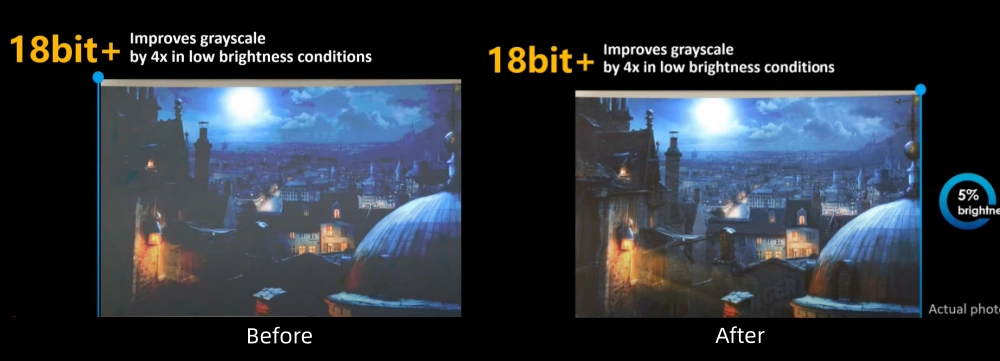
NovaStar describes 18bit+ as a fourfold grayscale improvement intended to reduce loss at low brightness. Treat this as a manufacturer feature description, rather than a measured comparison with every other receiving card.
2.3 Pixel-Level Calibration
With NovaStar’s calibration system, the A5s Plus supports brightness and chroma correction for individual pixels. Calibration can improve uniformity; inspect the actual screen at its intended brightness before accepting the result.
2.4 Quick Adjustment of Dark or Bright Lines
Dark- or bright-line adjustment compensates for brightness differences at module and cabinet seams. Check mechanical alignment first, then adjust the affected seam and review it with both test patterns and normal content.
2.5 Low Latency Mode
NovaStar specifies one frame at the receiving-card end with PWM driver ICs. This is not total source-to-screen latency. Continuous-DCLK PWM ICs need customized firmware. See the official A5s Plus specifications, Features.
2.6 Individual Gamma Adjustment for RGB
Separate red, green and blue gamma adjustments help address low-grayscale color imbalance. The function requires NovaLCT and a controller that supports it. Compare dark gradients and neutral gray patches after adjustment.

2.7 Smart Module Support
Smart modules can support module IDs, calibration storage, temperature monitoring and error detection. Dedicated firmware is required. Confirm the module hardware and firmware package with the cabinet supplier before relying on these maintenance functions.
3. A5s Plus Novastar Receiving Card Specification
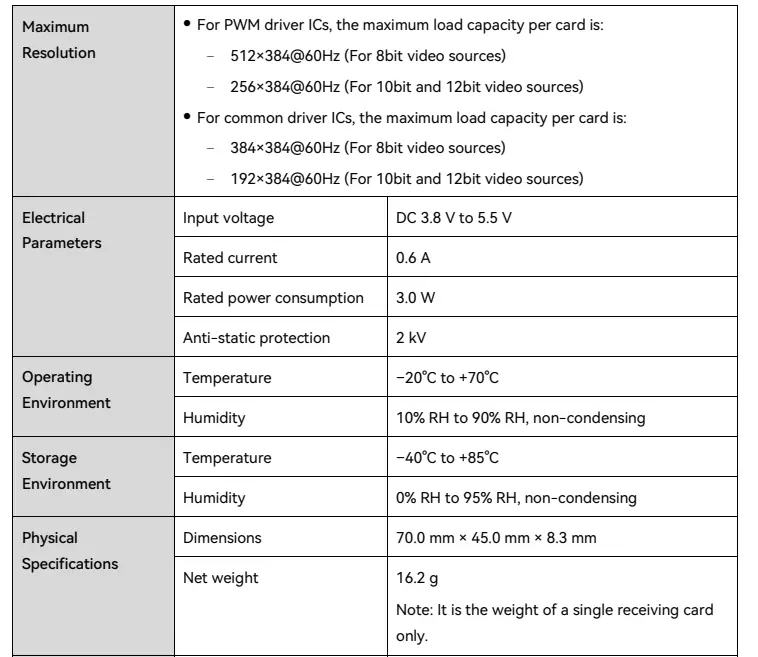
The following per-card ratings are listed in NovaStar’s A5s Plus specifications V1.4.1. Check loading at the intended source bit depth, refresh rate and module configuration.
3.1 Maximum Resolution
- PWM driver ICs:
- 512 × 384 at 60 Hz: 8-bit source
- 256 × 384 at 60 Hz: 10-bit or 12-bit source
- Common driver ICs:
- 384 × 384 at 60 Hz: 8-bit source
- 192 × 384 at 60 Hz: 10-bit or 12-bit source
3.2 Electrical Parameters
- Input voltage: DC 3.8–5.5 V; recommended 5 V
- Rated current: 0.6 A
- Rated power consumption: 3.0 W
- Anti-static rating: 2 kV
3.3 Physical Specifications
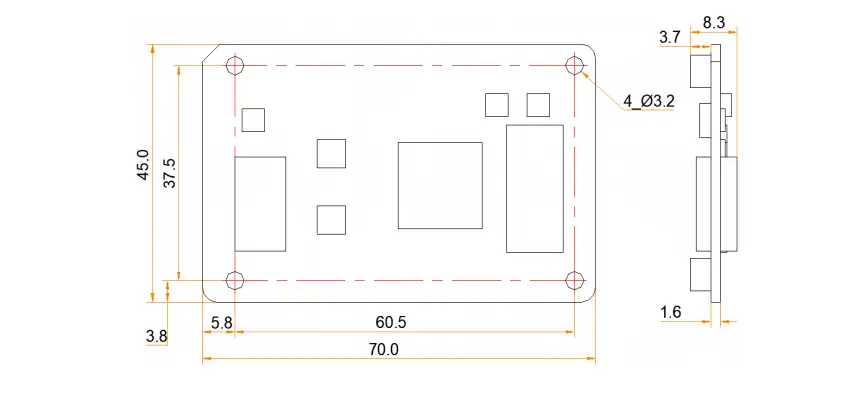
- Nominal dimensions: 70.0 × 45.0 × 8.3 mm
- Net weight: 16.2 g
For mounting, use the mechanical drawing: maximum total thickness is 8.7 mm and the recommended connector-to-HUB spacing is 5.0 mm. Obtain a precision drawing before machining mounting holes.
3.4 Environmental Conditions
- Operating temperature: −20°C to +70°C
- Operating humidity: 10–90% RH, non-condensing
- Storage temperature: −40°C to +85°C
- Storage humidity: 0–95% RH, non-condensing
3.5 Certifications
- RoHS
- EMC Class B
These are card-level ratings. They do not certify the complete LED cabinet or its outdoor protection. Ask the supplier for the documentation required for your installation region.
4. Setting Up the Novastar A5s Plus Receiving Card Guide
Commission one cabinet first, then apply the validated configuration to the display. Back up the existing receiving-card parameters and calibration data before making changes.
4.1 Hardware Installation
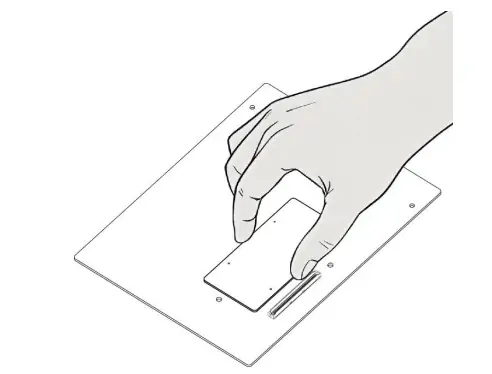
- Switch off power and follow the cabinet supplier’s ESD precautions. Hold the card by its edges.
- Align both high-density connectors with the matching HUB board; seat them evenly without forcing them.
- Use the specified mounting supports. Mounting holes are GND-connected; follow the supplier’s grounding design rather than assuming GND and chassis shield are interchangeable.
4.2 Firmware Configuration
- Confirm the exact card model and approved firmware with your supplier. Use the official Armor receiving-card downloads.
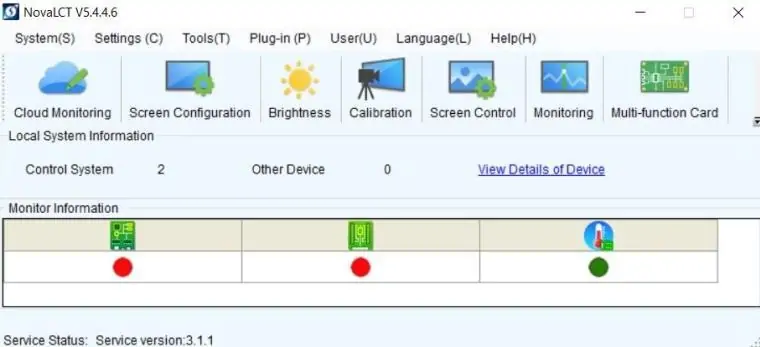
- Use the approved NovaLCT workflow, keeping power stable throughout an update.
- Load the cabinet’s validated parameters and check mapping before saving them to hardware.
See our NovaStar software download guide for software selection.
4.3 Calibration
- Use the matching NovaStar calibration system and measurement equipment.
- Apply brightness and chroma calibration, then inspect module seams and low-brightness uniformity.
- Save the coefficients and a recoverable copy of the final configuration.
4.4 Testing
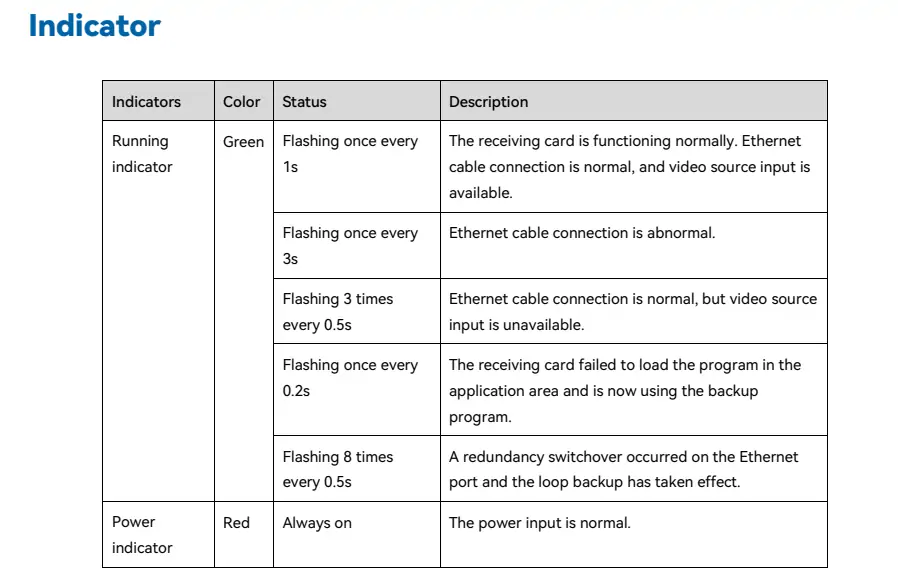
- Check power and the running indicator against the table below.
- Display test patterns and normal content; inspect mapping, color and any required rotation or low-latency settings.
- Test the configured backup path and retain the final commissioning record.
| Indicator pattern | Meaning |
|---|---|
| Green: once every 1 second | Normal Ethernet connection and video input. |
| Green: once every 3 seconds | Abnormal Ethernet connection. |
| Green: 3 flashes every 0.5 seconds | Ethernet connected; video input unavailable. |
| Green: once every 0.2 seconds | Application program failed to load; backup program running. |
| Green: 8 flashes every 0.5 seconds | Ethernet redundancy switched over; loop backup active. |
| Red: continuously on | Normal power input. |
Source: NovaStar indicator reference. Record the flash pattern before troubleshooting.
5. A5s Plus LED Receiving Card Compatibility Overview
Compatibility is a system-level check. Confirm the controller, HUB pinout, LED module, source bit depth and required functions together.
5.1 Supported Driver ICs
The loading specifications distinguish PWM and common driver ICs. They are not a universal compatibility list. Give the supplier your exact driver IC, scan ratio and module resolution, and request a tested configuration file.
5.2 Video Sources
HDMI or DVI sources connect to the compatible controller, not directly to the A5s Plus. The card receives the controller’s display data through its HUB connections. NovaStar removed LVDS transmission from the feature list in specification V1.2.1.
5.3 Software Integration
NovaLCT handles receiving-card configuration and supported display adjustments. NovaStar calibration tools, including NovaCLB workflows, serve a different role and may require measurement hardware. Use software versions approved for your controller and cabinet.
5.4 Network Topology
Gigabit Ethernet signals pass through the high-density connector and HUB board. Loop backup requires primary and backup connections to the controller plus the correct configuration. Test failover; redundant cabling alone does not prove recovery.
6. Novastar A5s Plus Price
No verified current A5s Plus price is quoted here. Request a dated quote for your quantity and delivery location. Compare the full installed cost, including the HUB board, commissioning, spare cards and any required customized firmware.
Ask whether the quote includes tax, shipping, warranty and configuration support. Confirm that it names A5s Plus, rather than a different A5-series card, and obtain written compatibility confirmation before replacing existing hardware.
7. FAQs
8. Conclusion
The Novastar A5s Plus is worth considering when its loading limits, calibration features and cabinet interface match the project. For stage LED display projects, verify latency and failover with the complete signal chain. This specification-based assessment cannot establish measured image quality, reliability or value for a particular installation.
Before ordering, agree on the exact hardware, firmware, configuration support and delivered price. Consult NovaStar or your display supplier when compatibility is uncertain, and keep a tested spare configuration for maintenance.
 Why Choose Novastar MCTRL660 Pro for Professional LED Walls?
 Novastar A7s Plus: Receiving Card Guide
Related Posts






Fill In Your Needs In Detail
Fill in the screen usage scene and size you need in “Content”.You will get a quote.