
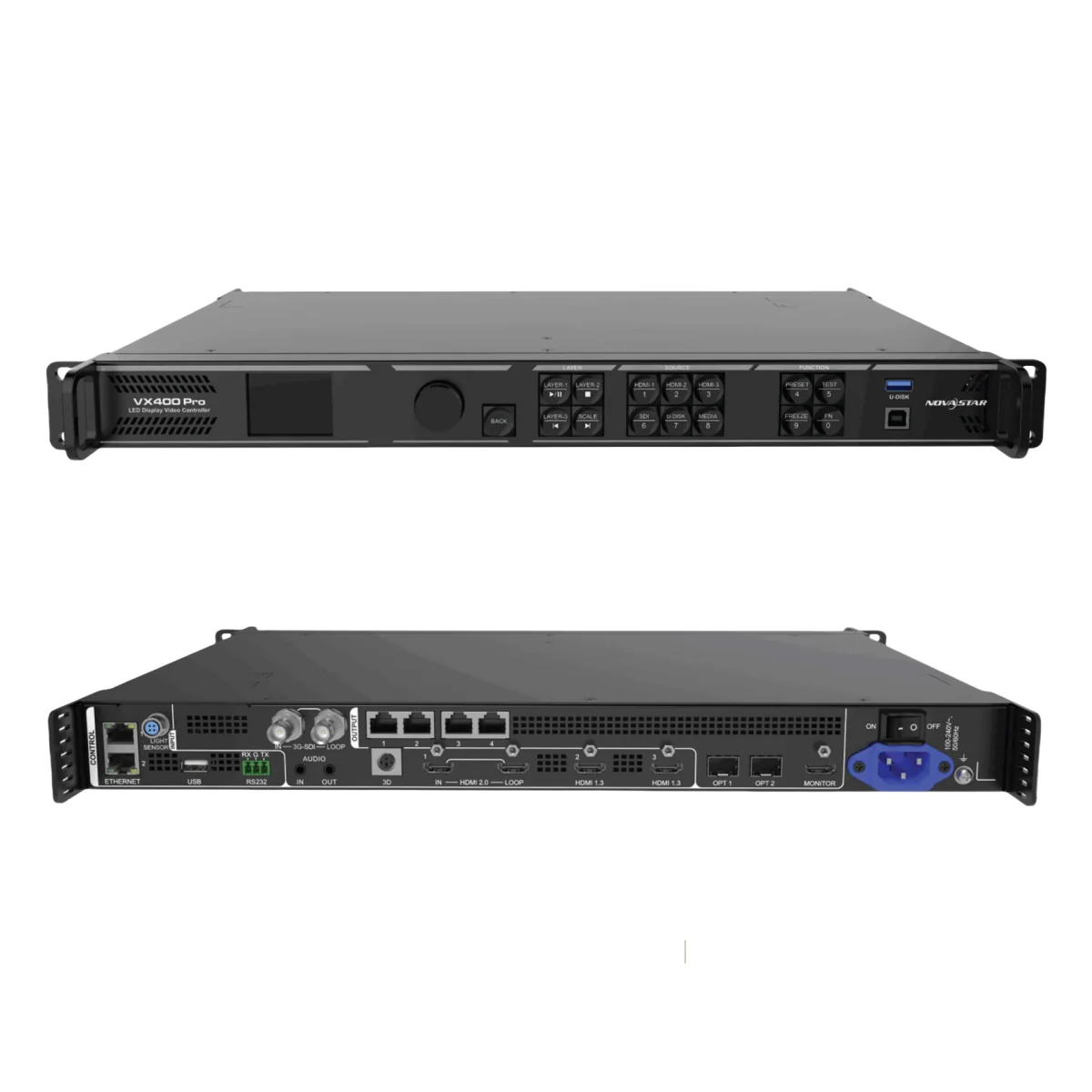
NovaStar VX400 Pro is a groundbreaking all-in-one LED controller that combines advanced video processing and control functionalities into a single, compact device. Designed for medium to high-end applications, this controller offers unmatched versatility, reliability, and performance for LED display systems. Whether you’re managing ultra-wide screens for live events or fine-pitch LED panels for corporate settings, the VX400 Pro delivers professional-grade results with ease.
In this guide, we’ll explore what makes the NovaStar VX400 Pro an industry leader, its core features, technical specifications, practical applications, downloadable resources, frequently asked questions, and why it’s worth the investment.
1. What Is the Novastar VX400 Pro?
NovaStar VX400 Pro is an all-in-one LED display controller designed to handle both video processing and transmission tasks in one robust unit. It supports up to 2.6 million pixels, with a maximum output resolution of 10,240×8,192 pixels, making it ideal for controlling large-scale LED screens on-site.
Key highlights include:
- 4K×2K@60Hz input support: Ensures crystal-clear image quality.
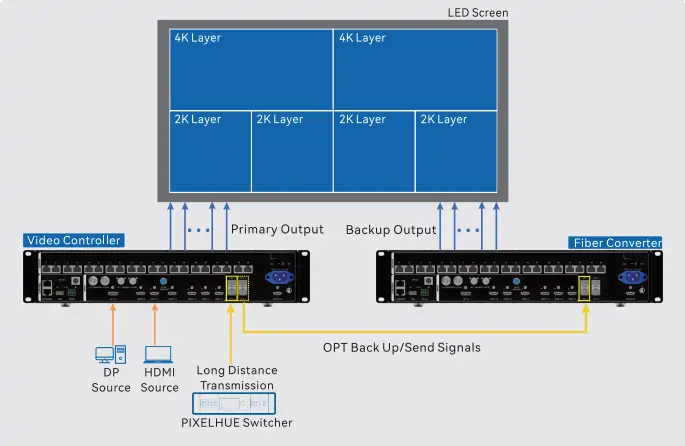
- Multiple working modes: Video Controller, Fiber Converter, and ByPass modes adapt to various operational needs.
- Industrial-grade casing: Built to withstand demanding environments while maintaining consistent performance.
- Low latency: Achieves zero-frame delay in ByPass mode, critical for real-time applications like live performances and gaming.
Whether used in rental setups, stage control systems, or fine-pitch LED displays, the VX400 Pro stands out as a versatile solution for professionals seeking efficiency and precision.
2. Core Features of the VX400 Pro LED Controller
The VX400 Pro LED Controller boasts a range of cutting-edge features that elevate its functionality:
2.1 Multiple Input and Output Connectors
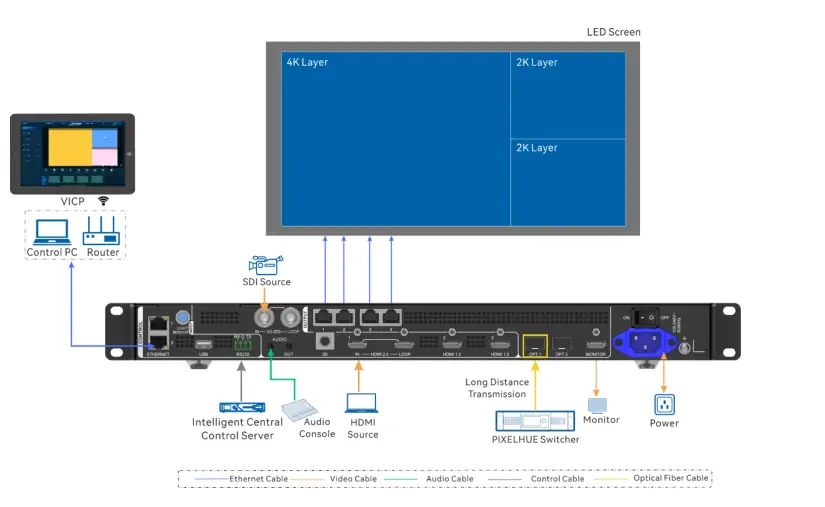
1. Inputs:
- 1x HDMI 2.0 (IN & LOOP)
- 2x HDMI 1.3
- 1x 10G optical fiber port (OPT 1)
- 1x 3G-SDI (IN & LOOP)
- 1x USB 3.0 (for media playback)
2. Outputs:
- 4x Gigabit Ethernet ports (max 2.6 million pixels)
- 2x Fiber outputs (copy or backup modes)
- 1x HDMI 1.3 (monitoring display)

2.2 Advanced Video Processing
- Resolution Support: Handles inputs up to 4096×2160@60Hzvia HDMI 2.0.
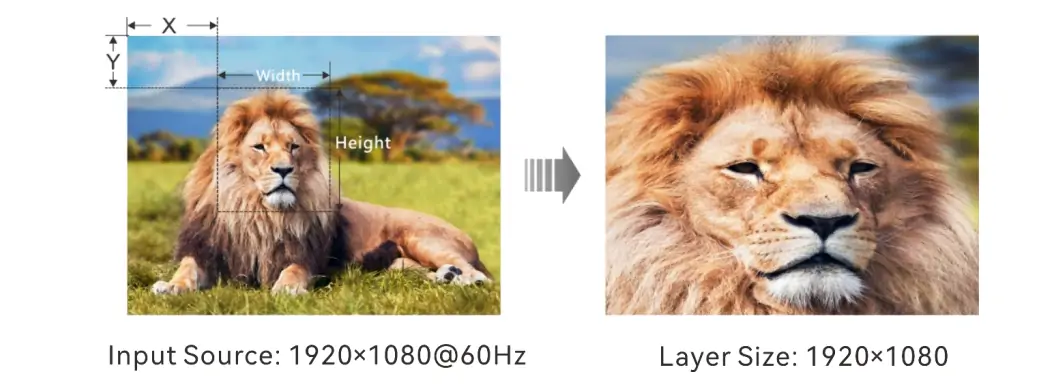
- Layer Management: Supports up to 6 layers, each adjustable in size, position, priority, and aspect ratio.
- Pixel-Level Calibration: Works with NovaLCT and NovaStar calibration software to ensure uniform brightness and chroma consistency across the screen.
2.3 Low Latency and Synchronization
- Zero-Frame Delay: When low latency and ByPass mode are enabled, the device reduces delays to near-zero frames.
- Output Sync: Uses internal input sources as sync signals to ensure seamless multi-device synchronization.
2.4 Flexible Control Options
Operate the VX400 Pro via:
- Front panel knob
- Unico client software
- NovaLCT software
- VICP mobile app
- Optional remote control (item code: M07020005)
2.5 Backup and Reliability
End-to-end backup options:
- Device-to-device backup
- Input source backup
- Ethernet port backup
- Dual receiving card backup
Data saving after power failure: Automatically restores previous settings upon reboot.
2.6 Enhanced Display Capabilities
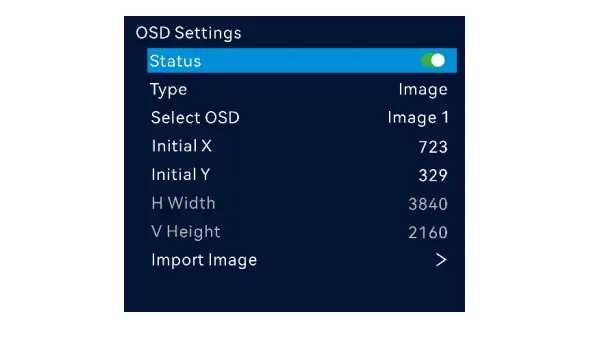
- OSD Functionality: Supports text overlays (static, dynamic, weather, time) and image overlays.
- 3D Support: Compatible with third-party 3D emitters for immersive viewing experiences.
- USB Playback: Plug-and-play convenience for images and videos stored on USB drives.
These features make the VX400 Pro LED Controller a powerful tool for creating stunning visual displays in diverse settings.
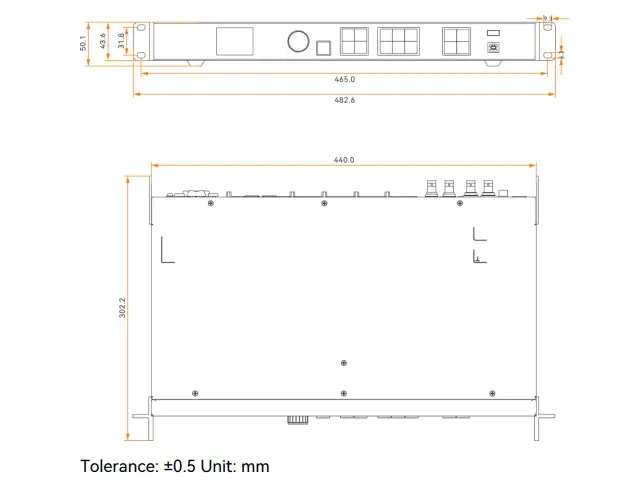
3. Technical Specifications of VX400 Pro Video Processor
To fully understand the capabilities of the VX400 Pro Video Processor, let’s dive into its technical specifications:
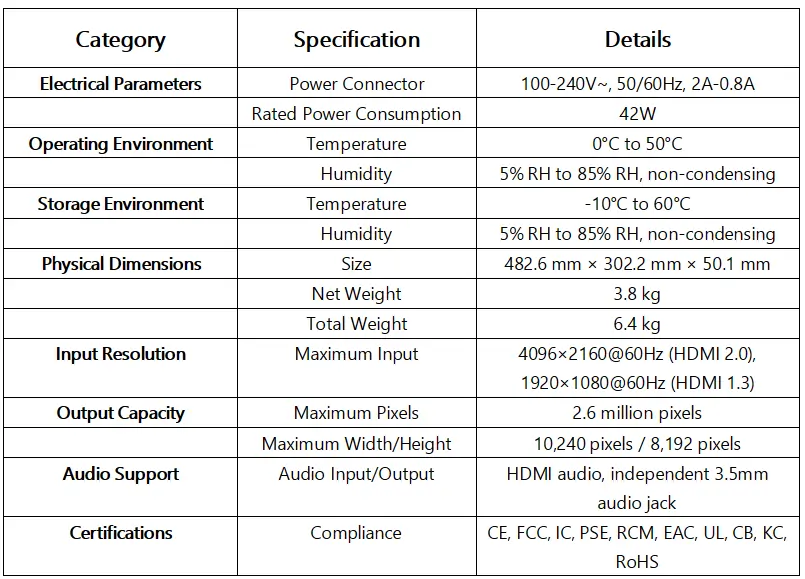
With these specs, the NovaStar VX400 Pro ensures top-tier performance in virtually any environment.
4. Applications of the Novastar VX400 Pro All-in-One Controller
The Novastar VX400 Pro All-in-One Controller excels in a variety of professional scenarios:
4.1 Stage Performances and Live Events
- Delivers smooth, high-refresh-rate visuals synchronized with lighting effects.
- Ideal for concerts, theater productions, and live broadcasts requiring real-time responsiveness.
4.2 Corporate Environments
- Powers conference room displays and video walls with multi-layer content.
- Provides precise color management for presentations and branding materials.
4.3 Retail Advertising
- Drives eye-catching digital signage in shopping malls and outdoor billboards.
- Supports dynamic transitions and vibrant imagery to captivate audiences.
4.4 Sports Venues
- Manages massive LED scoreboards and perimeter advertising screens.
- Ensures clear visibility even from long distances.
4.5 Control Rooms
- Enables accurate information display in command centers and monitoring hubs.
- Offers pixel-level calibration for consistent brightness and color accuracy.
Its ability to handle complex configurations and deliver exceptional image quality makes the VX400 Pro indispensable in modern LED installations.
5. NovaStar VX400 Pro 4K LED Controller File Download
For users looking to maximize their experience with the NovaStar VX400 Pro 4K LED Controller, official documentation and software downloads are available:
- Quick Start Guide: Download PDF
- User Manual: Download PDF
- Specifications Sheet: Download PDF
These resources provide detailed instructions on setup, configuration, troubleshooting, and advanced usage tips.
6. FAQs
7. Conclusion
The NovaStar VX400 Pro redefines what an all-in-one LED controller can achieve. With its 4K×2K@60Hz input, 6-layer display capability, and zero-frame latency, it sets a new standard for performance and flexibility. Its industrial-grade design ensures durability, while its intuitive controls and comprehensive backup options guarantee reliability.
For those considering the NovaStar VX400 Pro Price, rest assured that its value far exceeds its cost. From live events to commercial installations, this controller empowers users to create breathtaking visuals with minimal effort.
Ready to take your LED display projects to the next level? Explore the NovaStar VX400 Pro Specs, download the NovaStar VX400 Pro Manual, and experience unparalleled control over your LED systems today.
Start Your Project Now!
 Novastar TU40 Pro LED Playback Control Processor Guide 2025
 Novastar TB20 Plus Review: Power for Modern LED Screens
Related Posts

Fill In Your Needs In Detail
Fill in the screen usage scene and size you need in “Content”.You will get a quote.



