




Catetory
2026 New LED Screen Price for You
Fill in the information and get your LED screen budget immediately!
Featured Articles
Shortlist a Chinese manufacturer of 500×1000 mm rental LED cabinets by the evidence it can supply for your actual event wall: an identifiable factory, a controlled bill of materials, a witnessed cabinet demonstration, documented assembly limits, and a written acceptance and support plan. A low square-metre price or a polished video cannot establish that the delivered fleet will behave consistently across large events.
- Match the quotation, sample cabinet and production specification.
- Demonstrate seams, locks, service access and camera performance on a multi-cabinet wall.
- Agree how substitutions, failed inspection and spare-part compatibility will be handled.

Contents — supplier evaluation checklist
1. Verify the factory and contracting company
Ask for the legal company name, factory address and the entity that will issue the quotation and invoice. Establish who manufactures the cabinets and who provides technical support. A trading company can be a workable partner, but its role and responsibility should be clear.
During a live factory tour, ask to see the proposed cabinet model, module assembly, quality checks, ageing area and packing station. Tie the demonstration to your quotation reference rather than accepting an unrelated showroom tour. For a larger fleet order, consider a buyer-appointed inspection before shipment.
Use EagerLED’s factory information as a starting point, then request current evidence for the exact configuration. Factory photographs demonstrate a process or location; they do not by themselves prove that your order passed inspection.
2. Compare suppliers with an evidence matrix
Send the same request to each shortlisted manufacturer. Record each item as received, needs clarification or missing. Keep the supporting document with the quotation so that a sales claim cannot silently become an assumed contractual specification.
| Decision item | Evidence to request | Resolve before ordering |
|---|---|---|
| Factory identity | Company details and a live tour linked to the quoted model | Who builds, invoices and supports the fleet? |
| Configuration control | Model code, cabinet drawing and bill of materials | LED package, driver IC, receiving card and power supply; substitution approval |
| Image consistency | Multi-cabinet test at the intended brightness and camera settings | Colour matching, seams, calibration records and replacement modules |
| Assembly system | Lock demonstration and documented installation limits | Approved hanging or stacking arrangement and compatible accessories |
| Environmental fit | Exact indoor/outdoor specification and operating conditions | Front/rear protection, temperature limits and cooling requirements |
| Shipment readiness | Inspection plan, cabinet labels and packing list | Sample approval, test records, packed weights and case layout |
| After-sales service | Written warranty, spare-parts list and support process | Included parts, exclusions, freight responsibility and compatible replacements |
Compare the complete supply package: cabinets, processor, receiving-card configuration, power and signal cables, approved assembly accessories, cases and spare parts. A cheaper cabinet quotation may omit equipment that another supplier includes.
3. Request a witnessed cabinet demonstration
Ask the supplier to join several production-representative cabinets, display white, grey, solid-colour and moving patterns, then show the rear connections. The purpose is to expose seams, mismatched batches and service obstacles that are difficult to assess from an isolated cabinet photograph.
- Assemble and inspect: check alignment, lock engagement, module corners and visible gaps. Have the operator dismantle and reconnect the wall.
- Run your signal chain: use the intended input format, processor and settings. A refresh-rate specification alone cannot guarantee every camera shutter setting will be free of artefacts.
- Show service access: demonstrate replacing a module and accessing the power and receiving-card assembly using the documented procedure.
- Record the configuration: retain the model, component versions, calibration files and test settings with the approved sample.
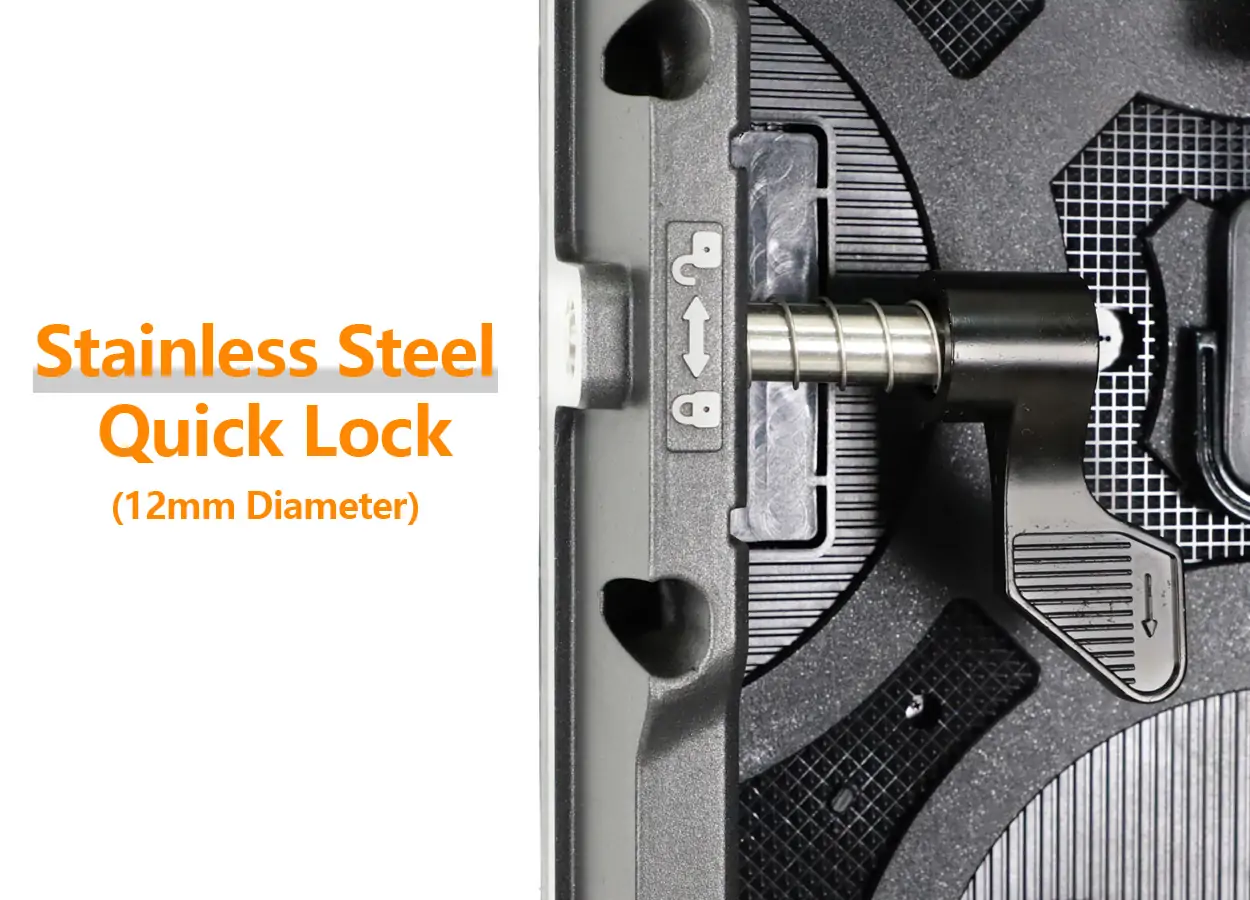
The EA1000C6 product page lists a 500×1000 mm die-cast aluminium cabinet and 12 mm stainless-steel quick locks. Treat these as model-specific reference features; confirm the ordered variant, current specifications and installation documentation in your quotation.
4. Check the large-event project assumptions
For an illustrative flat wall 8 m wide × 4 m high, with cabinets installed 0.5 m wide × 1 m high, the grid is 16 columns × 4 rows = 64 cabinets, covering 32 m². This is geometry only: it excludes spare cabinets, rigging, power distribution and any perimeter or irregular section. It is not an approved hanging design.
Request a project drawing showing cabinet orientation, support system, service space, cable routes and processor mapping. Structural loads and lifting arrangements require assessment by the responsible qualified installer or engineer using the actual equipment and venue conditions.
For Middle East event projects, describe whether the wall is indoors, outdoors or under a temporary canopy. Give the expected heat, direct sunlight, dust exposure and build duration. Obtain written operating limits for the exact model; an outdoor protection label does not make every rear connection or installation arrangement suitable for every environment.
If your fleet needs smaller edge sections, read the 500×500 versus 500×1000 cabinet comparison. Do not infer mixed-model compatibility from cabinet width alone: verify locking geometry, pitch, module layout, electronics and colour matching.
5. Put acceptance and support in writing
Agree the approved sample, final bill of materials and inspection procedure before production. Define the patterns and settings used for visual checks, how defects will be recorded, the process for corrective work, and who authorises shipment after inspection. Avoid an undefined promise such as “good quality” as the only acceptance criterion.
Ask for cabinet serial identification, configuration backups and a traceable spare-parts list. For rental fleets, replacement compatibility matters after the original order: confirm how the supplier identifies a suitable module, receiving card or power supply and whether calibration is required after replacement.
Clarify warranty scope, turnaround arrangements, remote-support availability during your local event hours and responsibility for repair shipping. Confirm included spares and packing in the signed quotation. Do not assume a headline warranty duration covers accidental handling damage, every accessory or local on-site labour.
6. Questions rental buyers ask
Is a manufacturer’s factory video enough to shortlist it?
No. Use it to establish what to investigate, then request a live demonstration tied to your model and written order evidence. A video cannot establish the specification or inspection result of a future shipment.
Should I select the lowest price per square metre?
Compare equivalent configurations and complete equipment packages first. Include cases, assembly accessories, spares and the support terms that affect your fleet’s operating costs.
Can 500×1000 cabinets be mixed with existing 500×500 stock?
Only after the manufacturer verifies the exact combination. Matching dimensions are insufficient; obtain mechanical, electrical and image-matching confirmation and demonstrate the joined wall.
7. Send a useful enquiry
Copy this project brief into your enquiry: destination and venue; wall width and height; nearest viewing distance; indoor/outdoor use; camera use and input format; hanging or ground stacking; expected operating conditions; existing fleet models; required delivery date; quantity and spare-parts needs.
Ask EagerLED for a matching 500×1000 mm rental cabinet configuration, current specifications, sample demonstration and an itemised supply package.
Product reference: EA1000C6. Cabinet drawings, operating conditions, compliance documents and commercial terms should be confirmed for the model and destination in the final quotation.
Related articles
How to Use an LED Pixel Pitch Calculator: 5 Steps
To use an LED pixel pitch calculator, enter the active screen width and height, choose a pixel pitch, and compare the resulting pixel matrix with your content requirements. Then check […]
Novastar TU4K Pro Guide: The All-in-One LED Controller
NovaStar TU4K Pro specifications, setup and buying guidance: pixel limits, HDMI inputs, 8K decoding, receiving-card compatibility and comparison with TU40 Pro and smaller TU models.
How to Choose and Calculate LED Display Size for Your Projects?
Calculate LED display width, height, area, and cabinet counts from pixel pitch and resolution, then check viewing distance, content readability, and installation space.
GET A QUOTE
Consult us for LED display solutions