
Choosing a finer pixel pitch does not automatically give an event a better rental LED display. If the nearest viewer is 10 meters away, paying for P2.6 may produce almost no visible benefit. If a broadcast camera is three meters from the screen, however, choosing P3.91 on price alone can create visible pixel structure or moire in close shots.
This P2.6 vs P2.97 vs P3.91 rental LED display guide uses the decisions that matter on a real show: closest viewing distance, finished wall resolution, content type, camera position, venue lighting and total system cost. The short answer is simple. Choose P2.6 for close viewers and demanding camera work, P2.97 for the best all-round balance, and P3.91 for large stages where viewers stand farther away.
1. Quick Answer: P2.6 vs P2.97 vs P3.91
For most event buyers, the closest viewer decides the starting point. Then the camera plan and environment confirm whether that choice will work.
| Pixel pitch | Best starting distance | Best fit | Relative cost |
|---|---|---|---|
| P2.6 | About 2.5-3 m and beyond | Broadcast, product launches, premium conferences, close-up text | Highest |
| P2.97 | About 3-4 m and beyond | Corporate events, weddings, exhibitions, mixed rental inventory | Medium |
| P3.91 | About 4 m and beyond | Concerts, festivals, large stages, many outdoor events | Lowest of the three |
These distances are practical planning ranges, not hard visual limits. Content with small text needs a finer pitch than abstract stage graphics. Cameras also see LED structure differently from the human eye, so a filmed event needs an on-camera test before the final booking.
2. What Does Pixel Pitch Actually Change?
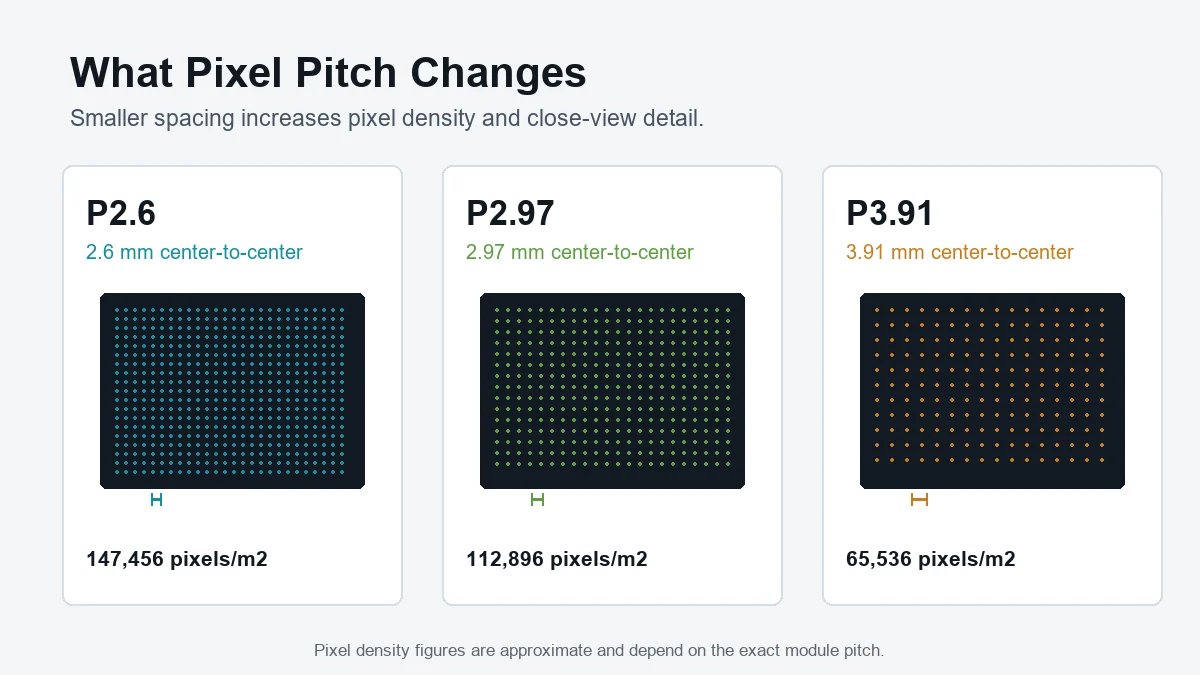
Pixel pitch is the center-to-center distance between adjacent LED pixels, measured in millimeters. A smaller number puts more pixels into every square meter. That improves close-view detail, but it also increases the number of LEDs, receiving-card load and processing required for the same physical wall size.
Approximate pixel densities show the difference clearly:
- P2.6: about 147,456 pixels per square meter.
- P2.97: about 112,896 pixels per square meter.
- P3.91: about 65,536 pixels per square meter.
P2.6 therefore carries roughly 2.25 times as many pixels per square meter as P3.91. That extra detail can be valuable when people stand close to the screen. From the back half of a concert venue, it may be invisible.
3. P2.6 vs P2.97 vs P3.91 Specification Comparison
Pixel pitch should never be compared in isolation. Brightness, refresh rate, cabinet size and environmental protection determine whether the finished rental LED display works at the event.
| Specification | P2.6 | P2.97 | P3.91 |
|---|---|---|---|
| Nominal pitch | 2.6 mm | 2.97 mm | 3.91 mm |
| Approx. density | 147,456 pixels/m2 | 112,896 pixels/m2 | 65,536 pixels/m2 |
| Common 500 x 500 mm cabinet resolution | 192 x 192 | 168 x 168 | 128 x 128 |
| Typical indoor brightness | 800-1,500 nits | 1,000-1,500 nits | 800-1,500 nits |
| Outdoor availability | Limited | Available on selected systems | Widely available at 3,500-5,000+ nits |
| Recommended refresh rate for cameras | 3,840 Hz, with scan mode and shutter testing also verified | ||
| Typical event role | Close-view premium | Versatile all-rounder | Large-stage workhorse |
Specifications vary between manufacturers and product generations. Always compare the actual product data sheet, not only the P-number. EagerLED’s rental LED display range includes 500 x 500 mm and 500 x 1000 mm cabinet options for different touring and event workflows.
4. Choose by the Closest Viewer, Not Venue Capacity
A 2,000-person venue can still need P2.6 if the front row is only two meters from the screen. A 300-person ballroom may be perfectly served by P3.91 if the LED wall is behind a deep stage and the nearest table starts six meters away. Venue capacity is therefore a poor shortcut. Measure the shortest real line of sight.
4.1 When P2.6 makes sense
Choose a P2.6 LED screen when the audience will inspect product details, dashboards, sponsor logos or small presentation text from close range. It is also the safest starting point for television studios and product launches where cameras frequently frame presenters against the wall.
The trade-off is cost. More pixels mean more LED packages, more processing and more opportunity for a mismatch to become visible if calibration is poor. P2.6 should be chosen because the show needs its detail, not because it is the smallest number on a quotation.
4.2 Why P2.97 is the practical all-rounder
P2.97 sits close enough to P2.6 to look refined in conference and gala environments, yet it normally costs less and uses fewer data resources. For rental companies that serve corporate presentations one week and a wedding or exhibition the next, P2.97 is often the most flexible inventory choice.
Use it when the nearest viewers are around three to four meters away and the content includes a mix of faces, slides, logos and video. For small on-camera text, confirm the camera distance before committing.
4.3 Why P3.91 remains the stage standard
P3.91 is popular because it matches the geometry of many live events. Concert stages are deep, barriers keep viewers away, and visual content is designed for impact rather than spreadsheet detail. The lower pixel count also makes large walls easier to process at native resolution.
P3.91 is not a low-quality choice. On a sufficiently large wall it can exceed Full HD, and at normal stage viewing distances the audience sees a continuous image. EagerLED’s stage LED screen guide covers additional stage layout and installation considerations.
5. How Much Resolution Will the LED Wall Actually Have?
This is the calculation many comparisons miss. Pixel pitch affects density, but physical wall size determines the final canvas. To estimate width in pixels, divide the wall width in millimeters by the exact pixel pitch. Repeat for height.
For common rental cabinets, a more reliable method is to multiply the cabinet resolution by the number of cabinets. Consider an 8 x 4.5 m, 16:9 wall made from 500 x 500 mm cabinets. It uses 16 cabinets across and nine high.
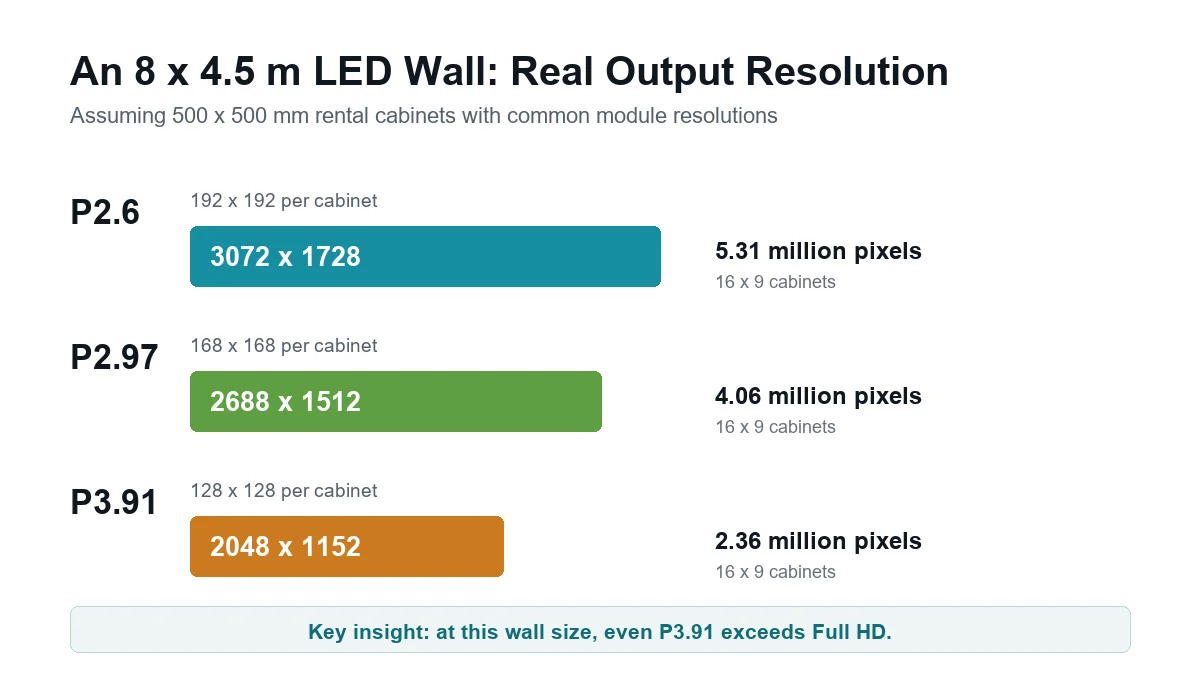
With common module designs, P2.6 produces about 3072 x 1728 pixels, P2.97 produces about 2688 x 1512, and P3.91 produces about 2048 x 1152. Even the P3.91 wall exceeds Full HD. In this scenario, moving to P2.6 is justified only if viewers or cameras are close enough to benefit from the extra 2.95 million pixels.
Always map the playback canvas before the event. If the media server outputs 1920 x 1080, a higher native wall resolution will still require scaling. Conversely, an ultrawide LED wall may need custom content even when its total pixel count looks impressive.
6. Best Rental LED Display Pixel Pitch for Different Event Types
6.1 Corporate conferences and product launches
Recommended starting point: P2.6 or P2.97. Corporate audiences often sit close, while the content contains fine text, charts and interface demonstrations. P2.97 works for most ballrooms. Choose P2.6 when the front row is unusually close or the screen must hold small product details during filmed presentations.
6.2 Weddings, galas and award ceremonies
Recommended starting point: P2.97. These events combine camera feeds, names, sponsor graphics and cinematic content. P2.97 gives planners strong close-to-mid-distance quality without paying the full P2.6 premium. P3.91 can still work when the screen sits far behind the stage.
6.3 Concerts and indoor stages
Recommended starting point: P3.91. Large graphics, live camera feeds and wide viewing distances favor P3.91. Move to P2.97 when performers stand directly in front of the wall and broadcast cameras take tight shots. The EagerLED French music venue case shows how P3.91 performs on a 12 x 2.5 m indoor installation.
6.4 Outdoor festivals
Recommended starting point: outdoor P3.91. Brightness and protection matter more than shaving one millimeter from the pitch. Specify an outdoor-rated cabinet, suitable IP protection, weather-resistant connectors and enough brightness for the actual sun position. A P2.6 indoor cabinet does not become outdoor-ready simply because its image is sharper.
6.5 Touring and mixed rental inventory
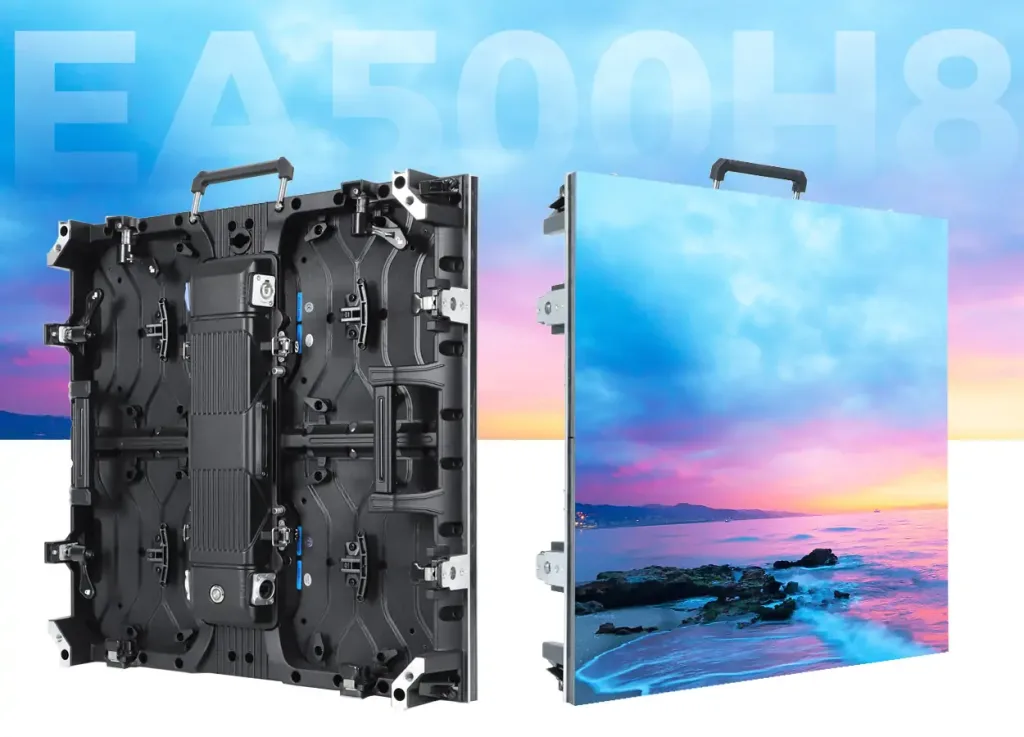
Recommended starting point: P2.97 for premium indoor work or P3.91 for high utilization. Rental owners should consider how often each cabinet will leave the warehouse. Shared 500 x 500 mm and 500 x 1000 mm platforms can reduce spare-part complexity and speed up build days. The EA500C6 and EA1000C6 illustrate two cabinet formats designed for rental workflows.
7. Camera Performance: Pixel Pitch Is Only Part of the Story
A fine pixel pitch can still look poor on camera if the refresh rate, scan mode or shutter timing is wrong. For broadcast and IMAG work, specify a 3,840 Hz refresh rate as the starting point, then test with the actual camera bodies and frame rates used by the production team.
Moire happens when the LED pixel grid interacts with the camera sensor grid. A finer pitch reduces the risk at a given distance, but it does not guarantee a clean image. Camera angle, focus, aperture and distance all matter. The best practice is a real camera test using the intended brightness and content.
- Test wide shots and the closest planned presenter shot.
- Check dark gradients and low-brightness gray content for scan lines.
- Confirm shutter settings at every production frame rate.
- Record the approved processor and cabinet settings for show day.
8. Indoor vs Outdoor: Pixel Pitch Does Not Decide It
P3.91 is commonly associated with outdoor rental screens, but it is also widely used indoors. Likewise, a P2.97 option may be offered in an outdoor cabinet. The P-number only describes spacing. It says nothing about ingress protection, brightness, connector sealing or thermal design.
For indoor events, avoid excessive brightness. A screen running at several thousand nits in a dark ballroom can wash out camera exposure and fatigue viewers. For outdoor daytime use, insufficient brightness makes even a high-resolution image disappear. Choose the environment first, then compare available pitches within the correct cabinet family.
9. The Hidden Cost of a Finer Pixel Pitch
The panel price is only one line in an event LED budget. A finer pitch increases the total pixel load, which may require more sending capacity, more receiving cards, additional network runs or a higher-tier video processor. It can also increase spare-module cost and calibration time.
Compare the full system:
- Panels: cabinet quantity, indoor or outdoor construction and spare ratio.
- Processing: native canvas size, scaling, backup signal paths and required outputs.
- Power: maximum and average consumption, distribution equipment and venue limits.
- Rigging: cabinet weight, truss, motors, structural approval and labor hours.
- Operations: setup time, module replacement, calibration and transport cases.
P2.6 is worth the extra cost when its pixels solve a visible problem. If the content, distance and camera plan do not reveal that improvement, the same budget may produce a better event when spent on a larger wall, reliable redundancy or professional content production.
10. Final P2.6, P2.97 or P3.91 Decision Checklist
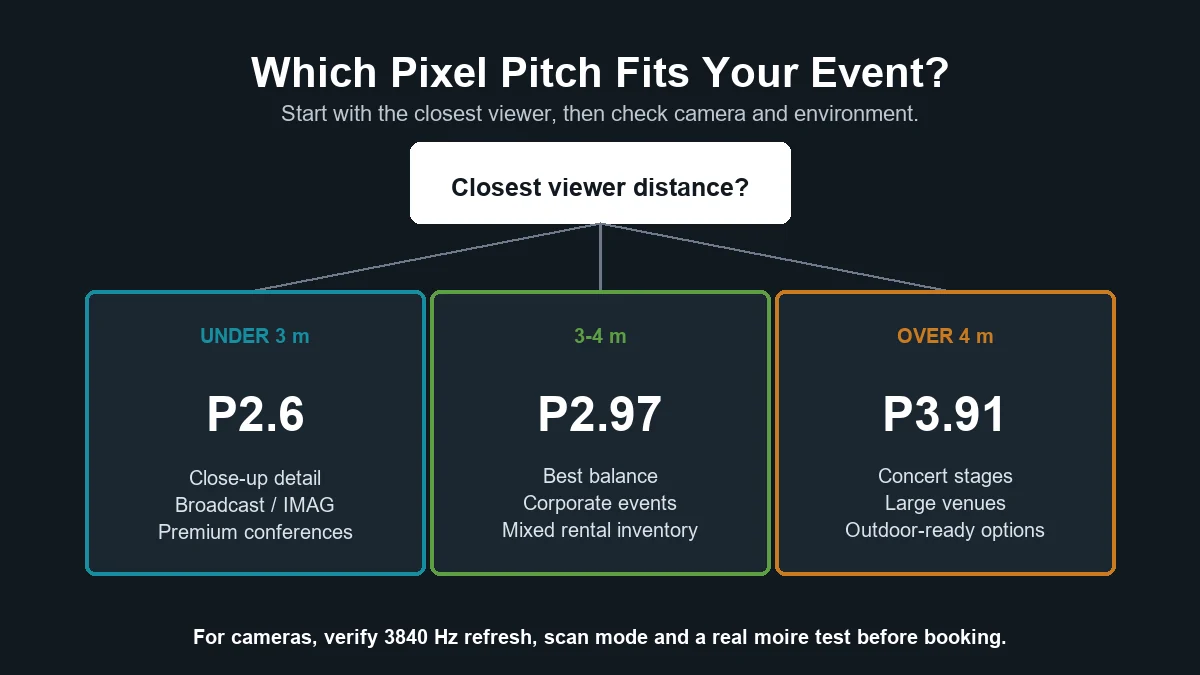
- Measure the closest viewer distance. Under three meters points toward P2.6; three to four meters favors P2.97; beyond four meters often allows P3.91.
- List the smallest content. Product labels and dashboards require more detail than concert graphics.
- Calculate the finished wall resolution. Do not compare pitch without the physical screen dimensions.
- Map every camera position. Test refresh rate, scan mode and moire using the real production setup.
- Choose the correct environment rating. Brightness and IP protection are separate from pitch.
- Price the complete system. Include processing, power, rigging, spares, transport and labor.
If those six checks point in different directions, prioritize the closest camera or viewer that must receive a flawless image. Everyone farther away will still see it clearly.
11. P2.6 vs P2.97 vs P3.91 FAQs
12. Conclusion
The right rental LED display is not the one with the smallest pitch. It is the one that gives the closest viewer and camera enough detail without adding pixels the event cannot use. P2.6 is the close-view specialist, P2.97 is the versatile middle choice, and P3.91 remains the efficient standard for large stages.
Before requesting a final quotation, send the LED supplier five facts: wall width and height, closest audience distance, nearest camera distance, indoor or outdoor environment, and content resolution. EagerLED can then match the pixel pitch, cabinet platform and processor to the actual event instead of quoting a generic screen. Contact EagerLED for a project-specific rental LED display recommendation and quotation.
 How to Choose an LED Screen for a Small Church?
 500x500 vs 500x1000 Rental LED Cabinet: Which Size Should You Choose?
Related Posts


Fill In Your Needs In Detail
Fill in the screen usage scene and size you need in “Content”.You will get a quote.



