NovaStar VMP vs NovaLCT is primarily a hardware compatibility decision. VMP manages supported COEX systems, while NovaLCT configures compatible NovaStar control systems outside that workflow. Start with the controller’s full model number, then check the receiving card, firmware, and cabinet files. Installing a different application on a laptop does not change the capabilities of the equipment connected to it.
For an AV integrator specifying a new LED wall or maintaining an installed system, the practical questions are which application can communicate with the controller, which settings it can change, and which files will restore the screen after service. A familiar interface helps your crew, but a documented combination of controller, receiver, and software determines whether the system can be commissioned reliably.
This NovaStar VMP vs NovaLCT guide covers software selection, representative hardware families, configuration files, and a repeatable procurement and migration process. Model examples identify a workflow. Confirm the supported combination in the documentation for the exact software and firmware release supplied with your project.
- 1. NovaStar VMP vs NovaLCT at a Glance
- 2. What Do VMP and NovaLCT Actually Control?
- 3. Which NovaStar Controllers Use Each Application?
- 4. NCP vs RCFGX: Which Files Can You Reuse?
- 5. How Screen Setup and Daily Operation Differ
- 6. Windows, macOS and Software Version Requirements
- 7. Can You Move an Existing LED Wall to COEX?
- 8. What to Specify Before Buying an LED Control System
- SSS
- Sonuç
1. NovaStar VMP vs NovaLCT at a Glance
For NovaStar VMP vs NovaLCT, choose the software specified for the installed controller and receiver combination. VMP provides the COEX management environment. NovaLCT provides configuration functions for supported sending devices and receiving cards in its own hardware ecosystem. Each has a defined place in a complete system.
| Soru | VMP / COEX workflow | NovaLCT workflow |
|---|---|---|
| What identifies the platform? | A supported COEX controller and compatible receiving-card configuration | A controller or sending device supported by the installed NovaLCT release |
| What does it configure? | Supported COEX devices, screen topology and associated image settings | Supported sending devices, cabinet parameters and screen connection maps |
| Which files matter? | Approved cabinet library and project files, with RCFGX available in documented configurations | Approved receiving-card configuration and screen connection backups |
| Desktop operating system | Windows or macOS package, subject to the selected release | Supported Windows environment |
| Nelerin doğrulanması gerekiyor? | Controller, receiver, file format and feature support as a combination | Controller, receiver, driver and software or firmware compatibility |
A useful NovaStar VMP vs NovaLCT comparison starts with a photograph of the controller label. Include suffixes such as Pro and the receiving-card designation. A quotation saying only “NovaStar control” leaves the platform undecided. Ask the bidder to list the model and software on the same equipment schedule, alongside the cabinet manufacturer’s configuration files.
Work from the installed equipment when servicing a screen. Record the working application version before making changes. A new laptop can introduce a different operating system, network interface, or software build into an otherwise unchanged installation. Keep a known working configuration available while checking the replacement service computer.
2. What Do VMP and NovaLCT Actually Control?
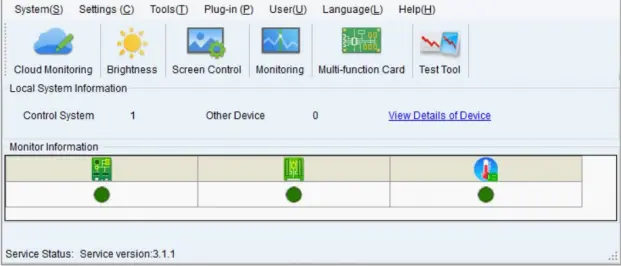
VMP means Vision Management Platform. It provides a visual environment for managing supported COEX devices and screen arrangements, with features tied to the controller and receiving system. NovaLCT is a configuration application used to establish compatible sending-device settings, receiving-card parameters, and the relationship between cabinets and output ports.
01. Separate video input from configuration access
In NovaStar VMP vs NovaLCT planning, draw the video path and the control path independently. A media server, presentation computer, or switcher supplies video to the processor. A service computer communicates with the control system to configure it. The same computer can perform both jobs in some designs, but each connection still has a separate role. A desktop displaying correctly through HDMI proves the video path for that source. Configuration access needs its own check.
Ask the installer to label the management connector and LED output connectors on the rack drawing. On equipment with similar-looking RJ45 sockets, port purpose matters. Use the manufacturer’s connection diagram and record which port reaches the service network. That drawing also helps a later technician connect without disturbing the cabinet data route.
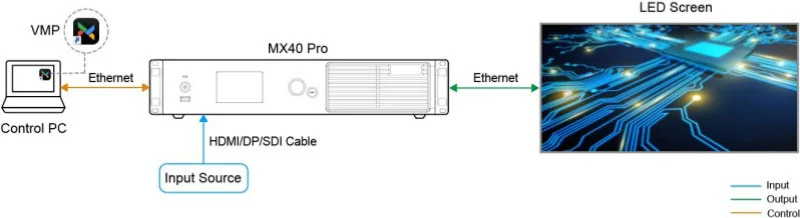
Connection example: The diagram shows an MX40 Pro managed through VMP over Ethernet. The video source connects separately to a supported video input; the LED outputs carry the image to the screen. Match the connector labels to the installed controller.
Watch the NovaLCT-side connection example: Bu EagerLED tutorial demonstrates connecting a VX-series controller to the control computer, using a VX1000. It complements the COEX diagram above; use the connection method documented for your exact controller.
02. Distinguish configuration from content management
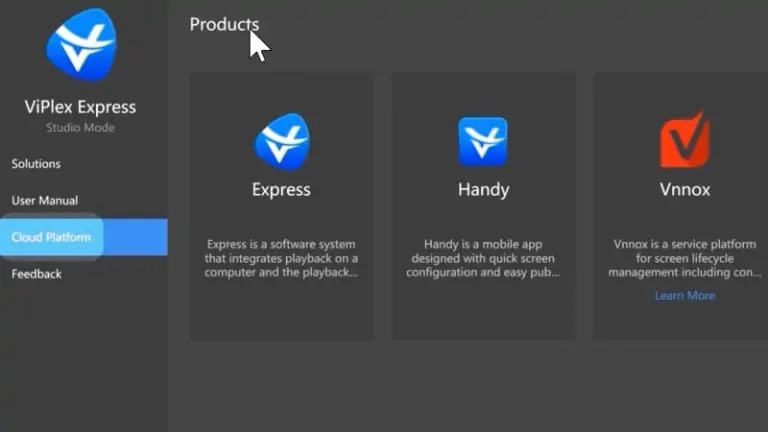
NovaStar VMP vs NovaLCT does not settle how a shop schedules advertising or how an event plays show media. Those are application and playback decisions elsewhere in the signal chain. A Taurus player may use a supported ViPlex workflow for content publishing, while a live processor accepts video from an external source. Establish the required task before selecting the software package.
For a conventional configuration sequence, EagerLED'S NovaLCT ekran yapılandırma kılavuzu gives the context for card settings and cabinet mapping. Keep detailed setup instructions matched to the supported release and the actual hardware you are commissioning.
3. Which NovaStar Controllers Use Each Application?
Controller family is the first filter in NovaStar VMP vs NovaLCT selection. The examples below show where to begin checking documentation. A matching receiver name alone cannot establish the whole system’s compatibility.
| Ekipman örneği | Başlangıç noktası | Confirm before connection |
|---|---|---|
| MX40 Pro, MX30 or KU20 COEX system | VMP documentation for that controller | Supported receivers, firmware, cabinet files, and required VMP build |
| CX40 Pro COEX system | VMP and the specified high-bandwidth receiver chain | Receiver and fiber-converter compatibility, port mode and firmware |
| MCTRL600 or MCTRL4K system | NovaLCT documentation for that sending controller | Supported software build, receiver settings and PC communication method |
| VX400, VX600 or VX1000 system | NovaLCT for supported screen configuration tasks | Exact generation and the appropriate processor operation software |
| Boğa multimedya oynatıcısı | Its player and NovaLCT documentation, where applicable | Content publishing software separately from screen configuration software |
For an integrator comparing NovaStar VMP vs NovaLCT, a compatibility statement should identify the controller, receiver, software build and firmware together. Ask whether an offered replacement receiver has been approved for the same module construction. A panel can use the same outside dimensions while having different driver ICs, scan arrangements or internal wiring.
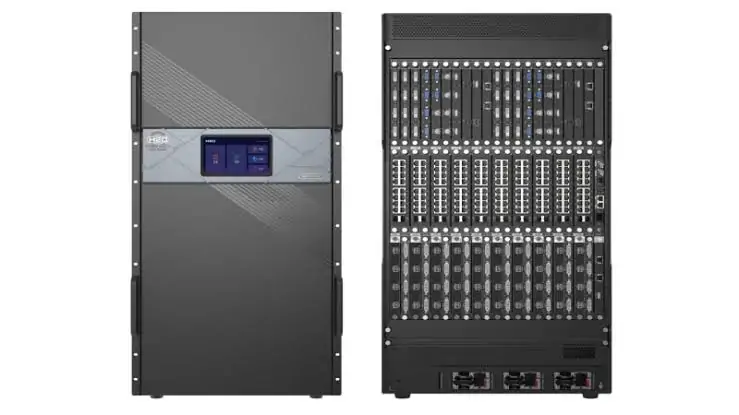
MKS MX40 Pro controller guide helps place a COEX controller in the hardware schedule. Where several candidates fit the image size, compare the actual source inputs, output arrangement, backup requirements and service workflow. The software name alone is insufficient detail for choosing a processor.
When resolving NovaStar VMP vs NovaLCT for existing stock, inventory each cabinet revision. Record receiver labels from representative cabinets and any spares. A mixed rental fleet deserves a documented compatibility check before controllers are shared between batches. Request written approval of the proposed combination and retain that confirmation in the project records.
4. NCP vs RCFGX: Which Files Can You Reuse?
File compatibility is one of the most consequential parts of NovaStar VMP vs NovaLCT. NovaStar’s NCP File Instruction Manual V1.0.1 describes NCP and RCFGX import in specific COEX configurations. The later VMP User Manual V1.5.0 adds an important receiver limitation. Read both the file requirements and the receiver restrictions for the installed release before planning reuse.
01. Understand what each file contains
An RCFGX file stores cabinet configuration information. An NCP cabinet library packages configuration with additional resources and parameters for its supported workflow. The manufacturer’s NCP documentation describes receiver firmware and cabinet image-related data among those resources. Which functions can be applied still depends on the hardware and how the library was prepared.
The NovaStar VMP vs NovaLCT question therefore includes where an approved file comes from. Obtain the cabinet manufacturer’s matching file, its revision, the applicable receiver and the module identity. An extension and a familiar filename provide too little information to approve it for a screen. Save the received package in a project folder with the approval record.
02. Verify the supported import path
| File or resource | Belgelenmiş rol | Action for an existing screen |
|---|---|---|
| RCFGX | Cabinet configuration used in supported receiving-card workflows | Verify that the proposed COEX and receiver combination supports its import before planning reuse |
| NCP | COEX cabinet library with configuration and associated resources | Request the cabinet manufacturer’s approved package and its supported hardware list |
| Screen topology or connection backup | Cabinet placement and output routing for the project | Rebuild or verify in the target platform against the physical cable route |
| Kalibrasyon kayıtları | Data associated with visual uniformity and the serviced cabinets | Ask how the installed data is retained or restored during the proposed change |
In NovaStar VMP vs NovaLCT migration, importing a cabinet file and editing its parameters require separate checks. The NCP manual directs NCP edits through Cabinet Tool and RCFGX edits through NovaLCT on a suitable non-COEX system. VMP User Manual V1.5.0 specifies NCP-only cabinet updates for XA50 Pro, CA50E, A10s Pro and its derivative cards, and A8s Pro and its derivative cards. Confirm the card label before promising RCFGX reuse.
EagerLED'S RCFG and RCFGX resource page explains how to approach existing cabinet files. Ask the supplier to identify the intended module revision before applying any downloaded package. Reusing an approved file should remain a traceable decision throughout commissioning and future service.
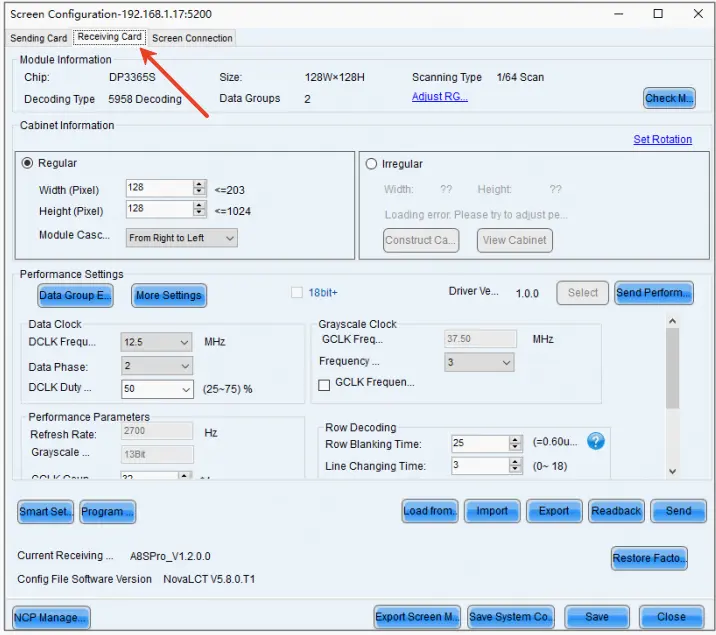
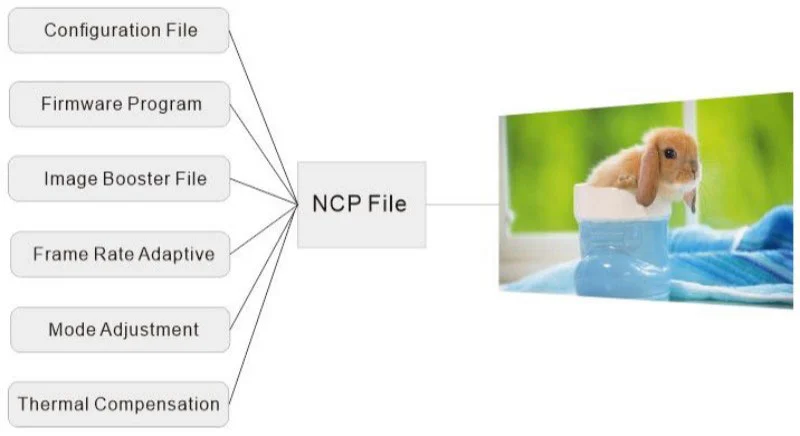
NCP resource example: An NCP library can group cabinet configuration with supported firmware and image-related resources. The package contents and applicable functions must match the receiving card and approved cabinet revision.
5. How Screen Setup and Daily Operation Differ
NovaStar VMP vs NovaLCT affects how the technician organizes a job and records its working state. Build your commissioning plan around an accepted image, repeatable startup, and recoverable settings. The number of clicks in a demonstration is a poor basis for estimating an installation with several cabinet revisions and multiple signal paths.
01. Establish the cabinet map
Before applying a configuration, verify the physical cabinet rows, columns and data direction. Mark the first cabinet on each output. Then use a numbered test image to check placement, orientation, gaps and duplicated areas. Keep the drawing and the displayed result together in the acceptance record so another technician can interpret the layout.
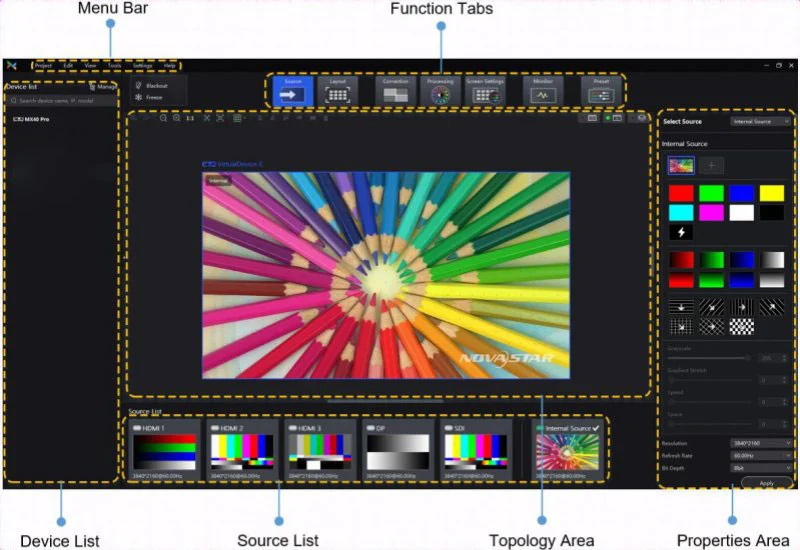
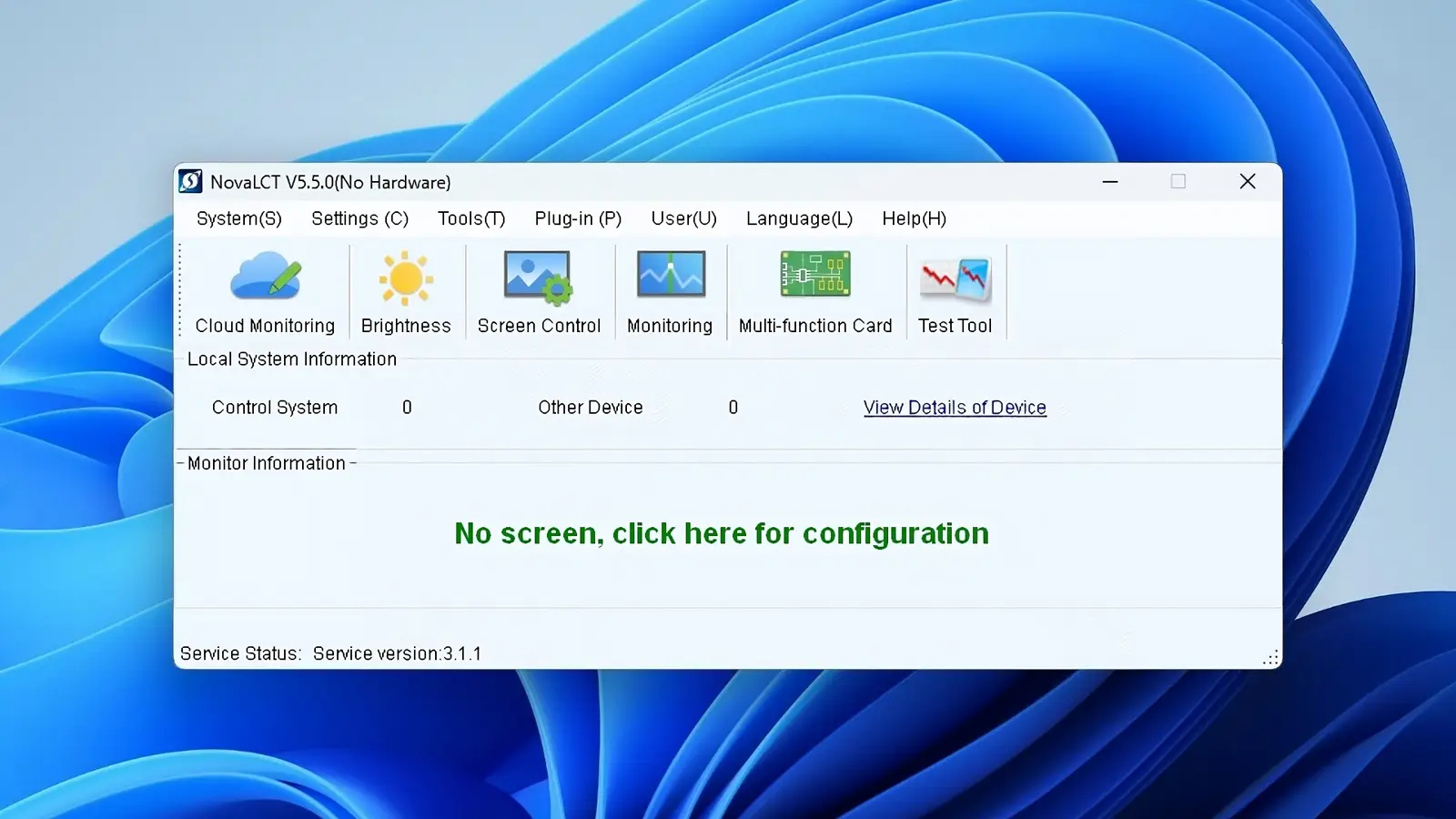
NovaLCT commonly separates Sending Card, Receiving Card and Screen Connection settings. An operator can check the source raster, load the approved cabinet parameters and map the cable route in sequence. VMP organizes the COEX job around a project with device and screen views. Its documented Layout, Processing, Screen Settings, Preset and Monitor areas group installation and operation tasks. Available controls still follow the selected hardware. Test one approved cabinet definition before expanding the mapping to the full screen.
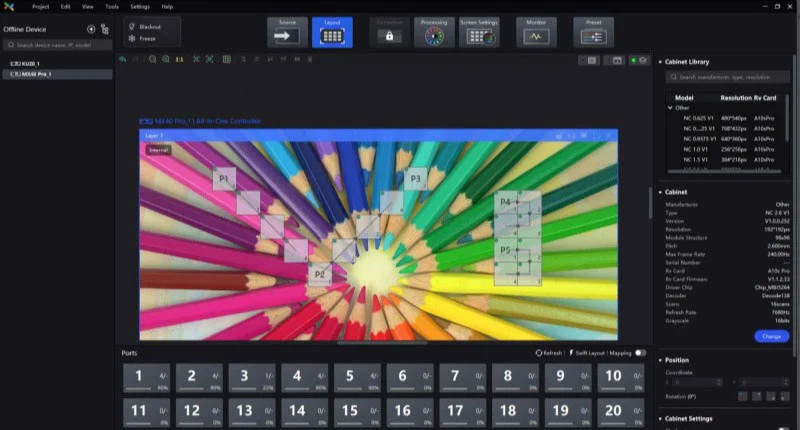
Layout example: The VMP workspace shows cabinet placement and output-port assignments. Check these against the physical data route and a numbered test image before accepting the screen map.
Watch the NovaLCT configuration workflow: EagerLED’s tutorial covers receiving-card file creation, cabinet mapping and saving screen configuration. Use it to see how cabinet parameters and connection data are handled as distinct parts of the job; it does not demonstrate COEX migration.
02. Define daily operator access
A NovaStar VMP vs NovaLCT proposal should explain which controls the venue operator will use after handover. List routine actions such as recalling an approved state, checking device status, or reporting a fault. Give commissioning changes and daily tasks separate instructions. This makes the service procedure easier to follow when an operator needs help during an event.
VMP distinguishes controller presets from screen presets. Its V1.5.0 manual states that a controller preset applies to that controller, while a screen preset can apply across the controllers in the screen. Label the scope in the operator instructions. Demonstrate a recall after startup and check source routing and the displayed image. Keep the complete recovery package alongside the presets.
Where NovaStar VMP vs NovaLCT influences a rental workflow, time the complete setup exercise with the crew who will repeat it. Include selecting the correct cabinet definition, arranging the wall, checking the content raster, and storing the accepted state. Record the hardware and application versions used in that exercise so the procedure can be repeated at the next venue.
6. Windows, macOS and Software Version Requirements
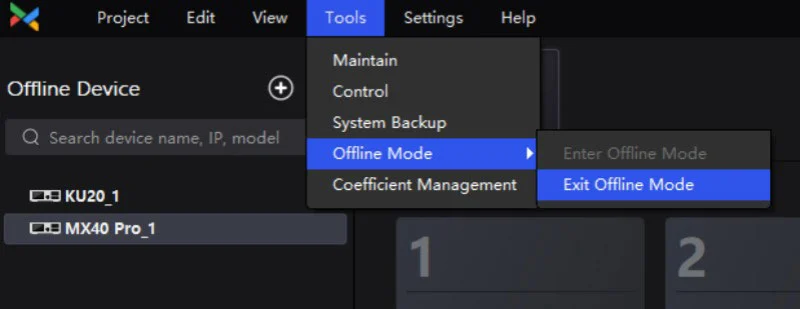
Operating-system support can narrow the NovaStar VMP vs NovaLCT choice, but it follows hardware compatibility. VMP offers Windows and macOS editions. NovaLCT uses a Windows workflow. A Mac operator working with an MX40 Pro can therefore evaluate the supported VMP Mac package. An existing MCTRL installation that requires NovaLCT still needs its supported Windows environment. Check OS versions and installer architecture for the selected release.
For NovaStar VMP vs NovaLCT on a service laptop, test the complete connection before sending the computer to the venue. Check that the correct network interface or communication driver is available, that the controller appears, and that an approved backup can be opened. Have the IT team authorize application connectivity on its managed network using the organization’s normal process.
A practical service kit contains the approved installer, release notes, the controller and receiver manuals, and the site configuration. Keep these available locally when the venue has limited internet access. Label the software package with its full version and record the operating-system build used for the accepted setup. This helps distinguish a software change from a cabinet or wiring change later.
Kullan NovaStar yazılım kaynak sayfası to locate the relevant software families and manuals. Check the supplier’s release documentation before replacing an established installation’s tools. Plan upgrades in a maintenance window with a known working backup and a defined way to return to the accepted state.
Remote maintenance also belongs in the NovaStar VMP vs NovaLCT brief. Define how the technician reaches the site management network, who grants access, and how the operator identifies the correct controller. Local discovery and remote connectivity are different conditions to test. Include the expected on-site recovery method if remote access is unavailable.
7. Can You Move an Existing LED Wall to COEX?
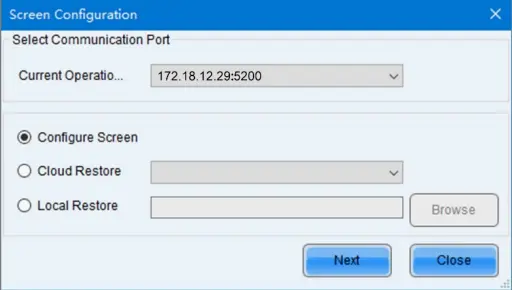
An existing LED wall may be reusable with a COEX controller if its receiving hardware, cabinet files and required functions are supported. NovaStar VMP vs NovaLCT migration should be treated as a system change with a test plan. Establish what the current wall does, what the replacement must improve, and how the supplier will prove that the retained cabinets are suitable.
01. Build a sample before converting the whole wall
Begin with a representative cabinet or a small group from the installed batch. Include a spare module and receiver if they differ from the current build. Ask the supplier to demonstrate image mapping, expected brightness behavior, low-gray content, motion, and operation at the project’s intended frame rate. For camera use, include the camera and shutter conditions in the agreed test.
In a NovaStar VMP vs NovaLCT comparison, a successful basic image and an enabled advanced function are different acceptance items. Verify each requested image feature against the receiver, driver IC, firmware and approved cabinet resources. Write the test result next to the feature requirement so commercial approval follows demonstrated behavior.
02. Control the cutover and recovery
| Kontrol noktası | Saklanacak kanıtlar | Serbest bırakma koşulu |
|---|---|---|
| Mevcut kurulum | Equipment inventory, cable map and verified configuration backups | The current system can be restored using the retained package |
| Proposed compatibility | Supplier confirmation of controller, receivers, firmware and cabinet files | Each retained cabinet revision has an approved route |
| Örnek kabulü | Test images, settings and results for required operating conditions | The project team accepts the sample and resolves open issues |
| Site cutover | Change sequence, responsible technician and return-to-service plan | A maintenance window and recovery resources are available |
| Teslim et | Final project, approved libraries, drawings and operator instructions | Another technician can identify and recover the installed state |
Budget NovaStar VMP vs NovaLCT migration beyond the controller purchase. Possible work includes receiver replacement, preparation of approved files, configuration labor, crew training and site recommissioning. Ask for these items separately in the offer. An integrator can then compare retaining the existing workflow with changing the system using the same service and performance requirements.
For a multiroom facility, schedule the first conversion where the sample can be validated without interrupting other displays. Keep separate records for each room. A cabinet file accepted for one installation should have an explicit approval record before it is used on another wall with a different receiver or module revision.
8. What to Specify Before Buying an LED Control System
Turn NovaStar VMP vs NovaLCT into an equipment and handover schedule before issuing the purchase order. State the desired display behavior, available inputs, service access and operating conditions. Ask the supplier to return the proposed software environment with the controller and receiver models so the choice is reviewable.
As a calculation example, assume a screen is 3,840 pixels wide and 2,160 pixels high. The active canvas contains 8,294,400 pixels. That calculation is a starting point for the hardware schedule. Have the bidder show how the pixels are distributed across outputs at the required frame rate and bit depth, including any reserved backup paths. Confirm input and output constraints for the exact controller.
NovaStar VMP vs NovaLCT can influence training and maintenance costs even when two proposals satisfy the same canvas. Ask who prepares cabinet resources, who keeps calibration records, who can commission spare equipment, and what the venue team receives at completion. Make those responsibilities part of the offer and acceptance checklist.
EagerLED'S KU20 controller overview is one starting point for understanding a COEX hardware option. Compare the complete proposed signal chain for your project. A corporate lobby, rental stage, and camera-facing studio may use different controller features even when their screen dimensions are similar.
At handover, ask a technician who did not build the initial configuration to locate the approved package, identify the controller, open the project and explain the recovery procedure. That exercise reveals missing documentation before the installation enters routine service. Record the support contact and the cabinet revision associated with every spare in the delivered kit.
9. SSS
10. Sonuç
Resolve NovaStar VMP vs NovaLCT by identifying the controller platform, checking the receiving hardware and confirming the approved cabinet files. Then compare the tasks the crew must perform during setup, daily operation and service. Keep the chosen software build and the acceptance records with the installed equipment.
For a new installation or controller change, send the cabinet dimensions, native pixel canvas, receiver labels, source requirements and current configuration details to EagerLED'nin proje ekibi. Request a proposal that identifies the software, compatibility checks and handover package alongside the hardware. That gives the integrator a practical basis for approving and maintaining the system.
 İnteraktif LED Ekran: Çeşitleri, Özellikleri ve Satın Alma Rehberi
İlgili Mesajlar

İhtiyaçlarınızı Ayrıntılı Olarak Doldurun
“İçerik” bölümüne ekran kullanım senaryosunu ve ihtiyacınız olan boyutu girin . Ardından fiyat teklifi alacaksınız.